
Table Of Content
- Why Claude Code Enhance Playwright MCP Integration?
- How Claude Code Enhance Playwright MCP Integration in the workflow
- Setup for Claude Code Enhance Playwright MCP Integration
- Claude Code Enhance Playwright MCP Integration inside claude.md
- Visual development and testing
- Comprehensive reviews for Claude Code Enhance Playwright MCP Integration
- Essential commands for UI testing (Playwright MCP)
- Compliance checklist for Claude Code Enhance Playwright MCP Integration
- Demo of Claude Code Enhance Playwright MCP Integration
- Prompt to the design review agent
- Fixing issues with Claude Code Enhance Playwright MCP Integration
- Final thoughts on How Claude Code Enhance Playwright MCP Integration?
How Claude Code Enhance Playwright MCP Integration?
Table Of Content
- Why Claude Code Enhance Playwright MCP Integration?
- How Claude Code Enhance Playwright MCP Integration in the workflow
- Setup for Claude Code Enhance Playwright MCP Integration
- Claude Code Enhance Playwright MCP Integration inside claude.md
- Visual development and testing
- Comprehensive reviews for Claude Code Enhance Playwright MCP Integration
- Essential commands for UI testing (Playwright MCP)
- Compliance checklist for Claude Code Enhance Playwright MCP Integration
- Demo of Claude Code Enhance Playwright MCP Integration
- Prompt to the design review agent
- Fixing issues with Claude Code Enhance Playwright MCP Integration
- Final thoughts on How Claude Code Enhance Playwright MCP Integration?
Claude Code can read logs and inspect a codebase, but it cannot open a browser, navigate an app, and verify UI changes by itself. That leaves a gap for front end work where visual feedback is essential. Playwright as an MCP server gives Claude Code eyes on the app so it can see, click, type, scroll, and validate what it just built.
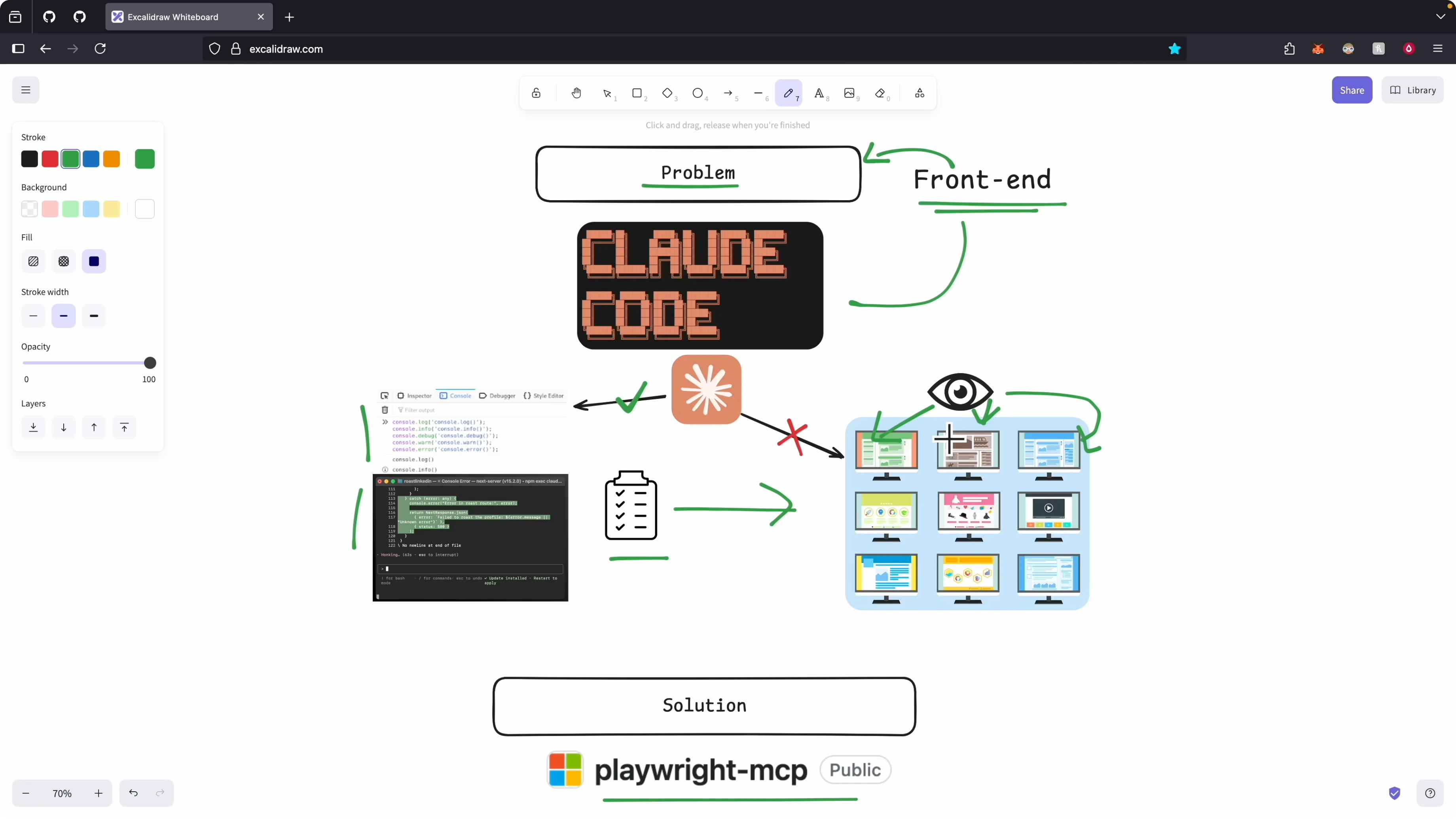
With Playwright MCP, Claude Code can visit pages, take screenshots, adjust viewport size, read browser console and network logs, and confirm acceptance criteria. This shifts it from coding blindly to verifying features against real UI behavior. It also enables a tight loop where Claude Code implements a change, runs a visual check, then refines based on what it observes.
If you are new to configuring Claude Code, start here for environment setup and project context basics.
Why Claude Code Enhance Playwright MCP Integration?
Claude Code can produce the feature from a spec, but accuracy against real requirements needs UI verification. I want it to execute a plan, see the UI, and decide if it met the bar. Playwright MCP lets Claude Code navigate the app and evaluate results like a human would.
This matters for front end development because we care about layout, spacing, interactive states, and accessibility. We also need evidence like screenshots and console checks. The integration closes that loop.
See a deeper breakdown of the coding loop and outputs if you want to refine task planning and review steps.
How Claude Code Enhance Playwright MCP Integration in the workflow
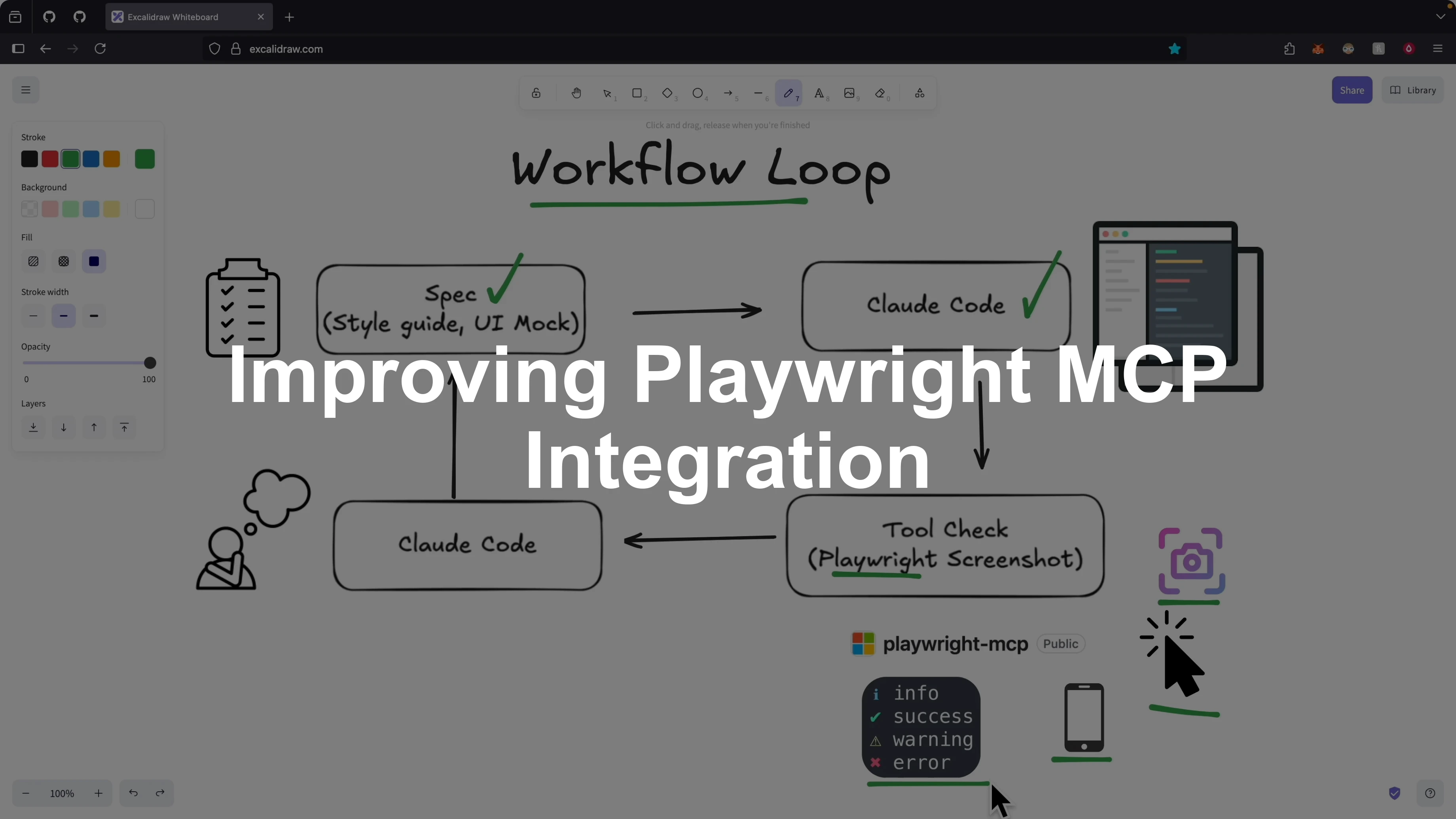
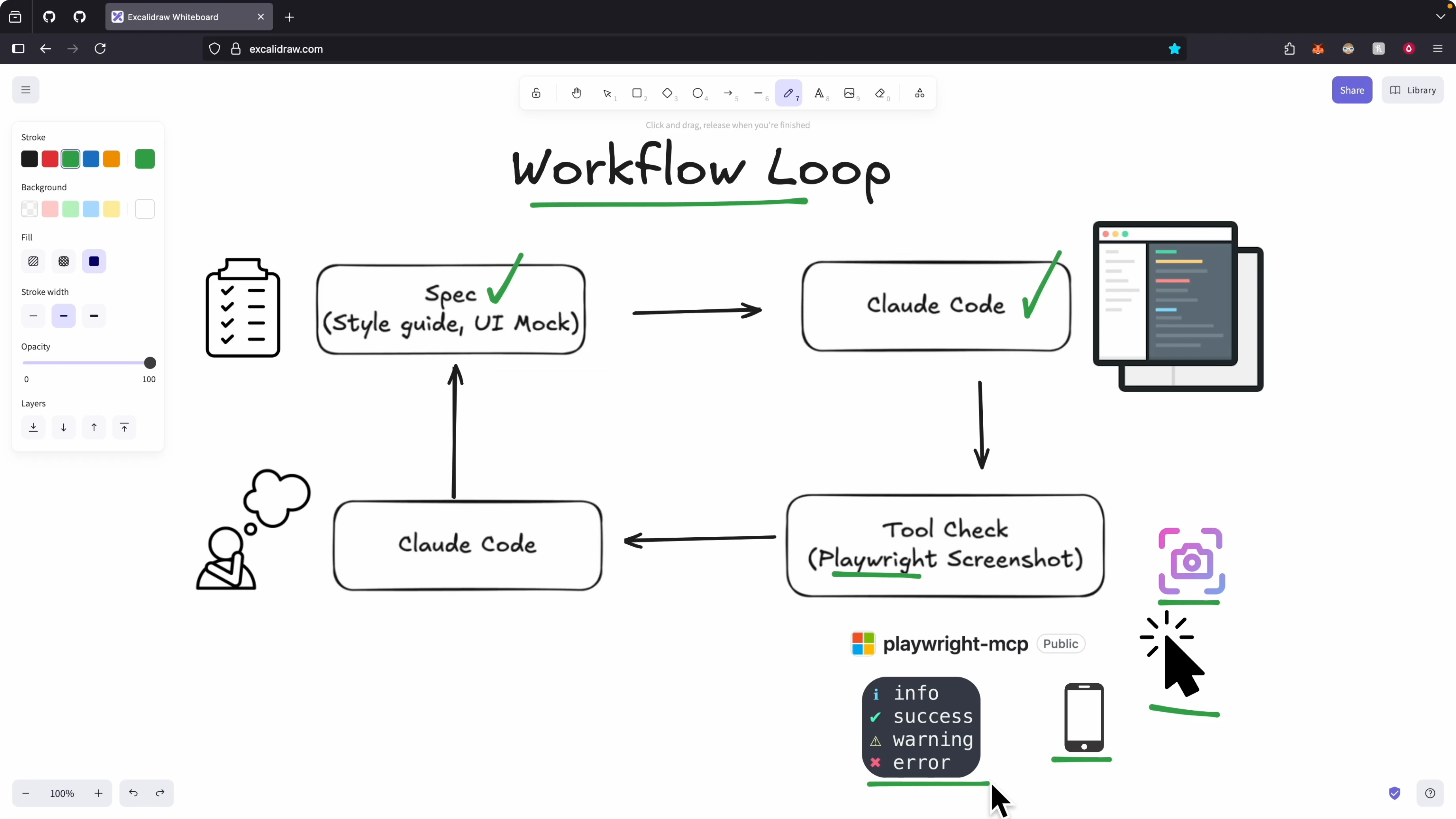
I start with a spec that defines the feature and implementation plan. I pass that plan to Claude Code so it can code the changes. After coding, it uses the Playwright MCP tools to test the UI and collect evidence.
It navigates pages, takes screenshots, sets screen sizes, and inspects console and network logs. It reasons about what passed and what needs to change. It loops until the feature meets the requirements and design standards.
Setup for Claude Code Enhance Playwright MCP Integration
I add the Playwright MCP server to my MCP servers so Claude Code can call its tools. After installing, I run Claude Code and confirm the Playwright server is connected. I open the tools list and verify I can close the browser, resize the window, get console messages, upload files, press keys, enter text, navigate to sites, take screenshots, and click elements.
These are the building blocks for end to end UI checks. Any browser action I care about is exposed as a tool Claude Code can call. That gives it full coverage to validate features as they are implemented.
Claude Code Enhance Playwright MCP Integration inside claude.md
I added a section called Visual development and testing to enforce a quick UI check on every front end change. I also documented the design principles we follow for border, spacing, layout, and visuals so Claude Code has a consistent baseline. It uses those principles during verification.
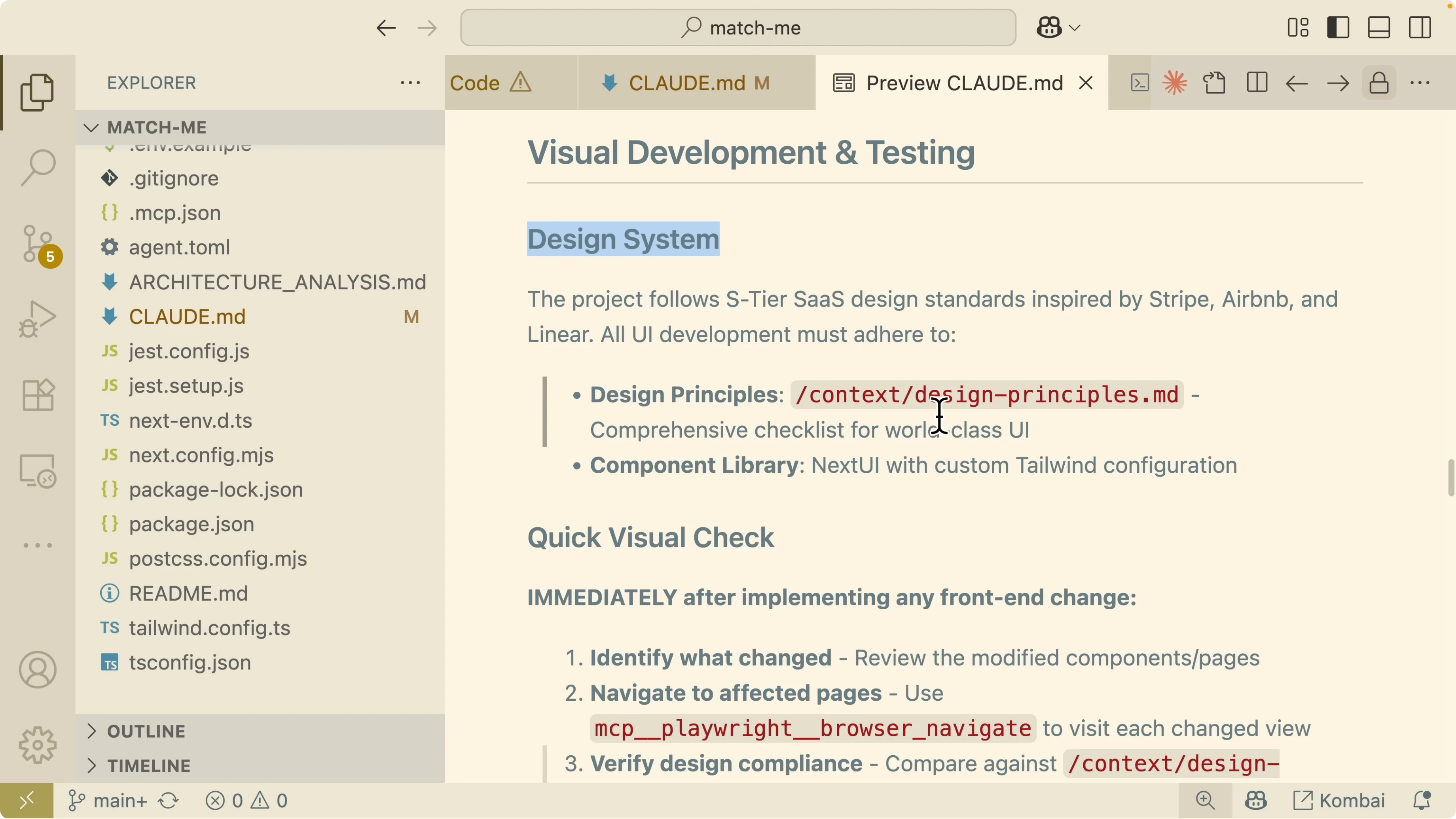
I defined the steps for a quick visual check. The goal is to capture what changed, where to check it, what to compare against, and how to prove it is correct. Errors and regressions should show up clearly in screenshots and console evidence.
# Visual development and testing
Identify what changed and the affected areas.
Navigate to the impacted pages using the Playwright MCP server and visit each change view.
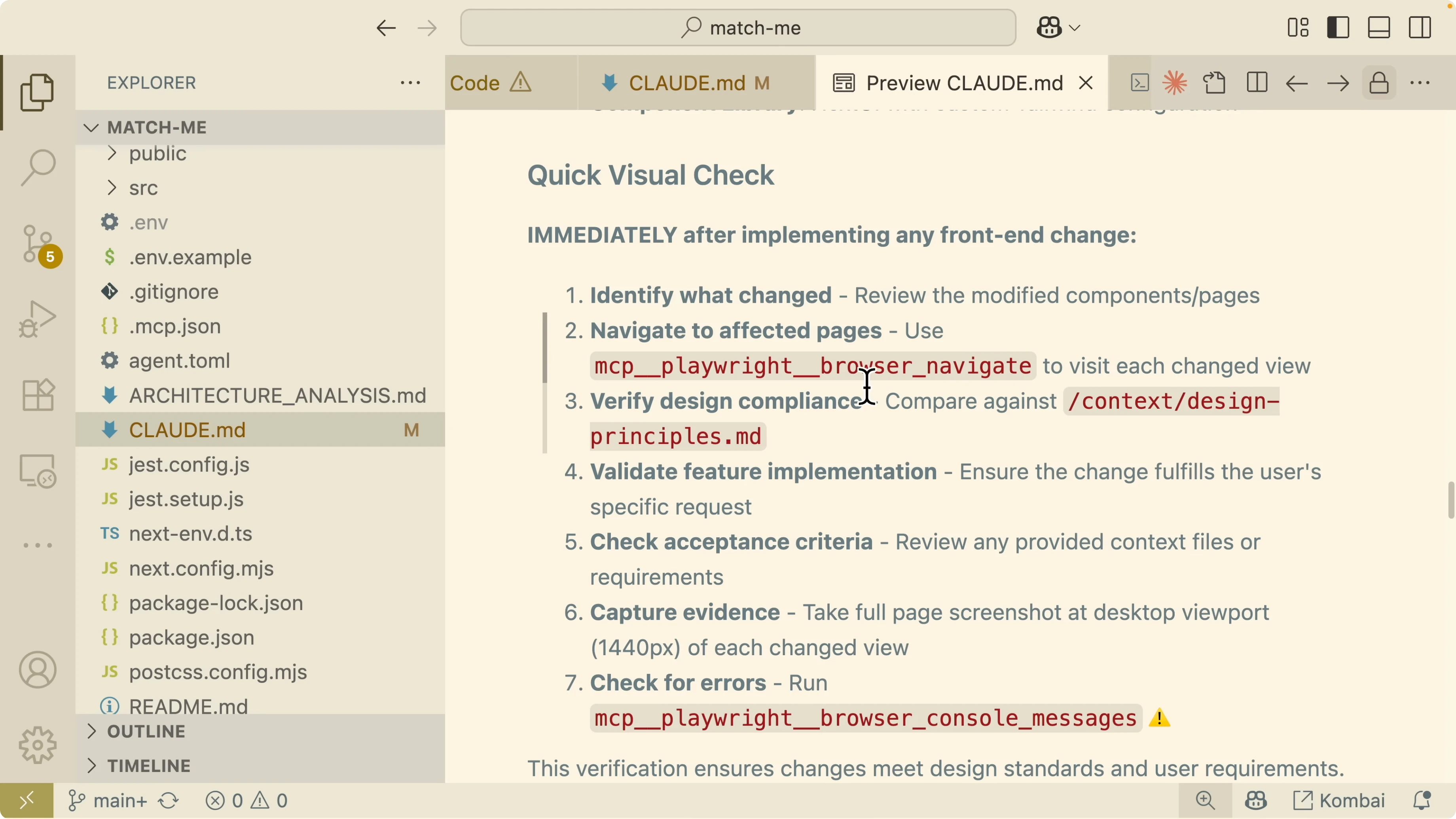
Compare the UI against our design principles for border, spacing, layout, and visuals.
Validate the feature implementation against the acceptance criteria.
Capture evidence with screenshots for each change and significant state.
Inspect for errors using browser console and network logs.Comprehensive reviews for Claude Code Enhance Playwright MCP Integration
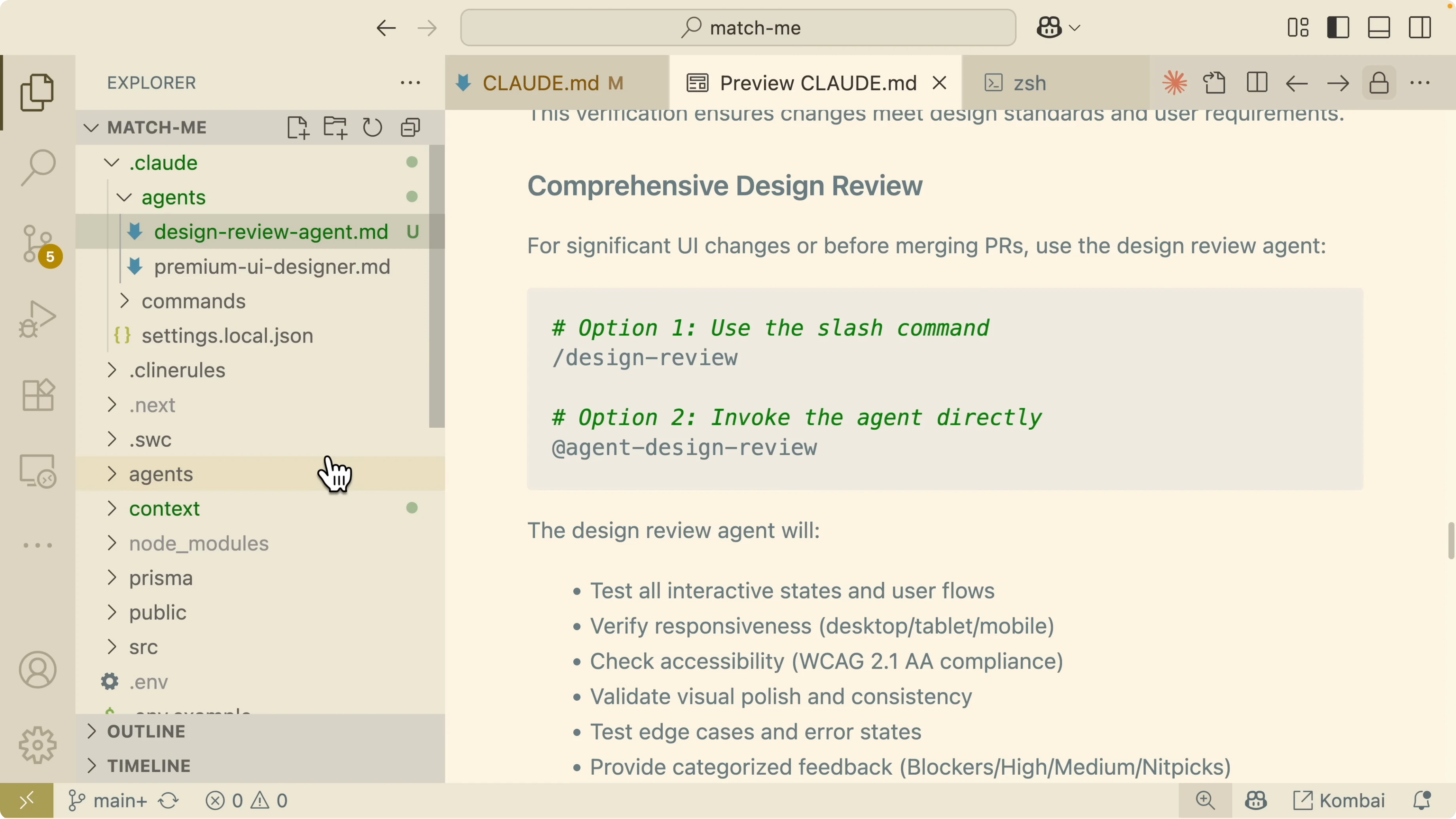
I added a Comprehensive design reviews section to run deeper checks on major work. When I prepare a pull request, a design review agent is triggered to test interactive states, responsiveness, accessibility, and edge cases. It is a separate sub agent focused on UI quality.
I also documented essential commands Claude Code can use during UI testing. It knows how to navigate to pages, take screenshots, set browser size for responsiveness checks, click and type to simulate user behavior, and validate data and console output. It can also check accessibility and confirm elements are present and loaded.
# Essential commands for UI testing (Playwright MCP)
Navigate to a route or external URL.
Take a screenshot of the current view and name it by state.
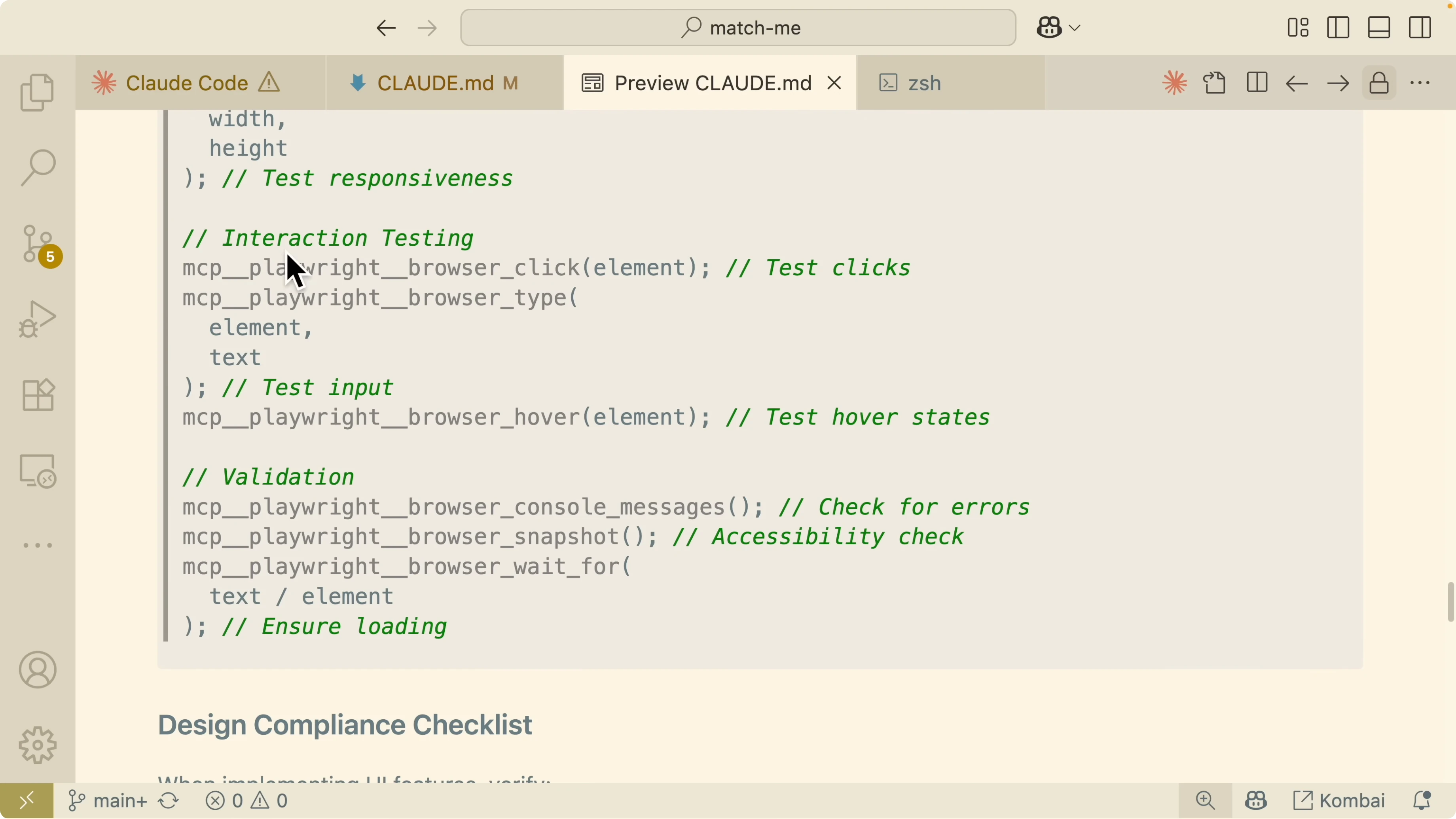
Set browser size with width and height to test responsive breakpoints.
Click elements, type into inputs, press keys, and hover interactive states.
Validate state by checking console errors, network responses, accessibility rules, and presence of key elements.Compliance checklist for Claude Code Enhance Playwright MCP Integration
I set baseline sizes for responsiveness. Mobile width is 375 pixels, tablet width is 768 pixels, and desktop width follows our standard. I also watch loading performance and other quality signals during reviews.
I outlined when to use automated visual testing and when to use comprehensive design reviews. Major features and component refactors trigger the review agent. Backend only changes and documentation updates skip visual testing.
Read More: Mastering Claude Code Superclaude Method
Demo of Claude Code Enhance Playwright MCP Integration
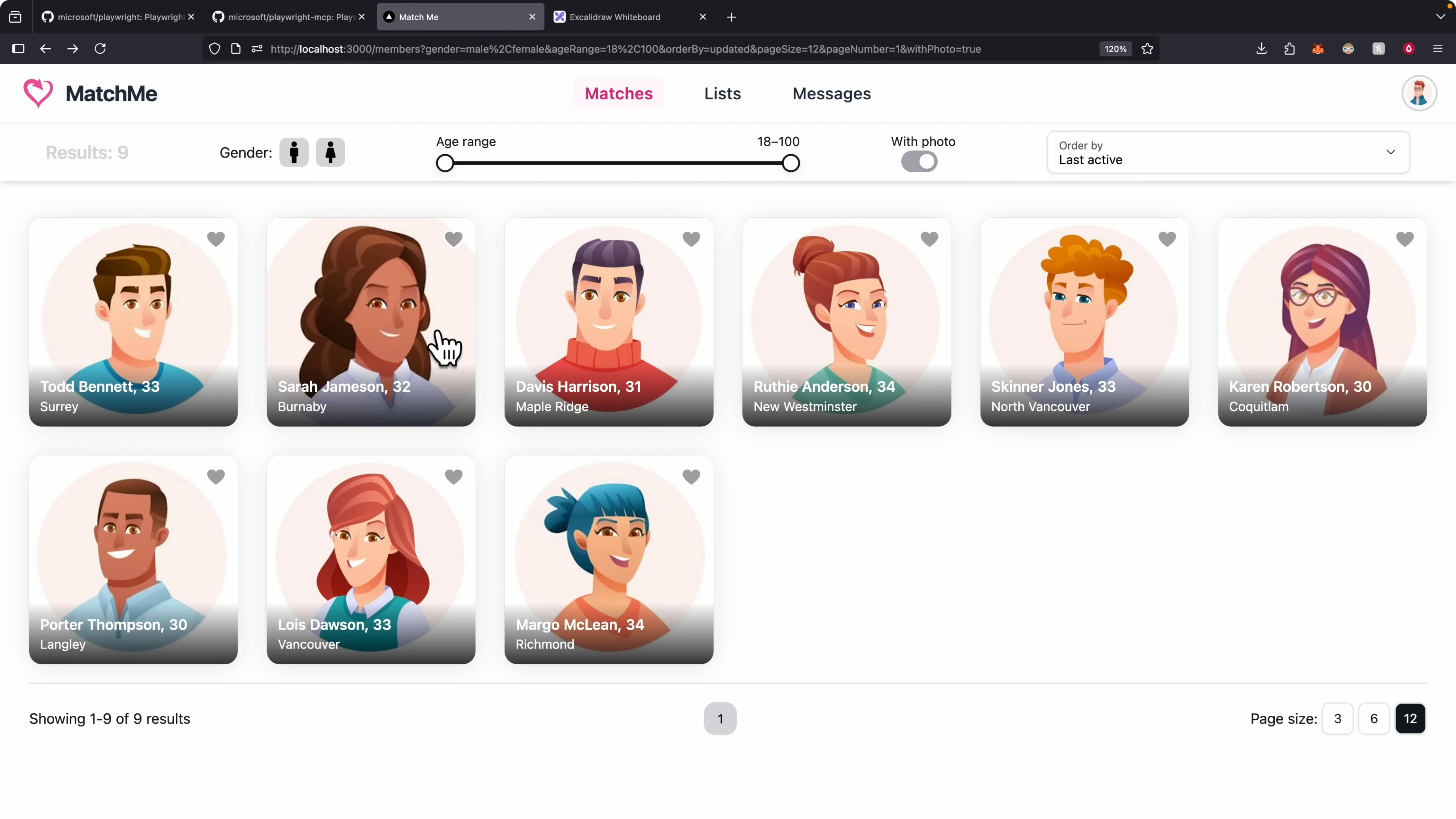
After login, the app shows a members view with actions like like, dislike, search by age range, and send a message. I asked the design review agent to navigate the app and test the login flow using a given email and password, then review the members page. Claude Code opened a new browser, took an initial screenshot, clicked login, filled the form, and signed in.
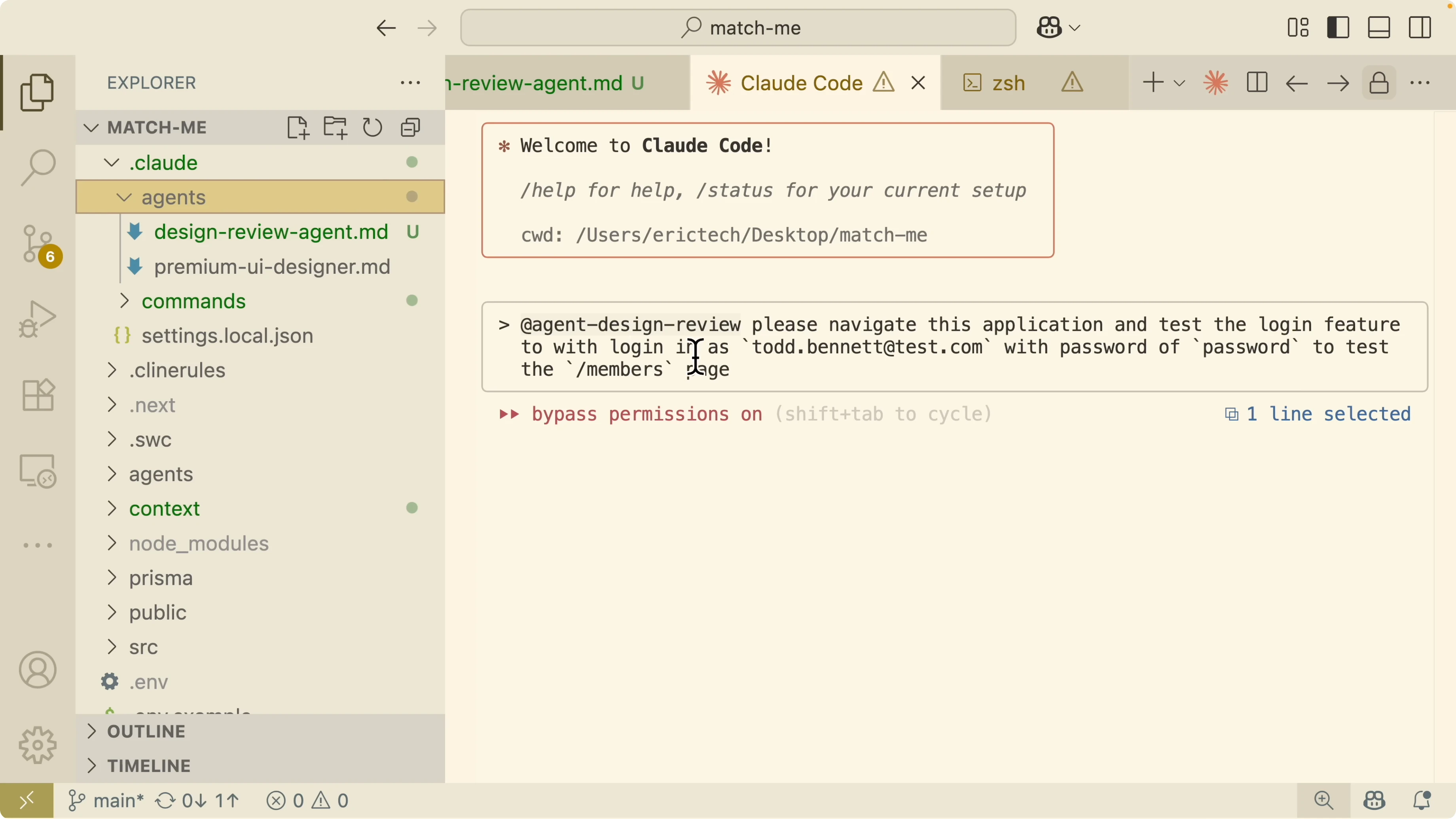
It navigated to the members page and resized the browser to test responsiveness. It validated the login flow, members page behavior, and visual consistency. It produced areas to improve such as loading states, image performance optimizations with lazy loading, and accessibility items.
# Prompt to the design review agent

Navigate the application and test the login feature using the provided credentials.

After login, test the members page for interactions and layout.

Capture screenshots for each state and resize the viewport for mobile and tablet checks.
I can view the screenshots for each step, like the home page, login page, success state, and invalid email validation. It captured filters like only females and all users. It also saved responsive views for mobile and tablet where layout issues were visible.
Read More: Claude Code With Ollama Models Without Anthropic Api Key
Fixing issues with Claude Code Enhance Playwright MCP Integration
I asked Claude Code to fix a mobile responsive issue shown in the sidebar where items collapsed into a cluster. It analyzed the problem, targeted the member sidebar component, and generated a to do list of specific fixes. After updating styles and structure, it reopened the app with the MCP server, resized the screen, and verified the change.
It improved the mobile layout and preserved behavior. It then validated the build to ensure there were no TypeScript errors. It also clicked buttons in the sidebar to confirm everything was functional.
npm run buildThe updated UI rendered correctly in organized rows across breakpoints and interactions held up during navigation. Claude Code committed the changes with context so the diffs tell a clear story. The fix and verify loop is fast because the agent can see what changed and prove it.
Read More: Qwen Claude Code Opus
Final thoughts on How Claude Code Enhance Playwright MCP Integration?
Claude Code with Playwright MCP closes the visual feedback gap for front end work. It codes a feature, opens the browser, checks the UI against design principles and acceptance criteria, then iterates. That makes testing visible, repeatable, and captured in evidence like screenshots and console logs.
Document your visual checks, design principles, essential commands, and compliance checklist in claude.md. Use a dedicated design review agent for deeper checks on major work. For setup and context tips, see this setup guide and this workflow explainer.
Subscribe to our newsletter
Get the latest updates and articles directly in your inbox.

Related Posts

8 Best Claude Code Plugins in 2026 (You Need to Know)
8 Best Claude Code Plugins in 2026 (You Need to Know)

7 Best Claude Code Skills (You Need to Know)
7 Best Claude Code Skills (You Need to Know)

Claude Code Desktop IDE Features (You Need to Know)
Claude Code Desktop IDE Features (You Need to Know)