
Table Of Content
- Local setup for Testing OmniCoder-9B Locally with Real Engineering Challenges
- Install and serve with vLLM for Testing OmniCoder-9B Locally with Real Engineering Challenges
- Connect Open WebUI for Testing OmniCoder-9B Locally with Real Engineering Challenges
- Hyperparameters that worked for Testing OmniCoder-9B Locally with Real Engineering Challenges
- Task 1 - HTML rocket builder in Testing OmniCoder-9B Locally with Real Engineering Challenges
- Task 2 - SQL tuning in Testing OmniCoder-9B Locally with Real Engineering Challenges
- Behavior and training signals in Testing OmniCoder-9B Locally with Real Engineering Challenges
- Use cases, pros, and cons for Testing OmniCoder-9B Locally with Real Engineering Challenges
- Final thoughts
Testing OmniCoder-9B Locally with Real Engineering Challenges
Table Of Content
- Local setup for Testing OmniCoder-9B Locally with Real Engineering Challenges
- Install and serve with vLLM for Testing OmniCoder-9B Locally with Real Engineering Challenges
- Connect Open WebUI for Testing OmniCoder-9B Locally with Real Engineering Challenges
- Hyperparameters that worked for Testing OmniCoder-9B Locally with Real Engineering Challenges
- Task 1 - HTML rocket builder in Testing OmniCoder-9B Locally with Real Engineering Challenges
- Task 2 - SQL tuning in Testing OmniCoder-9B Locally with Real Engineering Challenges
- Behavior and training signals in Testing OmniCoder-9B Locally with Real Engineering Challenges
- Use cases, pros, and cons for Testing OmniCoder-9B Locally with Real Engineering Challenges
- Final thoughts
OmniCoder-9B is a 9 billion parameter coding model that is outperforming models 10 times its size on coding benchmarks. I installed it locally and pushed it through real engineering tasks to see how it behaves off the leaderboard. The highlights for me are the behaviors it learned and how that shows up in practical workflows, not just the numbers like 83.8 percent on GPQA Diamond.
It comes from Tesslate as a coding model fine-tuned on a Qwen 3.5 9B hybrid architecture. Training includes 425,000 curated agentic trajectories, which are recordings of an AI agent successfully completing real software engineering tasks across tool use, terminal operations, and multi-step debugging. That data teaches the model how to work, not just what to say.
You can grab the open weights under Apache 2 from Hugging Face here: Tesslate/OmniCoder-9B. For context on 9B-class models and VRAM tradeoffs, see our comparison of sizes in this Qwen parameter-size guide.
Local setup for Testing OmniCoder-9B Locally with Real Engineering Challenges
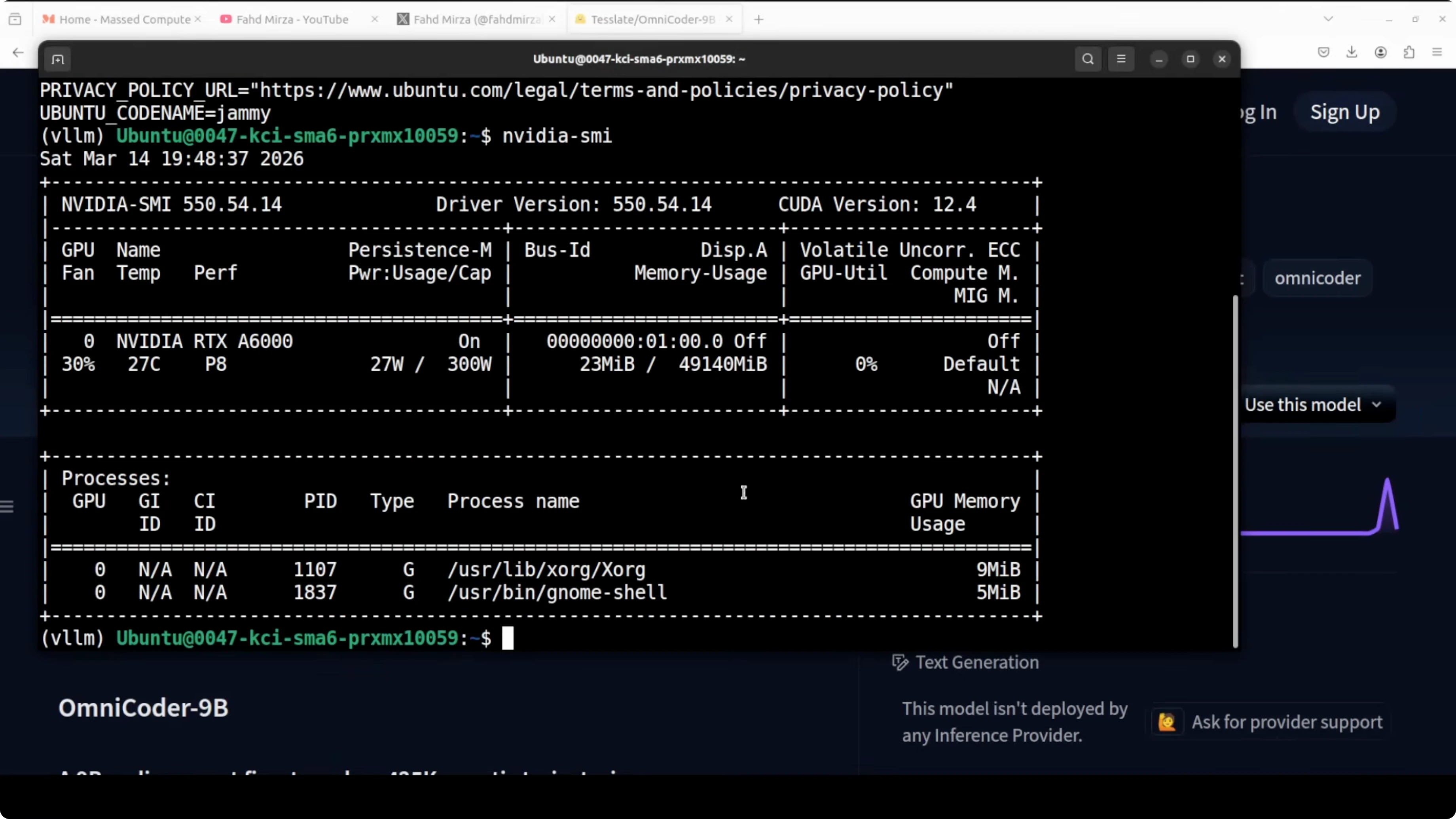
I used an Ubuntu box with an Nvidia RTX 6000 48 GB. At full 262K context, VRAM use landed around 44 GB for me. If you have less VRAM, reduce the context length to 8K or 16K and it will drop accordingly.
Install and serve with vLLM for Testing OmniCoder-9B Locally with Real Engineering Challenges
I served the model using vLLM because its OpenAI-compatible server works smoothly with UI clients and agents. You can also use Transformers if you prefer direct scripting. Below is a quick start for vLLM.

Step 1: Install vLLM.
pip install "vllm>=0.5.4"Step 2: Start the OpenAI-compatible server with OmniCoder-9B.
python -m vllm.entrypoints.openai.api_server \
  --model Tesslate/OmniCoder-9B \
  --host 0.0.0.0 \
  --port 8000 \
  --dtype bfloat16 \
  --max-model-len 262144
Step 3: Verify GPU allocation and VRAM in a second terminal.
nvidia-smi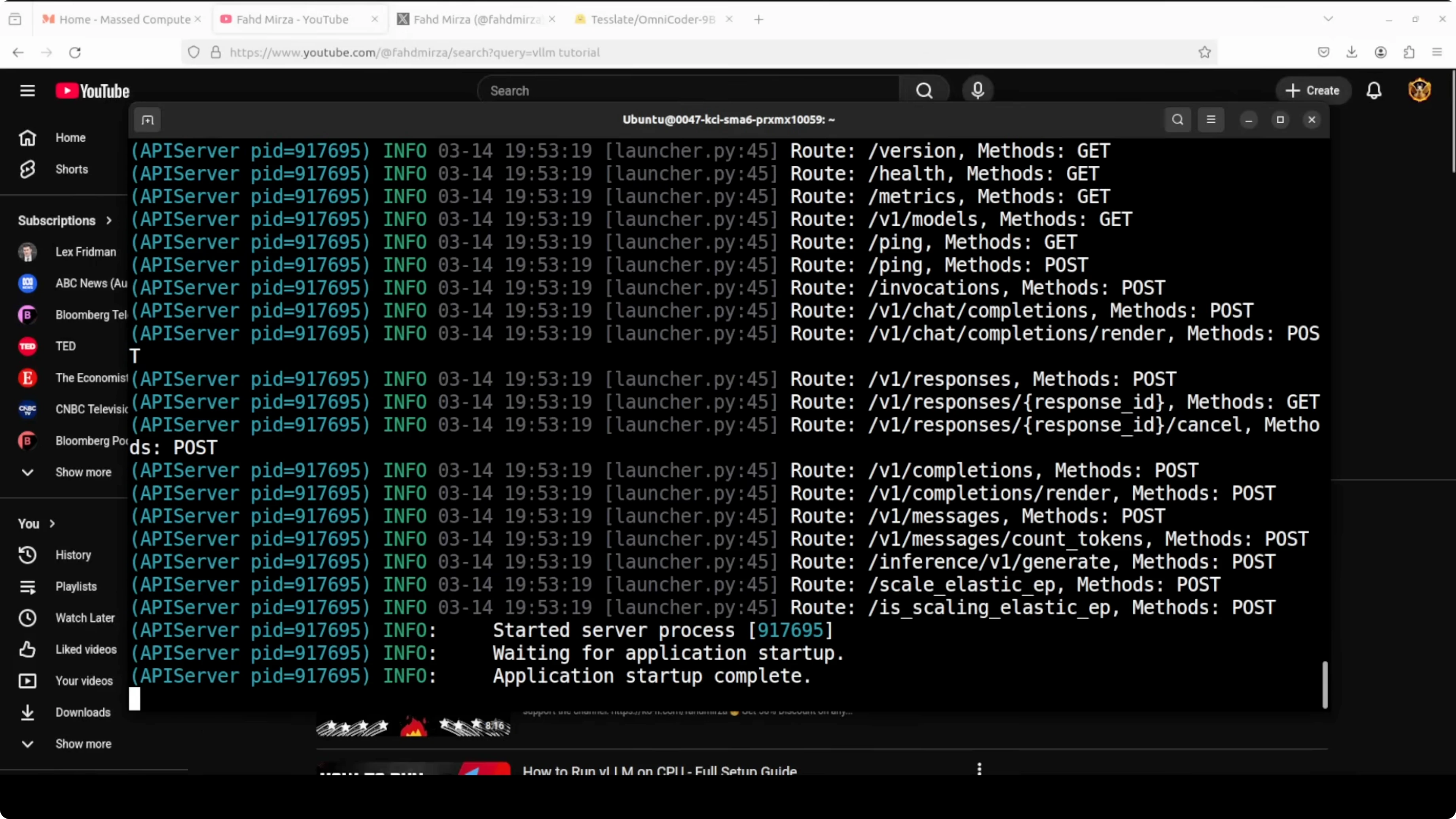
Step 4: If you need to lower VRAM, reduce context length and restart the server.
python -m vllm.entrypoints.openai.api_server \
  --model Tesslate/OmniCoder-9B \
  --host 0.0.0.0 \
  --port 8000 \
  --dtype bfloat16 \
  --max-model-len 16384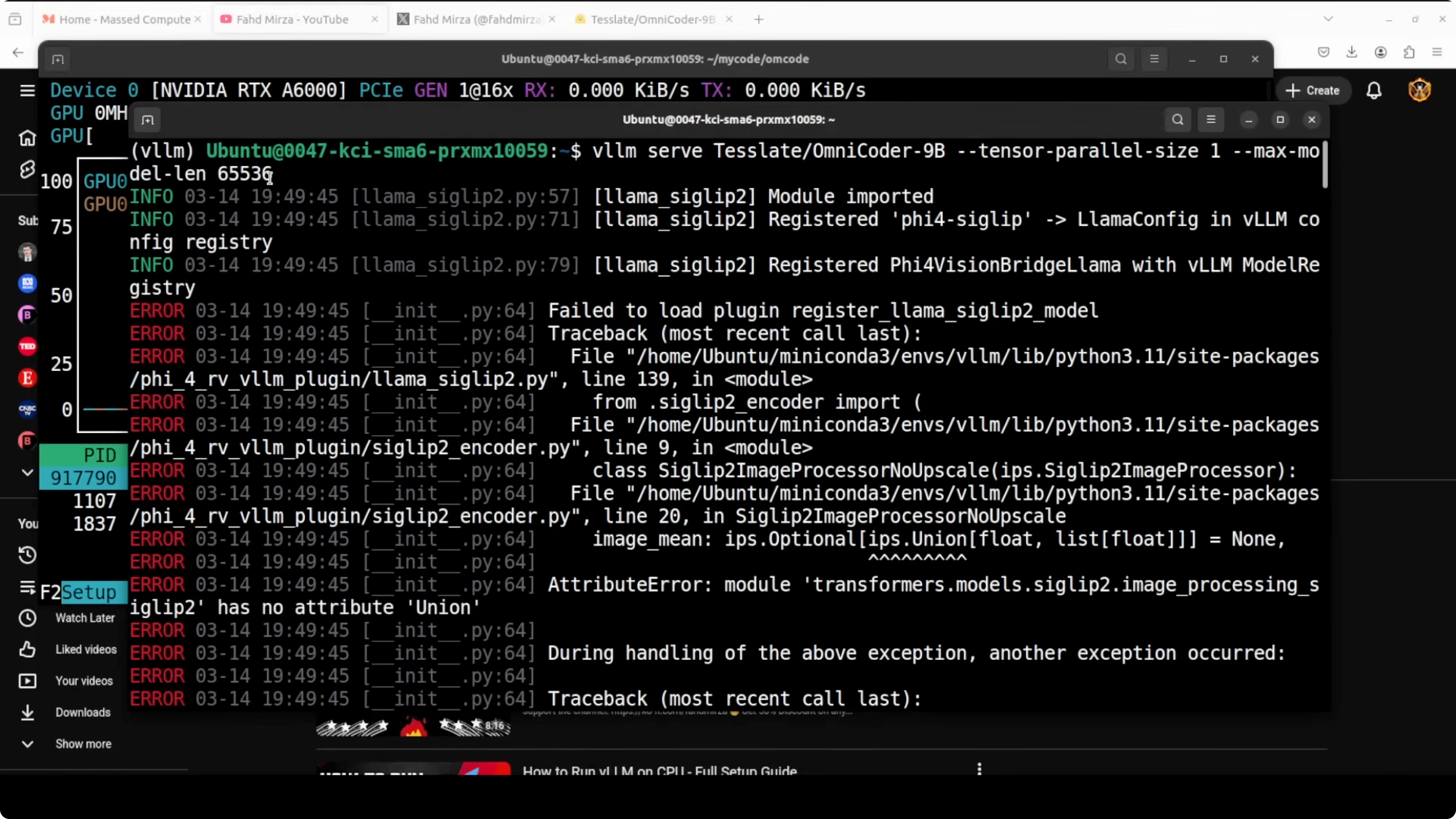
If you prefer Transformers, you can work directly with AutoModel and generate code without serving. My goal here was to plug it into a UI and agents through the OpenAI-compatible endpoint at http://localhost:8000/v1.
Connect Open WebUI for Testing OmniCoder-9B Locally with Real Engineering Challenges
I used Open WebUI to chat with the model through a simple GUI. Point it at the vLLM endpoint and it just works.
Step 1: Launch Open WebUI with the endpoint set to your vLLM server.
docker run -d --name open-webui -p 3000:8080 \
  -e OPENAI_API_BASE=http://host.docker.internal:8000/v1 \
  -e OPENAI_API_KEY=sk-omnicoder-local \
  ghcr.io/open-webui/open-webui:main
Step 2: Open http://localhost:3000 and select your model through the admin Models screen.
Step 3: Save and start chatting.

If you are building local agent stacks that speak the OpenAI API, this endpoint is drop-in. For an agent build that pairs well with local models, see our OpenClaw with Qwen 3.5 and Ollama setup.
Hyperparameters that worked for Testing OmniCoder-9B Locally with Real Engineering Challenges
Before running tasks, I set the model parameters in Open WebUI’s Model settings. These values hit a good balance for code tasks.
Temperature: 0.6.
Top_p: 0.95.
Top_k: 20.
Presence_penalty: 0.

Temperature controls creative variance, and 0.6 sits in the middle ground. Top_p limits the token mass to the most probable 95 percent at each step, clipping low-probability junk. Top_k of 20 further constrains choices to the 20 most likely tokens, while presence penalty at 0 avoids artificial avoidance of repeats.
Task 1 - HTML rocket builder in Testing OmniCoder-9B Locally with Real Engineering Challenges
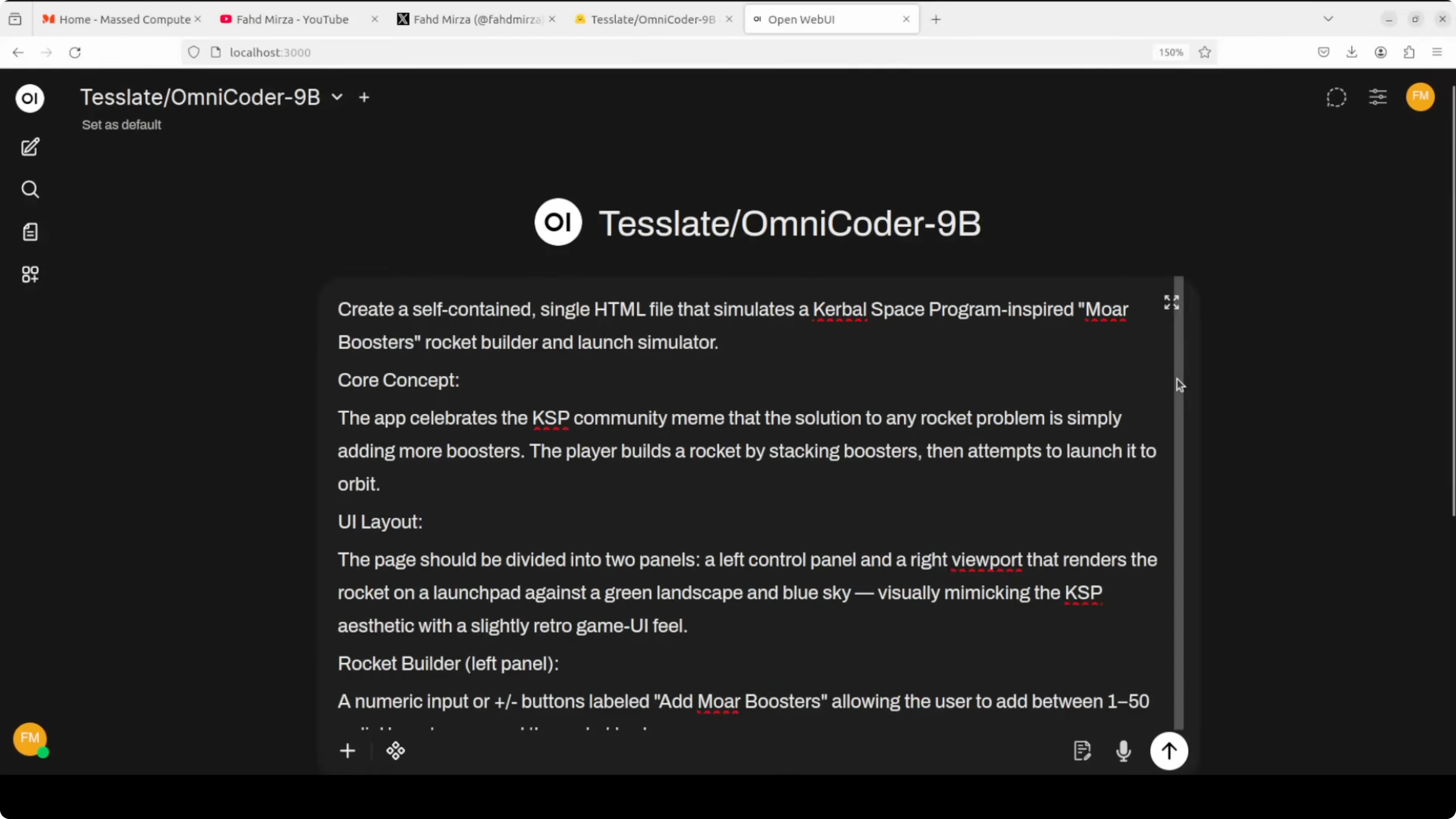
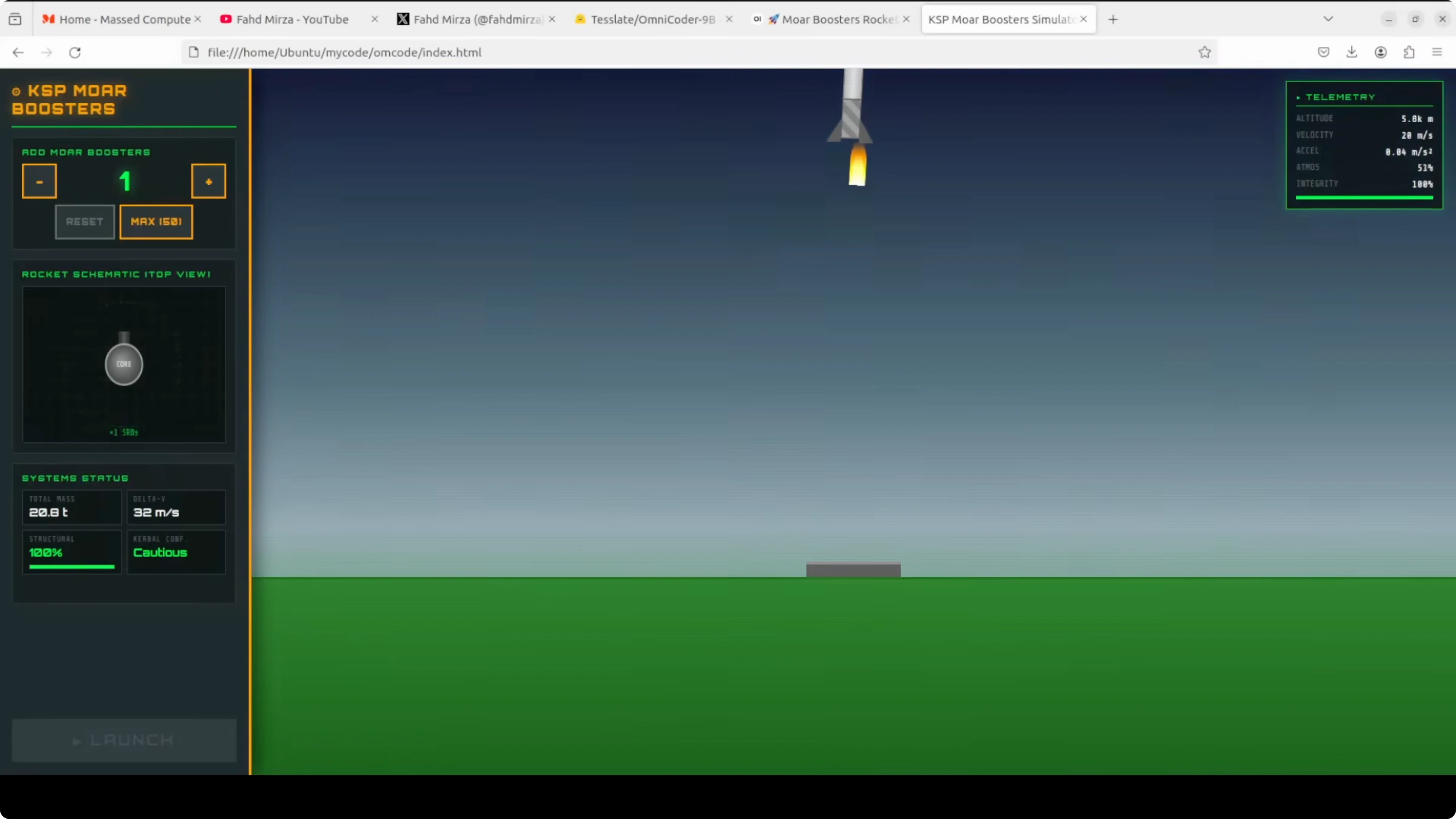
I asked for a self-contained HTML file simulating a Kerbal Space Program inspired booster rocket builder and launcher. The core concept is the KSP meme that the solution to any rocket problem is simply adding more boosters. The model produced a complete HTML app with a rocket in the middle, telemetry, and physics.
Here is a compact example that mirrors the request and runs as a single file.
<!DOCTYPE html>
<html lang="en">
<head>
<meta charset="utf-8"/>
<meta name="viewport" content="width=device-width,initial-scale=1"/>
<title>More Boosters Rocket Simulator</title>
<style>
body{font-family:system-ui,Arial,sans-serif;background:#0b0f19;color:#e6eef8;margin:0;display:flex;height:100vh}
#left,#right{width:300px;padding:16px;background:#101626;box-sizing:border-box}
#main{flex:1;display:flex;flex-direction:column}
#canvas{flex:1;background:#0f1324;border-left:1px solid #1e2a44;border-right:1px solid #1e2a44}
.panel{margin-bottom:12px}
input[type=range]{width:100%}
.row{display:flex;justify-content:space-between;margin:6px 0}
button{background:#2a73ff;border:0;color:#fff;padding:10px 14px;border-radius:6px;cursor:pointer}
button:disabled{background:#2a73ff55}
.badge{display:inline-block;background:#192544;color:#9ec1ff;padding:4px 8px;border-radius:999px;margin-left:6px}
</style>
</head>
<body>
<div id="left">
<h2>Builder <span class="badge">More Boosters</span></h2>
<div class="panel">
<label>Boosters: <span id="boosterCount">1</span></label>
<input id="boosters" type="range" min="1" max="50" step="1" value="1"/>
</div>
<div class="panel">
<label>Thrust per booster: <span id="thrustVal">50 kN</span></label>
<input id="thrust" type="range" min="10" max="200" step="5" value="50"/>
</div>
<div class="panel">
<label>Dry mass: <span id="massVal">5 t</span></label>
<input id="mass" type="range" min="1" max="50" step="1" value="5"/>
</div>
<div class="panel">
<label>Fuel mass: <span id="fuelVal">10 t</span></label>
<input id="fuel" type="range" min="0" max="100" step="1" value="10"/>
</div>
<div class="panel">
<button id="launch">Launch</button>
<button id="reset">Reset</button>
</div>
</div>
<div id="main">
<canvas id="canvas" width="900" height="600"></canvas>
</div>
<div id="right">
<h2>Telemetry</h2>
<div class="row"><span>Altitude</span><span id="altitude">0 m</span></div>
<div class="row"><span>Velocity</span><span id="velocity">0 m/s</span></div>
<div class="row"><span>Acceleration</span><span id="accel">0 m/s²</span></div>
<div class="row"><span>Atmosphere</span><span id="atm">1.00</span></div>
<div class="row"><span>Integrity</span><span id="hull">100%</span></div>
</div>
<script>
const cvs = document.getElementById('canvas');
const ctx = cvs.getContext('2d');
const ui = {
boosters: document.getElementById('boosters'),
thrust: document.getElementById('thrust'),
mass: document.getElementById('mass'),
fuel: document.getElementById('fuel'),
boosterCount: document.getElementById('boosterCount'),
thrustVal: document.getElementById('thrustVal'),
massVal: document.getElementById('massVal'),
fuelVal: document.getElementById('fuelVal'),
altitude: document.getElementById('altitude'),
velocity: document.getElementById('velocity'),
accel: document.getElementById('accel'),
atm: document.getElementById('atm'),
hull: document.getElementById('hull'),
launch: document.getElementById('launch'),
reset: document.getElementById('reset'),
};
function syncLabels(){
ui.boosterCount.textContent = ui.boosters.value;
ui.thrustVal.textContent = ui.thrust.value + ' kN';
ui.massVal.textContent = ui.mass.value + ' t';
ui.fuelVal.textContent = ui.fuel.value + ' t';
}
['input','change'].forEach(ev=>{
ui.boosters.addEventListener(ev, syncLabels);
ui.thrust.addEventListener(ev, syncLabels);
ui.mass.addEventListener(ev, syncLabels);
ui.fuel.addEventListener(ev, syncLabels);
});
syncLabels();
let state = {
t: 0,
h: 0,
v: 0,
a: 0,
hull: 100,
fuel: +ui.fuel.value * 1000, // kg
running: false
};
function atmosphere(h){
const scaleHeight = 8500;
return Math.max(0, Math.exp(-h/scaleHeight));
}
function drawRocket(){
ctx.clearRect(0,0,cvs.width,cvs.height);
const ground = cvs.height - 40;
const pxPerM = 1; // simple mapping
const y = ground - state.h * pxPerM;
ctx.fillStyle = '#2a2f4a';
ctx.fillRect(0,ground, cvs.width, 4);
// body
const x = cvs.width/2;
ctx.save();
ctx.translate(x, y);
ctx.fillStyle = '#9ec1ff';
ctx.fillRect(-10,-60,20,60);
ctx.beginPath();
ctx.moveTo(-10,-60);
ctx.lineTo(0,-80);
ctx.lineTo(10,-60);
ctx.closePath();
ctx.fill();
// boosters
const b = +ui.boosters.value;
const cols = Math.min(10, b);
const rows = Math.ceil(b / cols);
const spacing = 6;
let count = 0;
for(let r=0;r<rows;r++){
for(let c=0;c<cols;c++){
if(count++>=b) break;
const bx = -cols*spacing/2 + c*spacing + (Math.random()-0.5)*1;
const by = 0 + r*8;
ctx.fillStyle = '#ffb86b';
ctx.fillRect(bx,-10+by,4,10);
if(state.running && state.fuel>0){
const flick = Math.random()*6+10;
ctx.fillStyle = 'rgba(255,180,80,0.8)';
ctx.beginPath();
ctx.moveTo(bx+2,by);
ctx.lineTo(bx-2,by+flick);
ctx.lineTo(bx+2,by+flick+2);
ctx.closePath();
ctx.fill();
}
}
}
ctx.restore();
ui.altitude.textContent = Math.max(0,state.h|0) + ' m';
ui.velocity.textContent = state.v.toFixed(1) + ' m/s';
ui.accel.textContent = state.a.toFixed(2) + ' m/s²';
ui.atm.textContent = atmosphere(state.h).toFixed(2);
ui.hull.textContent = state.hull.toFixed(0) + '%';
}
function step(dt){
const g = 9.80665;
const thrustPer = +ui.thrust.value * 1000; // N
const b = +ui.boosters.value;
const totalThrust = state.running && state.fuel>0 ? thrustPer * b : 0;
const dryMass = +ui.mass.value * 1000; // kg
const fuelMass = Math.max(0, state.fuel);
const mass = dryMass + fuelMass;
const dragCoef = 0.15;
const rho0 = 1.225;
const atm = atmosphere(state.h);
const vSign = Math.sign(state.v);
const drag = 0.5 * rho0 * atm * dragCoef * state.v*state.v * vSign;
state.a = (totalThrust - mass*g - drag) / Math.max(1,mass);
state.v += state.a * dt;
state.h += state.v * dt;
state.h = Math.max(0, state.h);
if(state.running && totalThrust>0 && state.fuel>0){
const mdot = Math.max(20, b*5);
state.fuel -= mdot * dt;
}
if(state.h===0 && state.v< -5){
state.hull -= Math.min(20, Math.abs(state.v)*0.5);
state.v = 0;
}
if(state.hull<=0){
state.running = false;
}
}
let last = 0;
function loop(ts){
const dt = Math.min(0.05, (ts-last)/1000 || 0.016);
last = ts;
step(dt);
drawRocket();
requestAnimationFrame(loop);
}
requestAnimationFrame(loop);
ui.launch.addEventListener('click', ()=>{
state.running = true;
});
ui.reset.addEventListener('click', ()=>{
state = {t:0,h:0,v:0,a:0,hull:100,fuel:+ui.fuel.value*1000,running:false};
syncLabels();
});
</script>
</body>
</html>I added one booster and launched and saw the physics running with telemetry for altitude, velocity, acceleration, atmosphere, and integrity. Increasing to five boosters changed acceleration and overall behavior as expected, even if the visual alignment could be tuned. The point is that a 9B model produced a complete, interactive, self-contained app from a detailed spec in one shot.
If you are exploring other 9B-class experiments, my notes on model behavior size are in this Flux2 Klein 9B evaluation.
Task 2 - SQL tuning in Testing OmniCoder-9B Locally with Real Engineering Challenges
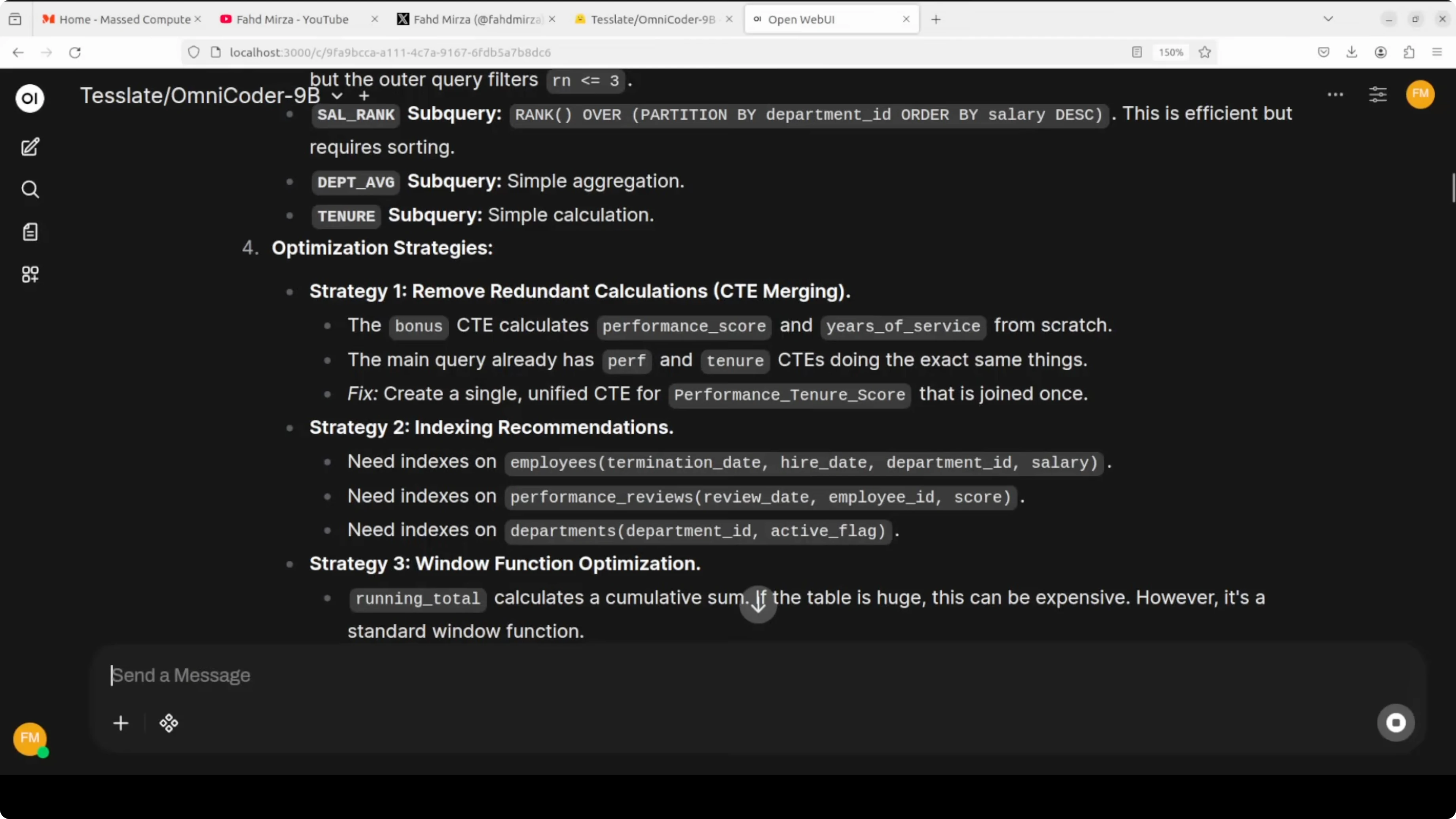
I gave it a nasty Oracle query to optimize, with deep nesting, several subqueries, ORDER BY chains, and multiple clauses. It spent time analyzing trajectories and returned optimization strategies that matched what I expected from DBA work. The list included CTE merging, window function optimization, indexing recommendations, filter pushdown, and optional materialized views.

What stood out was that it kept refining until it settled on a final shape. For indexing, it proposed specific composite keys around high-selectivity predicates and ORDER BY columns. For rewrite, it recommended converting nested subqueries into WITH clauses, collapsing redundant layers, replacing correlated subqueries with analytic functions, and pushing filters before joins.
Example snippets it suggested conceptually looked like this:
-- Create supporting indexes
CREATE INDEX idx_orders_cust_date ON orders(customer_id, order_date);
CREATE INDEX idx_items_order_prod ON order_items(order_id, product_id);
-- Rewrite outline
WITH base AS (
SELECT ...
FROM orders o
JOIN order_items i ON i.order_id = o.order_id
WHERE o.order_date >= DATE '2024-01-01'
),
scored AS (
SELECT
...,
ROW_NUMBER() OVER (PARTITION BY customer_id ORDER BY order_date DESC) AS rn
FROM base
)
SELECT ...
FROM scored
WHERE rn = 1
ORDER BY order_date DESC;This is exactly the kind of tune-up that took me days as an Oracle DBA. Seeing a 9B model propose it with clear reasoning is impressive for real-world maintenance work.
Behavior and training signals in Testing OmniCoder-9B Locally with Real Engineering Challenges
The interesting part is not just the benchmark numbers. It reads requirements before it writes, responds to compiler diagnostics, and makes minimal diffs instead of rewriting entire files. Those habits make it more useful in automated coding pipelines than models that overwrite large swaths of code.
It runs with a 262K token context window, which is helpful for multi-file edits and long logs. The model card notes support for think-style tags and it ships as fully open weights under Apache 2. If you already use code agents, the OpenAI-compatible endpoint means you can swap it in and test quickly.
If you plan to fine-tune related bases for your stack, our Qwen 3.5 8B fine-tuning walkthrough covers a local pipeline that pairs well with this setup. For building voice features around generated code and demos, the Kokoro TTS WebUI install guide is a handy addition.
Use cases, pros, and cons for Testing OmniCoder-9B Locally with Real Engineering Challenges
Practical use cases I validated are full-stack scaffolding from specs, targeted code edits that follow diagnostics, and SQL tuning for production workloads. It also fits API agent loops that call tools, read compiler output, and iterate with minimal changes. The long context window allows it to keep design docs, logs, and code side by side.
Pros include strong coding performance for its size, open weights under Apache 2, and behaviors learned from agentic trajectories that matter in engineering flows. It produced a working web app in one pass and delivered correct DBA-grade optimization strategies. The OpenAI-compatible server made integration trivial across UI and agent clients.
Cons are VRAM demands at the maximum 262K context and longer think time on complex prompts. If you lower context to 8K or 16K, usage drops but you trade off long-file awareness. In a few UI tasks, small physics or layout details needed polish, though the core logic was sound.
If you want to run a smaller or larger Qwen family model beside it for A-B checks, I outlined selection notes in this size and capability comparison.
Final thoughts
OmniCoder-9B feels engineered for how programmers actually work. The agentic training shows up in its tendency to read first, react to errors, and edit precisely. For local-first engineers, serving it with vLLM and steering it with a GUI like Open WebUI is a quick path to real results.
Subscribe to our newsletter
Get the latest updates and articles directly in your inbox.

Related Posts

8 Best Claude Code Plugins in 2026 (You Need to Know)
8 Best Claude Code Plugins in 2026 (You Need to Know)

7 Best Claude Code Skills (You Need to Know)
7 Best Claude Code Skills (You Need to Know)

Claude Code Desktop IDE Features (You Need to Know)
Claude Code Desktop IDE Features (You Need to Know)