
How MimiClaw Runs OpenClaw on Just a $5 Chip?
OpenClaw Error Fixer
Paste any OpenClaw error and get the exact fix instantly — cause, steps, copy-ready commands, and related guides.
We started this OpenClaw series with the original tool running on a Mac mini. Then the community shrank it down: Nanobot in Python, PicoClaw in Go, ZeroClaw and NullClaw in Rust and Zig reaching 678 kilobytes. We covered each one locally installed and integrated with local models, including fixes such as this NodeJS error.
MimiClaw does something none of the others do. It throws out the operating system entirely - no Linux, no NodeJS, no runtime - just pure C on a $5 microcontroller. It runs on an ESP32-S3 dev board, connects to Wi-Fi, and you talk to it through Telegram.
The entire AI agent loop runs on the chip with no OS underneath it. LLM calls, tool use, memory, heartbeat, and cron all execute on-device using the ESP-IDF embedded framework. It supports both Anthropic Claude and OpenAI ChatGPT, switchable at runtime, and has no local models. For model context, see Claude Opus.
How MimiClaw Runs OpenClaw on Just a $5 Chip?
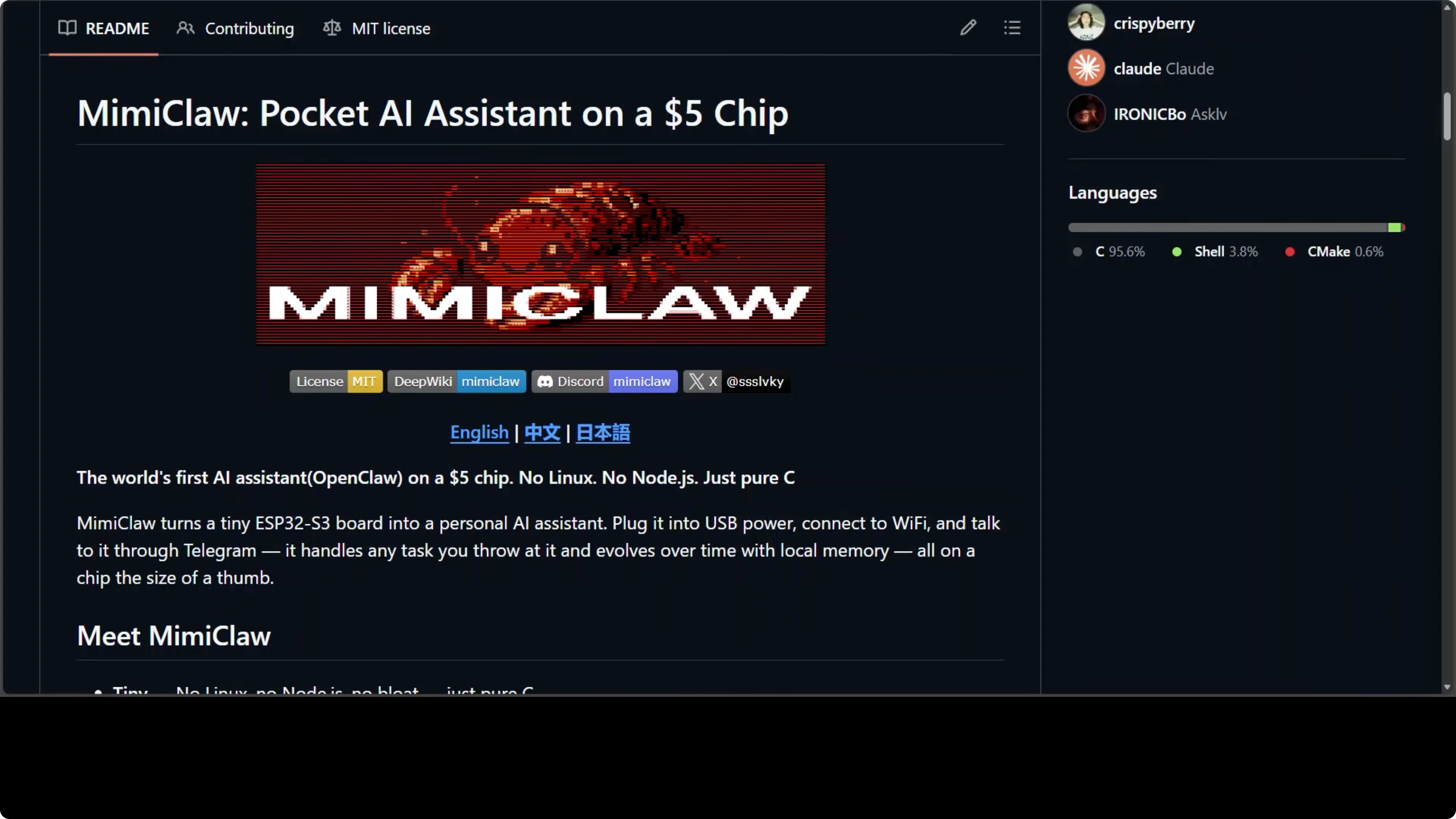
MimiClaw runs on an ESP32-S3 with two cores at 240 MHz each. Core 0 handles the network stack such as Wi-Fi polling and Telegram communication. Core 1 is dedicated to AI processing.
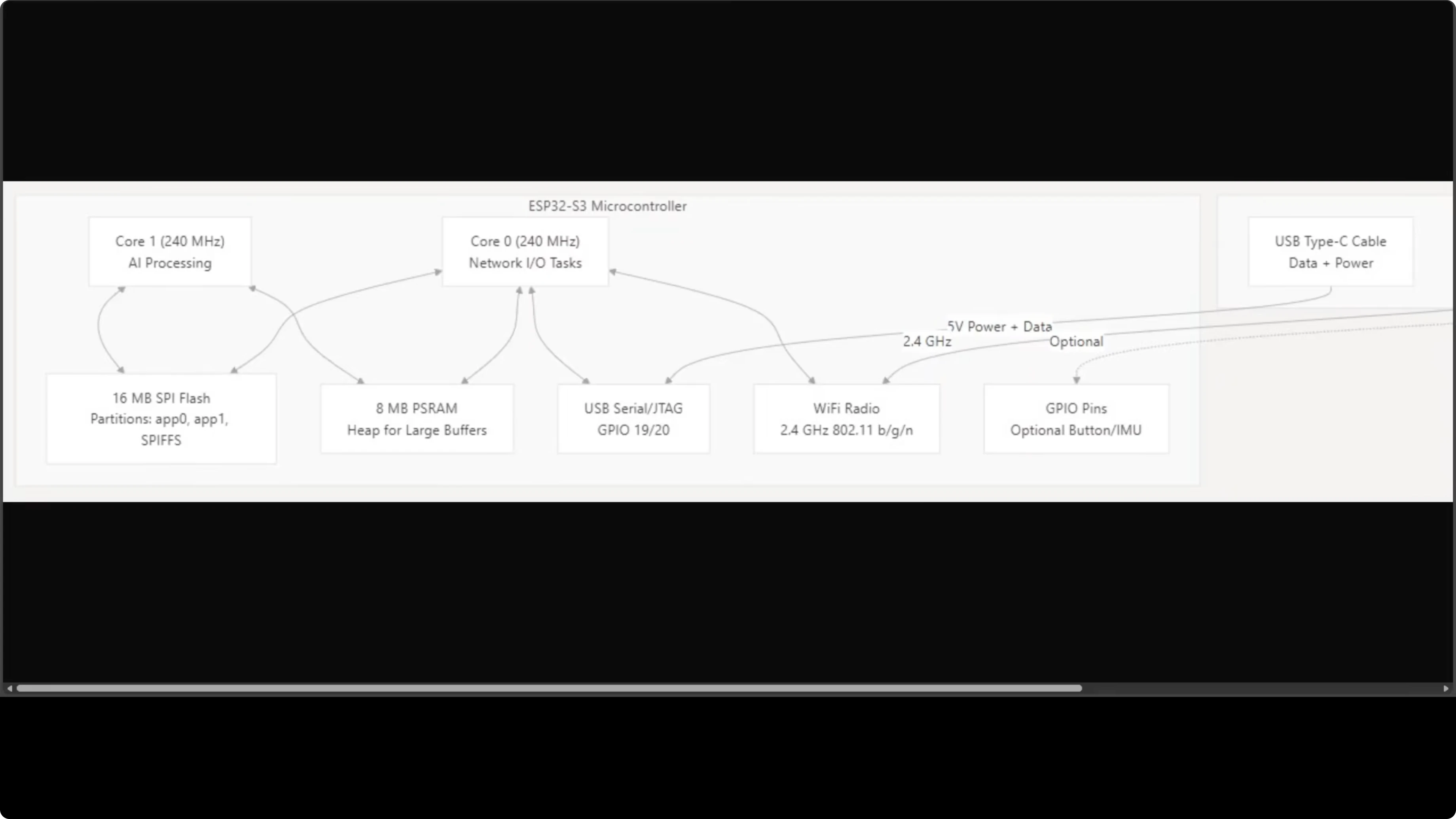
They share 16 MB of SPI flash storage and 8 MB of PSRAM, which acts as the heap for large buffers. Networking, processing, and storage all live inside a board the size of your thumb. Everything your AI assistant needs is on that chip.
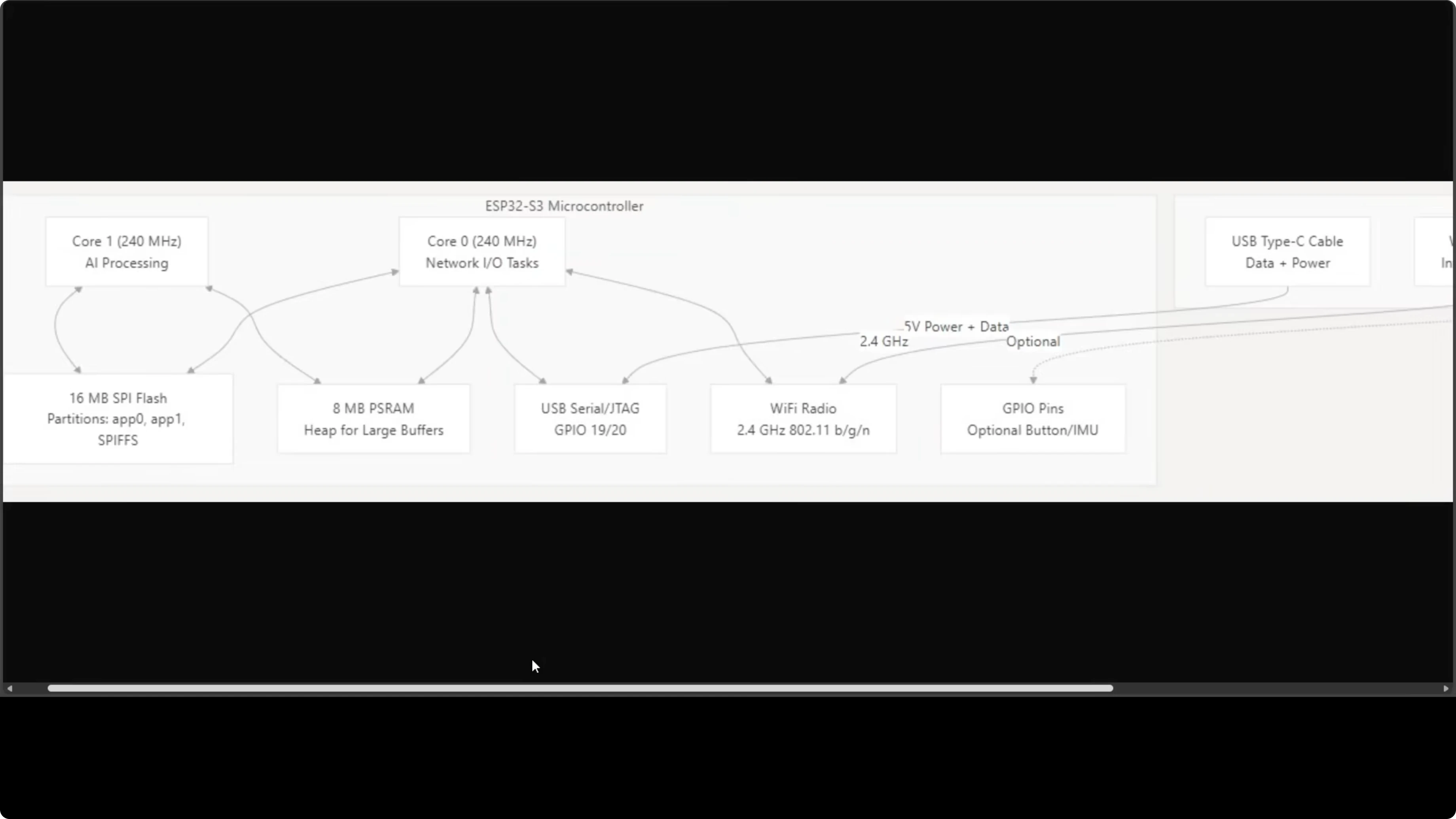
Cores and tasks
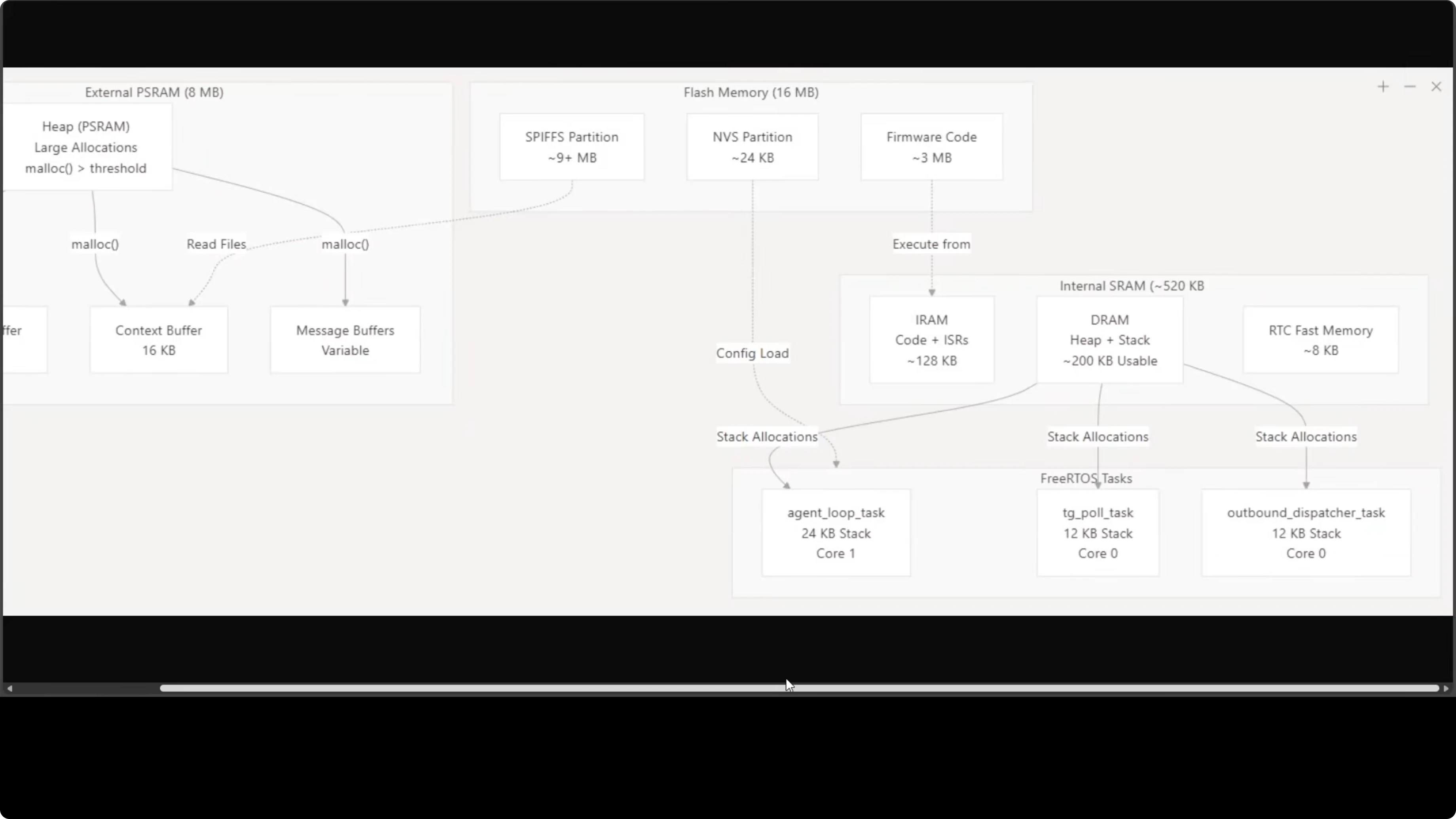
Three FreeRTOS tasks run concurrently. The agent loop task runs on Core 1, while the Telegram polling task and outbound dispatcher both run on Core 0. This split keeps I/O responsive while the agent loop processes LLM calls.
The 8 MB external PSRAM handles the heavy lifting. The LLM stream buffer, context buffer, and message buffers all live there. That keeps the working set in memory without paging or an OS.
Memory layout
The 16 MB flash handles firmware code and persistent files. Conversation history, memory files, skills, and cron jobs all live on the flash. It is a remarkably tight and efficient setup for something with no operating system.
Flash partitions
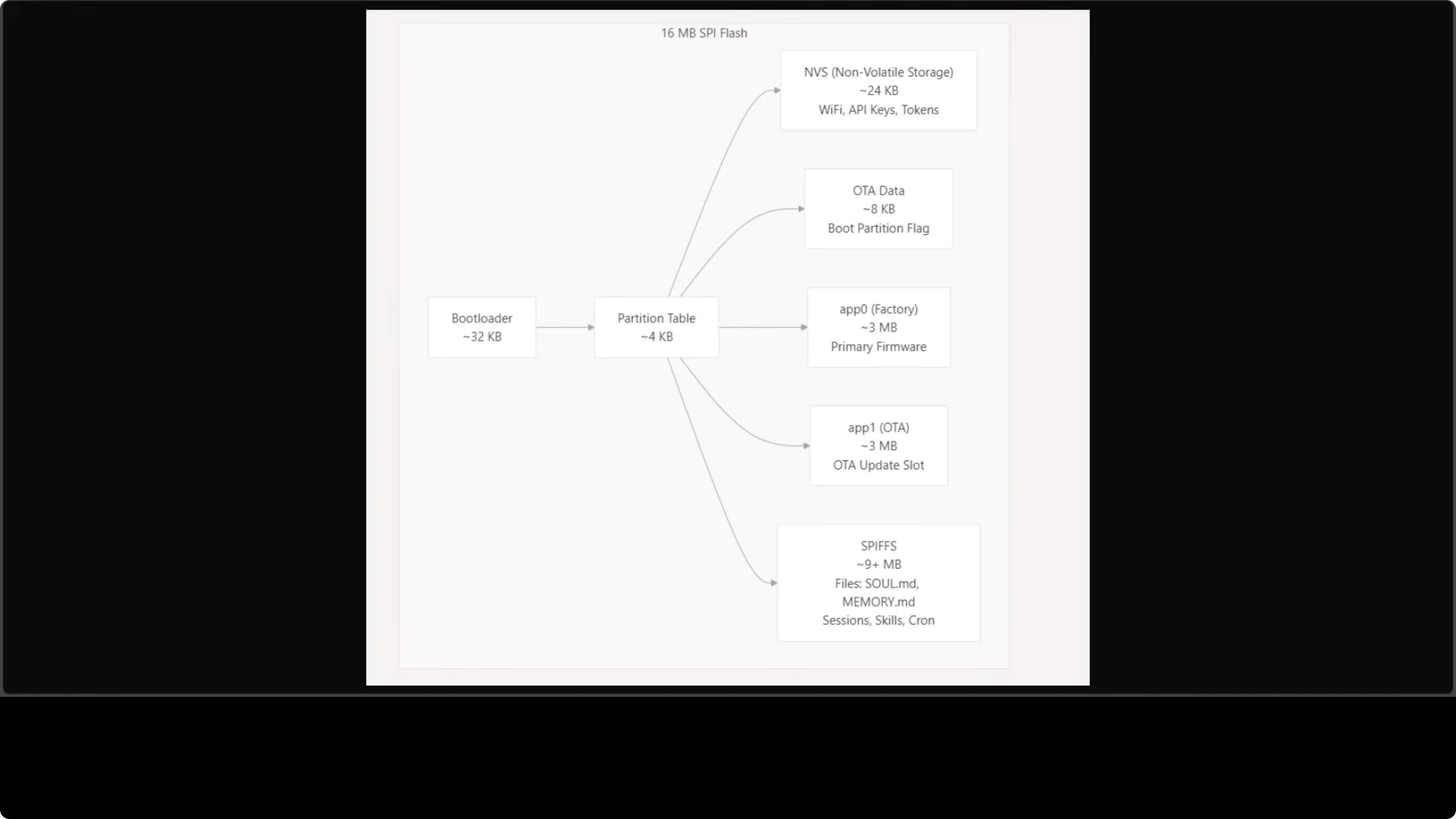
Flash storage is carefully partitioned. NVS (non-volatile storage) gets 24 KB, storing Wi-Fi credentials, API keys, and Telegram tokens configured via the serial CLI. Two 3 MB app partitions are present - app0 for primary firmware and app1 for the OTA update slot.
The remaining 9+ MB is assigned to SPIFFS, the on-device file system. This is where agent files live such as skill.mmd, memory.mmd, conversation history, and cron jobs. Everything persists across reboots.
USB port check
Most ESP32-S3 boards expose two USB-C ports that are not interchangeable. Use the one labeled USB or Native, which connects to the chip’s built-in USB-Serial/JTAG interface. The port labeled COM or U routes through an external bridge and flashing through it will fail.
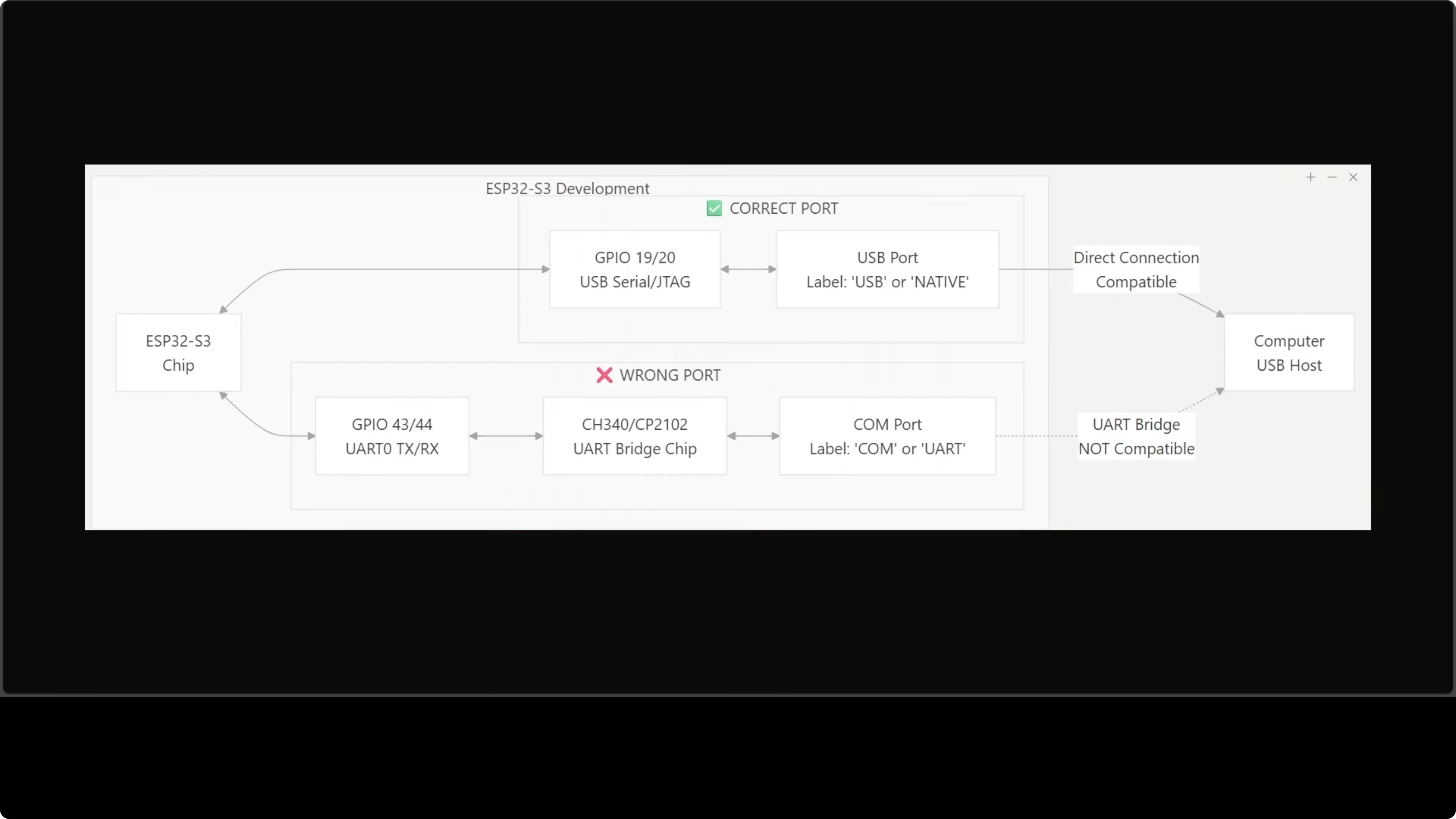
If you choose the wrong port, you will get cryptic errors. Check your board carefully before connecting. This detail is easy to miss and wastes time.
Setup and flashing
The setup has more steps than the software-only tools. You need ESP-IDF 5.5 or higher on Ubuntu, which is Espressif’s official development framework for ESP32 chips. Install the system dependencies, clone the MimiClaw repository, and run its setup script.
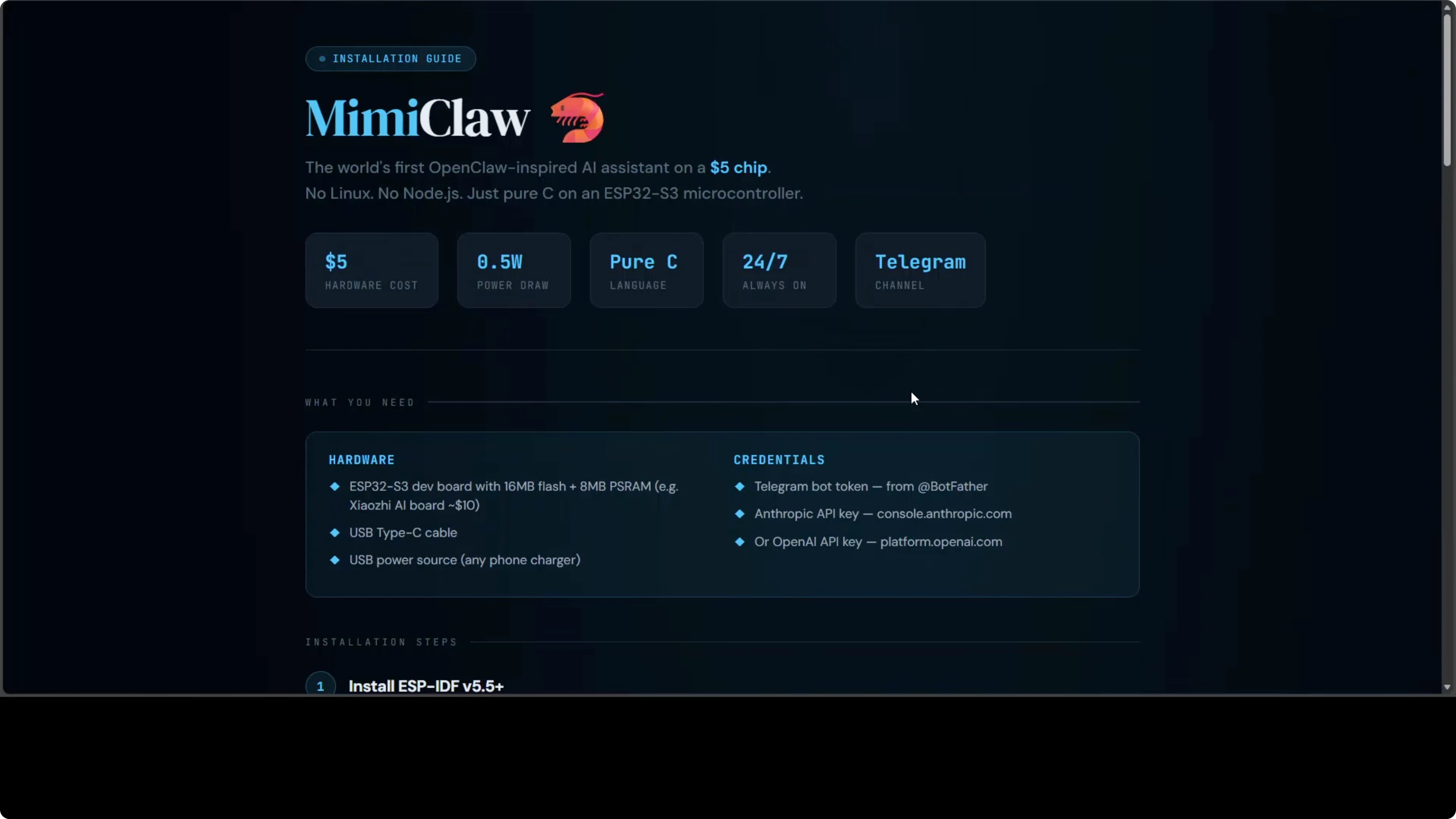
Copy the secrets template file and fill in Wi-Fi name and password, the Telegram bot token, and your Anthropic or OpenAI API key. Build the firmware and flash it to the board over USB, making sure to use the correct port. After the first flash, the runtime CLI lets you change any setting without recompiling.
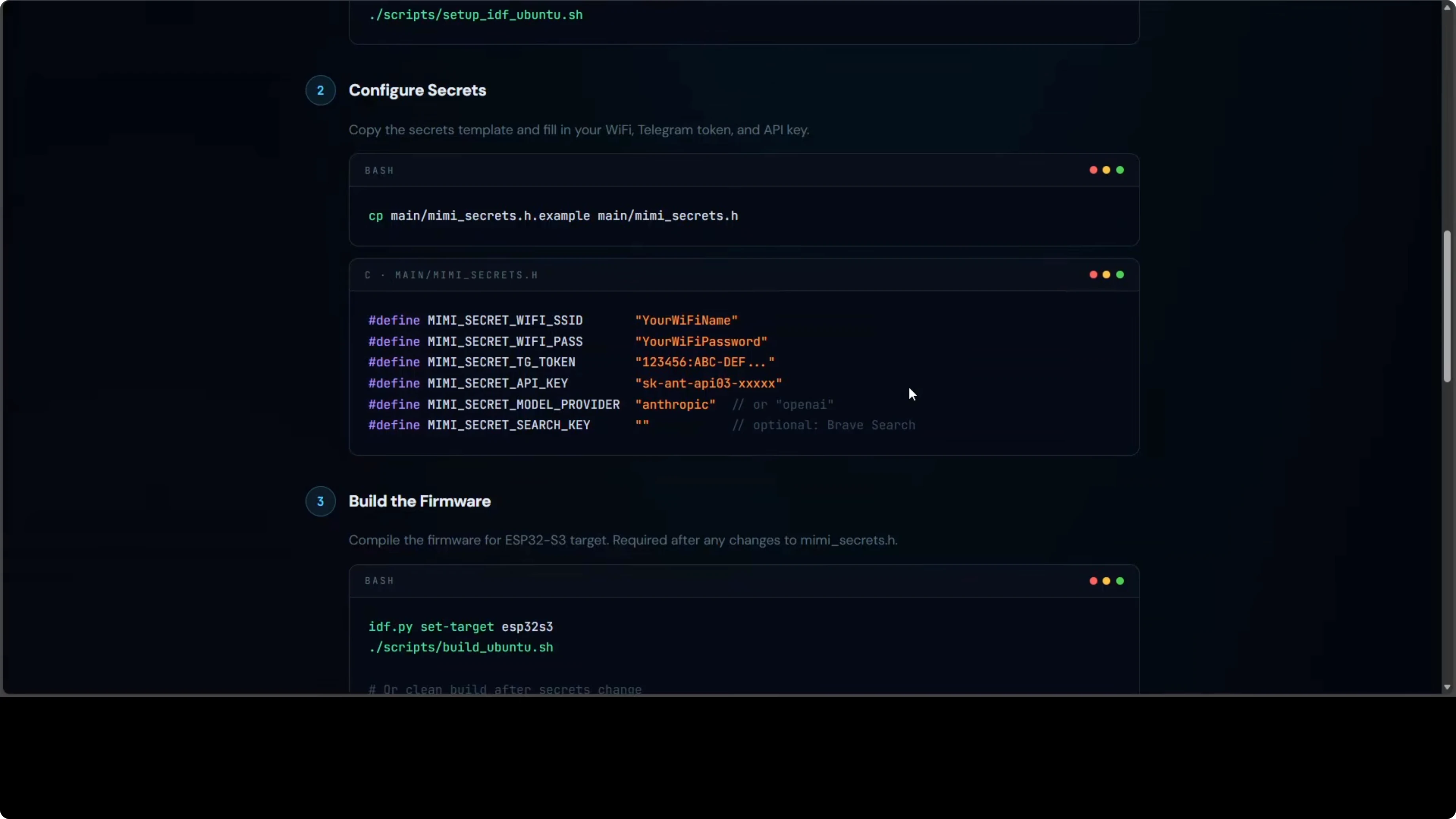
Here is a minimal example of a secrets file:
WIFI_SSID="your-ssid"
WIFI_PASS="your-password"
TELEGRAM_BOT_TOKEN="123456:ABC..."
ANTHROPIC_API_KEY="sk-ant-..."
OPENAI_API_KEY="sk-proj-..."
PROVIDER="openai"   # or "anthropic"
MODEL="gpt-4o-mini" # or a Claude variant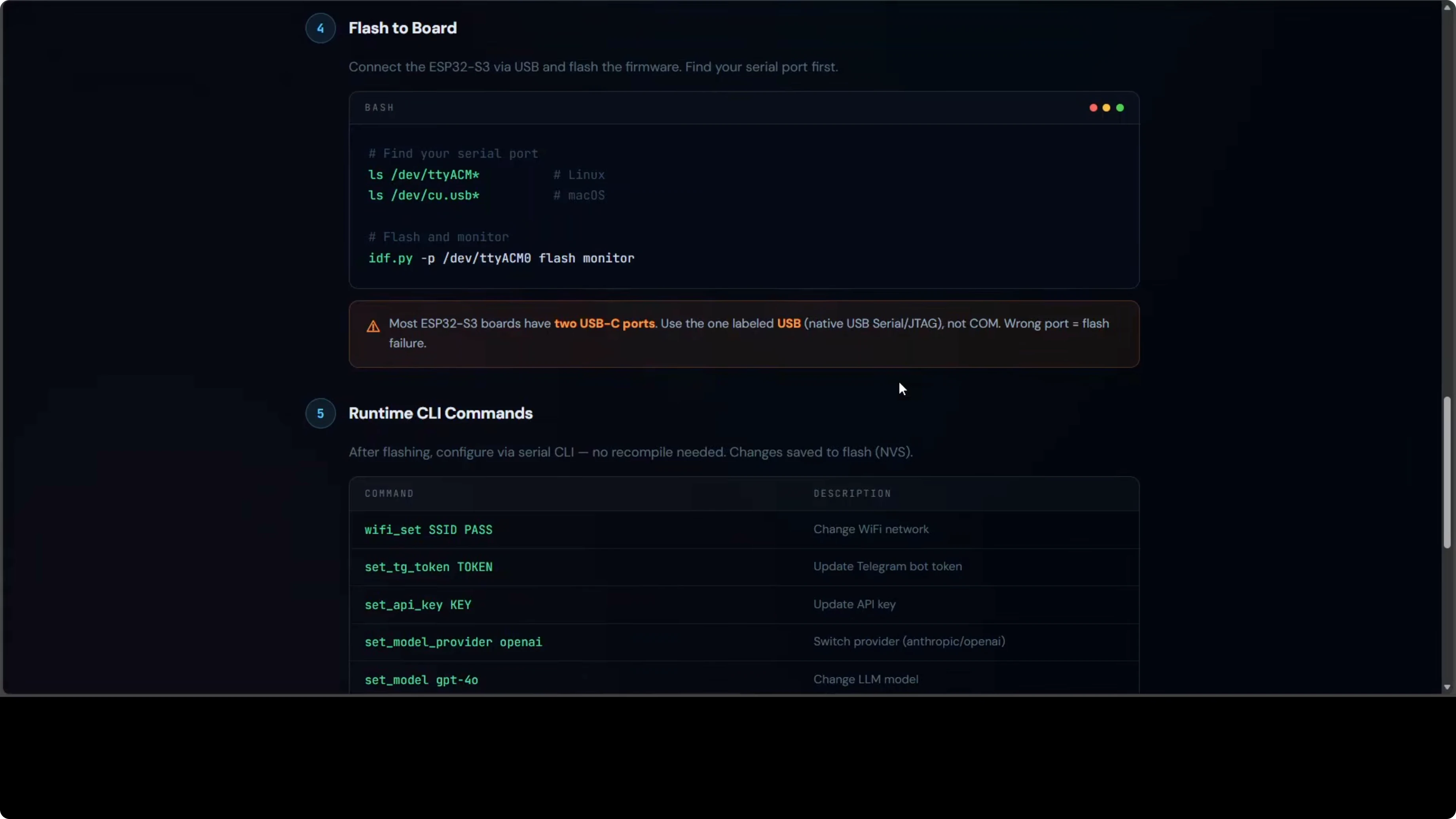
Build and flash with ESP-IDF:
# Inside the MimiClaw project
idf.py set-target esp32s3
idf.py build
idf.py -p /dev/ttyACM0 flash monitor
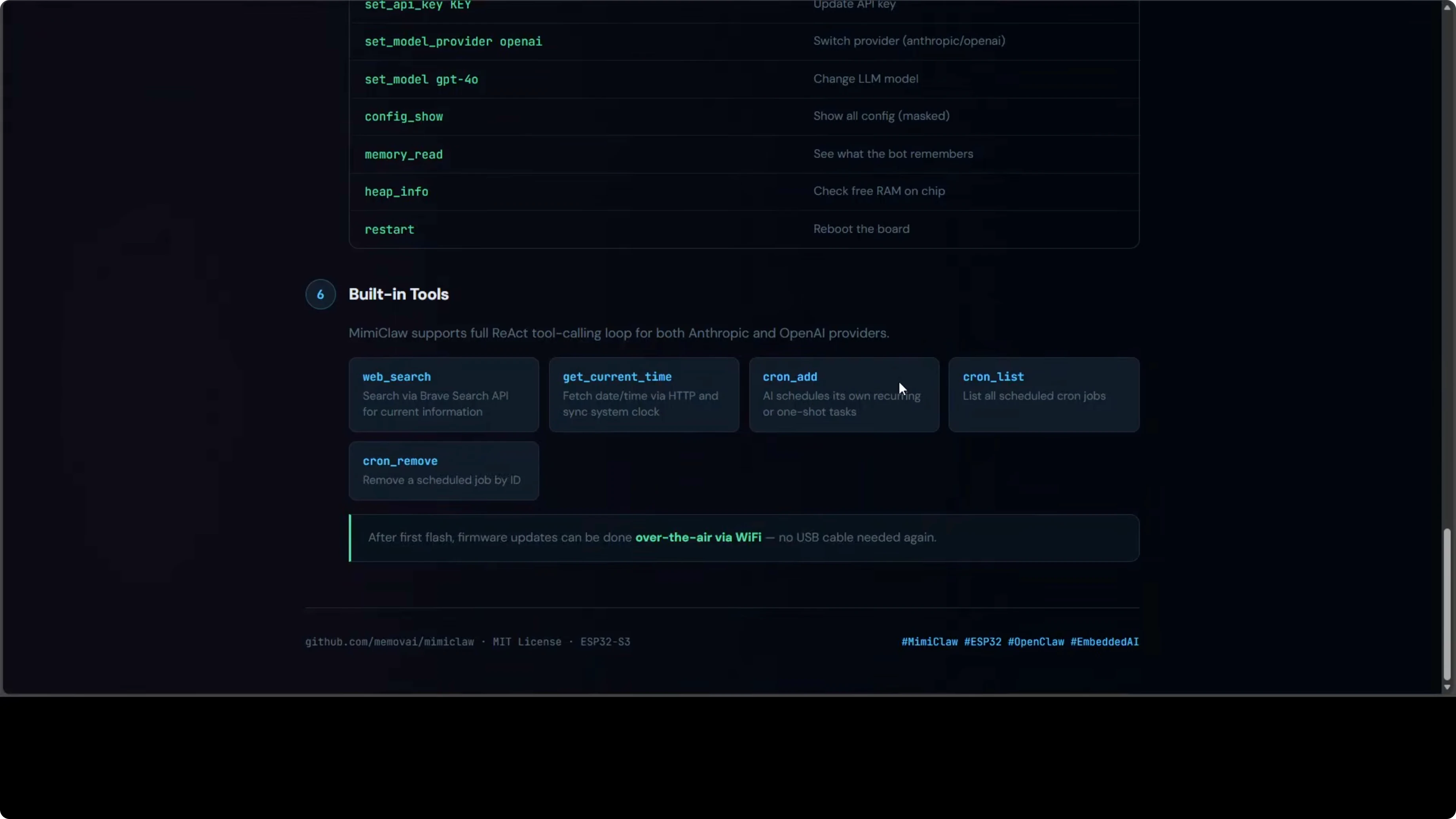
Use the serial CLI to configure or update settings live:
set wifi.ssid your-ssid
set wifi.pass your-password
set telegram.token 123456:ABC...
set provider openai
set api.key sk-proj-...
set model gpt-4o-mini
save
reboot
Firmware updates happen entirely over Wi-Fi via OTA. You will not need to plug in a USB cable again after the first flash. Configuration also persists across reboots in NVS.
Picking the right board
Look for 16 MB flash and 8 MB PSRAM. That is the minimum MimiClaw needs. Some boards include antennas, displays, or cameras, which are not required but will not hurt.
Pricing varies by region and board features. The key detail is that it must be ESP32-S3 and not ESP32. They are different chips and it is easy to order the wrong one.
Cloud model reality
It runs on a $30-$40 board, but you still need an Anthropic or OpenAI API key. The model runs in the cloud while the chip runs the agent loop and handles communication. You pay for API calls even though the hardware cost is low.
For those exploring other model families, see Ernie 5. MimiClaw remains provider-switchable at runtime, so you can test and compare. The form factor stays the same while you iterate.
Final Thoughts
MimiClaw is the most radical member of the OpenClaw family. Pure C on an ESP32-S3 with no OS, two cores split between networking and AI, and a tight memory and flash layout that keeps everything persistent. An always-on AI assistant sipping about 0.5 watts and replying over Telegram is a genuinely special setup in this series.
Subscribe to our newsletter
Get the latest updates and articles directly in your inbox.

Related Posts

8 Best Claude Code Plugins in 2026 (You Need to Know)
8 Best Claude Code Plugins in 2026 (You Need to Know)

7 Best Claude Code Skills (You Need to Know)
7 Best Claude Code Skills (You Need to Know)

Claude Code Desktop IDE Features (You Need to Know)
Claude Code Desktop IDE Features (You Need to Know)