
Table Of Content
- GPT-5.2 vs Codex - Kanban task manager
- Prompt and setup
- What the models built
- Cost and tokens
- GPT-5.2 vs Codex - Space Invaders game
- Prompt and setup
- What the models built
- Cost, token limits, and retries
- Comparison overview table
- Use cases, pros, and cons
- GPT-5.2
- Codex Max - Medium
- Codex Max - Extra high
- Codex Max - Default
- Codex Max - Low
- Step-by-step - reproduce the Kanban test
- Example localStorage helpers
- Modal add-task pattern used by GPT-5.2
- Step-by-step - reproduce the Space Invaders test
- Base canvas loop and input
- Step-by-step - API run config and token limits
- Example request shape
- Final thoughts
GPT-5.2 vs Codex: Which AI Outperforms in Cost and Build?
Table Of Content
- GPT-5.2 vs Codex - Kanban task manager
- Prompt and setup
- What the models built
- Cost and tokens
- GPT-5.2 vs Codex - Space Invaders game
- Prompt and setup
- What the models built
- Cost, token limits, and retries
- Comparison overview table
- Use cases, pros, and cons
- GPT-5.2
- Codex Max - Medium
- Codex Max - Extra high
- Codex Max - Default
- Codex Max - Low
- Step-by-step - reproduce the Kanban test
- Example localStorage helpers
- Modal add-task pattern used by GPT-5.2
- Step-by-step - reproduce the Space Invaders test
- Base canvas loop and input
- Step-by-step - API run config and token limits
- Example request shape
- Final thoughts
I compared GPT-5.2 to Codex Max to answer a simple question. Is the newer generalist better for coding tasks, or does the coding specialist still win even on an older base. I ran the exact same tests I used for my Opus 4.5 comparison so you can directly compare all three models. For context, you can compare all three models here.
GPT-5.2 is OpenAI’s latest general purpose model. Codex Max is built on GPT-5.1 and is trained and tuned specifically for coding. Same brain, different priorities.
Codex Max supports multiple reasoning levels. The higher the level, the more the model thinks before responding, which shows up as more tokens and higher cost. I tested Codex Max at every reasoning level against GPT-5.2 using the same API test runner with exact token tracking.
The goal was clear. Which model performs better, which reasoning level gives the best value, and what should we actually be using for real coding work.
GPT-5.2 vs Codex - Kanban task manager

Prompt and setup
I used a simple Kanban task manager prompt. Three columns - To Do, In Progress, and Done. Add tasks, move between columns, delete tasks, and task counts per column.
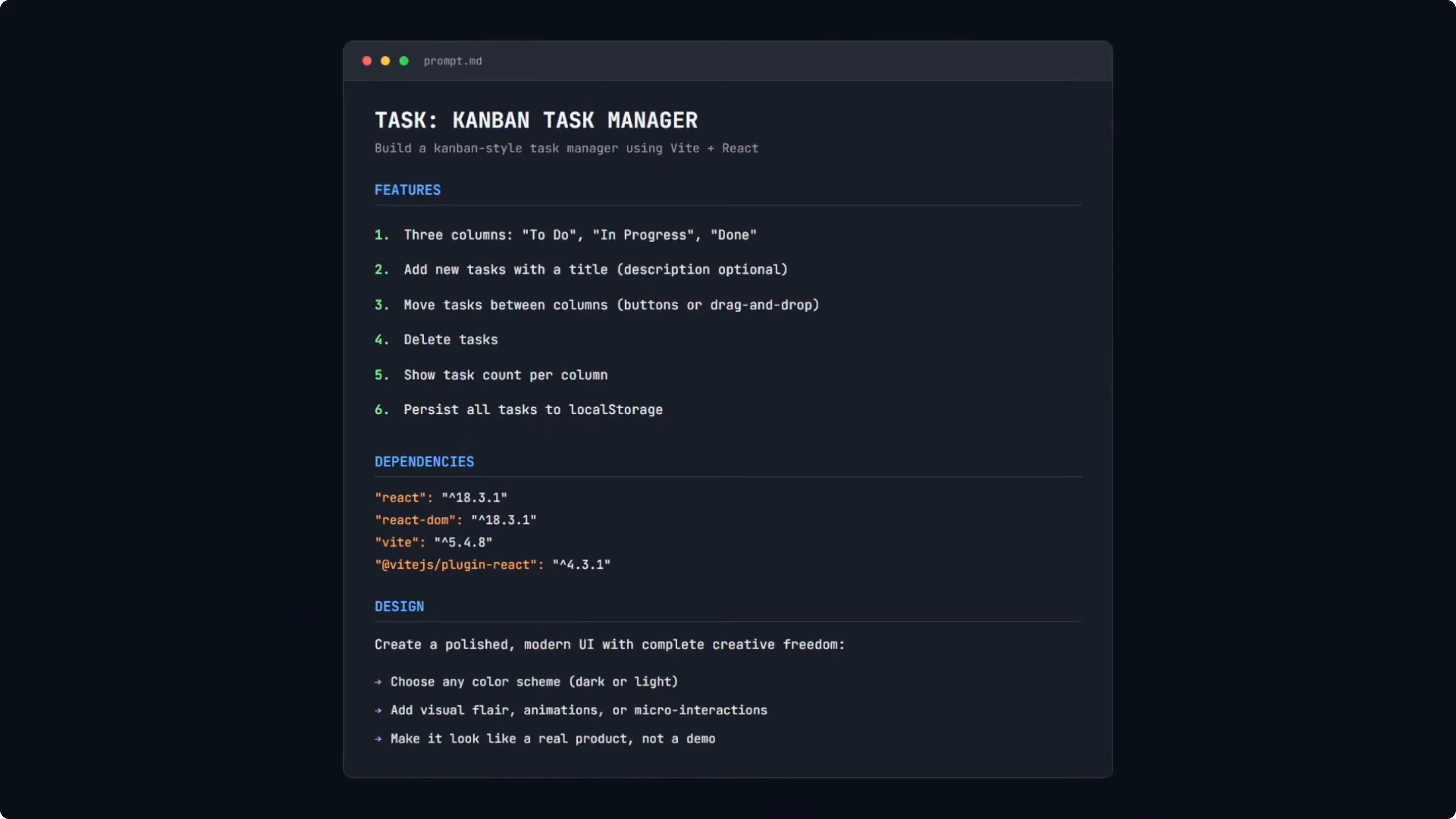
Everything must persist to localStorage. Dependencies are locked to React 18 and Vite. No extra libraries, with a polished modern UI brief.
This is a benchmark task, not a production grade prompt. I used the same prompt in my Opus 4.5 test so results are directly comparable. For broader context across vendors, see another head-to-head with GLM 4.7, Opus 4.5, and GPT 5.2.
What the models built
All five builds worked with no bugs and no broken functionality. That alone is a good sign for this simple app.
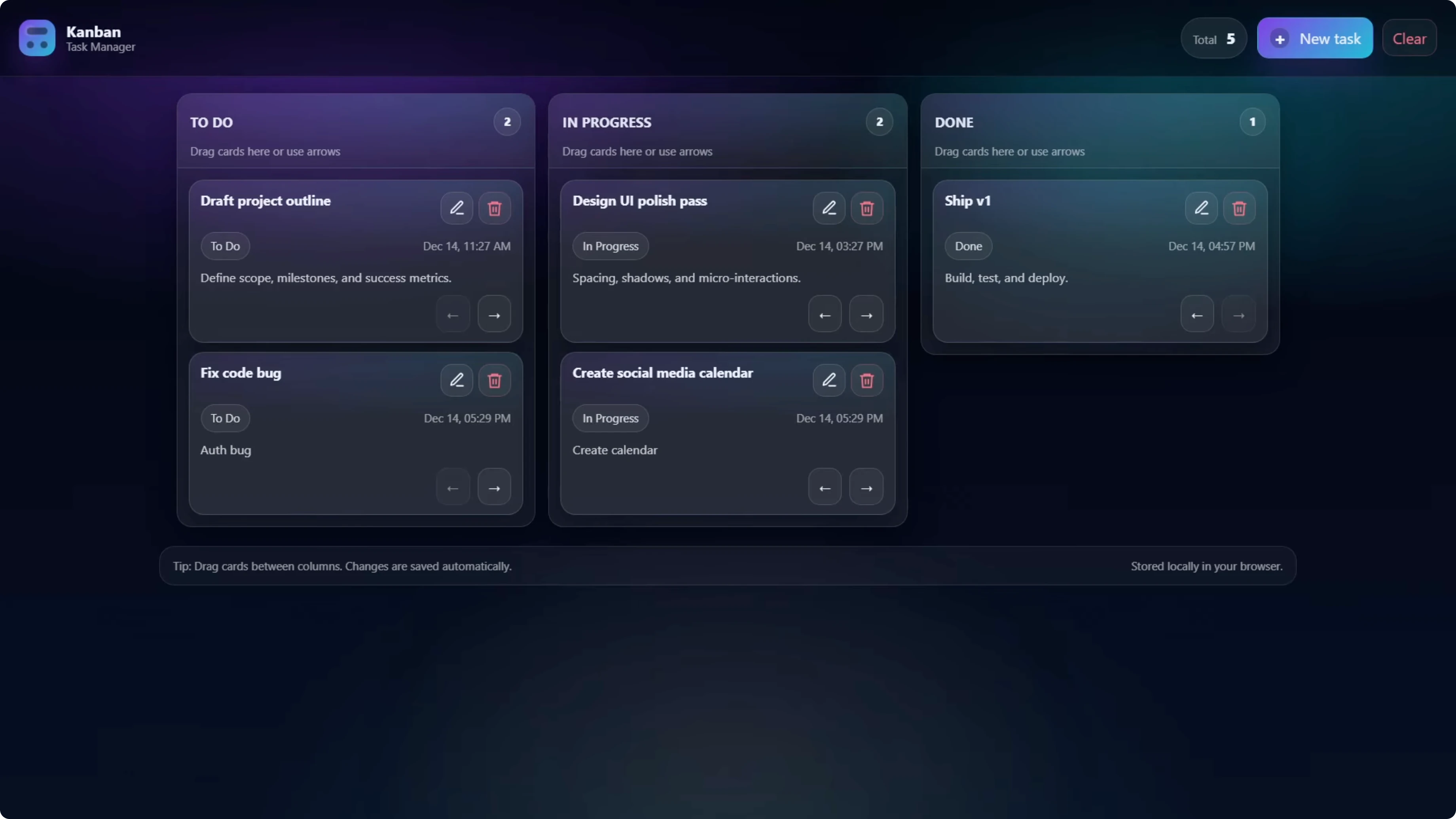
GPT-5.2 used a pop-up modal for adding tasks, which kept the board cleaner. It also added timestamps and edit icons on the cards, and you could edit the title and description with the original timestamp preserved.
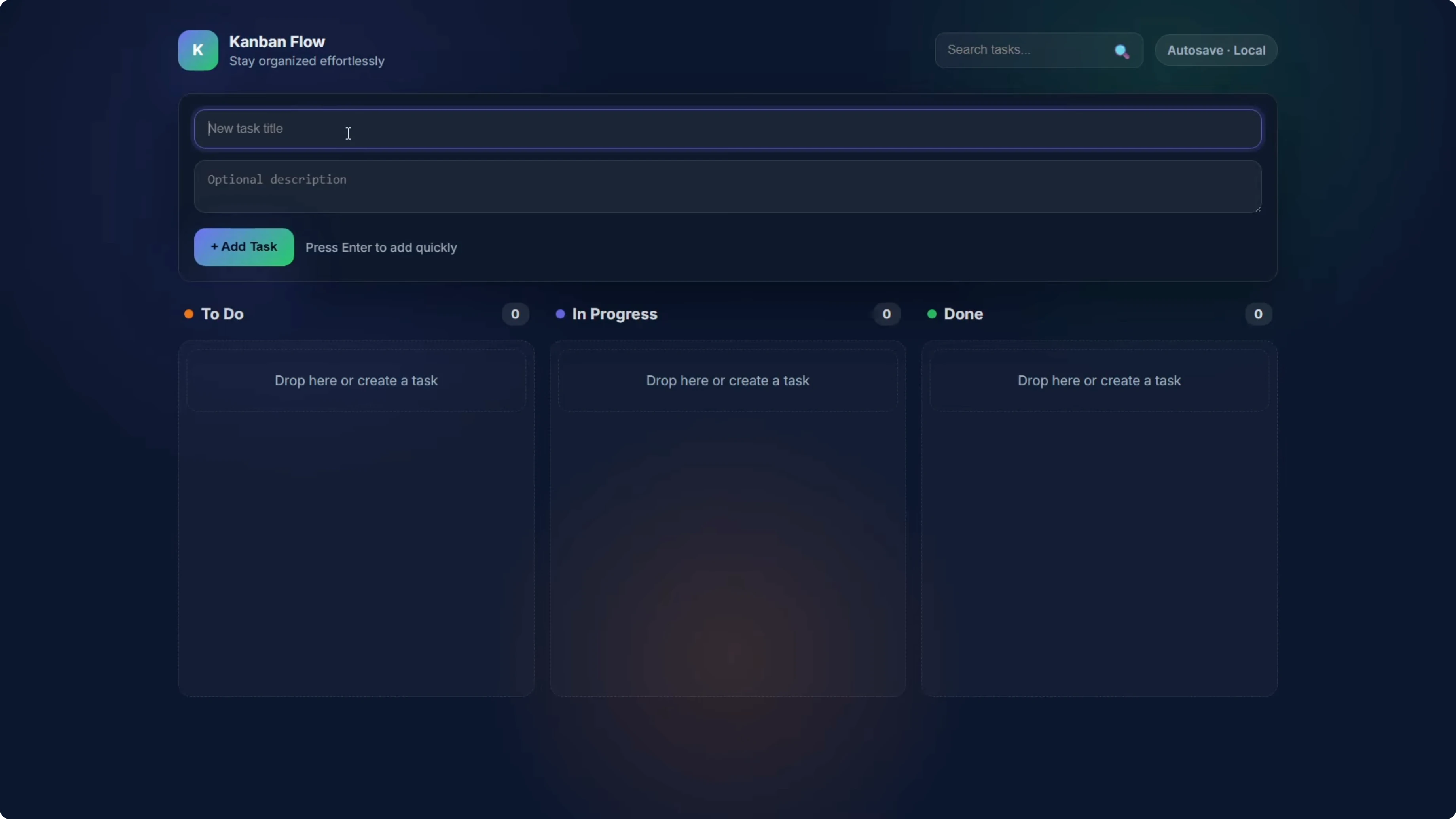
Codex Max - Default reasoning built the add-new-task form directly into the page rather than a modal. It worked and added a search tasks feature, which was unique to this build.
Codex Max - Medium reasoning used a slightly different design. The notable difference was that the status label was not shown on the individual card, only in the column header. All other functionality worked.
Codex Max - Extra high reasoning shipped a design very similar to the low reasoning version. It looked like a dark mode variant and included labels like To Do, In Progress, and Done on the individual cards. All functionality worked.
Cost and tokens
Here is the cost story for the Kanban build. GPT-5.2 was the baseline at 13.2 cents.

Codex Max - Medium came in at 4 cents. That is 70 percent cheaper than GPT-5.2 for the same task, with the fewest output tokens under 4,000 vs GPT-5.2 at 9,300, but it did cut some features.
Codex Max - Low was 4.8 cents. It was also very cheap and all functionality worked.
Codex Max - Extra high was 8.1 cents. It was still cheaper than GPT-5.2, with a nice design and full functionality.
Codex Max - Default needed a repair on the first attempt because it forgot to include index.html. The test runner caught it, sent it back, and it fixed it, which bumped input tokens to 1,985 vs 566 for the others. It could be a one-off, but it is worth noting that even the low reasoning level passed first try, while the recommended setting did not.
On pure cost, Codex Max Medium wins at 70 percent cheaper. If you want the safest option with a bit more design, Extra high at 8.1 cents is still about 40 percent cheaper than GPT-5.2.
GPT-5.2 vs Codex - Space Invaders game

Prompt and setup
This is the harder test with more logic and more moving parts. The game uses HTML5 canvas, the player ship moves left to right, and shoots with the space bar.
Aliens form a grid, move, and shoot back. You need collision detection, score tracking, a lives system, and win and lose conditions.
It uses React 18 and Vite. No external game libraries, so they need to build the game loop and physics from scratch. If you want to see how related model families fare at higher tiers, check this GLM 5 vs Opus 4.6 vs GPT 5.3 Codex comparison.
What the models built
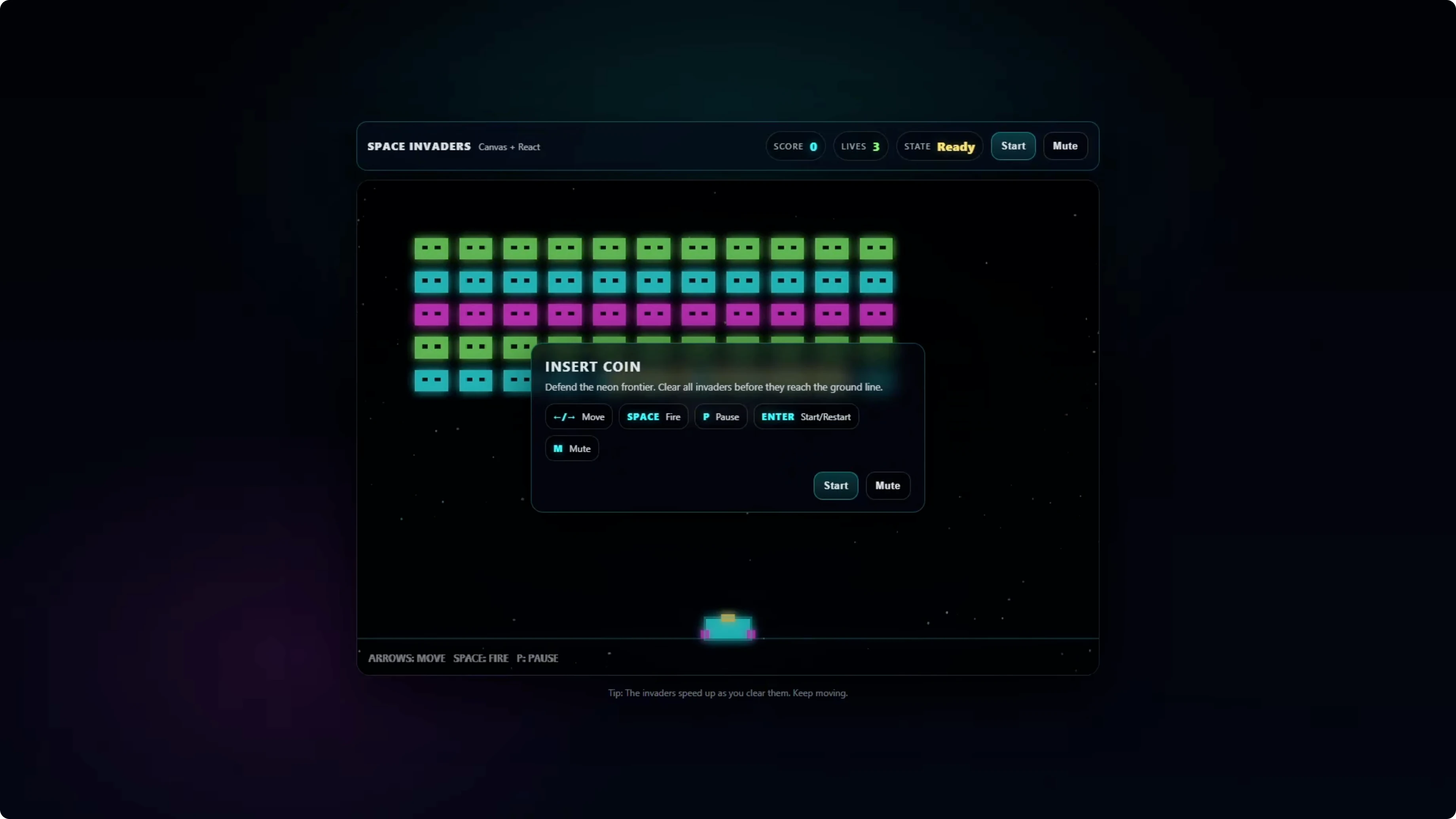
GPT-5.2 was the most polished. It was the only one that included a start screen with a start button, added audio, and a flashing animation when you get hit, with good pacing that plays well.
Codex Max - Low was broken and unplayable. Bullets spammed and the game kept resetting, so this setting is not suitable for complex builds.

Codex Max - Extra high played well. It had a nice design and good pacing, visually on par with GPT-5.2, but missing the start screen and audio, though the ship did flash on hits.

Codex Max - Default was playable but needed iteration. The pacing was too fast and bullets came down together with no variety, so you could not reasonably clear a level before aliens reached the bottom.
Codex Max - Medium showed similar pacing issues. Bullets fell too fast which made it hard to avoid them and progress through a level.
Cost, token limits, and retries
Codex Max - Default came in at 5 cents for Space Invaders. Medium was 7.7 cents, both playable but needing iteration to reach the polish GPT-5.2 delivered in one shot.
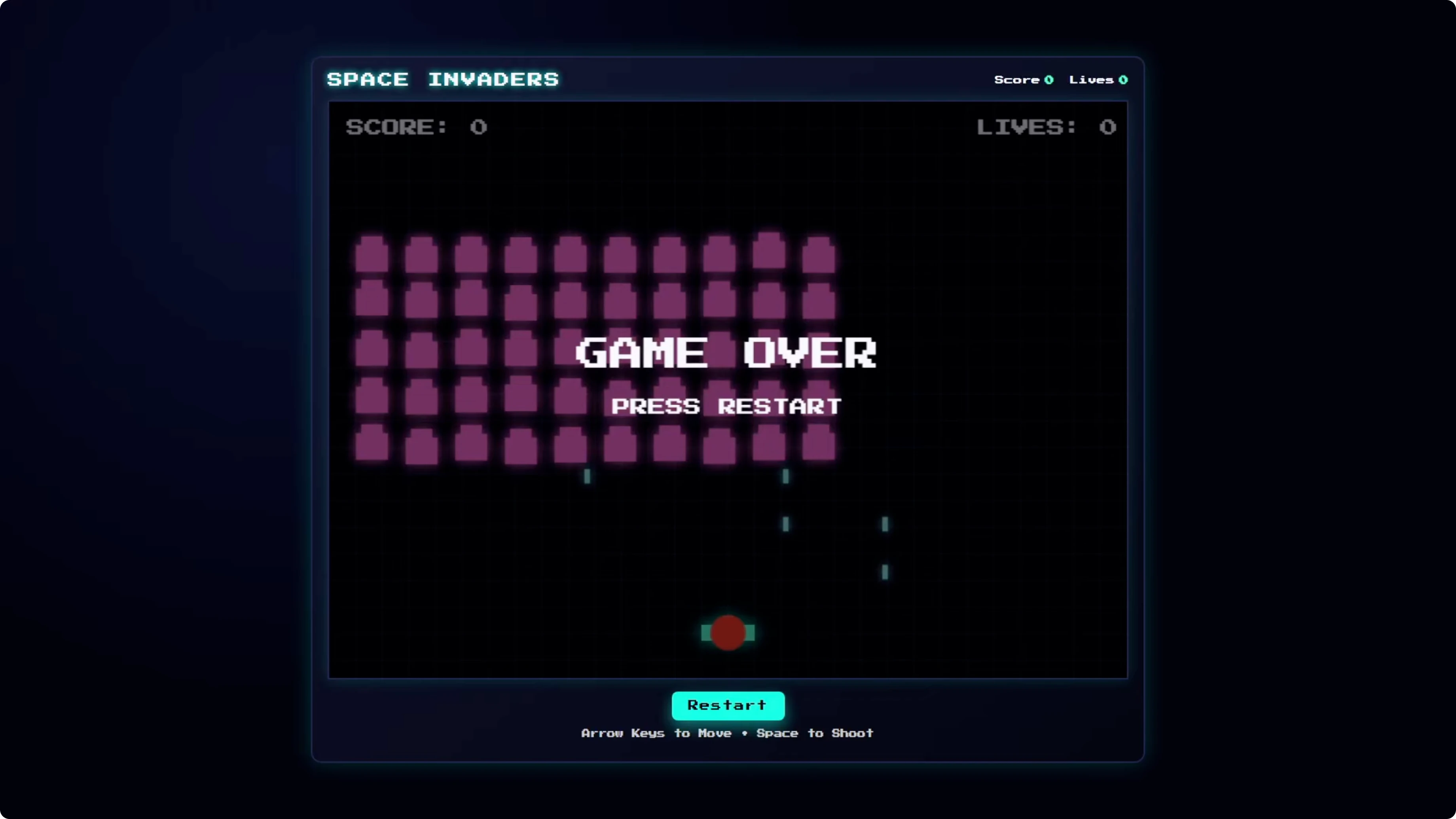
Codex Max - Low cost 7 cents but was broken and unplayable. That one is a write-off for this complexity.
Codex Max - Extra high ran into a max output token limit. With a 16,000 token cap, it used all 16,000 tokens on internal reasoning and returned nothing, burning 22 cents with zero output.
A repair turn added another 15,000 tokens to actually generate code. That pushed the total to 44 cents, nearly three times what GPT-5.2 cost. Rerunning Extra high with a 32,000 token limit passed first try, used 19,500 tokens, and landed at about 20 cents, with the same gameplay as the original Extra high build.
GPT-5.2 cost 15.4 cents, passed first try, and it was the only one with a start screen and audio. It gets a big tick for reliability and overall result.
Comparison overview table
| Model | Reasoning level | Kanban result | Kanban cost | Space Invaders result | Space Invaders cost | Notes |
|---|---|---|---|---|---|---|
| GPT-5.2 | n-a | Passed first try, extra features like modal, timestamps, edit | 13.2 cents | Passed first try, start screen, audio, polished pacing | 15.4 cents | Most reliable across both tests |
| Codex Max | Low | Passed, all functionality worked | 4.8 cents | Broken, unplayable | 7 cents | Not suitable for complex builds |
| Codex Max | Medium | Passed, slight feature cuts like status label on cards | 4 cents | Playable but pacing too fast | 7.7 cents | Best value for simple apps |
| Codex Max | Default | Passed after repair, search tasks added | Higher due to repair input spike | Playable but pacing too fast | 5 cents | Missed index.html first attempt |
| Codex Max | Extra high | Passed, dark mode look, labels on cards | 8.1 cents | Good gameplay but token cap can burn budget | 44 cents at 16k cap, ~20 cents at 32k cap | Set higher token limit to avoid empty responses |
For context across even more models and vendors, see this broader comparison across GPT 5.3 Codex, Opus, Kimi, and Qwen.
Use cases, pros, and cons
GPT-5.2
Use it for complex tasks where quality and reliability matter. It passed both tests first try, needed no config, and added polish like start screens, audio, and thoughtful UI extras.
Pros include predictable results and strong out-of-the-box polish. The tradeoff is a higher cost than Codex Medium on simpler apps, but it still beat Extra high on cost when Extra high needed a second turn.
Codex Max - Medium
Use it for simple apps where cost matters. It was 70 percent cheaper on the Kanban build and passed both tests first try.
Pros include reliability at a low price and workable outputs. The tradeoff is reduced polish and some trimmed features that you might need to iterate on.
Codex Max - Extra high
Use it when you want Codex’s best shot on complex code, but configure it carefully. At a 16,000 token cap it burned the entire budget on internal thinking and returned nothing.
Pros include solid gameplay and design once configured with a higher token limit. The tradeoff is cost and the need to raise the token cap to avoid empty responses.
Codex Max - Default
Use it if you want the recommended setting but be ready for a repair turn in rare cases. It forgot index.html on the first Kanban attempt.
Pros include a working baseline and unique touches like task search. The tradeoff is that gameplay pacing was too fast on Space Invaders and the initial Kanban repair increased tokens.
Codex Max - Low
Avoid it for complex builds like Space Invaders. It broke and kept resetting, which made it unplayable.
Pros exist on simple builds like the Kanban board where it passed. The tradeoff is that complexity pushed it past its limits.
If you are tracking how Google’s stack and OpenAI’s stack compare at newer tiers, check the Gemini 3.1 Pro vs Opus 4.6 vs GPT 5.3 Codex results.
Step-by-step - reproduce the Kanban test
Create a React app with Vite.
Install and run it locally.
Lock dependencies to React 18 and Vite.
Remove any styling or UI libraries.
Build three columns - To Do, In Progress, Done.
Add task creation, editing, deletion, and movement between columns.
Show counts per column.
Persist everything to localStorage.
Example localStorage helpers
// src/storage.ts
export type Task = {
  id: string;
  title: string;
  description?: string;
  status: 'todo' | 'inprogress' | 'done';
  createdAt: number;
};

const KEY = 'kanban_tasks_v1';

export function loadTasks(): Task[] {
  try {
    const raw = localStorage.getItem(KEY);
    return raw ? (JSON.parse(raw) as Task[]) : [];
  } catch {
    return [];
  }
}

export function saveTasks(tasks: Task[]): void {
  localStorage.setItem(KEY, JSON.stringify(tasks));
}
Modal add-task pattern used by GPT-5.2
// src/components/AddTaskModal.tsx
import { useState } from 'react';

export function AddTaskModal({ onCreate, onClose }: { onCreate: (t: { title: string; description?: string }) => void; onClose: () => void }) {
  const [title, setTitle] = useState('');
  const [description, setDescription] = useState('');

  function submit() {
    if (!title.trim()) return;
    onCreate({ title: title.trim(), description: description.trim() || undefined });
    onClose();
  }

  return (
    <div className="backdrop">
      <div className="modal">
        <h2>New Task</h2>
        <input value={title} onChange={e => setTitle(e.target.value)} placeholder="Title" />
        <textarea value={description} onChange={e => setDescription(e.target.value)} placeholder="Description" />
        <div className="actions">
          <button onClick={onClose}>Cancel</button>
          <button onClick={submit}>Add</button>
        </div>
      </div>
    </div>
  );
}
Step-by-step - reproduce the Space Invaders test
Create a React app with Vite.
Set up an HTML5 canvas that fills a fixed area.
Implement the player ship with left and right movement.
Listen for the space bar to fire bullets.
Build an alien grid that moves horizontally and steps downward.
Make aliens fire shots back at intervals.
Add collision detection between bullets, aliens, the player, and alien shots.
Track score, lives, and win or lose conditions.
Base canvas loop and input
// src/Game.tsx
import { useEffect, useRef } from 'react';

export function Game() {
  const canvasRef = useRef<HTMLCanvasElement | null>(null);
  const keys = useRef<Record<string, boolean>>({});

  useEffect(() => {
    const canvas = canvasRef.current!;
    const ctx = canvas.getContext('2d')!;
    let raf = 0;
    let last = performance.now();

    function onKeyDown(e: KeyboardEvent) {
      keys.current[e.code] = true;
    }
    function onKeyUp(e: KeyboardEvent) {
      keys.current[e.code] = false;
    }
    window.addEventListener('keydown', onKeyDown);
    window.addEventListener('keyup', onKeyUp);

    function update(dt: number) {
      // Update player position with keys.current['ArrowLeft'] and ['ArrowRight']
      // Fire on keys.current['Space']
      // Update aliens, bullets, collisions, score, lives
    }

    function draw() {
      ctx.clearRect(0, 0, canvas.width, canvas.height);
      // Draw player, aliens, bullets, UI
    }

    function loop(ts: number) {
      const dt = Math.min(32, ts - last);
      last = ts;
      update(dt);
      draw();
      raf = requestAnimationFrame(loop);
    }

    raf = requestAnimationFrame(loop);
    return () => {
      cancelAnimationFrame(raf);
      window.removeEventListener('keydown', onKeyDown);
      window.removeEventListener('keyup', onKeyUp);
    };
  }, []);

  return <canvas ref={canvasRef} width={800} height={600} />;
}
Step-by-step - API run config and token limits
Send the same prompt for each model.
Track input and output tokens on every run.
For Codex Max - Extra high, raise the max output tokens to 32,000 to avoid empty responses.
Re-run if the response is empty at 16,000.
Example request shape
// pseudo-code request
const response = await fetch('https://api.openai.com/v1/chat/completions', {
  method: 'POST',
  headers: {
    'Content-Type': 'application/json',
    'Authorization': `Bearer ${process.env.OPENAI_API_KEY}`
  },
  body: JSON.stringify({
    model: 'gpt-5.2', // or 'codex-max'
    reasoning_level: 'extra_high', // 'low' | 'medium' | 'default' | 'extra_high'
    max_output_tokens: 32000, // raise for extra_high to prevent empty output
    messages: [
      { role: 'system', content: 'You are a helpful coding assistant.' },
      { role: 'user', content: 'Build a React 18 + Vite Kanban with columns, counts, localStorage, and polished UI. No external libraries.' }
    ]
  })
});
If you are benchmarking across model families beyond this scope, check this deeper GLM 5 vs Opus 4.6 vs GPT 5.3 Codex breakdown for cost and reliability patterns.
Final thoughts
GPT-5.2 passed both tests on the first try and needed no configuration. It was the most reliable and added polish out of the box, including a start screen and audio in Space Invaders and thoughtful UI touches in the Kanban app.
Codex Max depends on settings. Medium was 100 percent reliable and the cheapest for simple apps, but it trimmed some features and needed polish in the game. Extra high can deliver good results but you must raise the token limit to avoid burning your budget on an empty response, and even then it cost more than GPT-5.2 while delivering similar output.
For simple tasks, Codex Max Medium is a solid and cheap choice. For complex tasks where quality matters, GPT-5.2 looks like the pick right now for predictable, polished results. If Codex migrates to a GPT-5.2 base in the future, I will retest and update, and you can watch how those changes affect cost and build quality next to other vendors in comparisons like this multi-model roundup.
Subscribe to our newsletter
Get the latest updates and articles directly in your inbox.

Related Posts

8 Best Claude Code Plugins in 2026 (You Need to Know)
8 Best Claude Code Plugins in 2026 (You Need to Know)

7 Best Claude Code Skills (You Need to Know)
7 Best Claude Code Skills (You Need to Know)

Claude Code Desktop IDE Features (You Need to Know)
Claude Code Desktop IDE Features (You Need to Know)