
Table Of Content
- GLM-5 vs Opus 4.6 vs GPT-5.3 Codex - PRD app build
- Build time and one-shot results
- Stack choices
- Dev mode behavior
- Visual rebuild - Stripe homepage
- Opus reference result
- GLM-5 result
- Comparison overview table
- Use cases and pros, cons
- GPT-5.3 Codex
- Opus 4.6
- GLM-5
- How to replicate these tests
- Final thoughts
GLM-5 vs Opus 4.6 vs GPT-5.3 Codex
Table Of Content
- GLM-5 vs Opus 4.6 vs GPT-5.3 Codex - PRD app build
- Build time and one-shot results
- Stack choices
- Dev mode behavior
- Visual rebuild - Stripe homepage
- Opus reference result
- GLM-5 result
- Comparison overview table
- Use cases and pros, cons
- GPT-5.3 Codex
- Opus 4.6
- GLM-5
- How to replicate these tests
- Final thoughts
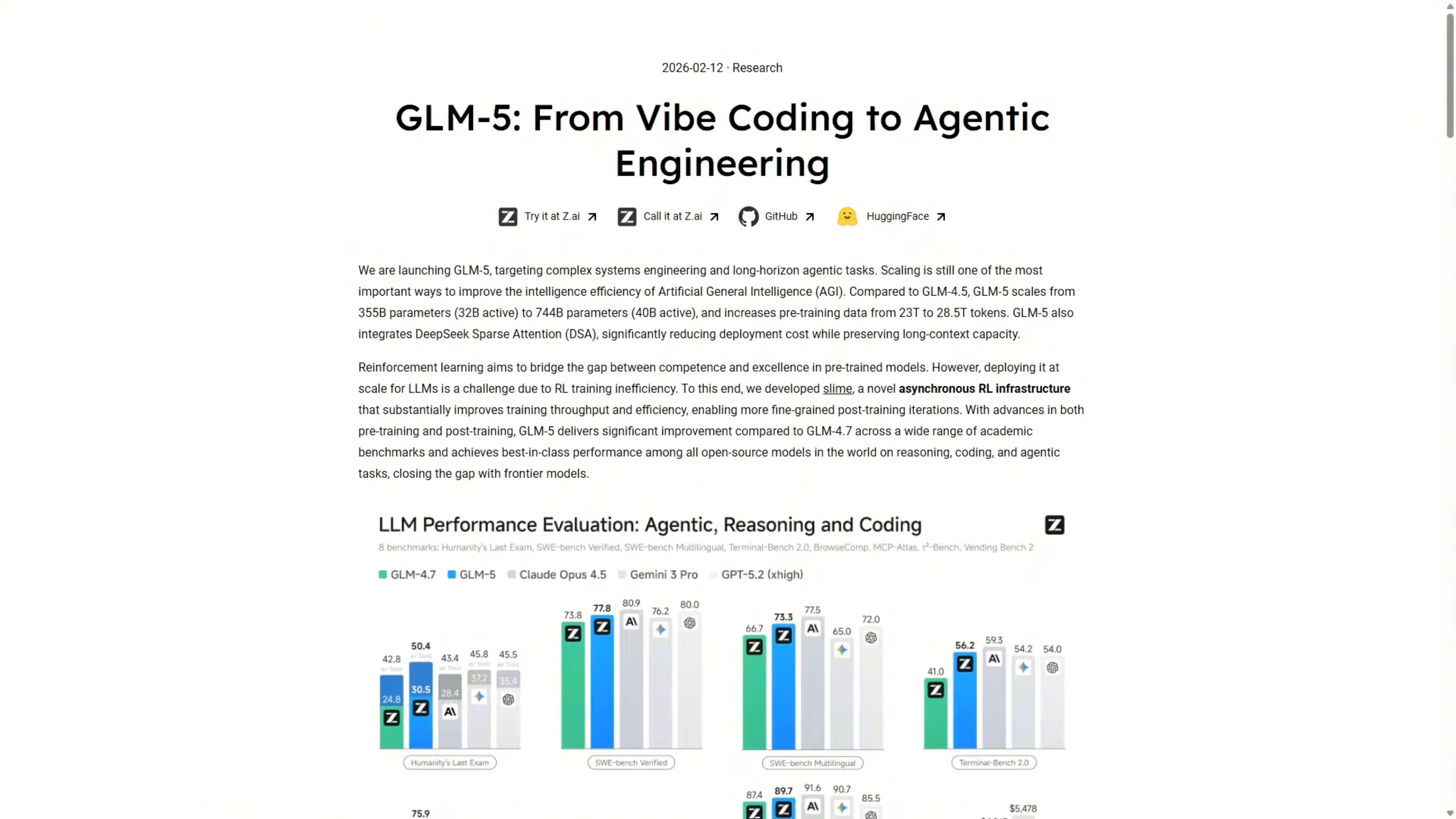
ZAI just released their new model GLM-5. I ran it through the same benchmark tests I used on Opus 4.6 and GPT-5.3 Codex. Same prompts, same setup, same one-shot builds so we can compare the results directly.
I tested two tasks. First, a complex PRD-driven app build for an earthquake monitor dashboard. Second, a visual UI rebuild based only on screenshots of the Stripe homepage.
GLM-5 is roughly five times cheaper per token than Opus 4.6. If it can get anywhere close on capability, that is a significant workflow advantage. Here is where it actually lands on both tests.
For a broader multi-model matchup that includes these systems, see this head-to-head with Gemini 3.1 Pro, Opus 4.6, and GPT-5.3 Codex.
GLM-5 vs Opus 4.6 vs GPT-5.3 Codex - PRD app build
I gave all three models the full PRD with no additional guidance. They had the full PRD and had to build from that. The task was the Quakewatch earthquake monitor dashboard.
Build time and one-shot results
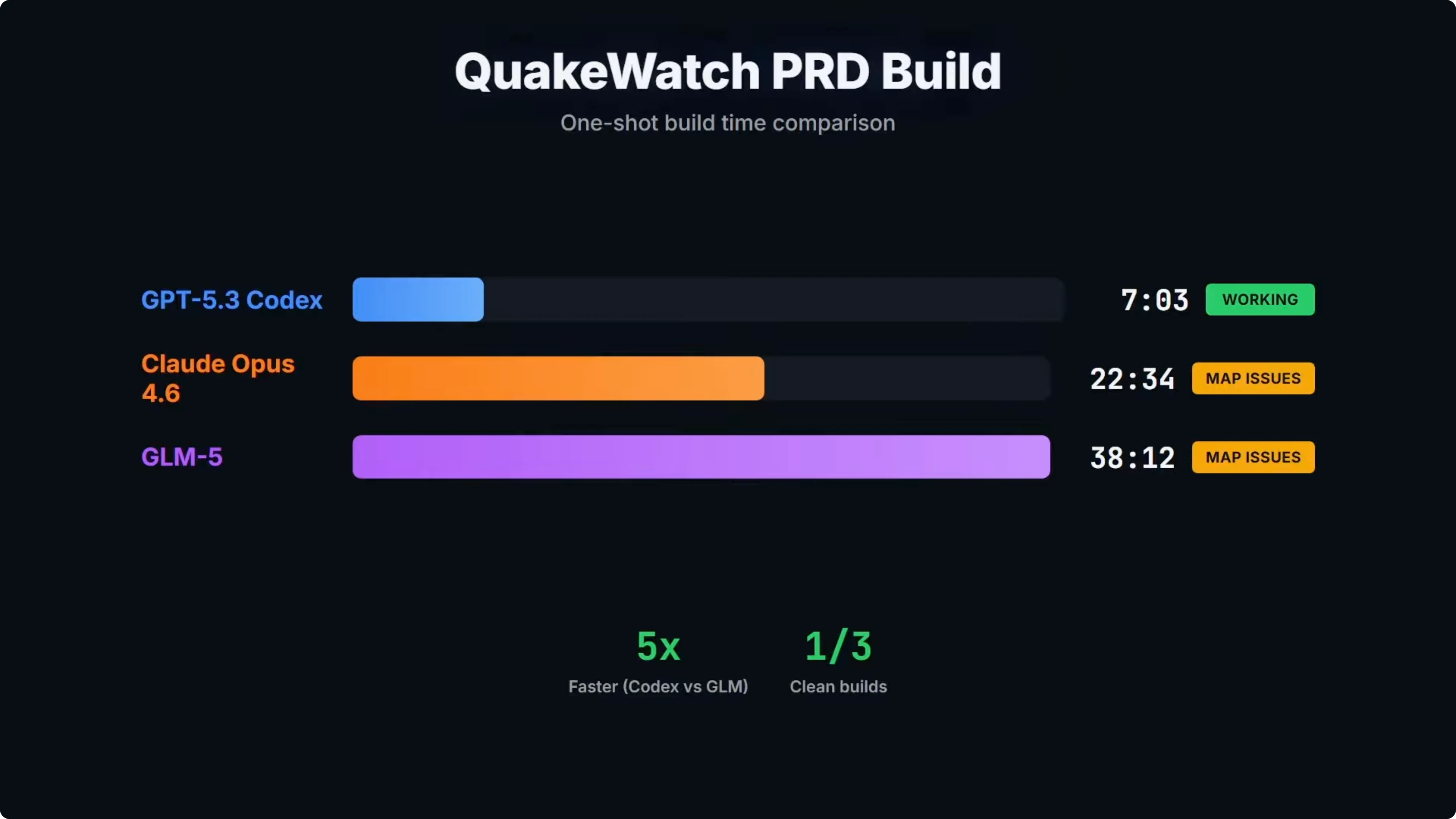
Build time was one of the big takeaways from the test. GLM-5 came in at over 38 minutes, which was more than five times slower than Codex and almost double Opus. GPT-5.3 Codex was the only one of the three that shipped a clean working build on the first attempt and provided a working dashboard.
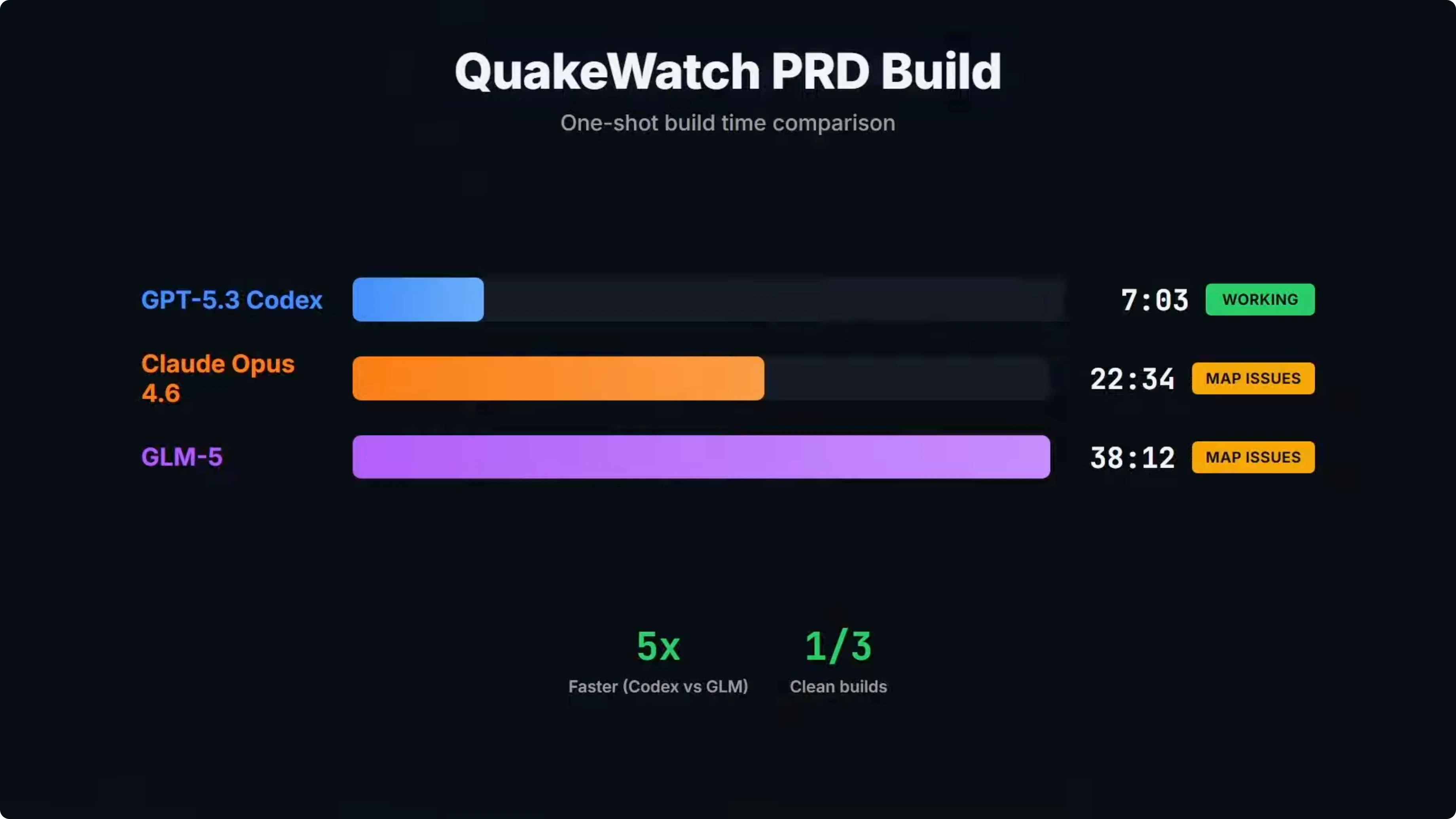
On build time alone, Codex clearly takes the points at 7 minutes. GLM-5 was the slowest at over 38 minutes. At that point, the cost savings on GLM-5 have to be considered.
If you want more context on Codex vs Opus across similar scenarios, check out this Codex against Opus and peers comparison.
Stack choices
On paper, GLM-5's build summary looks reasonable. It chose React 19 with TypeScript, Vite, TanStack Query, TanStack Virtual, Recharts, and Tailwind. Very similar to Opus and Codex.
One interesting difference was mapping. GLM-5 went with MapLibre GL instead of Leaflet, which is what both Codex and Opus used. That is a fair choice and it was the one area where GLM-5 differed from both Codex and Opus.
Dev mode behavior
Here is the Quakewatch dashboard that Codex built. The map renders correctly and it is contained to the viewport box. The event feed is contained by a scroll bar, and it is the only model that successfully implemented this feature on a one-shot build.
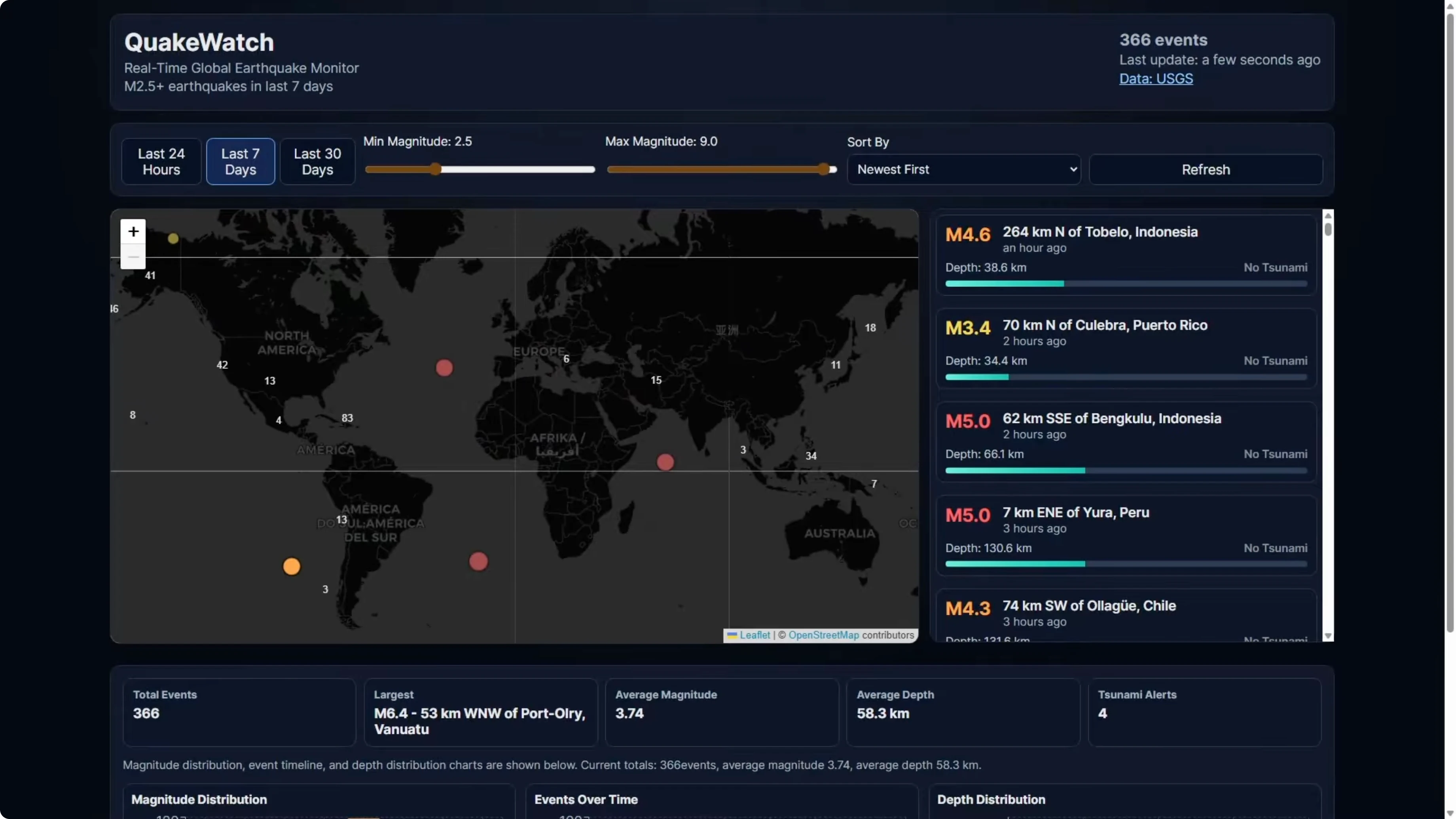
On the GLM-5 build, the first dev run off the one-shot build had a broken map. It rendered as a narrow sliver on the left side of the screen, only 5 to 10 percent of the viewport, with the event feed and the stats panel taking the horizontal space. I gave it a repair turn and the map then rendered properly with clustering, color-coded markers, and working hover tooltips.
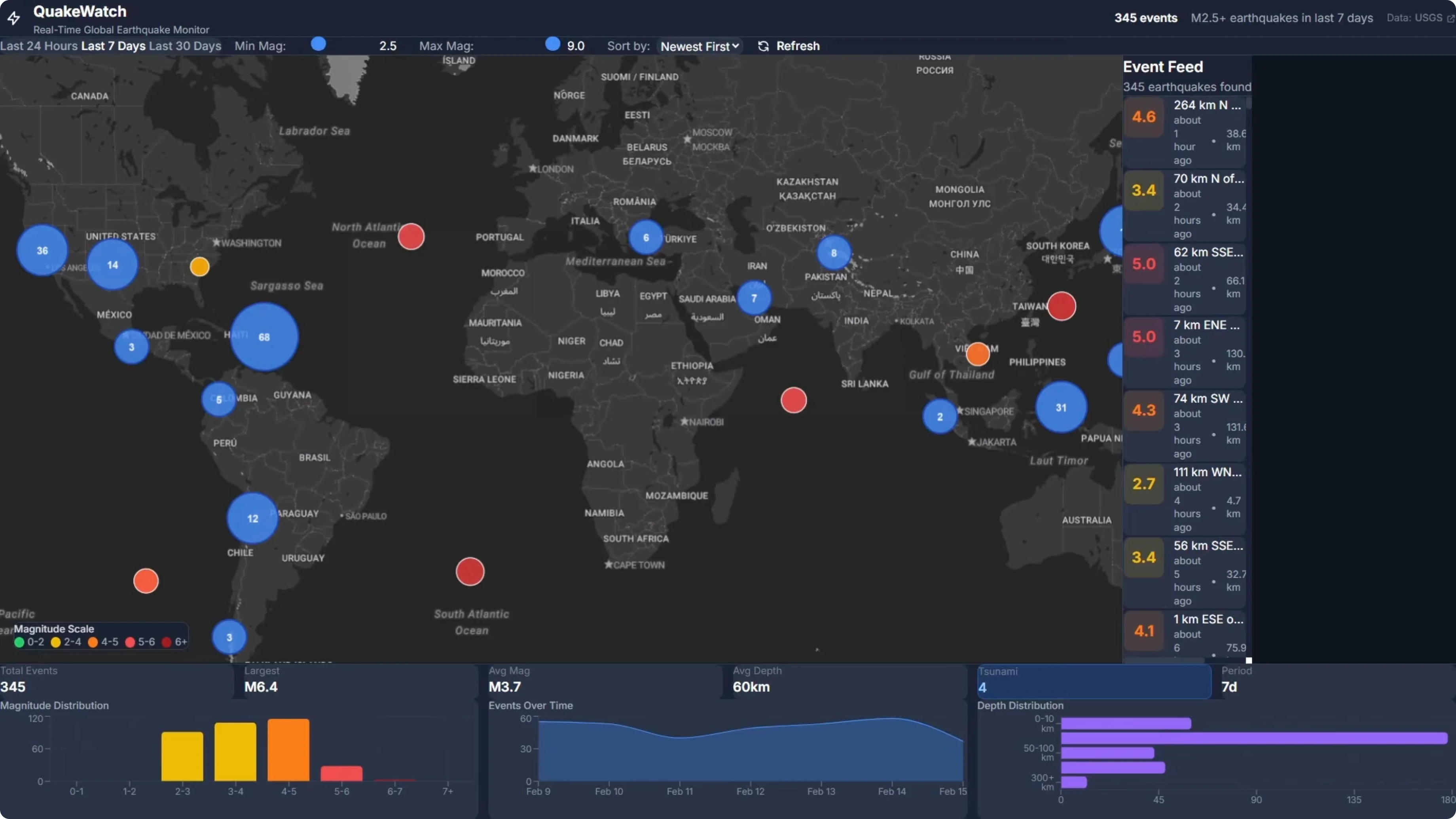
The event feed was slightly broken after repair. There was empty space on the right where the event feed should take up, though it did implement the scroll bar where Opus failed. Zooming out showed the map view repeating and doubling up horizontally, which is another minor issue.
Even with those issues, it was a big improvement on the one-shot build. It fixed the main map problem but created a couple of other ones. If you are building something that is code heavy, Codex is the clear choice at the moment.
GLM-5 is a clear improvement over previous models. There is definite potential here, but the speed gap was notable at over 38 minutes vs 7 minutes for Codex. That difference matters if you are running many builds.
For a focused overview of Opus itself, see this Opus 4.6 overview.
Visual rebuild - Stripe homepage
I took screenshots of the Stripe homepage and asked each model to recreate it based solely on the images. No written spec, no component list, and no fetching the URL. The model had to work from the screenshots only.
There is a lot going on in that page. The hero section has a gradient, there is a logo bar, and a live GDP counter. Scrolling shows feature sections, product showcase cards with detailed UI mockups, Stripe Sessions, a conference banner, a dark stats section, enterprise case studies, a startup stories carousel, a developer integration section, and a massive multicolumn footer.

This is a strong test of a model’s ability to look at images, understand what it is seeing, and turn that into working code. For GLM-5 specifically, this should be a strong area, and the vendor claims a 98 percent front-end build success rate. In earlier testing, Opus won this task over Codex, so I used the Opus build as the benchmark here.
Opus reference result

Opus produced a page that was very close to the real one. The hero section had the correct headline, Financial infrastructure to grow your revenue, along with a GDP counter and the logo bar. Scrolling down is where Opus separated from Codex in the previous test.
The product showcase cards had fully built UI mockups inside them. There was a phone payment terminal with line items and a total, a browser checkout form with email fields and an order summary, and a billing dashboard with a usage meter. Opus looked at the screenshots and recreated what was there.
The rest of the page matched the screenshots closely. In terms of the rebuild based on images alone, it clearly outperformed Codex. That makes Opus the benchmark for this visual comprehension task.
For a deeper technical read on Opus 4.6, see this full breakdown of Opus 4.6.
GLM-5 result
GLM-5’s page did not resemble the Stripe homepage provided. It looked like a clean, professional landing page with a fine layout and well-structured sections, but it did not reflect the screenshots. On details, it clearly hallucinated or created its own content instead of rebuilding exactly what was shown.
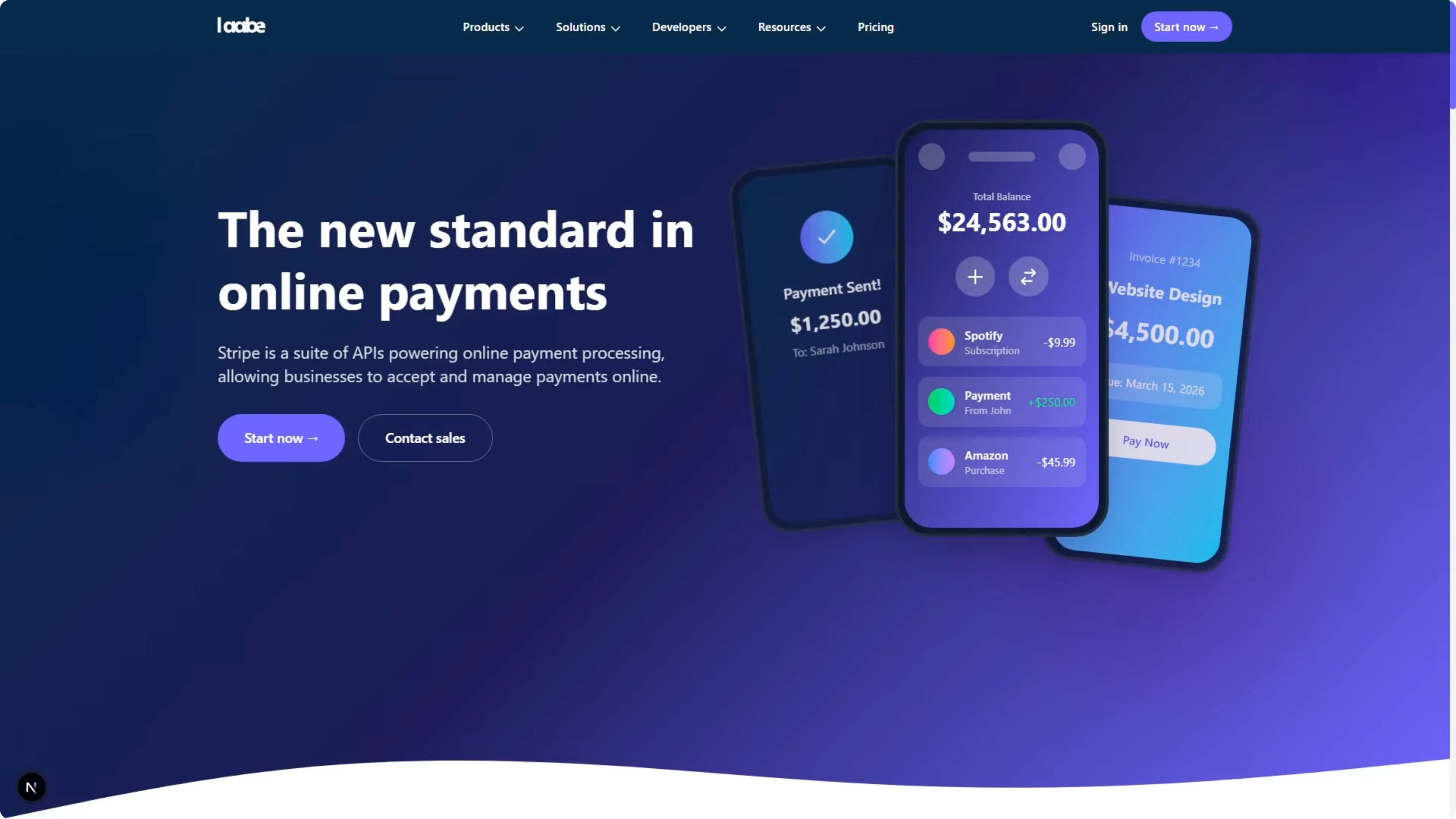
The hero headline read The new standard in online payments. The real page used Financial infrastructure to grow your revenue. GLM-5 left out some components and created sections that were not in the screenshots.
The total content on the landing page was a lot less than the real page. That is a fail on comprehension and on following the instruction to rebuild the page exactly. Opus clearly delivered a superior result on this task.
For historical context on Opus improvements across versions, here is an Opus 4.6 vs 4.5 analysis.
Comparison overview table
| Model | PRD build time | One-shot success | PRD build notes | Visual UI rebuild fidelity | Notable stack choices | Relative price vs Opus |
|---|---|---|---|---|---|---|
| GPT-5.3 Codex | 7 minutes | Yes | Working dashboard and correct map container, event feed with scroll bar | Behind Opus on image-to-UI fidelity | React, TypeScript, Leaflet, Tailwind-class stack | Baseline |
| Opus 4.6 | Faster than GLM-5 | No | Initial map issues noted in this test, stronger than GLM-5 overall | Very close to real page, recreated internal mockups accurately | React, TypeScript, Leaflet-class choices | Higher than GLM-5 |
| GLM-5 | Over 38 minutes | No | Initial map broke to a sliver, repair fixed map and clustering, event feed spacing issues, map view repeating on pan | Clean page but not faithful to screenshots, invented and missing sections | React 19, TypeScript, Vite, TanStack Query, TanStack Virtual, Recharts, Tailwind, MapLibre GL | Roughly 5x cheaper |
Use cases and pros, cons
GPT-5.3 Codex
Use it for app builds from a written PRD where speed and reliability matter. It is the best choice here if you are running code-heavy projects and want working output quickly.
Pros: fastest build time at 7 minutes, only clean one-shot build, working dashboard with correct map container, event feed scrolling implemented.
Cons: did not match Opus on the Stripe visual rebuild fidelity.
For more Codex vs Opus context, see this Codex vs Opus comparison.
Opus 4.6
Use it for builds from visual references or UI work where accuracy matters. It reconstructed detailed internal UI mockups and matched the screenshots closely.
Pros: strong image-to-UI comprehension, accurate content across the page, faster than GLM-5 on PRD build in this test.
Cons: initial map issues noted on the PRD build, not as fast as Codex, higher token cost.
GLM-5
Use it when budget per token is the priority and you can afford repair passes to correct layout issues. It shows progress and can fix major errors with a repair turn.
Pros: roughly five times cheaper per token than Opus 4.6, improved vs previous models, implemented the event feed scroll bar, repaired map with clustering and tooltips.
Cons: much slower build time at over 38 minutes, initial layout bugs and repeated map view, poor fidelity on the visual rebuild with invented or missing sections.
How to replicate these tests
Step 1: Prepare the full PRD for the Quakewatch earthquake dashboard without extra guidance.
Step 2: Provide the same PRD and identical initial prompt to GLM-5, Opus 4.6, and GPT-5.3 Codex.
Step 3: Run a one-shot build for each model and record total build time from first token to last artifact.
Step 4: Launch each build in dev mode and verify map container sizing, clustering, color-coded markers, hover tooltips, and event feed scroll behavior.
Step 5: Optionally allow exactly one repair turn for a failing build to measure recovery behavior, then retest the same UI checkpoints.
Step 6: For the visual task, capture screenshots of the Stripe homepage across all major sections, including the hero, product cards, and footer.
Step 7: Provide only the images to each model with an instruction to rebuild the page exactly from screenshots, with no URL fetch and no text spec.
Step 8: Compare each output to the screenshots for headline text, logos, stats, section presence, internal UI mockups, and overall fidelity.
Step 9: Weigh speed, quality, and token cost to decide the fit for your workflow.
If you want a quick primer on Opus before you start, here is a concise Opus 4.6 overview.
Final thoughts
GLM-5 is an impressive model on paper and the price is attractive at roughly five times cheaper than Opus. In these two tests, the savings did not translate into faster builds or higher accuracy. On the PRD-driven Quakewatch app, GLM-5 was over five times slower than Codex and nearly double Opus, and it needed a repair turn to get the map usable.
On the Stripe rebuild, GLM-5 produced a clean landing page but it did not come from the screenshots. It did not match the original page, with the wrong headline, wrong logos, wrong stats, invented sections, and missing ones. Opus built from the same screenshots and prompt and got the content right throughout.
These are only two tests, so I am not making broad claims about GLM-5 overall. Based on what I have seen here, if you are building apps from a written spec, Codex is probably still worth the extra token cost because it is faster and ships working code reliably. If you are working from visual references or building UI where accuracy matters, Opus is probably worth the extra cost too.
For more historical perspective on Opus progress, see this brief version-to-version comparison.
Subscribe to our newsletter
Get the latest updates and articles directly in your inbox.

Related Posts

8 Best Claude Code Plugins in 2026 (You Need to Know)
8 Best Claude Code Plugins in 2026 (You Need to Know)

7 Best Claude Code Skills (You Need to Know)
7 Best Claude Code Skills (You Need to Know)

Claude Code Desktop IDE Features (You Need to Know)
Claude Code Desktop IDE Features (You Need to Know)