
Table Of Content
- GPT-5.1 Codex vs Gemini 3 Pro: Snake game build
- GPT-5.1 Codex vs Gemini 3 Pro: sample Snake code
- GPT-5.1 Codex vs Gemini 3 Pro: Homepage redesign
- GPT-5.1 Codex vs Gemini 3 Pro: Gemini 3 Pro redesign
- GPT-5.1 Codex vs Gemini 3 Pro: GPT-5.1 Codex redesign
- GPT-5.1 Codex vs Gemini 3 Pro: comparison overview
- GPT-5.1 Codex vs Gemini 3 Pro: use cases, pros, and cons
- GPT-5.1 Codex vs Gemini 3 Pro: steps to reproduce
- GPT-5.1 Codex vs Gemini 3 Pro: sample hero section code
- Final thoughts
GPT-5.1 Codex vs Gemini 3 Pro
Gemini API Pricing Calculator
Dynamically estimate your Google Gemini API costs for text, audio, images, and context caching. Covers new 3.1 Pro, Flash, and 2.5 models.
Table Of Content
- GPT-5.1 Codex vs Gemini 3 Pro: Snake game build
- GPT-5.1 Codex vs Gemini 3 Pro: sample Snake code
- GPT-5.1 Codex vs Gemini 3 Pro: Homepage redesign
- GPT-5.1 Codex vs Gemini 3 Pro: Gemini 3 Pro redesign
- GPT-5.1 Codex vs Gemini 3 Pro: GPT-5.1 Codex redesign
- GPT-5.1 Codex vs Gemini 3 Pro: comparison overview
- GPT-5.1 Codex vs Gemini 3 Pro: use cases, pros, and cons
- GPT-5.1 Codex vs Gemini 3 Pro: steps to reproduce
- GPT-5.1 Codex vs Gemini 3 Pro: sample hero section code
- Final thoughts
I tested two of the newest models, GPT-5.1 Codex High and Gemini 3 Pro, in two real build challenges. First, I asked each model to build a functional, visually engaging Snake game from scratch with no tech stack guidance. Second, I gave both models my website codebase and asked them to redesign the homepage for a cleaner, more premium UI while keeping the menu navigation and the opt-in form.
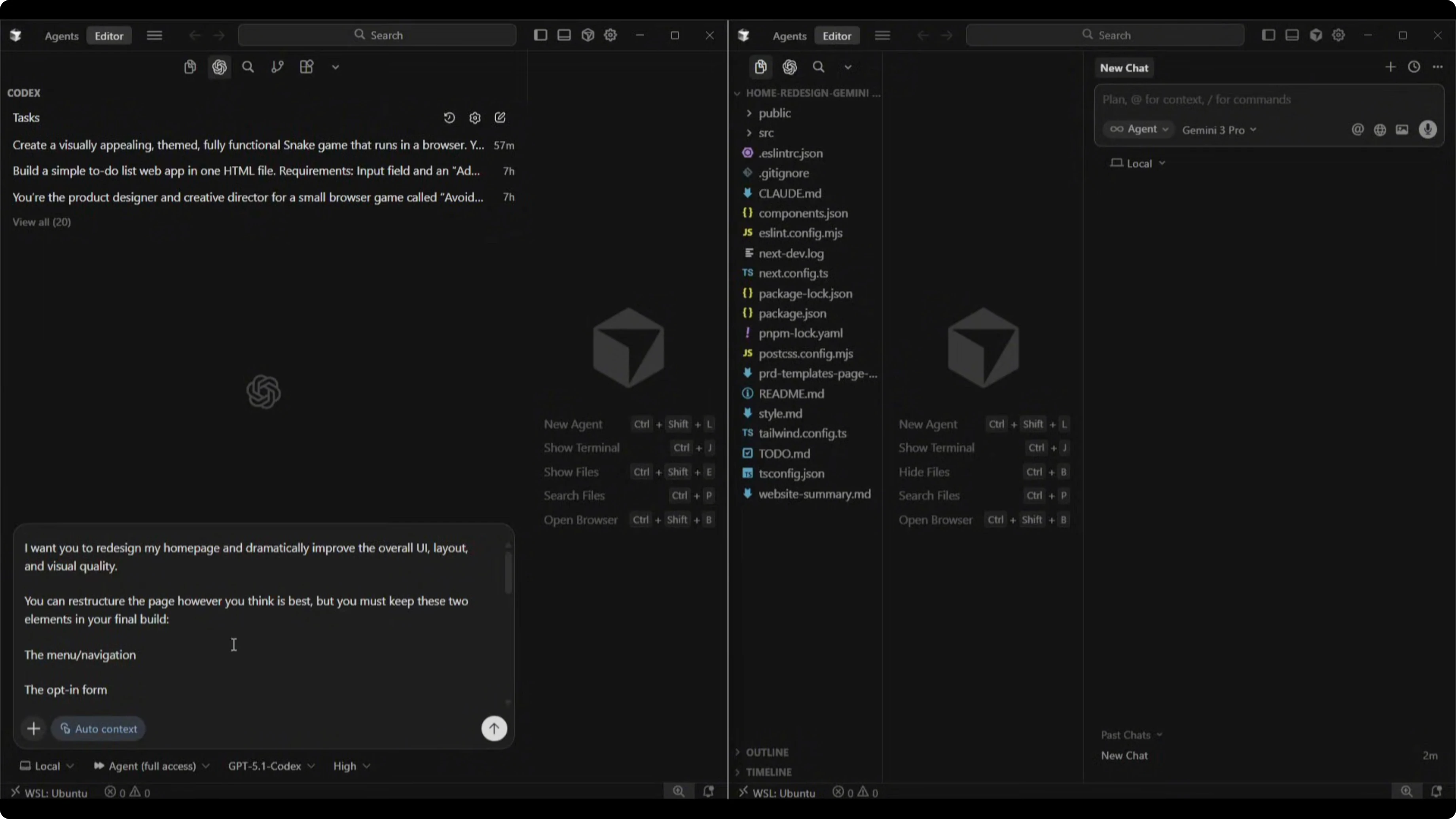
Both models received the exact same prompt and an isolated copy of the codebase. I set up separate work trees so their changes would not overlap, and I measured build times, file counts, and output quality.
GPT-5.1 Codex vs Gemini 3 Pro: Snake game build
The brief was simple: create a basic Snake game that looks good and works. I did not specify frameworks, libraries, or extra features.
Both finished the build. Gemini 3 Pro completed it in 5 minutes and 40 seconds. GPT-5.1 Codex High took 18 minutes and 20 seconds.
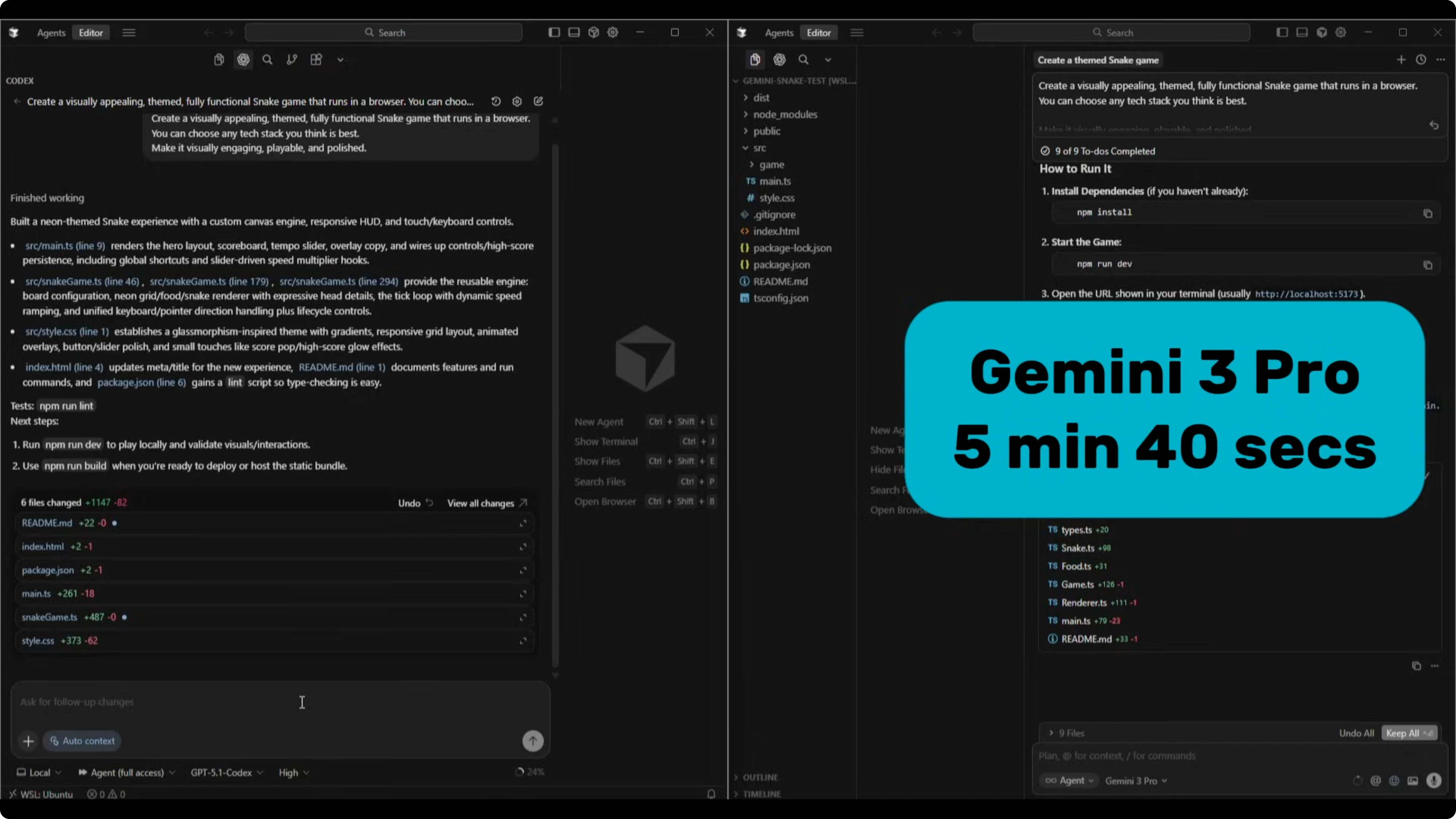
Codex produced six files with about 1100 lines of code. Gemini 3 Pro produced nine files with around 500 lines of code. That sets up a clear difference in architecture choices and complexity.
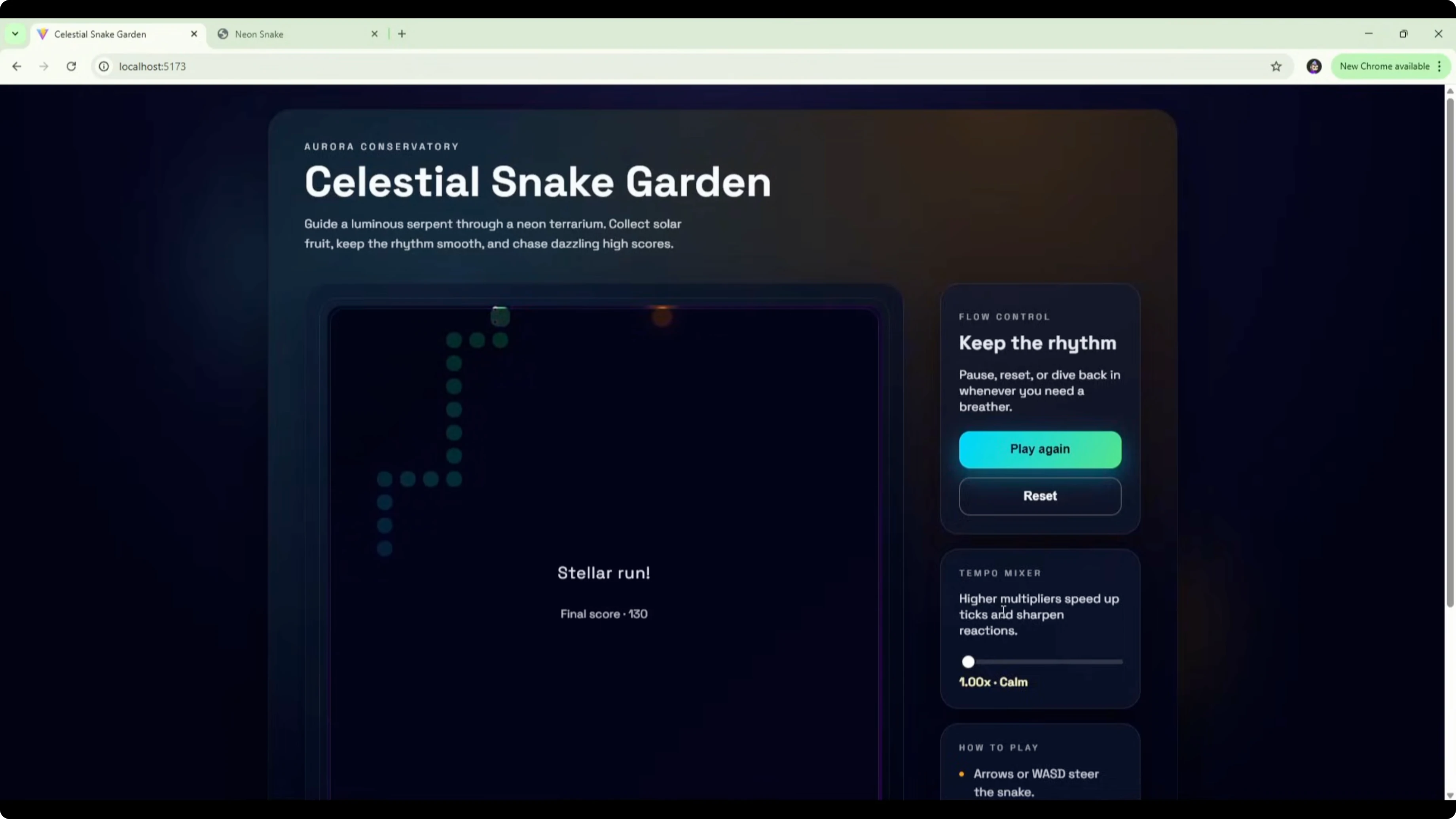
For the Codex version, the game is titled Celestial Snake Garden with a dark gradient background and the game board centered in a box. There is a flow control panel on the right with copy like keep the rhythm, pause, reset, or dive back in whenever you need a breather, plus controls to play or reset. It also includes a tempo mixer with higher multipliers, speed up ticks, and sharpen reactions, with a default of 1.5x steady.
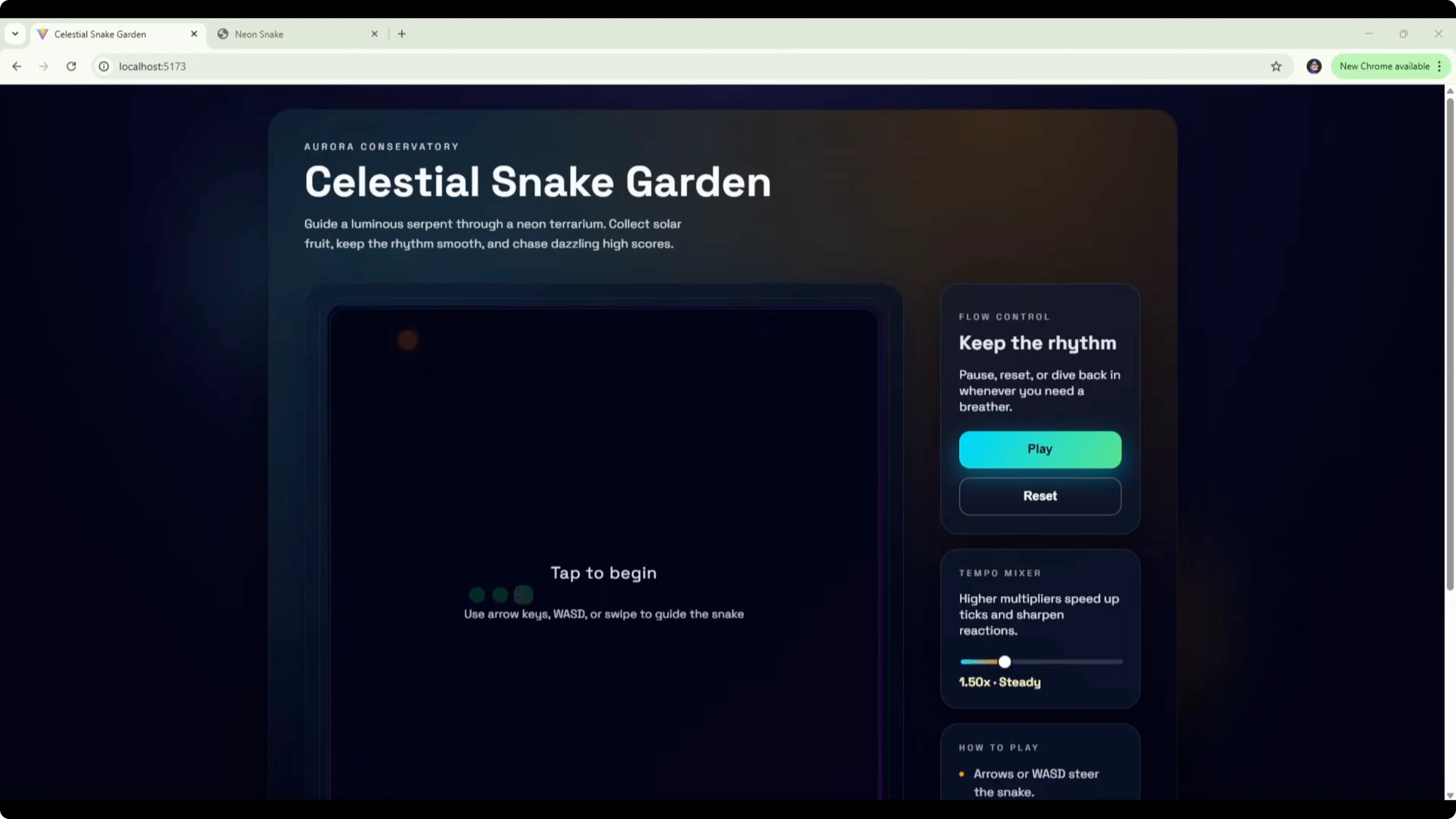
Controls are standard arrow keys for movement, spacebar to pause and resume, and swipe support on touch devices. The board shows tap to begin with a snake silhouette and food in the background. From a UI perspective, it adds a lot of extra features that were not requested in the brief.
The Gemini 3 Pro version opens with a Neon Snake title and press any key to start. It is more visually striking on first load, with a strong neon theme and a clean box layout. There are no extra instructions or settings on the menu screen.
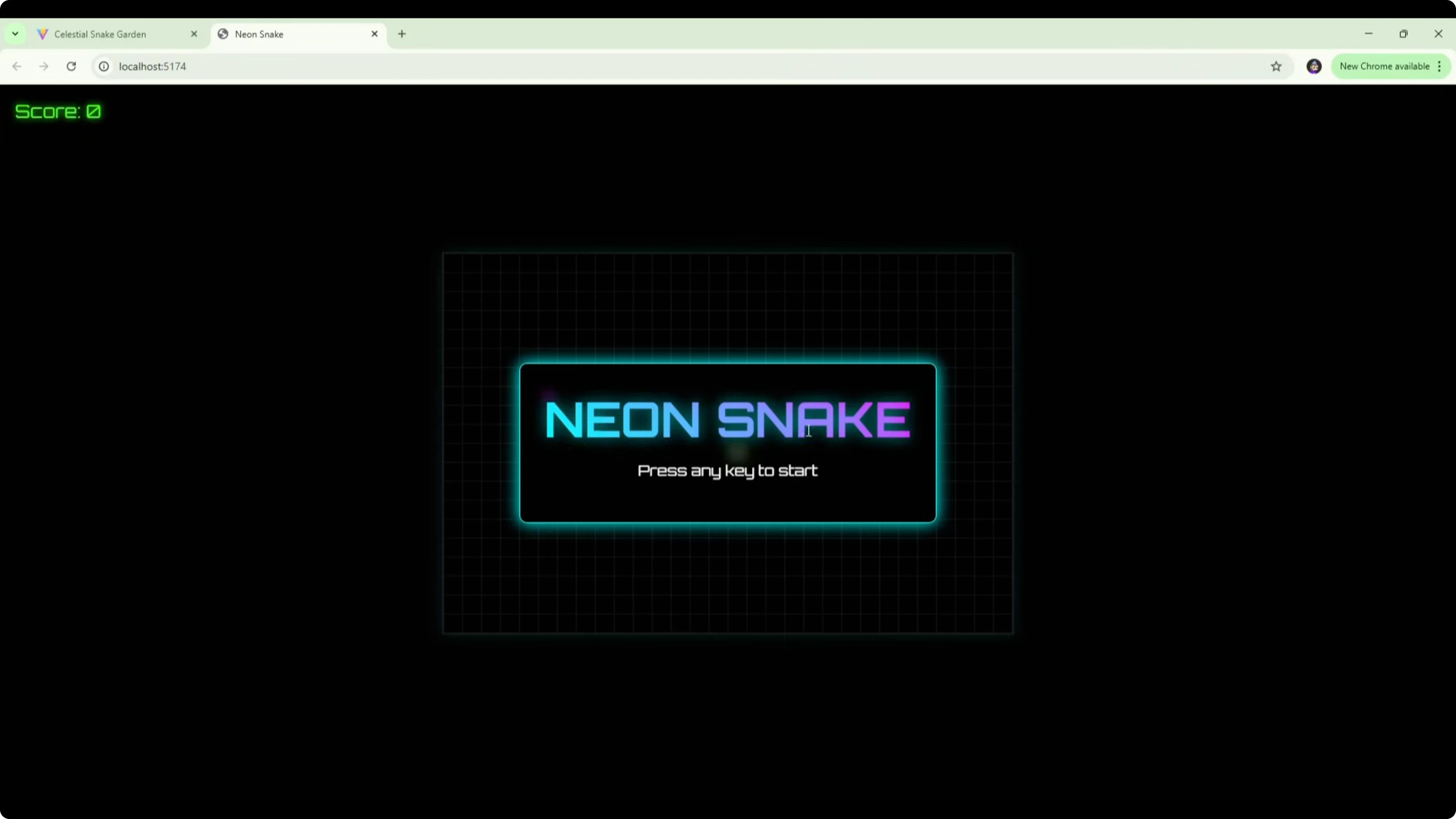
In play, Codex moves fast at the default 1.5x steady. I did not see powerups or extras while playing, it seemed to speed up over time, and I lost with a final score of 70. Gemini uses a square snake with purple dots for food, runs at a more manageable pace, shows the score in the top left, and keeps the neon theme consistent. It works cleanly as a basic Snake game with no powerups and no issues.
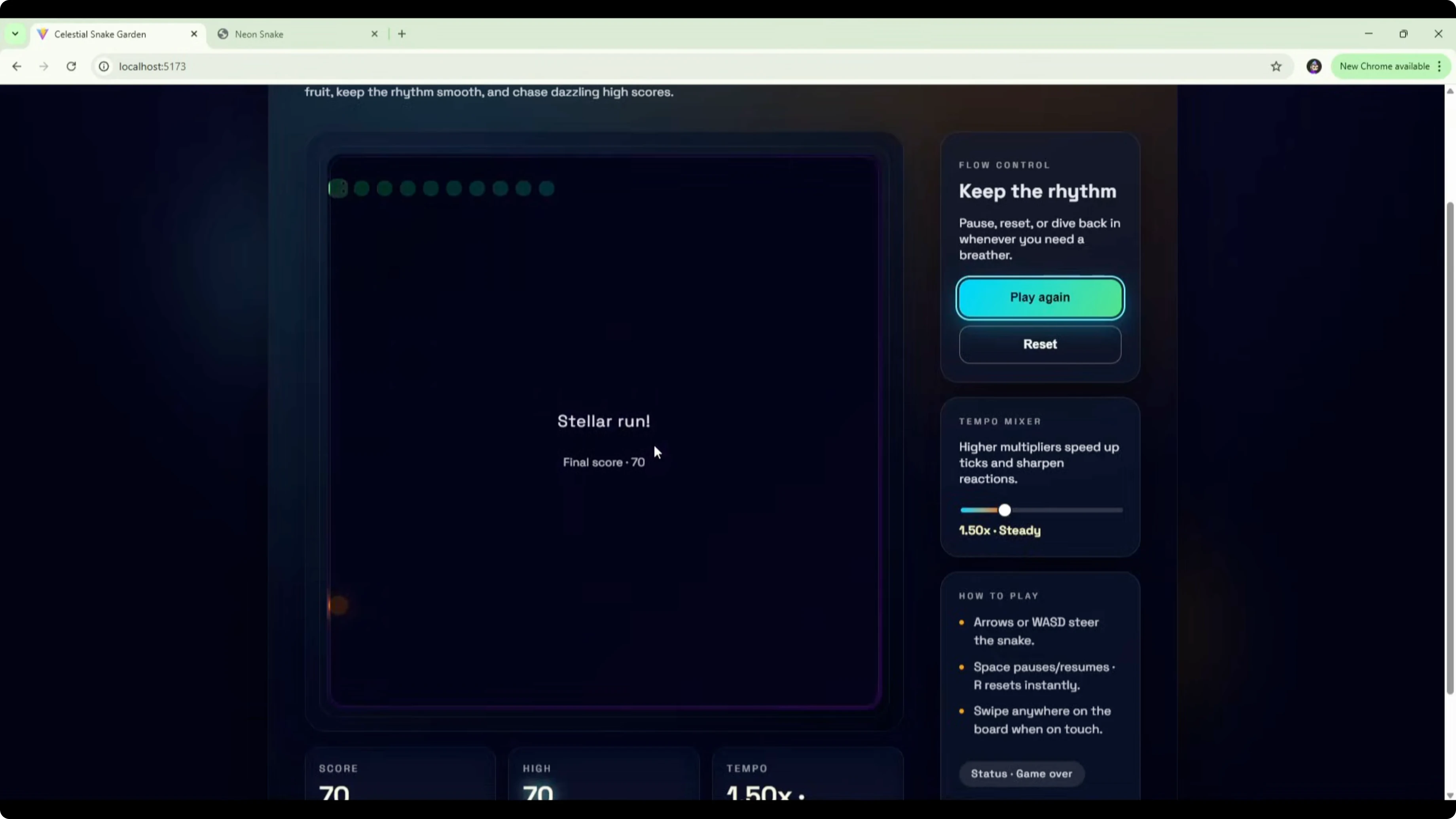
Based on the brief, Gemini 3 Pro stuck to the core request and delivered a simple, polished game that functions well. Codex added flow control, a tempo mixer, and a how to play section that were not asked for, which likely explains the 18-minute build time. If I judge strictly by the scope I set, Gemini 3 Pro edges it here for adhering closely to the brief and shipping a solid UI quickly. For more head-to-head context, you can skim a broader matchup in this related comparison.
GPT-5.1 Codex vs Gemini 3 Pro: sample Snake code
Here is a compact HTML Canvas Snake implementation you can use to sanity-check basic functionality and input handling during model evaluations.
<!doctype html>
<html lang="en">
  <head>
    <meta charset="utf-8" />
    <title>Snake Minimal</title>
    <style>
      html, body { height: 100%; margin: 0; background:#0b0f14; color:#e6f1ff; font:14px/1.4 system-ui, sans-serif; }
      .wrap { display:grid; place-items:center; height:100%; }
      canvas { background:#111827; border:1px solid #334155; image-rendering: pixelated; }
      .hud { margin-top:12px; }
    </style>
  </head>
  <body>
    <div class="wrap">
      <canvas id="c" width="400" height="400"></canvas>
      <div class="hud">Arrows to move. Space to pause.</div>
    </div>
    <script>
      const c = document.getElementById('c');
      const ctx = c.getContext('2d');
      const size = 20;
      const cells = c.width / size;

      let vx = 1, vy = 0;
      let snake = [{x:10, y:10}];
      let food = spawnFood();
      let paused = false;
      let speedMs = 120;
      let last = 0;

      addEventListener('keydown', e => {
        if (e.code === 'Space') { paused = !paused; return; }
        if (e.key === 'ArrowUp' && vy !== 1) { vx = 0; vy = -1; }
        if (e.key === 'ArrowDown' && vy !== -1) { vx = 0; vy = 1; }
        if (e.key === 'ArrowLeft' && vx !== 1) { vx = -1; vy = 0; }
        if (e.key === 'ArrowRight' && vx !== -1) { vx = 1; vy = 0; }
      });

      function spawnFood() {
        return { x: Math.floor(Math.random()*cells), y: Math.floor(Math.random()*cells) };
      }

      function loop(ts) {
        requestAnimationFrame(loop);
        if (paused) return;
        if (ts - last < speedMs) return;
        last = ts;

        const head = { x: (snake[0].x + vx + cells) % cells, y: (snake[0].y + vy + cells) % cells };
        if (snake.some(p => p.x === head.x && p.y === head.y)) { reset(); return; }
        snake.unshift(head);

        if (head.x === food.x && head.y === food.y) {
          food = spawnFood();
          if (speedMs > 60) speedMs -= 2;
        } else {
          snake.pop();
        }

        ctx.clearRect(0,0,c.width,c.height);
        // draw food
        ctx.fillStyle = '#a78bfa';
        ctx.fillRect(food.x*size, food.y*size, size, size);
        // draw snake
        ctx.fillStyle = '#34d399';
        snake.forEach(p => ctx.fillRect(p.x*size, p.y*size, size, size));
      }

      function reset() {
        vx = 1; vy = 0; speedMs = 120; snake = [{x:10,y:10}]; food = spawnFood();
      }

      requestAnimationFrame(loop);
    </script>
  </body>
</html>
GPT-5.1 Codex vs Gemini 3 Pro: Homepage redesign
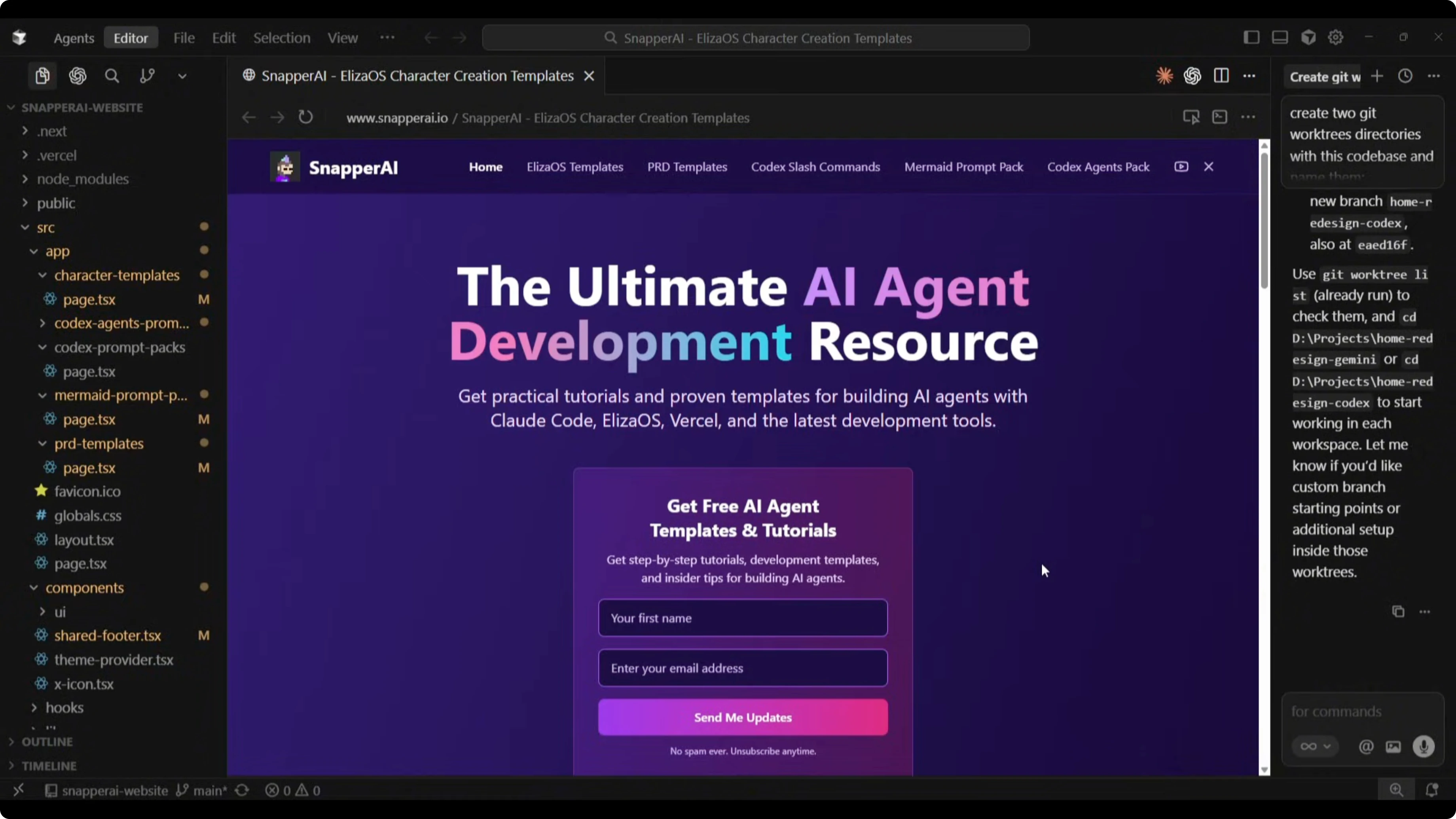
I asked both models to redesign my homepage at snapperai.io. The current page has a headline, an opt-in form, a top navigation with social icons, two content blocks promoting videos and template downloads, a tools overview list, another form, and a footer.
The goal was to assess how each model reads an existing codebase, understands content and brand style, and ships a modern, clean homepage that keeps the existing nav and the opt-in form. I wanted improved spacing, typography, section structure, and practical, fully implementable code.
Here is the exact prompt I sent to both models.
I want you to redesign my homepage and dramatically improve the overall UI layout and visual quality. You can restructure the page however you think is best, but you must keep these two elements in your final build: the menu navigation and the opt-in form. Everything else can be redesigned or replaced.

What you should do:
- Analyze my entire website's codebase to understand the brand, style, tone, and content.
- Decide which content sections, layout, structure, and UI elements are best for the homepage.
- Produce a modern, clean, visually polished homepage that feels premium.
- Feel free to introduce new UI components. Improve spacing, typography, sections or layouts.
- Keep the design practical and fully implementable. You choose the best tech approach, styling, structure, and UI patterns.
- Output the redesigned homepage as full source code.
- Begin the redesign now.
Both builds completed in a similar time. Gemini 3 Pro took 3 minutes and 56 seconds for 340 lines of code. Codex took 4 minutes and 30 seconds for 631 lines of code.
GPT-5.1 Codex vs Gemini 3 Pro: Gemini 3 Pro redesign
Gemini changed the hero headline to Build AI agents faster than ever. It kept the form, improved its styling, and constrained the headline and subheading to the form width, which left empty space on the sides that could be tightened up. The hero works but could use better width handling.
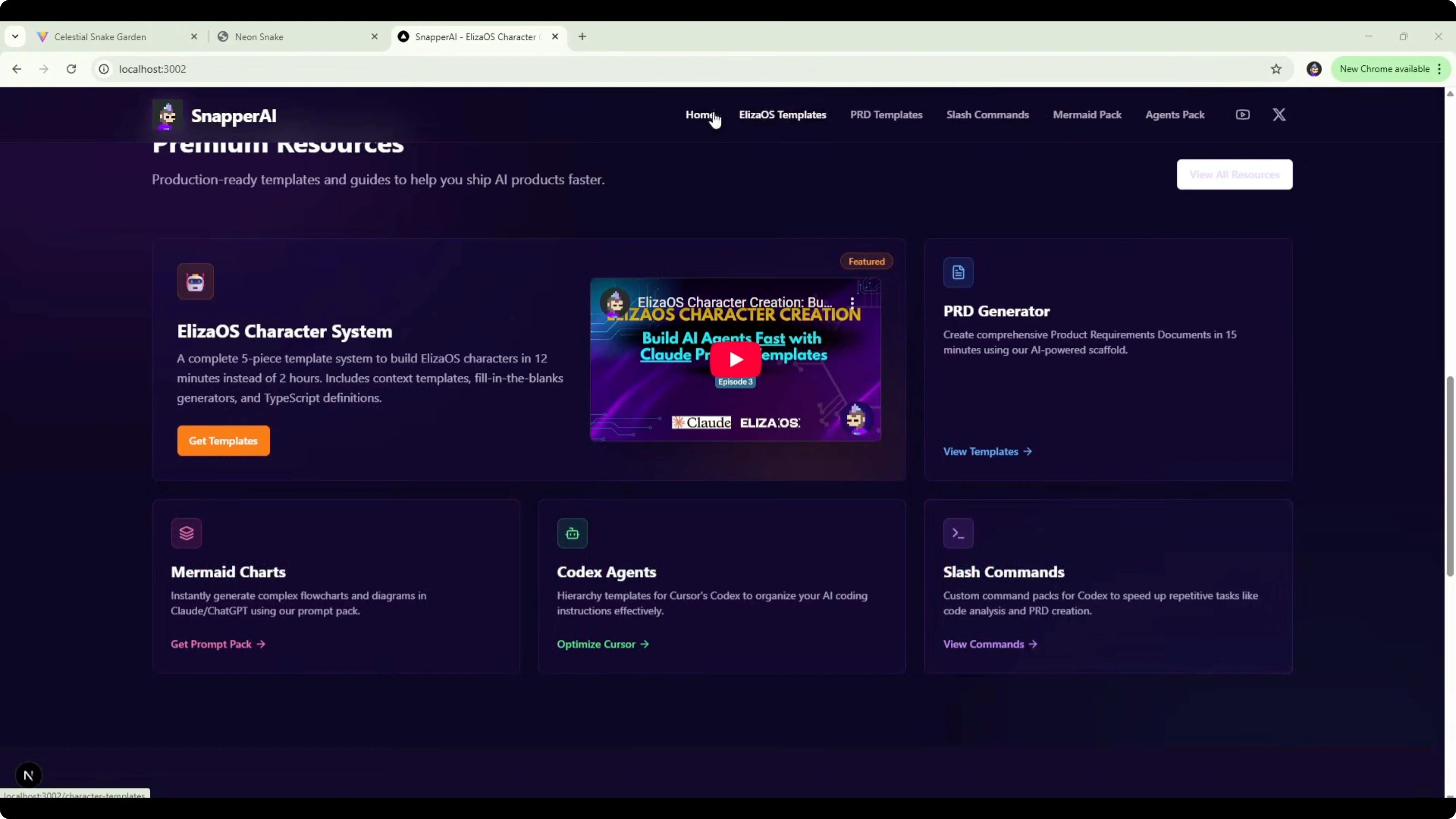
The tools section is condensed, and each logo shows a tooltip with the tool name on hover. A premium resources section consolidates template and content blocks, features the Eliza OS character system, and links out to PRD generator, slash commands, Codex agents, and Mermaid charts through existing menu routes.
There is a benefits section about production-ready agent-native templates, and a Start building today section with a link to watch tutorials on the YouTube channel. That change reduces duplicate forms on the page and adds a useful call to action. Overall styling stays close to the existing site, which makes sense within the current codebase. For another head-to-head featuring Gemini’s approach across models, see this multi-model comparison.

GPT-5.1 Codex vs Gemini 3 Pro: GPT-5.1 Codex redesign
Codex shipped a more ambitious hero with a two-column layout. The headline reads Redesign your AI product workflow with premium ready playbooks, with a video link and supporting info on the right.
It added stat-style callouts like six premium lead magnets ready to deploy, 52+ iterated drops shipped last year, 18,000 builders subscribed, 350 copy paste workflows, and 12 minutes average time to deploy. Those numbers are placeholders and would need to be replaced with accurate figures before shipping.
The opt-in form alignment in this split layout reduces empty space compared to the centered approach in the Gemini version. Codex also added a tools section, a signature systems section with content that drifts off-brief, and additional highlight areas that are strong from a layout perspective but need content adjustments. Swapping those blocks with actual templates would make the design accurate and ready. For a view on how Codex variants stack up across families, check this related Codex-focused piece.
GPT-5.1 Codex vs Gemini 3 Pro: comparison overview
| Criterion | Gemini 3 Pro | GPT-5.1 Codex High |
|---|---|---|
| Snake build time | 5m 40s | 18m 20s |
| Snake files / LOC | 9 files / ~500 LOC | 6 files / ~1100 LOC |
| Snake UI and scope | Clean, sticks to brief | Feature-rich, beyond brief |
| Snake gameplay pace | Manageable | Fast at default 1.5x |
| Homepage build time | 3m 56s | 4m 30s |
| Homepage LOC | ~340 | ~631 |
| Homepage hero | Polished but narrow width | Two-column, strong layout |
| Content accuracy risks | Low | Placeholder stats need edits |
| Best fit | Fast, scoped builds | Richer layouts and features |
GPT-5.1 Codex vs Gemini 3 Pro: use cases, pros, and cons
For Gemini 3 Pro, the strength here is speed and adherence to a simple brief. It ships working outputs with fewer lines and a clean visual layer.
Pros include quick turnarounds, focused scope management, and a polished look that aligns with existing styles. Cons include fewer extra features and less ambitious layout shifts on complex pages.
For GPT-5.1 Codex High, the strength is depth in UI composition and feature scaffolding. It added tuned controls and multi-section layouts that can elevate a page once content is finalized.
Pros include richer components, thoughtful alignment, and extensible structures. Cons include longer build times, scope creep beyond the prompt, and a need to verify or remove fabricated stats. If you are weighing Codex variants at higher tiers, this Codex Max comparison adds helpful detail.
GPT-5.1 Codex vs Gemini 3 Pro: steps to reproduce
Prepare two isolated work trees from the same repo so each model has an independent branch and folder.
git fetch origin
git worktree add -b gpt-codex ./worktrees/codex origin/main
git worktree add -b gemini ./worktrees/gemini origin/main
Open each work tree in your IDE, attach one model per workspace, and paste the exact redesign prompt shown above. For build-and-run parity, use the same dev server command in each workspace, for example:
npm install
npm run dev
For the Snake test, provide the same minimal prompt describing a basic, functional, visually engaging Snake game. Start each output in a clean folder, record build time, file count, and lines of code, and then validate input handling, pacing, and scoring. For broader multi-model benchmarks to cross-check expectations, see this extended analysis.

GPT-5.1 Codex vs Gemini 3 Pro: sample hero section code
Here is a simple two-column hero you can adapt during redesign tests to evaluate layout decisions.
<section class="hero">
  <div class="left">
    <h1>Build AI agents faster than ever</h1>
    <p>Production-ready templates and tutorials to ship faster.</p>
    <form class="optin">
      <input type="email" placeholder="you@example.com" aria-label="Email" />
      <button type="submit">Get updates</button>
    </form>
  </div>
  <div class="right">
    <a class="video" href="/videos/featured">Watch a quick overview</a>
    <ul class="stats">
      <li><strong>6</strong> premium templates</li>
      <li><strong>52+</strong> iterations last year</li>
    </ul>
  </div>
</section>
<style>
  .hero { display:grid; grid-template-columns:1.2fr 1fr; gap:32px; padding:56px 24px; align-items:center; }
  .optin { display:flex; gap:8px; margin-top:16px; }
  .optin input { flex:1; padding:10px 12px; border:1px solid #334155; background:#0b1220; color:#e6f1ff; }
  .optin button { padding:10px 14px; background:#6366f1; color:#fff; border:0; }
  .stats { list-style:none; padding:0; margin:16px 0 0; color:#cbd5e1; }
  .video { display:inline-block; padding:8px 12px; border:1px solid #334155; color:#e6f1ff; text-decoration:none; }
  @media (max-width: 900px) { .hero { grid-template-columns:1fr; } }
</style>
Final thoughts
On the Snake game, Gemini 3 Pro wins for sticking to the brief, delivering strong visuals fast, and keeping scope tight. Codex built a more complex game shell with extra controls that look nice but were not required.
On the homepage redesign, both shipped workable outputs. Gemini kept things tidy and aligned to the existing style, while Codex pushed a more ambitious layout that would shine once placeholder stats are replaced and content is tuned. If you want to compare this matchup against other lineups, this tri-model overview and this Gemini-centric comparison are useful context for future tests.
Subscribe to our newsletter
Get the latest updates and articles directly in your inbox.

Related Posts

8 Best Claude Code Plugins in 2026 (You Need to Know)
8 Best Claude Code Plugins in 2026 (You Need to Know)

7 Best Claude Code Skills (You Need to Know)
7 Best Claude Code Skills (You Need to Know)

Claude Code Desktop IDE Features (You Need to Know)
Claude Code Desktop IDE Features (You Need to Know)