
Table Of Content
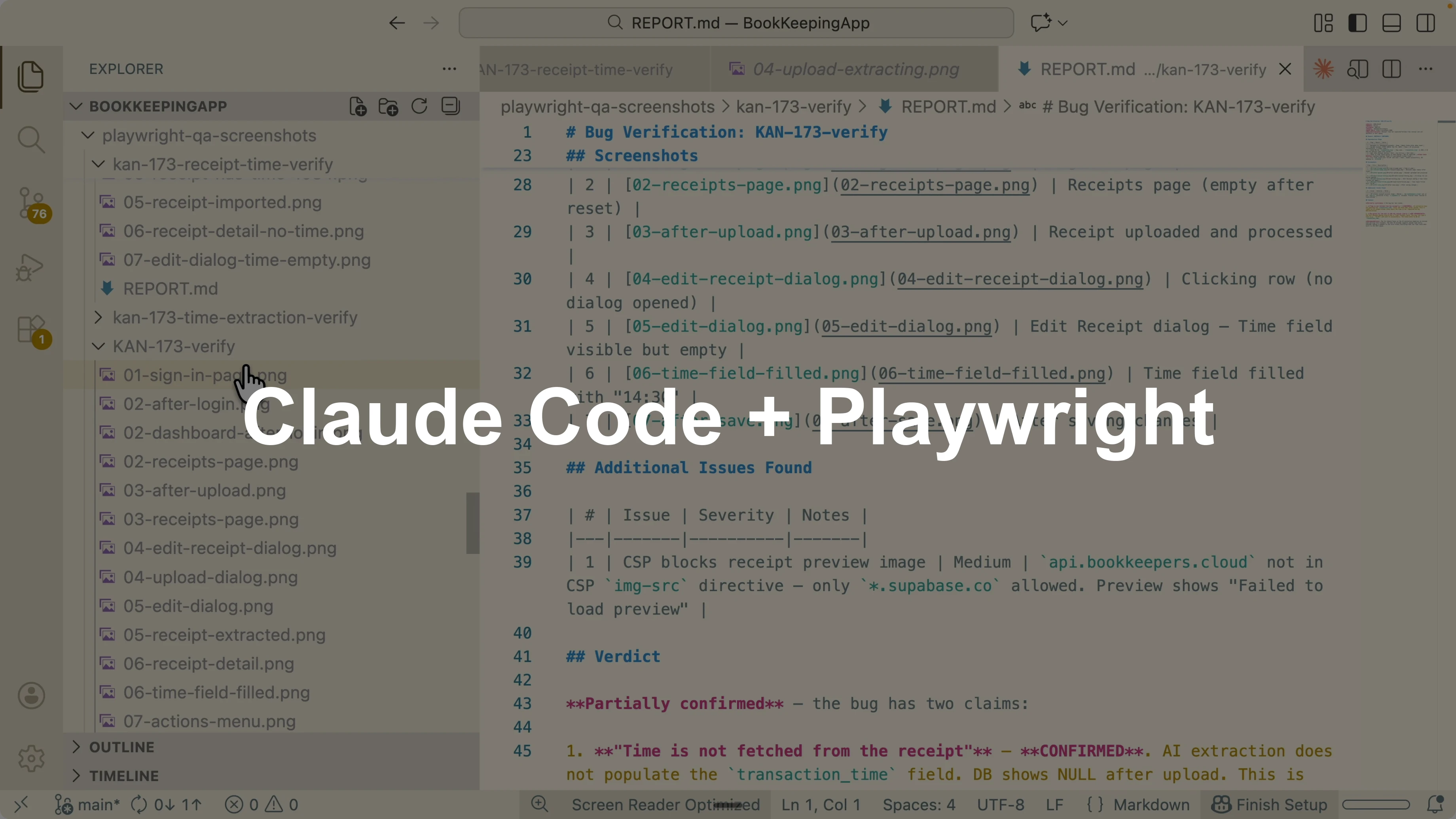
How Claude Code and Playwright CLI Cut Tokens?
Table Of Content
I am comparing two paths to browser automation with Claude Code. One path uses a Playwright CLI skill that drives headless actions through shell commands. The other uses a Playwright MCP skill that funnels full page data into Claude’s context at each step.
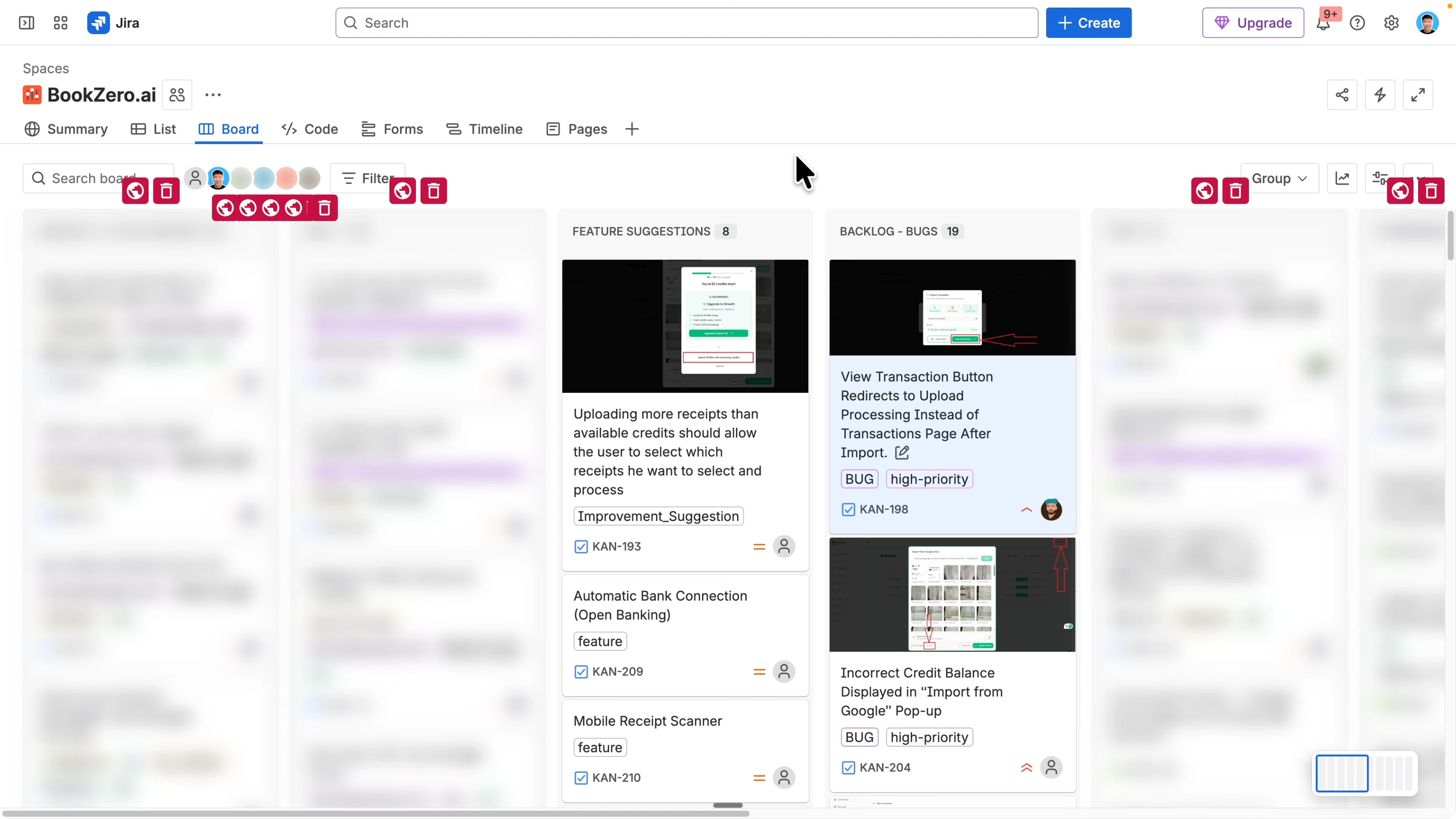
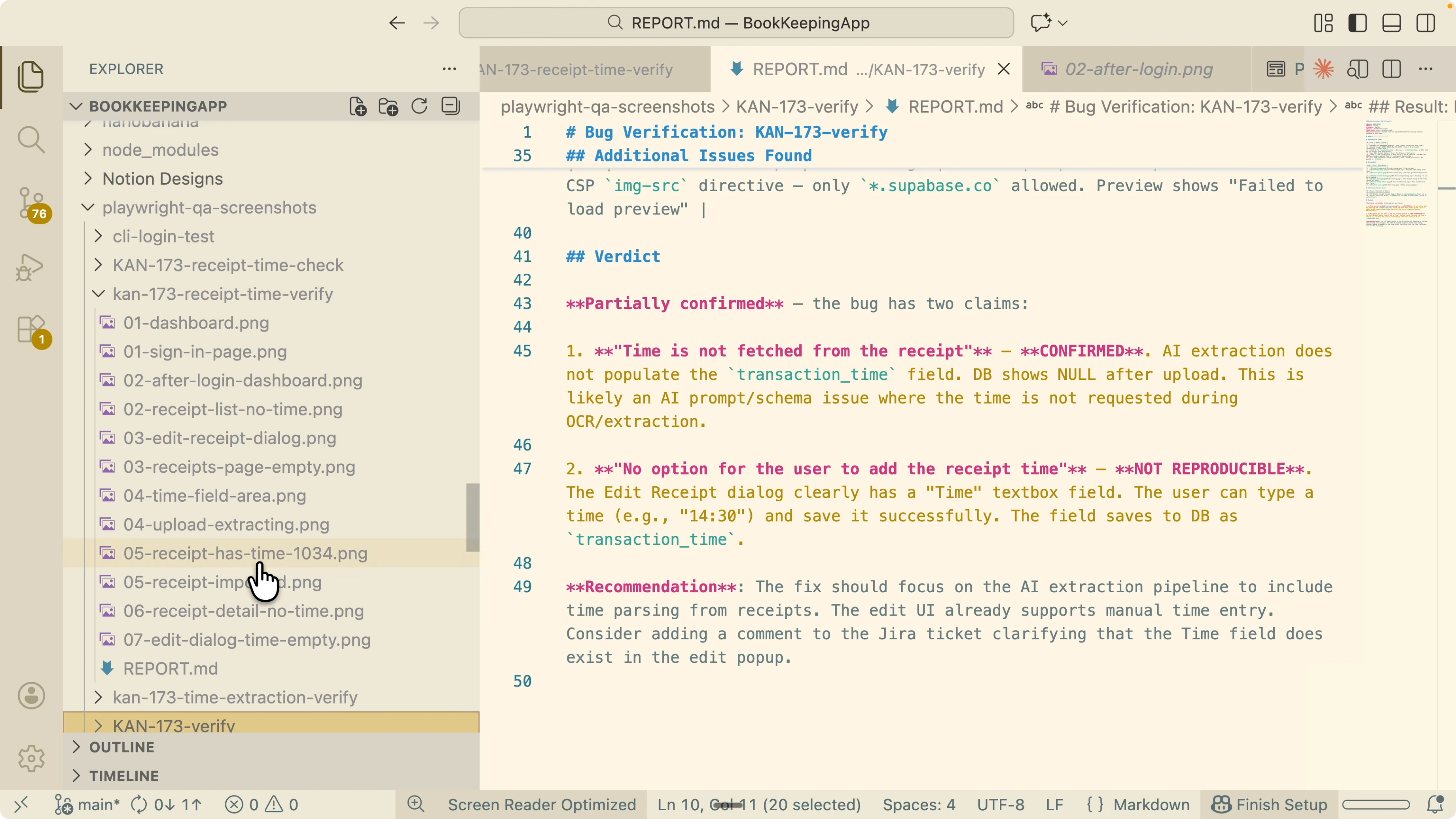
In both cases, I verify a Jira ticket on my local machine. The flow reads the Jira ticket, understands the context, sets up a user from my Supabase account, and executes actions in a headless browser. Each run captures screenshots and produces a report that flags status, reproduction steps, screenshots gathered, the issue found, and recommendations.
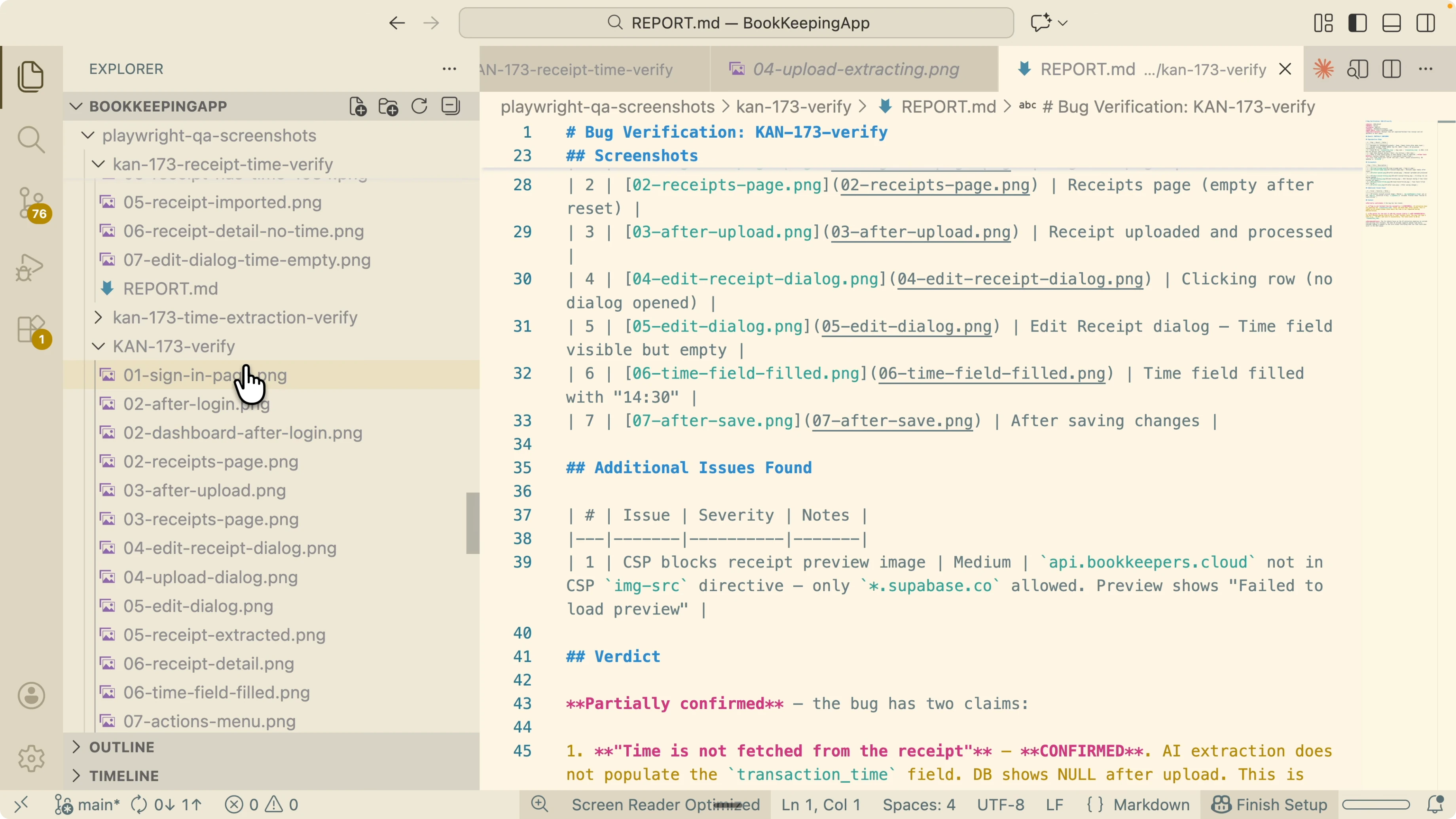
I can generate multiple reports in a folder, review results, and pass that folder to a sub agent to implement fixes and improve the app. This is valuable because the Playwright CLI path uses fewer tokens and tends to be more accurate than the Playwright MCP path for known tasks. I will explain why Claude Code benefits from the CLI approach and how the two skills behave across different QA situations.
How Claude Code and Playwright CLI Cut Tokens?
Playwright is a tool that lets an AI agent control a browser. It can navigate pages, click buttons, fill forms, and take screenshots. You can picture it as giving Claude hands and eyes to use the browser.There are three practical ways people use Playwright. One is the classic developer flow that writes automated tests in code files. Another is the Playwright MCP server, which exposes the browser through MCP tools.
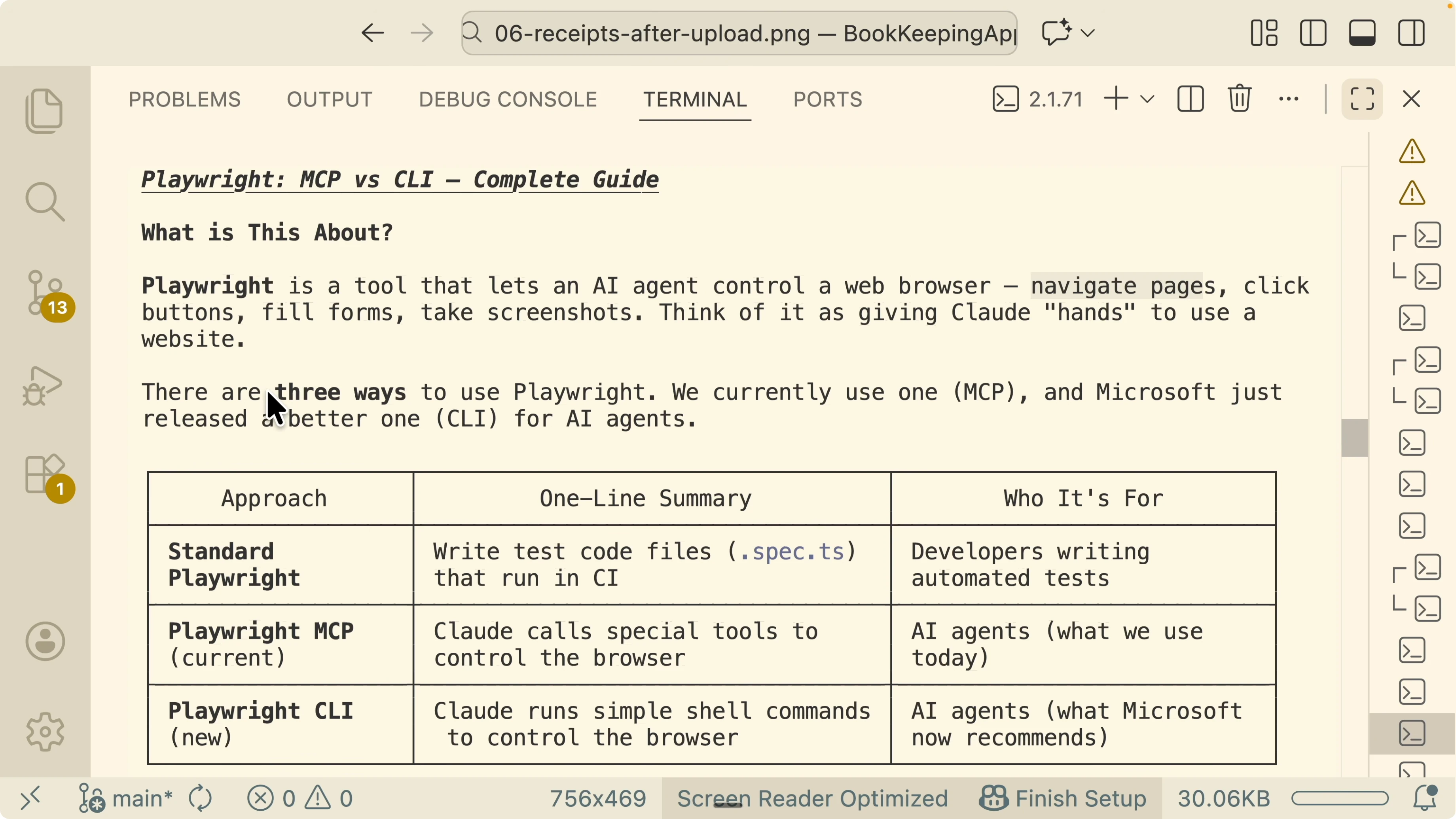
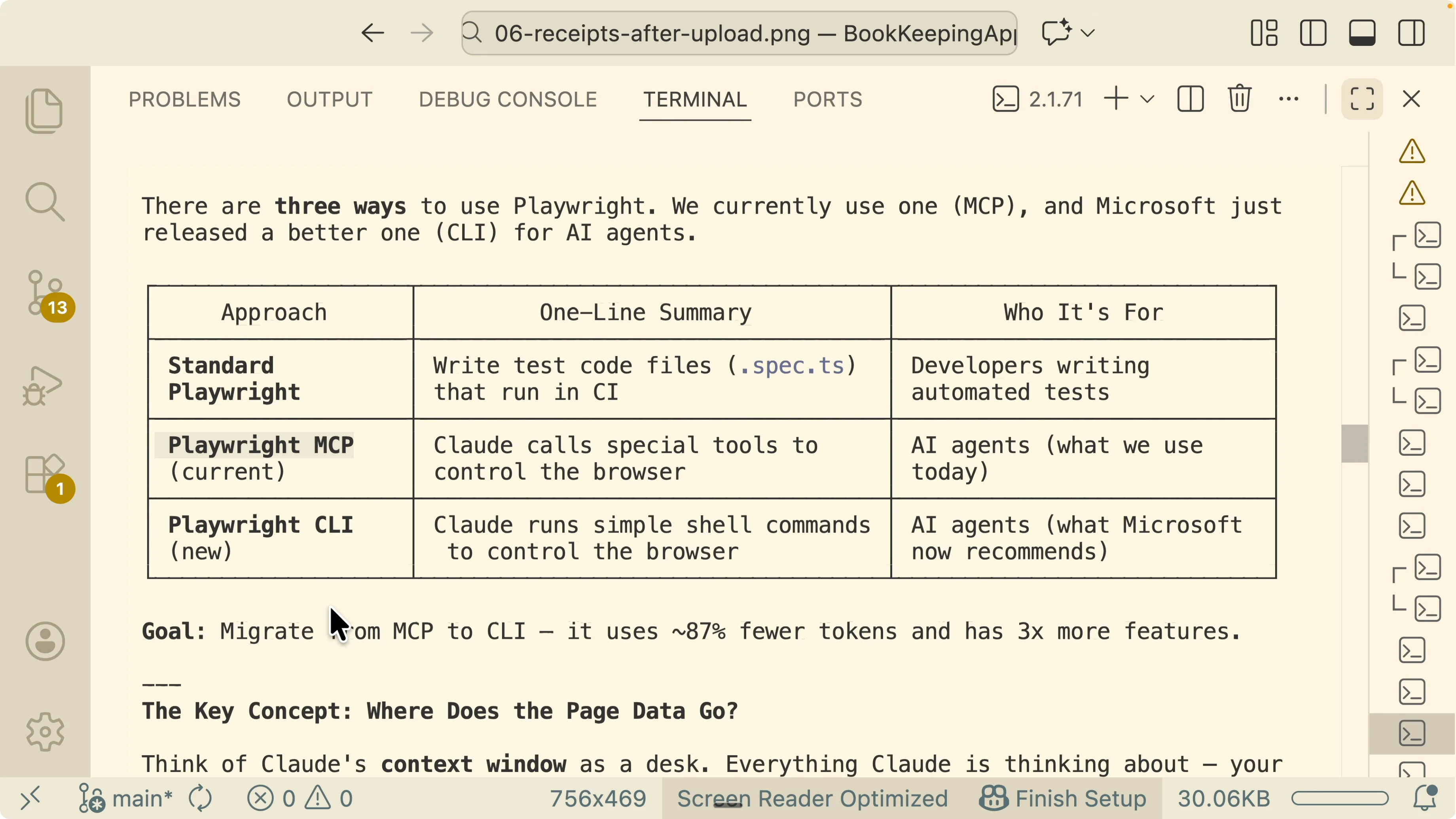
Microsoft now recommends the Playwright CLI for shell based control over the browser rather than MCP. The CLI uses fewer tokens and offers many more features compared to the MCP approach for Claude Code. To see why, we need to look at how page data flows into the context window.
For a full walkthrough on wiring Claude with the MCP path, see this guide to Claude Code with Playwright via MCP.
How Claude Code and Playwright CLI Cut Tokens? The context window problem
Think of Claude’s context window like a desk. Code, conversation, and instructions sit on that desk. When you also put full browser page data on the desk, space runs out for code and reasoning.As the context window grows, AI accuracy starts to go down. MCP pushes full page data and accessibility trees into the desk after every action. That means the desk fills up fast, tokens spike, and the model has less room to think about code or multi step strategies.
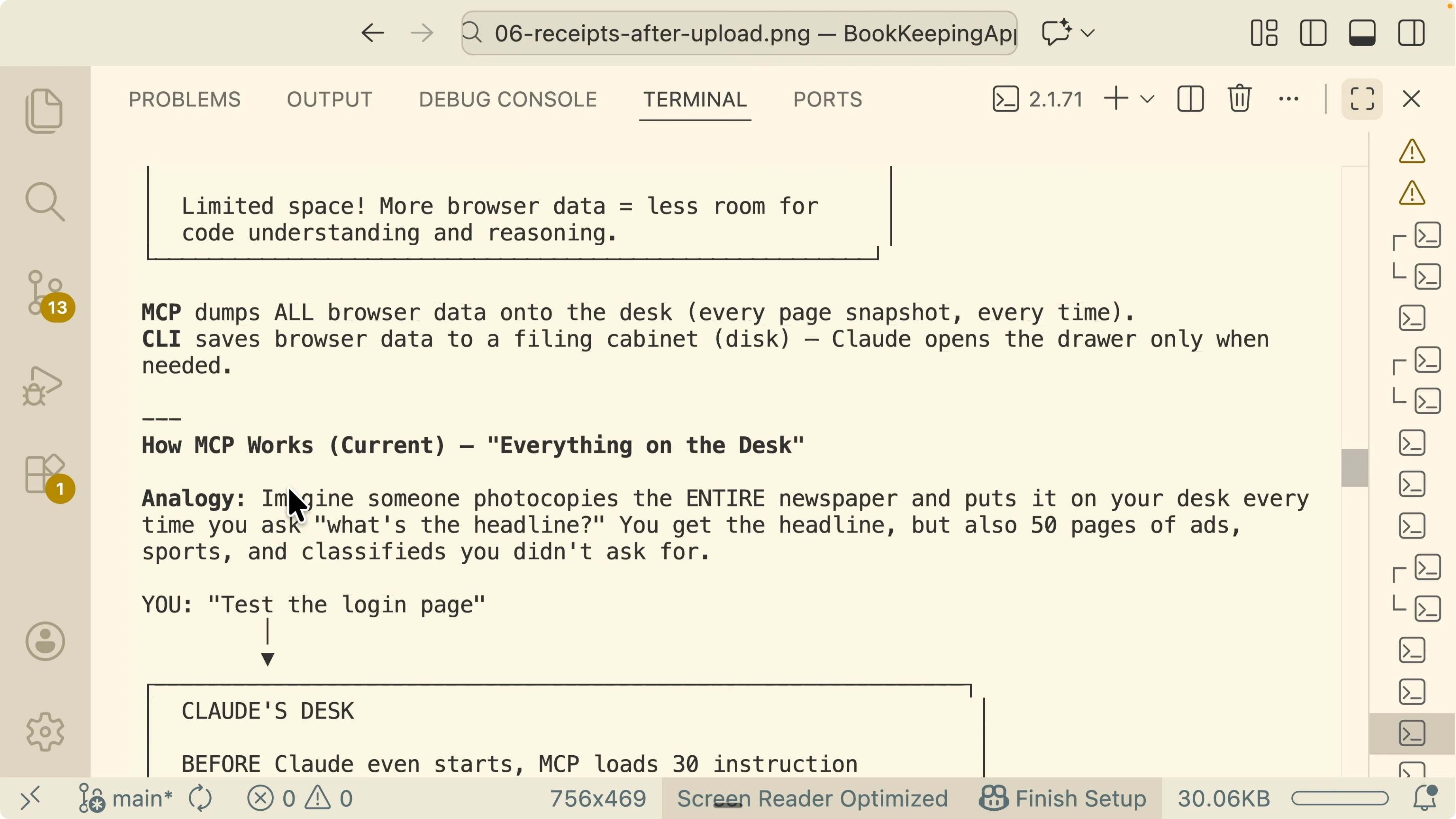
How Claude Code and Playwright CLI Cut Tokens? Sticky notes not full pages
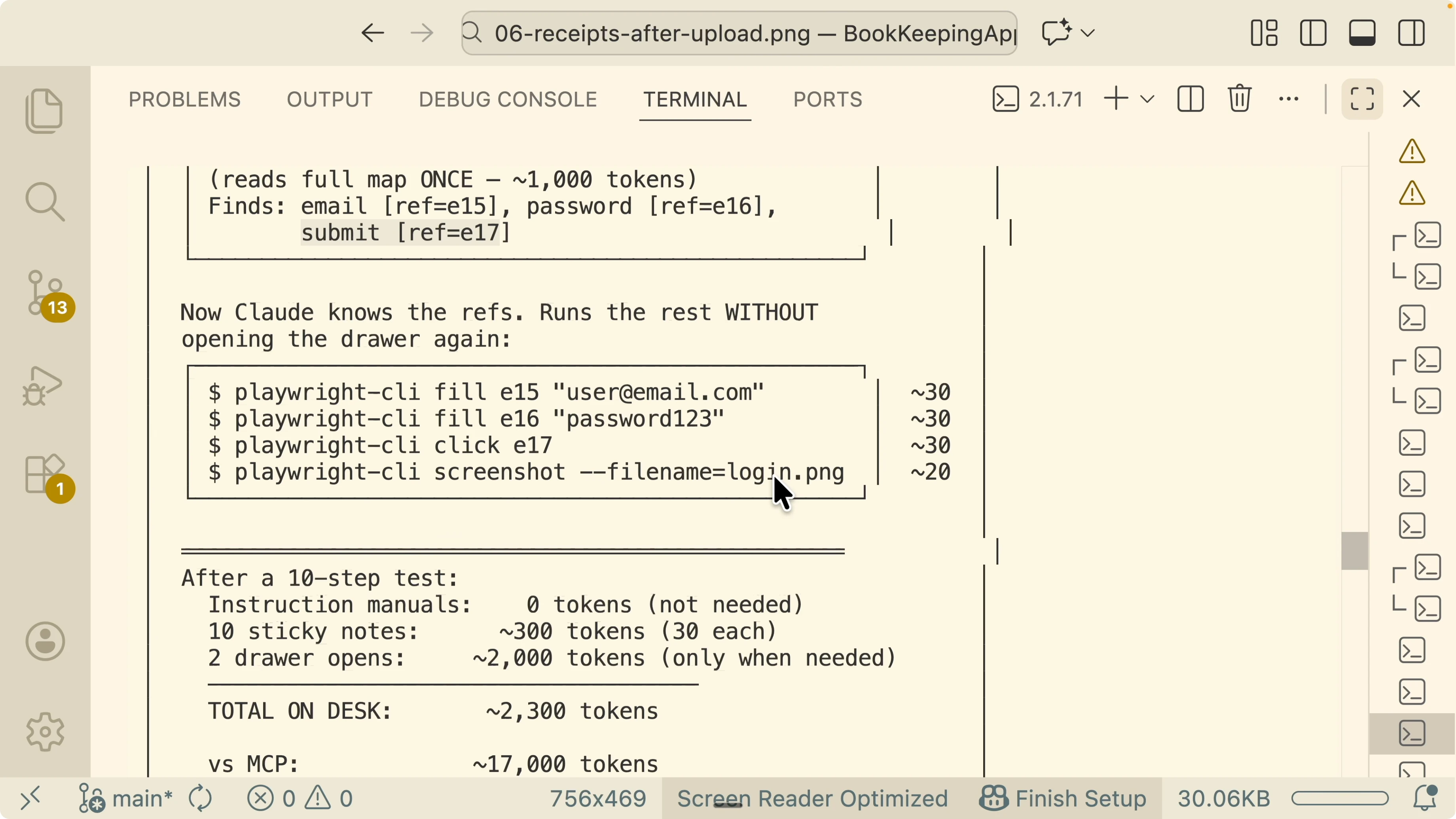
The CLI approach avoids stuffing the desk with full page data. Instead it writes a small sticky note summary about the page and saves the full details to disk. The summary points to where the full page is saved so Claude can open that file only when it truly needs it.This reduces token consumption a lot because the desk only gets summaries. Claude reads complete page content from disk on demand rather than by default at every step. In practice this leads to higher accuracy for tasks that do not require full visibility on every page transition.
If you are setting up Claude Code for the first time in your dev environment, you can follow this quick start and also refer to the Claude Code setup walkthrough.
How Claude Code and Playwright CLI Cut Tokens? Side by side behavior
With MCP, the session first loads large instruction manuals for its tools into the context. When the agent navigates to a page, MCP dumps the entire page data into the context window. Every click or form fill triggers another full page dump.With CLI, the session does not need to load heavy tool descriptions because Claude already knows shell commands. When the agent navigates to a page, CLI emits a short summary and a path to the saved full page map on disk. The agent only reads that file if it needs the details to continue.
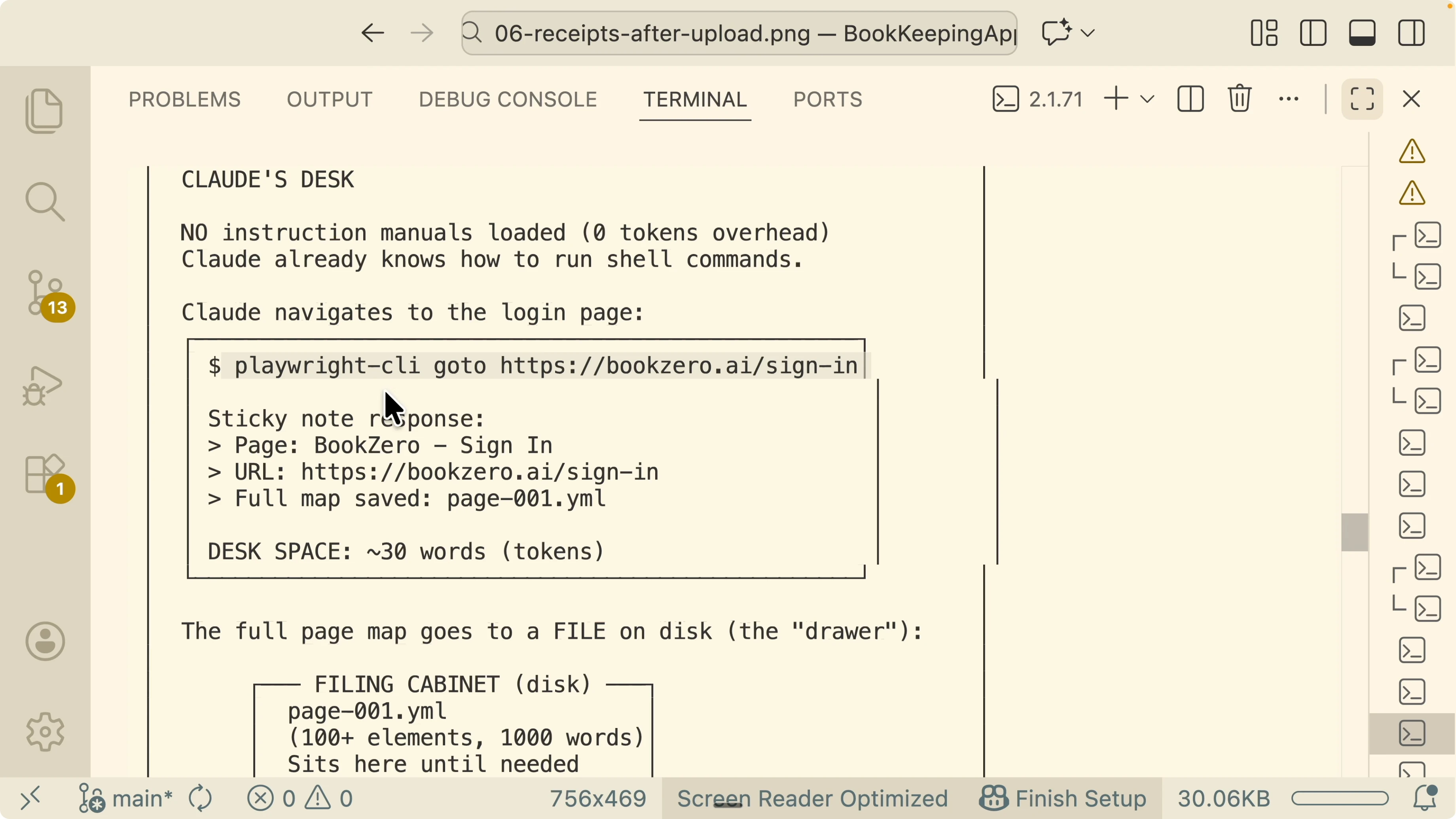
In practice this means a long flow that touches many pages will keep Claude’s desk clean most of the time. It only reads a handful of saved pages when necessary, which keeps tokens low and frees capacity for code reasoning and test planning.
How Claude Code and Playwright CLI Cut Tokens? Accuracy trade offs
MCP is like an always on observer. It forces Claude to look at every full page after each action. That ensures Claude never misses a detail that was on screen.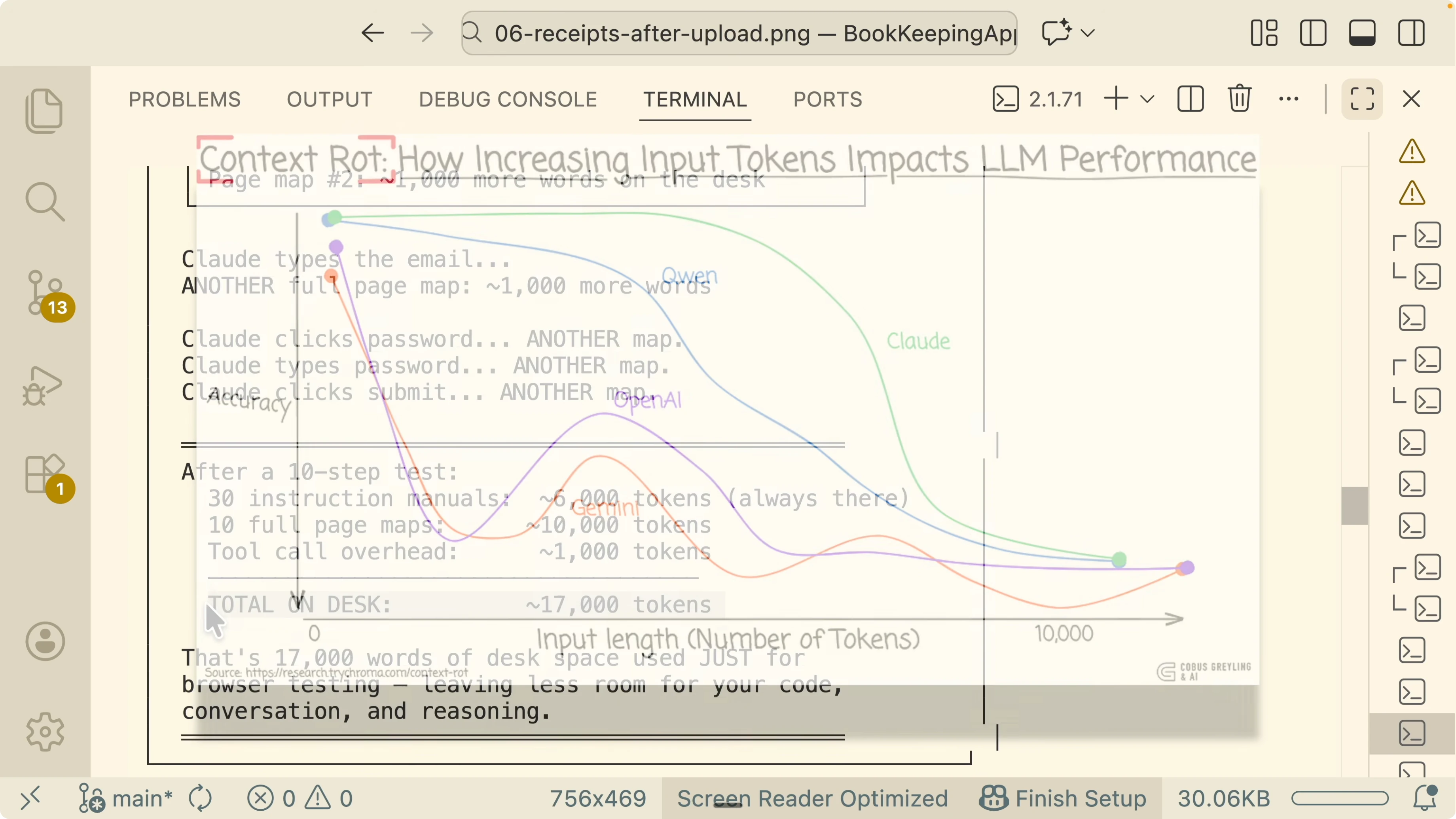
CLI gives Claude summaries and snapshots. For a login submission, the CLI might save a snapshot and move on based on the summary. If an error banner quietly appeared on the next render, Claude could miss it unless it decides to open the full saved page.
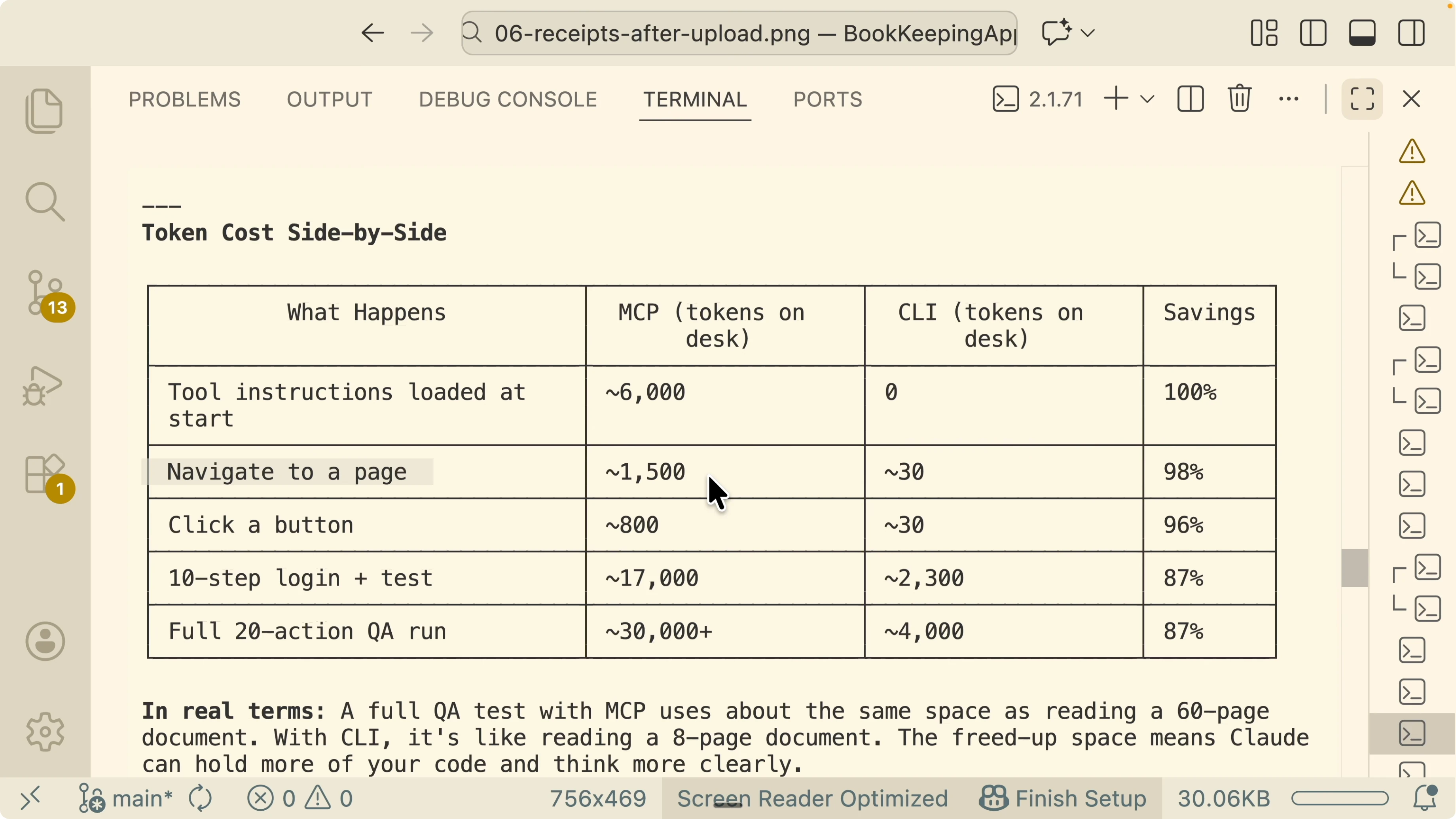
For known flows that have a clear expectation, CLI tends to be better. For a login page where the expected fields and steps are known, the summaries are enough and token savings are large. For unknown pages or to audit a bug that might appear at unexpected steps, MCP can be better since it always loads everything and forces visibility.
If you use Claude to triage and fix tickets with lightweight planning, you may also want to organize backlog and work in boards. I show a practical workflow in this Kanban based guide for Claude driven work.
How Claude Code and Playwright CLI Cut Tokens? Automated QA flow
I use two skills. One is a Playwright MCP skill. The other is a Playwright CLI skill that calls shell commands for headless actions.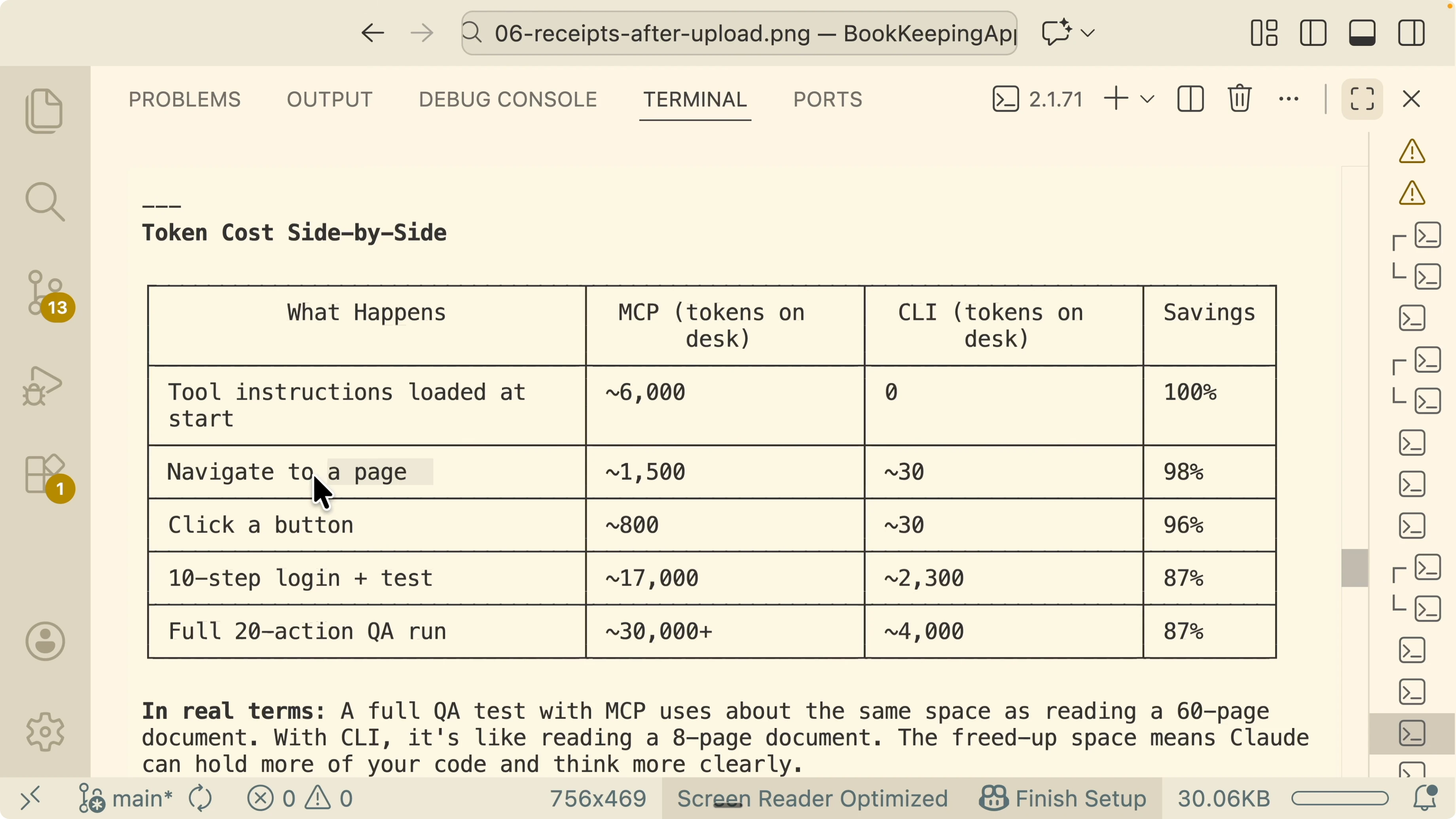
Both run headless and both collect screenshots along the way. Each step is documented and the run ends with a report that shows issue status, reproduction steps, screenshots, and recommendations. I can save many reports into a folder, inspect differences, and pass that folder to a sub agent to implement fixes.
If you prefer managing runs and tasks directly on your machine with Claude Code, you can pair this workflow with the ideas in this desktop focused task management article.
How Claude Code and Playwright CLI Cut Tokens? Minimal setup
Install Playwright in the project.Run Playwright install to ensure browsers are available.
Create environment variables for test accounts and local app URLs.
Here is a simple example test that logs in, takes a screenshot, and writes a lightweight page summary you can keep on disk for Claude to read on demand.
// tests/login.spec.ts
import { test, expect } from '@playwright/test';
import fs from 'fs';
import path from 'path';

const BASE_URL = process.env.APP_URL || 'http://localhost:3000';
const EMAIL = process.env.TEST_EMAIL || 'tester@example.com';
const PASSWORD = process.env.TEST_PASSWORD || 'password123';

test('login flow with summary and screenshot', async ({ page }) => {
  await page.goto(`${BASE_URL}/login`);

  // Minimal summary for Claude to read later if needed
  const summary = {
    url: page.url(),
    expectedFields: ['email', 'password'],
    expectedAction: 'submit login form',
    timestamp: new Date().toISOString(),
  };
  const outDir = path.join(process.cwd(), 'qa-artifacts');
  fs.mkdirSync(outDir, { recursive: true });
  fs.writeFileSync(path.join(outDir, 'login-summary.json'), JSON.stringify(summary, null, 2));

  await page.getByLabel('Email').fill(EMAIL);
  await page.getByLabel('Password').fill(PASSWORD);
  await page.getByRole('button', { name: /sign in|log in|submit/i }).click();

  // Save a screenshot to reference in reports
  await page.screenshot({ path: path.join(outDir, 'login-after-submit.png'), fullPage: true });

  // Optional assert that avoids dumping full trees in context
  await expect(page).toHaveURL(new RegExp(`${BASE_URL}/dashboard|${BASE_URL}/home`, 'i'));
});
Run it from the CLI.
npx playwright install
APP_URL=http://localhost:3000 TEST_EMAIL=me@example.com TEST_PASSWORD=secret npx playwright test -g "login flow with summary and screenshot"
This mirrors the idea that the agent keeps only summaries in context and stores full artifacts on disk. If the next step needs details, Claude can read the saved file or open the artifact folder.
How Claude Code and Playwright CLI Cut Tokens? Shell hooks for a CLI skill
You can expose small shell commands as skill steps that Claude can call. For example, a step to visit a URL, a step to fill fields, a step to click a role, and a step to capture a screenshot.Visit a URL
npx playwright test --project=chromium --grep "goto-login"Fill form fields
npx playwright test --project=chromium --grep "fill-credentials"Click submit and capture a screenshot
npx playwright test --project=chromium --grep "submit-and-screenshot"Each step writes a summary JSON and a screenshot path into the qa artifacts folder. Claude only reads a file when it needs to make a decision that requires details. This pattern keeps token usage low while preserving traceability and reproducibility.
How Claude Code and Playwright CLI Cut Tokens? Report format
A run writes a small report that flags status, shows reproduction steps, and lists screenshots and notes.{
"ticket": "JIRA-1234",
"status": "partially fixed",
"steps": [
"open /login",
"fill email and password",
"submit form",
"redirect to /dashboard"
],
"screenshots": [
"qa-artifacts/login-after-submit.png"
],
"issuesFound": [
{
"summary": "Error banner flashes on slow network",
"recommendation": "Debounce error state and await auth response before redirect"
}
]
}I keep multiple such reports in a folder and hand them to a sub agent that applies a patch. The same pattern works well for pre push checks on feature branches.
How Claude Code and Playwright CLI Cut Tokens? MCP and CLI in practice
When the flow is predictable and Claude knows what to expect, CLI wins on tokens and accuracy. When auditing unknown pages or verifying a bug that can surface at any step, MCP can be safer because it forces full visibility at each action. Pick the path based on how much context Claude needs to guarantee a correct judgment.For broader project setups that combine agents and QA with planning, see how boards and automations fit into an engineering loop in this Kanban based workflow. If you want a complementary look at local task flows with Claude on your machine, check this desktop workflow overview.
Note on code aware testing with an AI tester
I tried an AI testing tool called Testrite on a small budgeting app. It read the project, understood the docs, validated agent results, and produced a report with gaps and risks. One flagged item was that storage was in memory only, which reset data on server restart, and fixing that improved the app.I allowed its MCP tool to run inside the IDE and it tested the project systematically. The final report called out key risks and made it easy to patch the storage bug. A code aware tester that validates agent output can be a strong complement to Claude driven Playwright runs.
Skills and reproducibility
I maintain two skills. One targets the Playwright MCP server and one uses the Playwright CLI through shell commands.Both run headless and both collect screenshots for every critical action. Both generate a human friendly report and save artifacts in a folder for review or handoff. The CLI skill tends to produce shorter context footprints and tighter reasoning on code heavy tasks.
If you want a deeper look at how Claude and Playwright connect through MCP in code, compare patterns with this integration focused writeup.
Read More: Claude Code Nano Banana Ai Images
Final Thoughts
MCP floods Claude’s context with full page data at every step, which increases tokens and can squeeze room for reasoning. The CLI approach keeps only short summaries in context and saves full details to disk for on demand reading, which cuts tokens and often boosts accuracy on known flows. Use CLI when expectations are clear and use MCP when you need guaranteed full visibility on every render.Subscribe to our newsletter
Get the latest updates and articles directly in your inbox.

Related Posts

8 Best Claude Code Plugins in 2026 (You Need to Know)
8 Best Claude Code Plugins in 2026 (You Need to Know)

7 Best Claude Code Skills (You Need to Know)
7 Best Claude Code Skills (You Need to Know)

Claude Code Desktop IDE Features (You Need to Know)
Claude Code Desktop IDE Features (You Need to Know)