
Table Of Content
- Quakewatch build - Opus 4.6 vs GPT-5.3 Codex
- Build time and testing behavior - Opus 4.6 vs GPT-5.3 Codex
- Spec compliance - Opus 4.6 vs GPT-5.3 Codex
- Dev run - Opus 4.6
- Dev run - GPT-5.3 Codex
- Why the Opus 4.6 map broke
- Example fixes for the Quakewatch layout and a11y
- Stripe screenshots rebuild - Opus 4.6 vs GPT-5.3 Codex
- Example markup for accurate cards and logos
- Comparison overview - Opus 4.6 vs GPT-5.3 Codex
- Step-by-step: Reproduce the Quakewatch PRD build
- Step-by-step: Reproduce the Stripe screenshots rebuild
- Use cases - GPT-5.3 Codex
- Use cases - Opus 4.6
- Pros and cons - GPT-5.3 Codex
- Pros and cons - Opus 4.6
- Final thoughts
Opus 4.6 vs GPT-5.3 Codex
Table Of Content
- Quakewatch build - Opus 4.6 vs GPT-5.3 Codex
- Build time and testing behavior - Opus 4.6 vs GPT-5.3 Codex
- Spec compliance - Opus 4.6 vs GPT-5.3 Codex
- Dev run - Opus 4.6
- Dev run - GPT-5.3 Codex
- Why the Opus 4.6 map broke
- Example fixes for the Quakewatch layout and a11y
- Stripe screenshots rebuild - Opus 4.6 vs GPT-5.3 Codex
- Example markup for accurate cards and logos
- Comparison overview - Opus 4.6 vs GPT-5.3 Codex
- Step-by-step: Reproduce the Quakewatch PRD build
- Step-by-step: Reproduce the Stripe screenshots rebuild
- Use cases - GPT-5.3 Codex
- Use cases - Opus 4.6
- Pros and cons - GPT-5.3 Codex
- Pros and cons - Opus 4.6
- Final thoughts
Anthropic just released Opus 4.6 and in the same week OpenAI dropped GPT-5.3 Codex. Both models are now available in Cursor. I gave them two identical tasks and compared the results.
In the first test, I asked each model to build an app from scratch from a detailed PRD. The same spec, the same requirements, and both models were able to choose their own tech stack. One model finished three times faster, and when both builds were spun up in dev mode, there was a clear winner.
The second test is visual comprehension. Both models got screenshots of the Stripe homepage and were asked to rebuild it from the images alone. Both identified the right page and built all 15 sections, but one model went deeper and recreated product mockups inside every card, while the other left them empty and used oversized fonts.
For broader context on multi-model performance patterns, see this cross-vendor comparison of complex builds: a head-to-head with Gemini 3.1 Pro, Opus 4.6, and GPT-5.3 Codex.
Quakewatch build - Opus 4.6 vs GPT-5.3 Codex
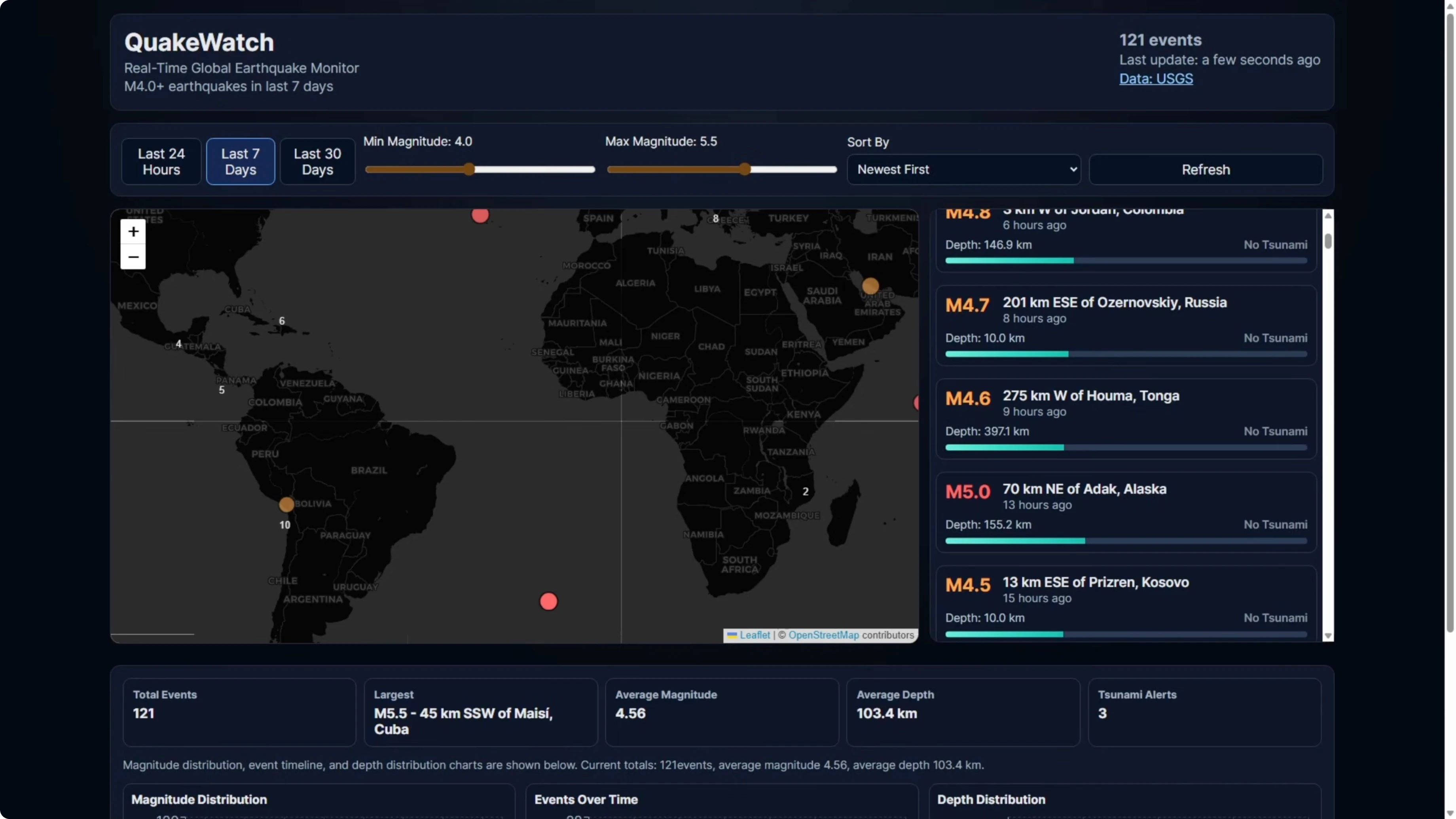
The app is called Quakewatch. It is a real-time earthquake dashboard that pulls live data from the USGS API and displays it across an interactive map with clustered markers, a filterable event feed, a detail panel, and three chart types all synced together.
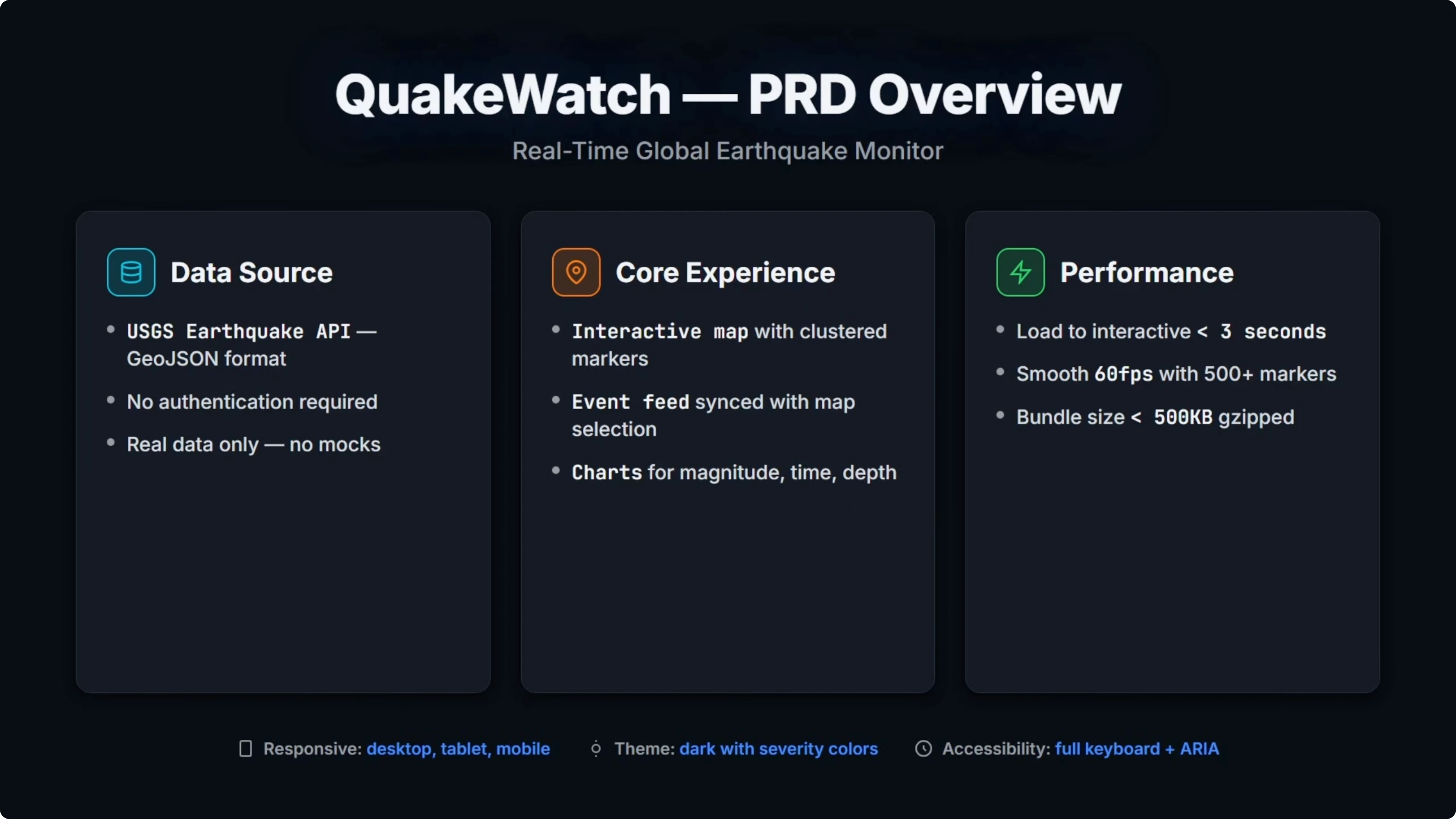
I chose this because it covers what matters in a real build. Live API integration, complex state management across multiple views, performance targets like keeping the bundle under 500 kilobytes, and accessibility requirements like keyboard navigation and aria labels.
I left the tech stack decision up to the models. I gave the full PRD to both models with no additional guidance. Then I reviewed build time and final results.
For a quick refresher on Opus family differences that can affect build behavior, here is a closer look at the latest Claude release: Claude Opus 4.6 overview.
Build time and testing behavior - Opus 4.6 vs GPT-5.3 Codex
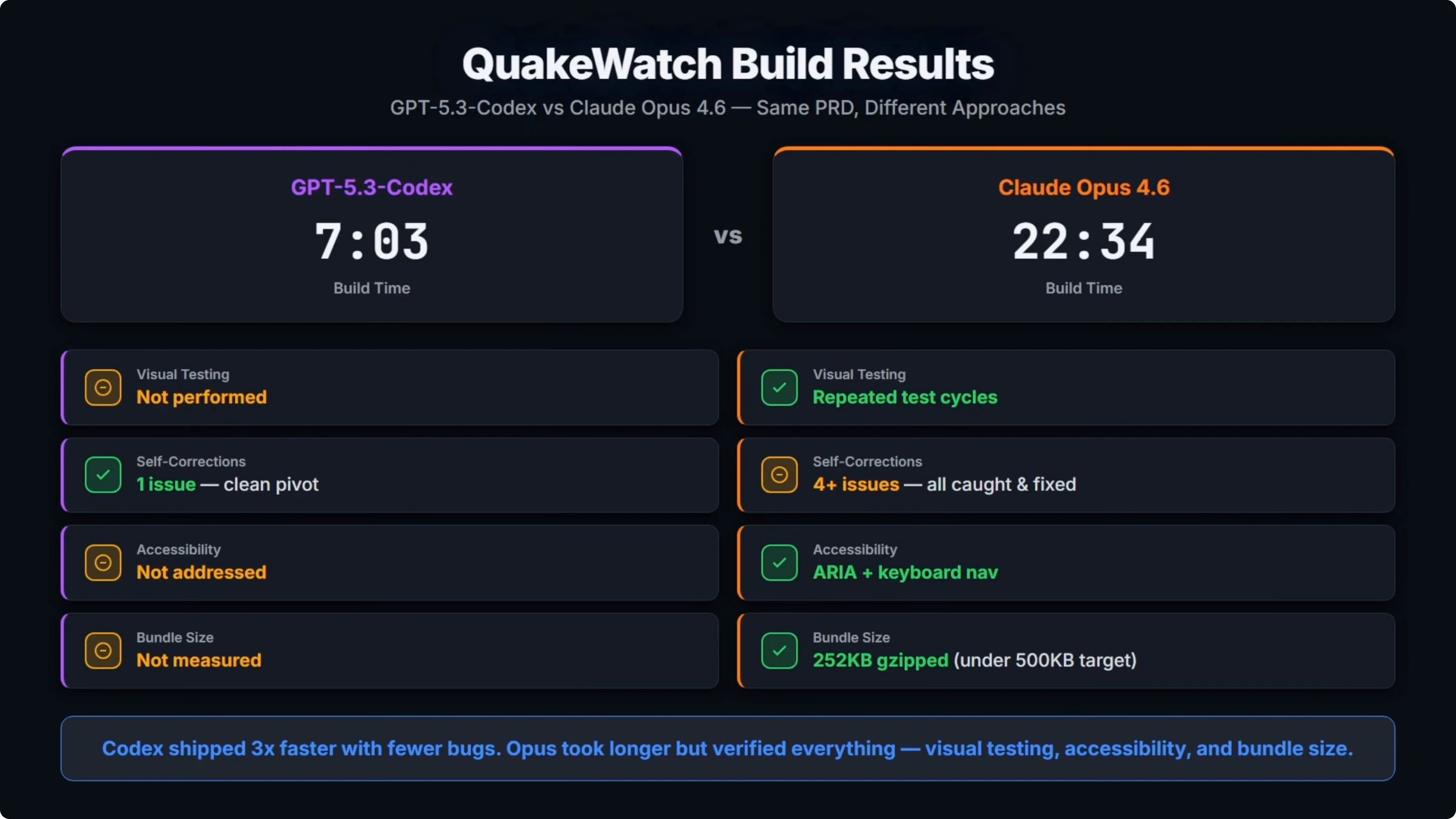
Codex came in at 7 minutes and 3 seconds. Opus took 22 and a half minutes, so it was over three times slower.
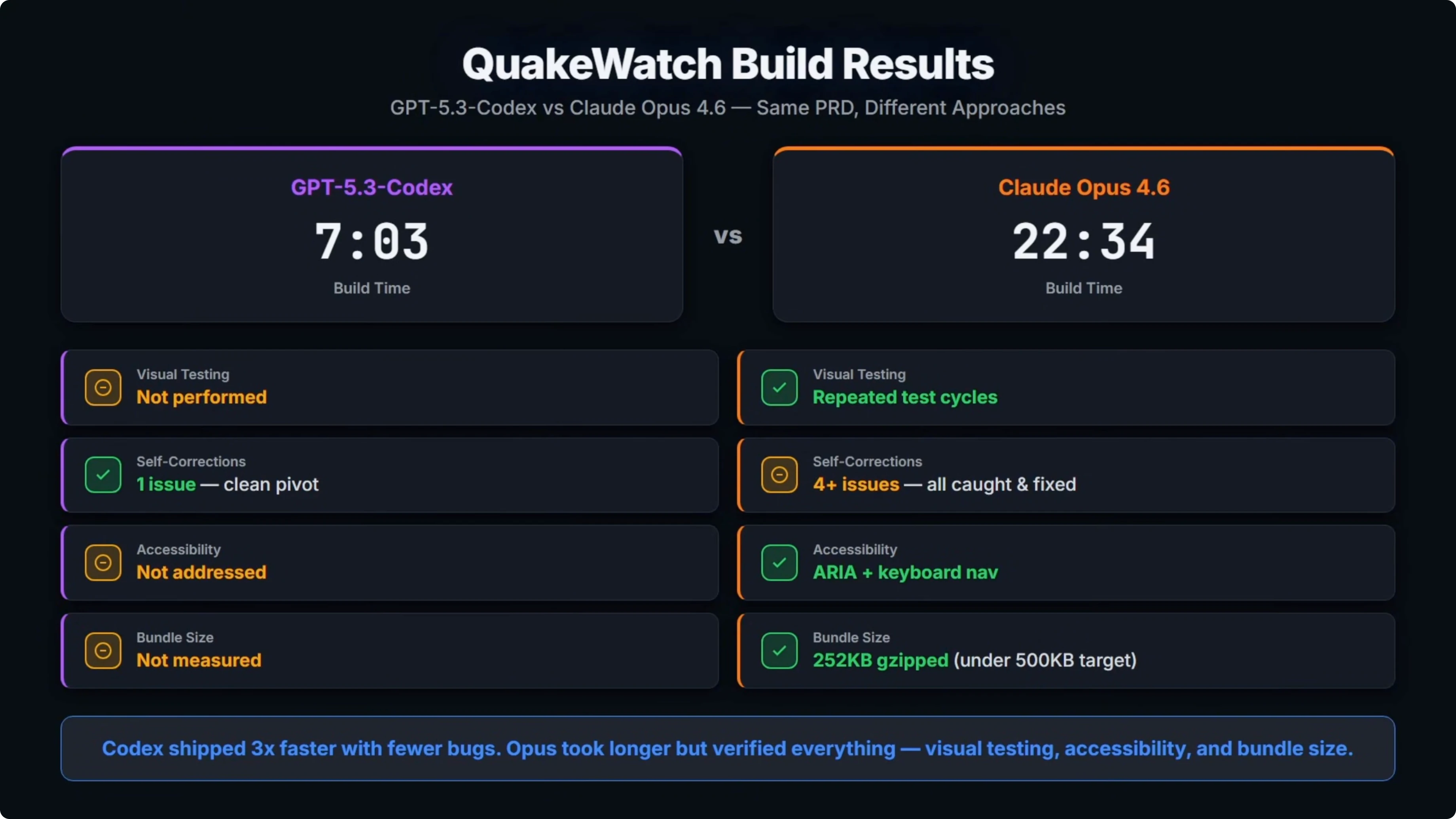
A big part of that was Opus repeatedly opening the build in a browser to test visually. It loaded the page, screenshotted it, found a bug, fixed it, and tested again. That cycle happened multiple times.
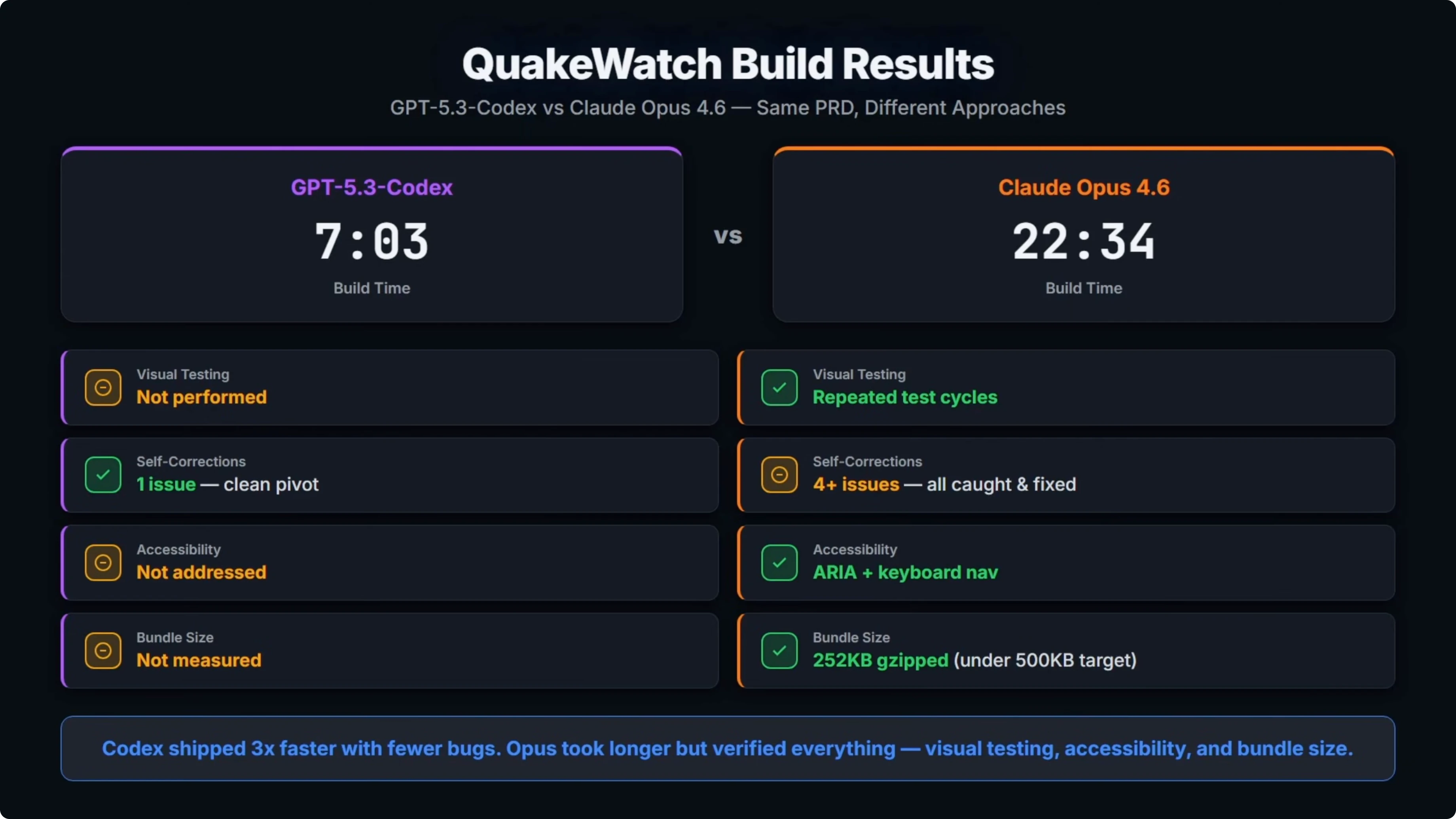
For self-corrections, Codex hit one issue during the build, a Leaflet clustering incompatibility. It spotted it, swapped the approach, and moved on. That was a clean pivot.
Opus hit four or more runtime bugs, including React Window API mismatches, a few coordinate crashes, and duplicate panels on mobile. It found and fixed all of the issues because it was actually testing visually. Codex never opened a browser and did any testing.
Spec compliance - Opus 4.6 vs GPT-5.3 Codex
The PRD required accessibility. Opus implemented aria labels and keyboard navigation. Codex did not address that.
Opus also measured the final bundle size which came in under the 500 kilobyte target from the PRD. Codex did not measure bundle size.
The open question is if the Codex build actually works end to end and if Opus’s more thorough approach produced a better one-shot build. I spun up both in dev mode to check.
Dev run - Opus 4.6
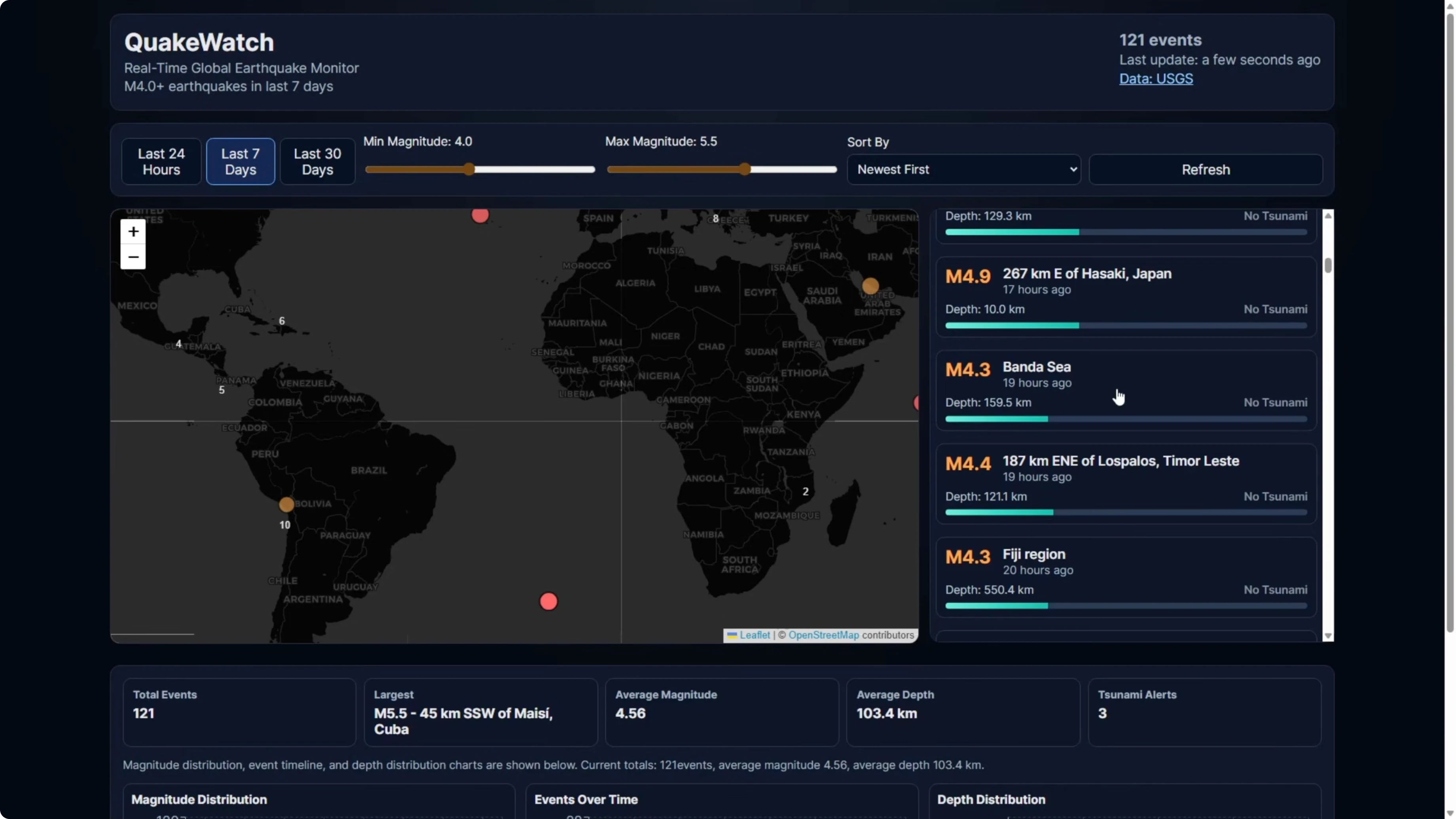
When I first loaded the page, the map was working. Once I went into full screen mode, it broke into a gray box.
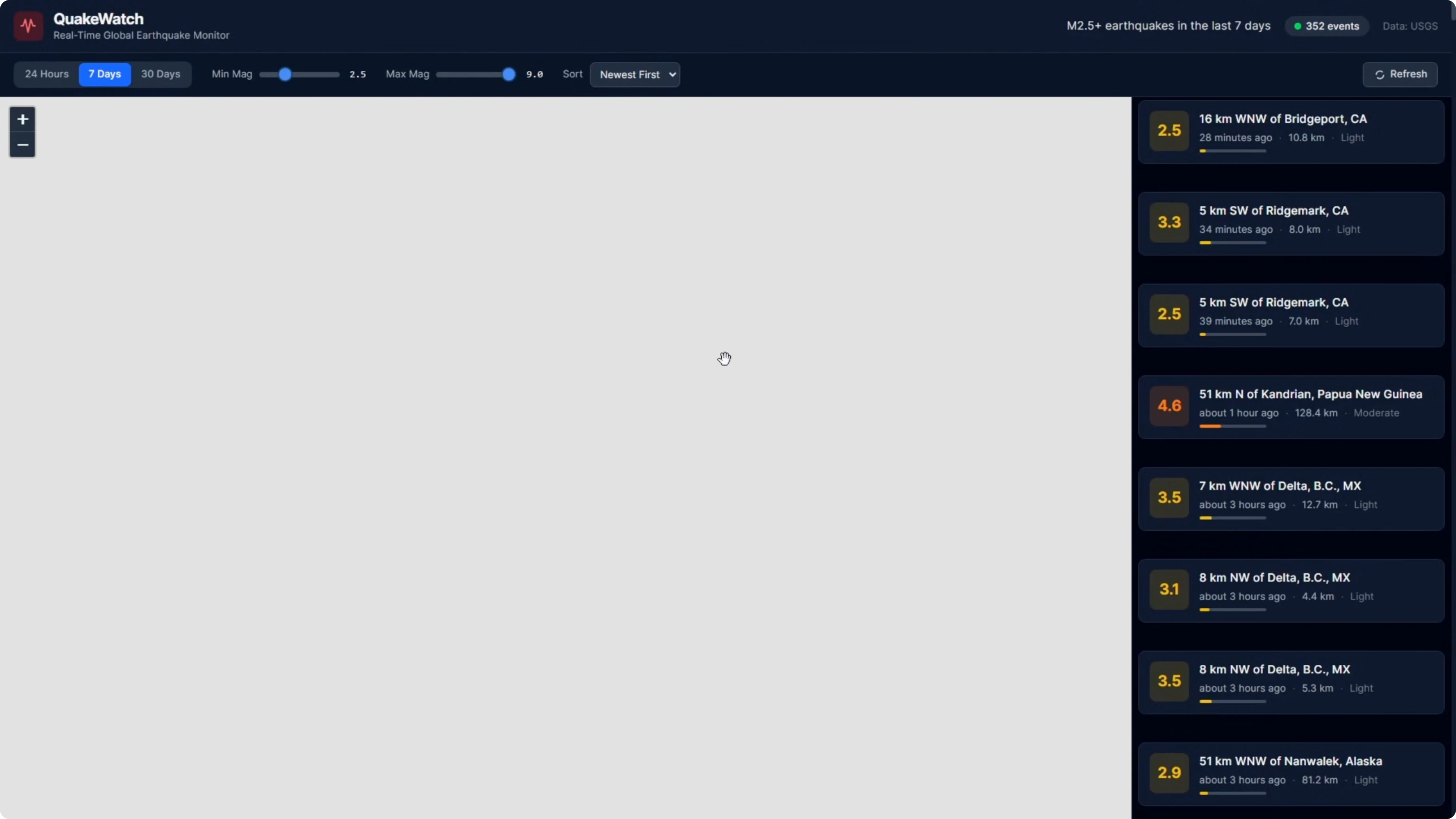
Tabs at the top worked and filters worked before full screen. The earthquake details panel on the right side rendered, but the map layout blew out after full screen.
Scrolling down, the map took up more space than it should. There were more breakages at the bottom around layout. Outside the map panel, the stats section rendered magnitude distribution, events over time, and depth distribution correctly.
Dev run - GPT-5.3 Codex
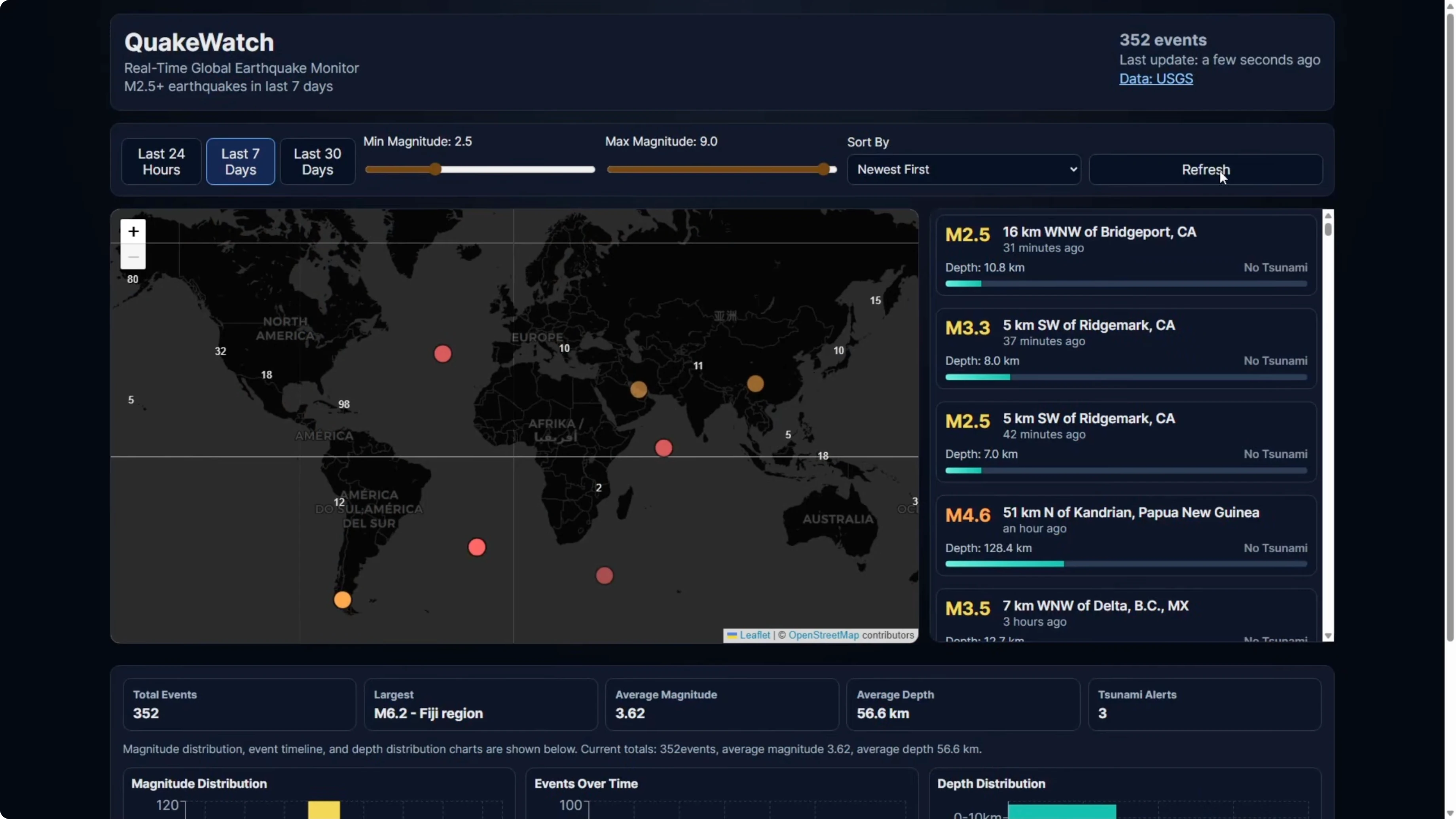
The Codex build worked. Full screen mode kept the map working.
Time range and magnitude filters worked and zoomed appropriately. The information panel on the right rendered similarly to Opus.
The map was contained to the intended area with proper zoom behavior. There was no extra gray box space, and the charts at the bottom rendered magnitude distribution, events over time, and depth distribution.
Why the Opus 4.6 map broke
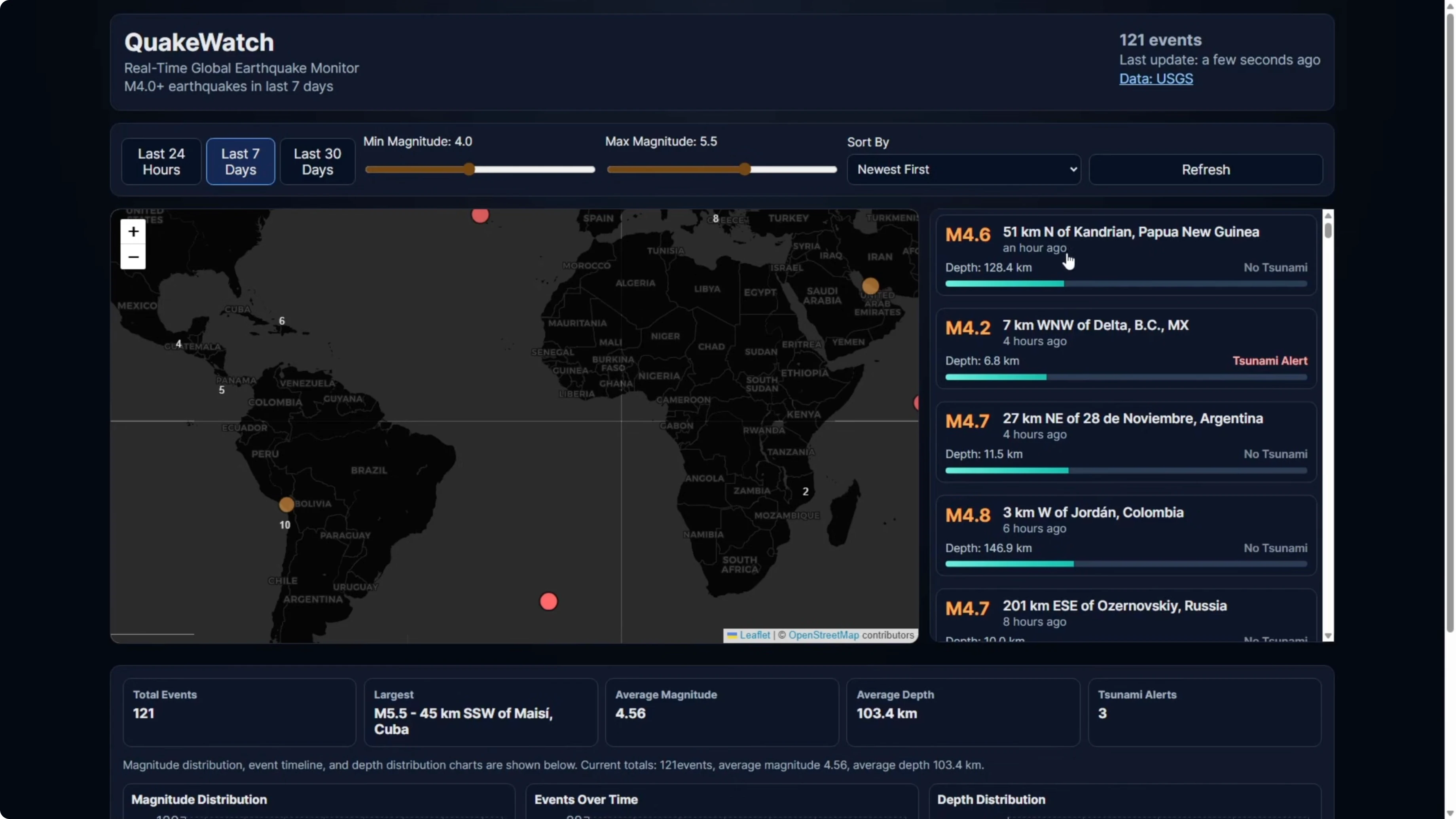
Codex had a scroll bar on the right-hand earthquake information panel. The content was limited to the panel and scrollable.
Opus did not implement a scroll bar in that panel. The list extended down the page and starved the map of its proper layout, which caused the break in full screen.
For a perspective on how Opus 4.6 compares to its immediate predecessor, see this targeted version comparison: Opus 4.6 vs Opus 4.5.
Example fixes for the Quakewatch layout and a11y
Here is a minimal way to constrain the earthquake list and avoid layout blowouts.
// PanelLayout.tsx
import React from "react";
import "./panel.css";

export function PanelLayout({ map, list, details }) {
  return (
    <div className="app">
      <div className="main">
        <div className="map" role="region" aria-label="Earthquake map">
          {map}
        </div>
        <aside className="side" role="complementary" aria-label="Earthquake list">
          {list}
        </aside>
      </div>
      <section className="details" aria-live="polite" aria-atomic="true">
        {details}
      </section>
    </div>
  );
}
/* panel.css */
.app {
display: grid;
grid-template-rows: 1fr auto;
height: 100vh;
}
.main {
display: grid;
grid-template-columns: 2fr 1fr;
min-height: 0;
}
.map {
min-height: 0;
}
.side {
overflow-y: auto;
border-left: 1px solid #e5e7eb;
min-height: 0;
}
.details {
max-height: 35vh;
overflow-y: auto;
border-top: 1px solid #e5e7eb;
}Fetching USGS data for the real-time feed is straightforward.
// usgs.ts
export async function fetchQuakes({ timeframe = "day", minMag = 0 } = {}) {
  const url = `https://earthquake.usgs.gov/earthquakes/feed/v1.0/summary/all_${timeframe}.geojson`;
  const res = await fetch(url);
  if (!res.ok) throw new Error(`USGS error ${res.status}`);
  const data = await res.json();
  return data.features
    .filter(f => f.properties.mag >= minMag)
    .map(f => ({
      id: f.id,
      mag: f.properties.mag,
      place: f.properties.place,
      time: f.properties.time,
      coords: [f.geometry.coordinates[1], f.geometry.coordinates[0]] // [lat, lng]
    }));
}
Map markers can expose accessible names.
// MarkerA11y.tsx
import { Marker, Popup } from "react-leaflet";

export function QuakeMarker({ quake }) {
  const label = `Magnitude ${quake.mag} at ${quake.place}`;
  return (
    <Marker position={quake.coords} title={label}>
      <Popup aria-label={label}>
        <strong>Mag {quake.mag}</strong>
        <div>{quake.place}</div>
        <time dateTime={new Date(quake.time).toISOString()}>
          {new Date(quake.time).toLocaleString()}
        </time>
      </Popup>
    </Marker>
  );
}
To verify bundle size under 500 kilobytes in a Vite app, add an analyzer.
npm i -D rollup-plugin-visualizer// vite.config.ts
import { defineConfig } from "vite";
import react from "@vitejs/plugin-react";
import { visualizer } from "rollup-plugin-visualizer";
export default defineConfig({
plugins: [
react(),
visualizer({ filename: "stats.html", gzipSize: true, brotliSize: true })
]
});Stripe screenshots rebuild - Opus 4.6 vs GPT-5.3 Codex
For the second test, I switched from a written prompt to a visual prompt. I provided screenshots of the Stripe homepage and asked the models to recreate it based solely on the screenshots.
The page includes a hero with animated gradients, a solutions grid with product mockups built into the cards, a dark stats block, enterprise and startup showcase sections, a developer integration area, and a large multicolumn footer. Because they are static screenshots, the models would not be able to see animations, so the build would be static but feature complete.
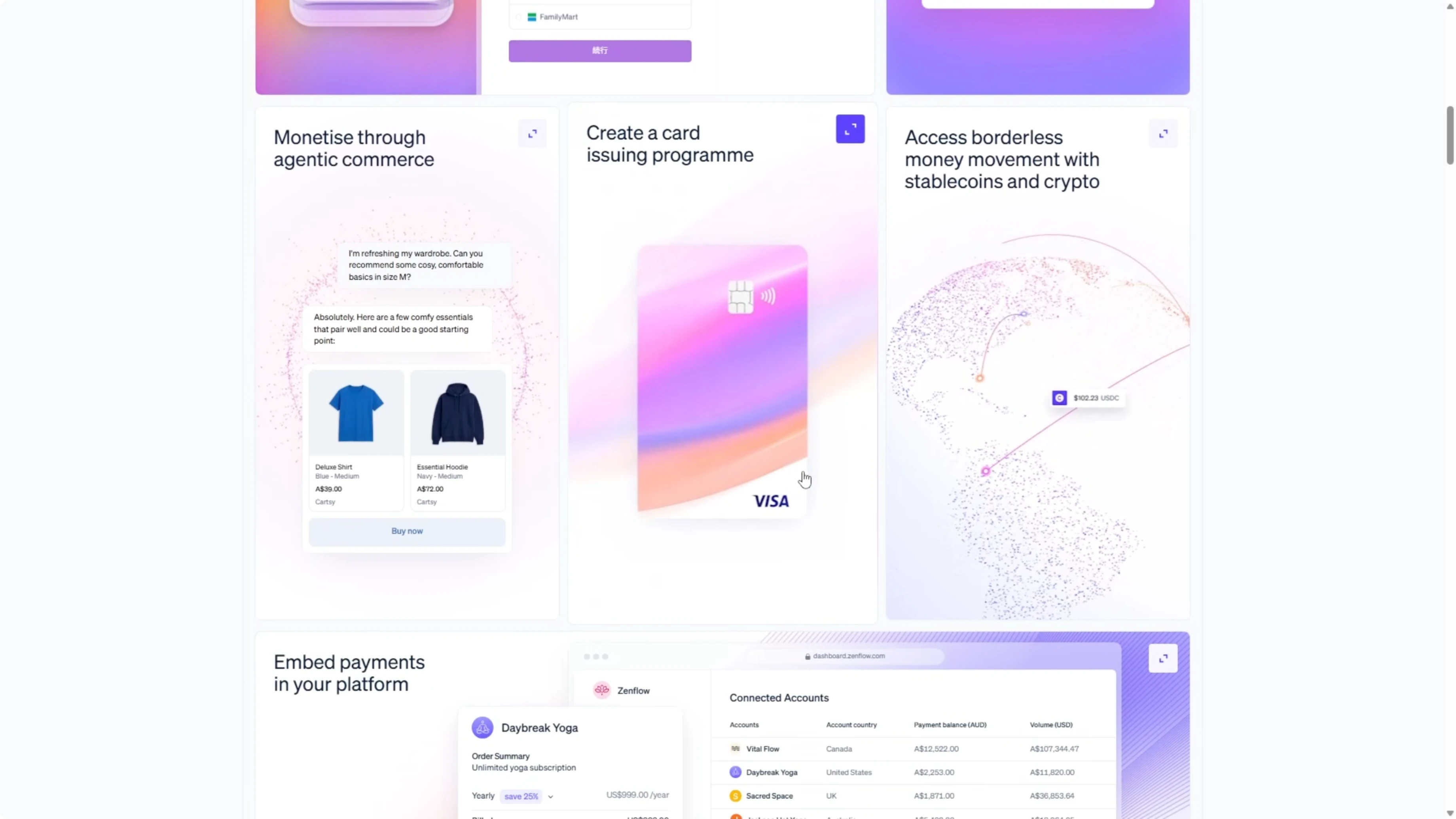
Codex finished in 3 and a half minutes. The page structure was present, including the hero with a gradient, a GDP counter, and a logo bar.
It did not use real logos and relied on large text in those slots. All key sections were included in the right order, covering the platform area, developer section, news carousel, and final CTA.
Two things stood out. The font sizing throughout was noticeably larger than the original, which made the page feel off. The solutions cards had the right titles and gradient backgrounds, but the interiors were empty where the product UI mockups should have been.
The footer also showed oversized font, which weakened visual accuracy compared to the real Stripe page. That was an area where Codex did not do a great job.
Opus took 8 and a half minutes, so about two and a half times longer than Codex. The typography scale was much closer to the original, and proportions felt right.
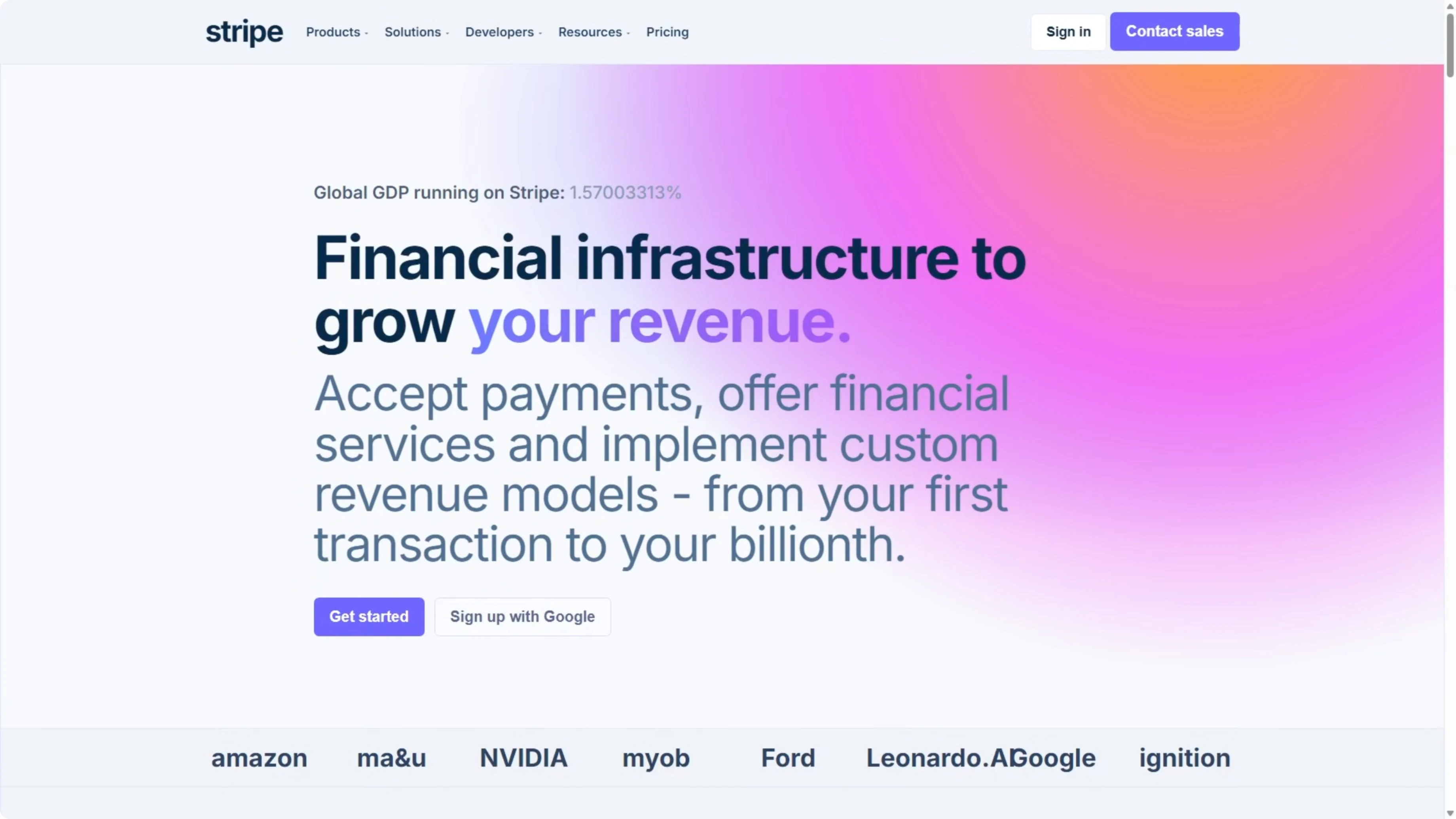
The logo bar used proper logos rather than just text. The solutions cards included actual product mockups, including a phone payment terminal with line items and a total, a browser checkout form with email fields and an order summary, and a billing dashboard with a usage meter and bar chart.
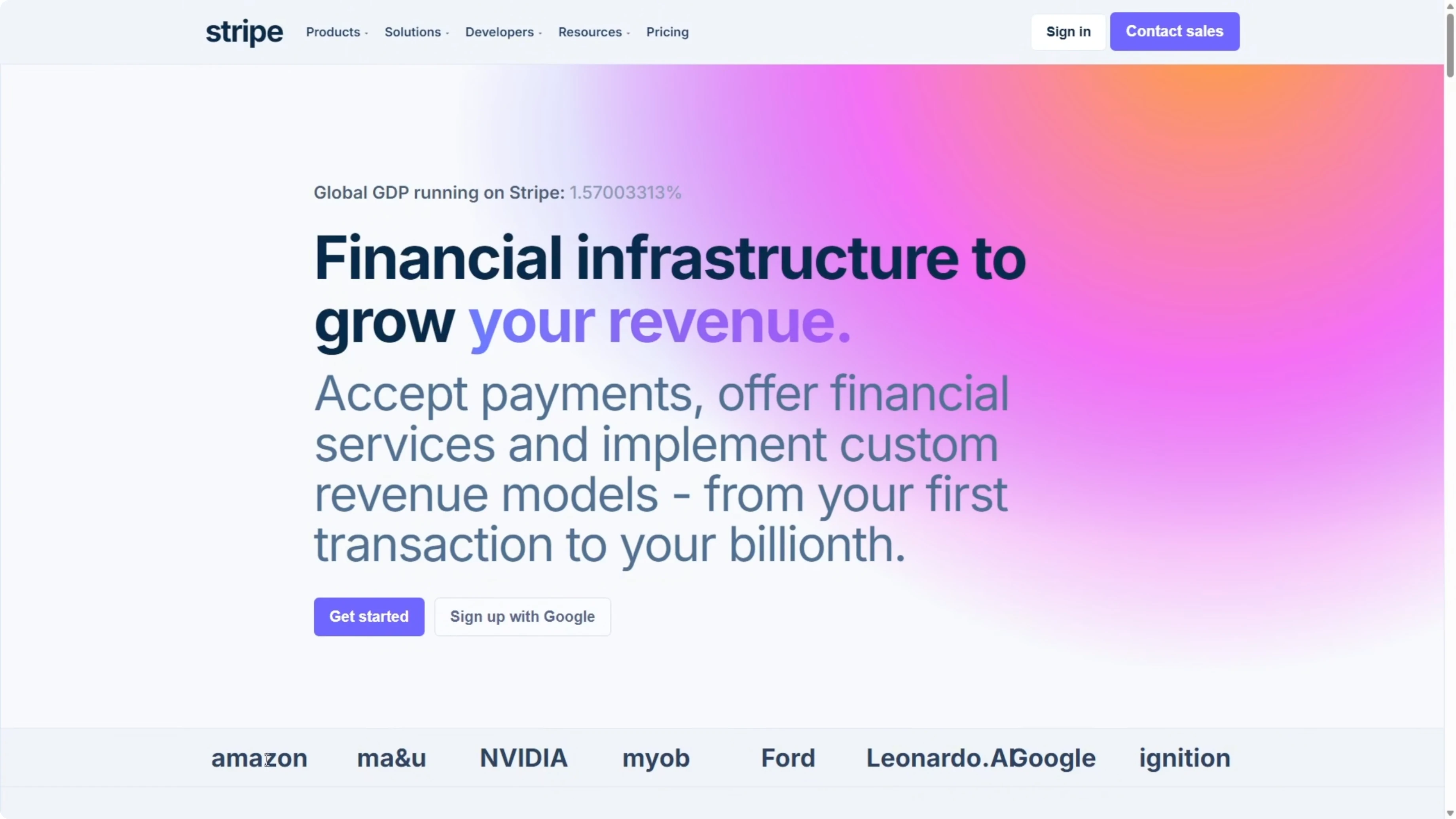
There was more detail throughout the middle sections, with an attempted animation and cleaner structure. The footer was a lot more accurate and matched the Stripe homepage closely.
For another pairing that looks specifically at how Codex stacks up against Opus plus other strong contenders, see this targeted face-off: Codex vs Opus and peers.
Example markup for accurate cards and logos
Here is a minimal approach to match the cards and logo bar from screenshots.
// LogosAndCards.tsx
export function LogoBar() {
  return (
    <div className="logos" aria-label="Customer logos">
      <img src="/logos/amazon.svg" alt="Amazon" />
      <img src="/logos/shopify.svg" alt="Shopify" />
      <img src="/logos/salesforce.svg" alt="Salesforce" />
      <img src="/logos/atlassian.svg" alt="Atlassian" />
    </div>
  );
}

export function SolutionCard({ title, children }) {
  return (
    <article className="card">
      <header><h3>{title}</h3></header>
      <div className="mockup">{children}</div>
    </article>
  );
}

// Usage
export function SolutionsGrid() {
  return (
    <section aria-label="Solutions">
      <SolutionCard title="Payments">
        <div className="terminal">
          <ul>
            <li>Line item A <strong>$12.00</strong></li>
            <li>Line item B <strong>$7.00</strong></li>
          </ul>
          <div className="total">Total <strong>$19.00</strong></div>
        </div>
      </SolutionCard>
      <SolutionCard title="Checkout">
        <form>
          <label>Email<input type="email" placeholder="you@example.com" /></label>
          <label>Card<input inputMode="numeric" placeholder="4242 4242 4242 4242" /></label>
          <button>Pay</button>
        </form>
      </SolutionCard>
    </section>
  );
}
If you want to expand benchmarks with an additional foundation model in the mix, this round-up compares GLM 5 with both Opus 4.6 and GPT-5.3 Codex: GLM 5 vs Opus 4.6 vs GPT-5.3 Codex.
Comparison overview - Opus 4.6 vs GPT-5.3 Codex
| Aspect | GPT-5.3 Codex | Opus 4.6 |
|---|---|---|
| PRD build time | ~7:03 | ~22:30 |
| Testing behavior | No browser testing during build | Repeated visual test cycles |
| Self-corrections | Addressed Leaflet clustering incompatibility and pivoted | Fixed multiple runtime bugs during testing |
| Accessibility from PRD | Not addressed | Implemented aria labels and keyboard navigation |
| Bundle size target | Not measured | Measured, under 500 KB |
| Dev run (Quakewatch) | Map worked in full screen, list scroll container correct | Map broke in full screen due to missing scroll container |
| Visual build speed (Stripe) | ~3.5 minutes | ~8.5 minutes |
| Visual fidelity (Stripe) | Correct structure, oversized fonts, empty card interiors | Accurate typography, real logos, full card mockups |
| Overall pattern | Consistently faster, strong code output from written specs | Slower, more thorough, higher visual precision |
For a broader strategic view on choosing across vendors for code and UI-heavy work, see this guide that compares families and versions in one place: Codex vs Opus and more.
Step-by-step: Reproduce the Quakewatch PRD build
Open Cursor and create a fresh project directory.
Paste the full PRD, instruct the model to choose its own tech stack, and request a production-ready setup with a dev script.
Run the dev server, open the local URL, and verify the map, charts, filters, and detail panel.
Tab through the UI to confirm keyboard navigation and check aria labels on interactive elements.
Measure the bundle size and confirm it stays under 500 kilobytes using your bundler’s analyzer.
Switch to full screen and verify the map layout and the scroll container behavior on the earthquake list.
Step-by-step: Reproduce the Stripe screenshots rebuild
Create two separate directories in Cursor, one for each model.
Drop in the screenshots of the Stripe homepage and prompt the model to recreate the page from the images alone, matching design, layout, colors, typography, spacing, and recognizable interactions.
Start the dev server, scan the page from top to bottom, and log sections that diverge from the screenshots, including typography scale, logos, card interiors, and footer accuracy.
If you are also comparing multiple Opus versions during this process, this focused write-up can help explain unexpected differences in layout or typography behavior: version-to-version notes for Opus.
Use cases - GPT-5.3 Codex
Codex is strong for building complex apps from written specs where speed matters. It produced a clean Quakewatch build that worked in dev mode and handled a Leaflet pivot on its own.
If you work primarily from PRDs and want working code fast, Codex fits that profile.
Use cases - Opus 4.6
Opus shines when prompts include images or you need high visual precision. It matched Stripe’s typography scale, used real logos, and built full product mockups inside cards.
If your task is more UI-led or you rely heavily on screenshots and mockups, Opus produces output with visible detail.
For a lens on how Opus fits into the Claude lineup and where it improves fidelity, see this deep-dive: Claude Opus 4.6 details.
Pros and cons - GPT-5.3 Codex
Pros: very fast PRD builds, solid problem solving on library conflicts, and a working dev run on Quakewatch. Cons: skipped accessibility tasks from the spec, did not measure bundle size, and visual rebuilds showed sizing issues and empty interiors.
This model is a strong pick for functional builds from text where throughput wins.
Pros and cons - Opus 4.6
Pros: thorough visual testing during build, implemented accessibility and measured bundle size, and high-fidelity UI recreation from screenshots. Cons: slower build time, plus a layout oversight on the Quakewatch list that broke the map in full screen.
This model is a strong pick for UI accuracy and image-guided work.
If you want a second multi-model snapshot that includes another family in the mix, this overview adds one more baseline for decision-making: GLM 5 vs Opus 4.6 vs GPT-5.3 Codex.
Final thoughts
Across both tests, the pattern is clear. Codex is consistently faster, and in the Quakewatch PRD build it was both faster and better in the dev run.
In the Stripe visual test, Opus took longer but delivered higher visual fidelity. If you are building from a written spec and want something functional fast, Codex is a strong choice. If you are working from visual references and you need precision in the output, Opus is worth reaching for.
To compare Codex and Opus across additional vendors and prompts, here is another resource that expands your view across families: a broader Codex vs Opus comparison.
Subscribe to our newsletter
Get the latest updates and articles directly in your inbox.

Related Posts

8 Best Claude Code Plugins in 2026 (You Need to Know)
8 Best Claude Code Plugins in 2026 (You Need to Know)

7 Best Claude Code Skills (You Need to Know)
7 Best Claude Code Skills (You Need to Know)

Claude Code Desktop IDE Features (You Need to Know)
Claude Code Desktop IDE Features (You Need to Know)