
Table Of Content
- How to fix Unacceptable Antigravity Quotas for Gemini 3.1 Pro and Workflow Completely Blocked?
- Solution Overview
- How to fix Unacceptable Antigravity Quotas for Gemini 3.1 Pro and Workflow Completely Blocked?
- Step-by-Step Solution
- Alternative Fixes & Workarounds
- Troubleshooting Tips
- Best Practices
- Final Thought
How to fix Unacceptable Antigravity Quotas for Gemini 3.1 Pro and Workflow Completely Blocked?
Gemini API Pricing Calculator
Dynamically estimate your Google Gemini API costs for text, audio, images, and context caching. Covers new 3.1 Pro, Flash, and 2.5 models.
Table Of Content
- How to fix Unacceptable Antigravity Quotas for Gemini 3.1 Pro and Workflow Completely Blocked?
- Solution Overview
- How to fix Unacceptable Antigravity Quotas for Gemini 3.1 Pro and Workflow Completely Blocked?
- Step-by-Step Solution
- Alternative Fixes & Workarounds
- Troubleshooting Tips
- Best Practices
- Final Thought
You’re hitting strict weekly caps on Gemini 3.1 Pro “Antigravity” that drop from 80% to 20% or hit zero with minimal use. Here’s the fastest way to unblock your workflow right now.
How to fix Unacceptable Antigravity Quotas for Gemini 3.1 Pro and Workflow Completely Blocked?
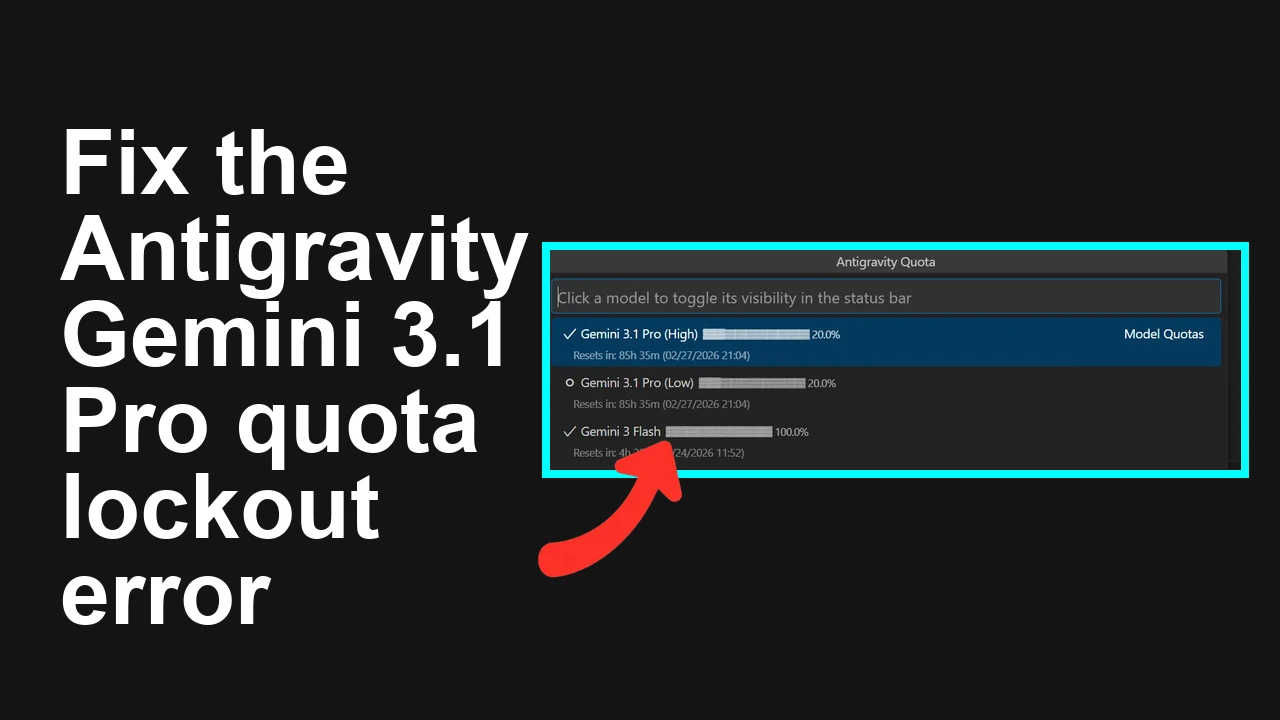
Teams on the Pro plan report the quota gauge falling sharply (e.g., 80% to 20% overnight), rapid depletion right after the weekly reset, and requests failing once the cap is hit. Symptoms include background tabs “counting,” and a perceived mismatch between actual usage and what the quota meter shows.
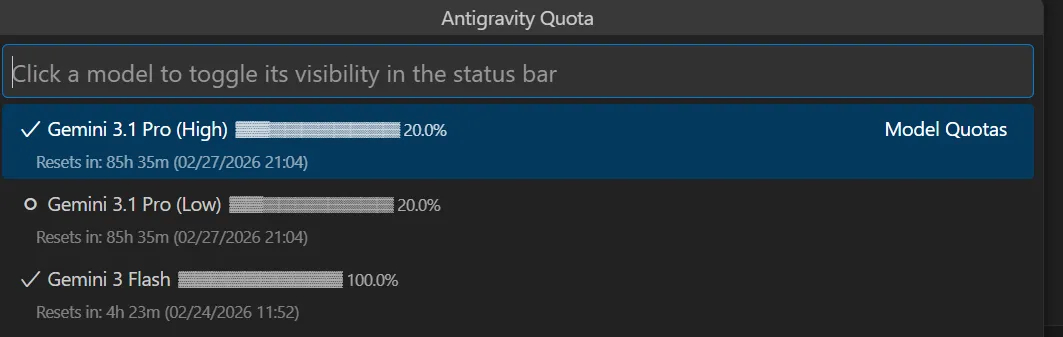
From community replies and Google staff notes, Gemini models currently enforce weekly, per-model limits under heavy demand, and some users are seeing quota metering that appears off. The official stance is that Ultra has different allowances, while Pro has tighter caps during spikes.
If you need a full breakdown of common error patterns and fixes, check our quick reference: Antigravity troubleshooting playbook.
Solution Overview
| Aspect | Detail |
|---|---|
| Root Cause | Weekly, per-model caps under high demand; quota metering and background sessions can drain allowance; migration rollout turbulence |
| Primary Fix | Stop silent usage, switch workloads to a model with higher headroom, implement backoff and a queue, and if needed, upgrade/request quota |
| Complexity | Medium |
| Estimated Time | 20–45 minutes |
How to fix Unacceptable Antigravity Quotas for Gemini 3.1 Pro and Workflow Completely Blocked?
Step-by-Step Solution
1) Stop silent usage and verify the real reset window
- Close all Antigravity/Studio tabs, browser windows, and any long‑running scripts that might be polling or streaming.
- Sign out, then sign back in to ensure no stuck sessions.
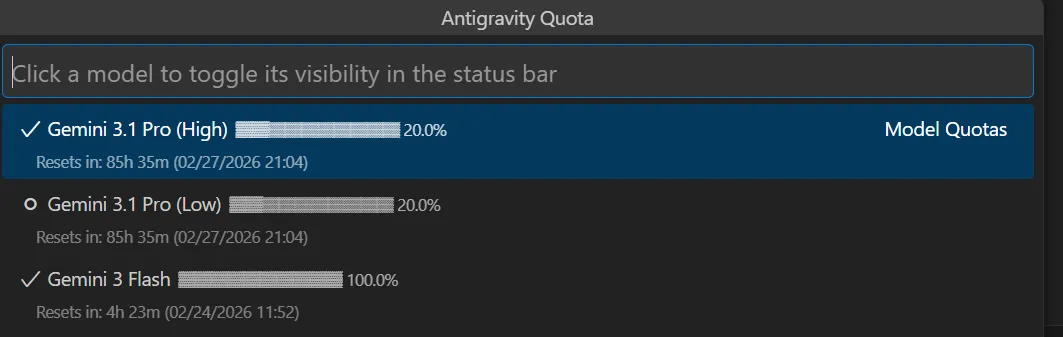
- Check the usage panel in AI Studio for your account and model to confirm the weekly reset day/time and remaining allowance. See official rate-limit guidance: Gemini API rate limits and pricing/allowances.
Tip: If you run workloads on Google Cloud (Vertex AI), also verify quotas in Cloud:
- Console path: Google Cloud Console > IAM & Admin > Quotas (filter for Vertex AI).
- CLI:
gcloud services quotas list --service="aiplatform.googleapis.com" --project="YOUR_PROJECT_ID"For the consumer Gemini API service (AI Studio keys), you can attempt:
gcloud services quotas list --service="generativelanguage.googleapis.com" --project="YOUR_PROJECT_ID"Note: Some consumer quotas are account-scoped and may not appear in gcloud.
2) Switch to a model with more headroom for the heavy work
- If Gemini 3.1 Pro is rate-limited, pivot bulk or background tasks to a “Flash”/throughput-optimized variant or any model listed with higher limits in pricing docs. Keep critical reasoning prompts on 3.1 Pro; move everything else off it.
- Update your client config to route by task type.
Example (Node.js — route non-critical tasks to a higher‑throughput model):
import 'dotenv/config'
import OpenAI from 'openai' // or the Gemini SDK you use

const client = new OpenAI({ apiKey: process.env.GEMINI_API_KEY, baseURL: 'https://generativelanguage.googleapis.com' })

const ROUTES = {
 critical: 'gemini-3.1-pro',
 bulk: 'gemini-3.1-flash', // adjust to an available, higher‑throughput variant
}

export async function generate(text, critical=false) {
 const model = critical ? ROUTES.critical : ROUTES.bulk
 try {
 const res = await client.chat.completions.create({
 model,
 messages: [{ role: 'user', content: text }],
 })
 return res.choices[0].message.content
 } catch (e) {
 if (e.status === 429 || e.status === 403) throw new Error('rate_limited')
 throw e
 }
}
For model behavior changes and what to expect when switching, see this short explainer: model choice overview.
3) Add exponential backoff and a simple queue
- Treat 429/“quota_exceeded” as retriable.
- Back off progressively up to a cap.
- Queue background requests to avoid bursts that burn quota quickly.
Python example:
import os, time, requests

API_KEY = os.getenv("GEMINI_API_KEY")
MODEL = "gemini-3.1-pro"
URL = f"https://generativelanguage.googleapis.com/v1beta/models/{MODEL}:generateContent?key={API_KEY}"

def generate(prompt, max_retries=6, base=1.5):
 body = {"contents": [{"parts": [{"text": prompt}]}]}
 for attempt in range(max_retries):
 r = requests.post(URL, json=body, timeout=60)
 if r.status_code in (429, 403):
 sleep = min(60, (base ** attempt))
 time.sleep(sleep)
 continue
 r.raise_for_status()
 return r.json()
 raise RuntimeError("Rate limited after retries")
Bash cURL probe (helps confirm if your key is hard-blocked now):
curl -sS -X POST \
 -H "Content-Type: application/json" \
 "https://generativelanguage.googleapis.com/v1beta/models/gemini-3.1-pro:generateContent?key=$GEMINI_API_KEY" \
 -d '{"contents":[{"parts":[{"text":"health check"}]}]}'
4) Cut token burn dramatically
- Shorten system and user prompts; collapse boilerplate.
- Trim history. Only pass the last 1–3 relevant turns or a compact RAG summary.
- Prefer structured output with low‑verbosity instructions.
JavaScript prompt compaction pattern:
function compactHistory(history, budget=1500) {
 // history: array of {role, content, tokens}
 let total = 0
 const pruned = []
 for (let i = history.length - 1; i >= 0; i--) {
 total += (history[i].tokens || 200)
 if (total > budget) break
 pruned.unshift(history[i])
 }
 return pruned
}
5) Request higher caps or change plan if production is blocked
- If you’re on Pro and repeatedly blocked midweek, request quota changes on Google Cloud (Vertex AI) or move critical jobs to a plan with higher allowances. Official guidance: Vertex AI quotas and pricing.
- For Cloud quotas: Console > IAM & Admin > Quotas > Filter “Vertex AI” > Edit Quotas > Submit request with business justification.
- If you must stay in AI Studio (non‑Cloud) for now, split workloads by model and throttle client concurrency.
Need a checklist of Antigravity-specific failure modes? See this quick companion: quota errors and false drains.
Alternative Fixes & Workarounds
-
Schedule around the reset window
-
Batch non‑urgent jobs for the first 24–48 hours after the weekly reset.
-
Keep a small “reserve” by enforcing a daily ceiling (e.g., 10–15% of the weekly limit).
-
Move chatty experiments off Pro
-
Exploratory prompts, prompt engineering, and dataset poking should run on a throughput‑friendly model. Switch to Pro only when quality is absolutely required.
-
Reduce concurrent workers
-
Cap client concurrency (e.g., max 2–3 parallel calls per model). This lowers burst hits that can prematurely trip your limit.
-
Cache repeated prompts
-
Deduplicate identical requests and memoize outputs for N hours. This reduces repeat token spend.
For a short, step-by-step recovery when Antigravity locks up, also see: quick fix sequence.
Troubleshooting Tips
- Quota drops when idle
- Confirm no background runners, cron jobs, or playground tabs are open. Sign out and close the browser to be certain.
- 429 vs 403
- 429 usually indicates rate/temporarily exhausted. 403 with a “quota” message can mean weekly cap reached for that model; switch models or wait for reset.
- Meter looks wrong
- Log exact timestamps, request counts, and model IDs. Open a support ticket with these details; miscounting during migrations can happen under load.
- SDK auto-retry collisions
- Some SDKs already retry. Disable or coordinate retries to avoid herd effects that worsen bursts.
- Environment separation
- Use separate API keys per service to pinpoint which app drains the allowance.
Best Practices
- Guardrails in code
- Add per-model budgets and enforce daily ceilings programmatically.
- Model routing
- Route by task class: critical → 3.1 Pro, bulk → Flash/throughput model, ultra‑precision → plan with higher caps.
- Observability
- Track error rates, latency, and request totals. Alert at 70% and 90% weekly consumption.
- Prompt hygiene
- Keep instructions compact; request structured, concise answers.
- Capacity planning
- Before launches, dry‑run with production‑like load and verify your weekly capacity.
If you need a concise reminder for common Antigravity errors and their fixes, bookmark this cheat sheet: Antigravity quota fixes.
Final Thought
Quota pain usually comes from two places: surprise weekly caps under heavy demand and invisible background usage. By stopping silent drains, routing to a higher‑headroom model, and adding backoff plus queuing, you can get moving again today—and keep production stable next week.
Subscribe to our newsletter
Get the latest updates and articles directly in your inbox.

Related Posts
How to fix Agent stuck and can't be stopped error in Antigravity?
How to fix Agent stuck and can't be stopped error in Antigravity?
How to fix Agent is not responding error in Antigravity?
How to fix Agent is not responding error in Antigravity?
How to fix Antigravity won't work with any Gemini models error?
How to fix Antigravity won't work with any Gemini models error?