
Table Of Content
- MCP-CLI (Model Context protocol) ? Stop wasting tokens on MCP Loading
- Installation
- Configure MCP servers
- Old vs new loading behavior
- Architecture and design
- Working with MCP-CLI (Model Context protocol) ? Stop wasting tokens on MCP Loading
- List servers and tools
- Search tools by pattern
- Inspect server details
- Inspect a single tool schema
- Execute calls
- Final Thoughts
What is MCP-CLI (Model Context protocol) ? Stop wasting tokens on MCP Loading
Table Of Content
- MCP-CLI (Model Context protocol) ? Stop wasting tokens on MCP Loading
- Installation
- Configure MCP servers
- Old vs new loading behavior
- Architecture and design
- Working with MCP-CLI (Model Context protocol) ? Stop wasting tokens on MCP Loading
- List servers and tools
- Search tools by pattern
- Inspect server details
- Inspect a single tool schema
- Execute calls
- Final Thoughts
Everyone is shipping in AI but hardly any tool offers any value. They all work but if you try to see what could be the advantage in business scenarios there is none and that is a clear sign of bubble. There are few tools which actually offer value not only in terms of usability but also in terms of cost and I think this MCP CLI is one such tool. It is open-source. It is free. It is MIT license.
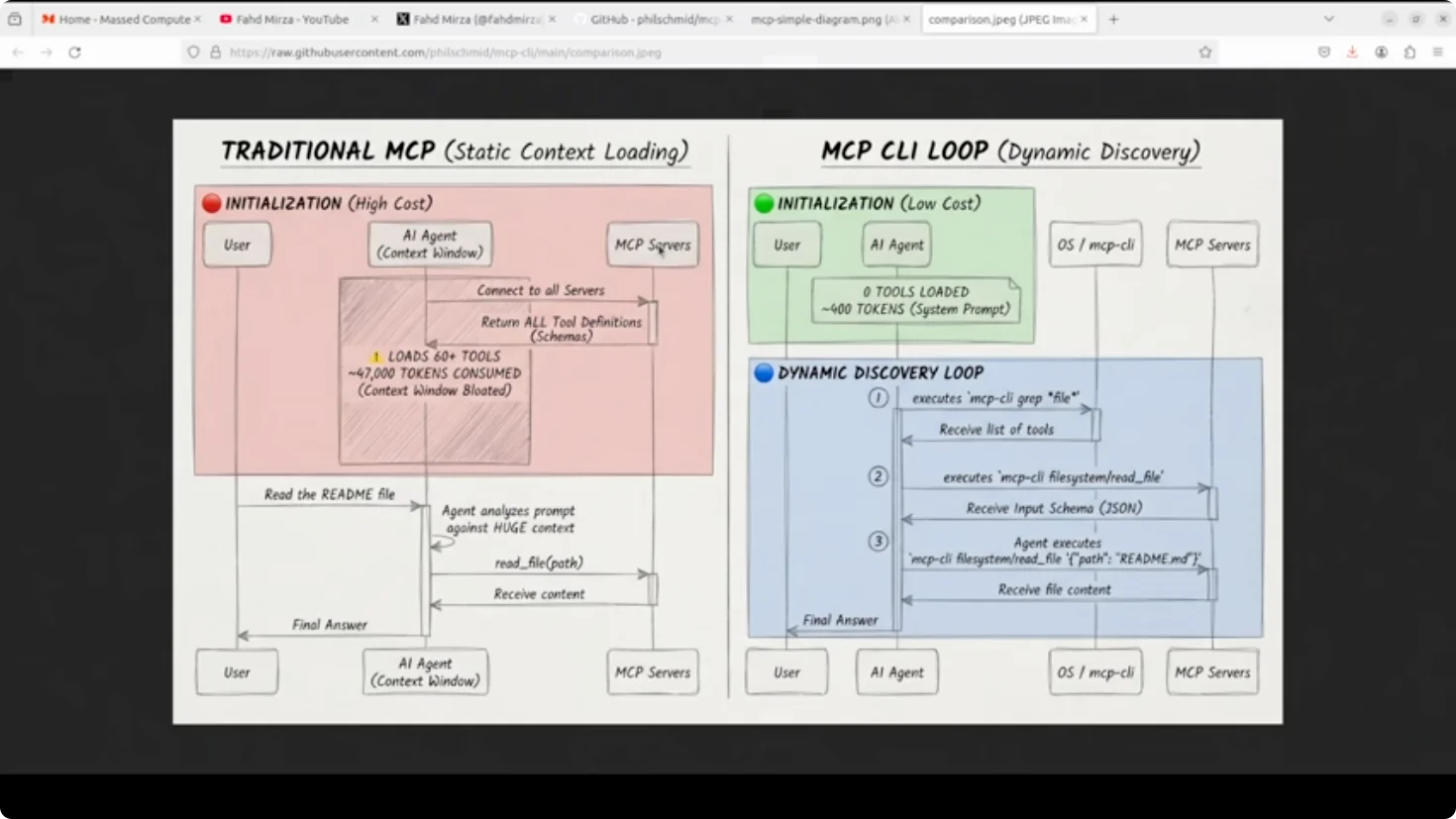
If you are using AI coding agents with MCP servers you have probably noticed your context window getting eaten alive before even you ask your first question. Traditional MCP integration loads every single tool definition up front. 60 tools across a few servers can burn through 47,000 tokens just on initialization as shown in this example from their GitHub repo. This is a real expensive affair.
MCP CLI fixes this by flipping the model entirely. Instead of static context loading, it uses dynamic discovery where tools are fetched only when the agent actually needs them.
Model context protocol or MCP is basically a standard interface that lets AI agents talk to external tools and APIs. One protocol, many tools. Think of it like a universal adapter for AI integration.
MCP-CLI (Model Context protocol) ? Stop wasting tokens on MCP Loading
Installation
For the installation, make sure that you have Bun installed which is an all-in-one runtime. Install the MCP CLI with a bash script. You can also install it from Bun directly. Verify the installation by running the help, and check the version with -v.
Configure MCP servers
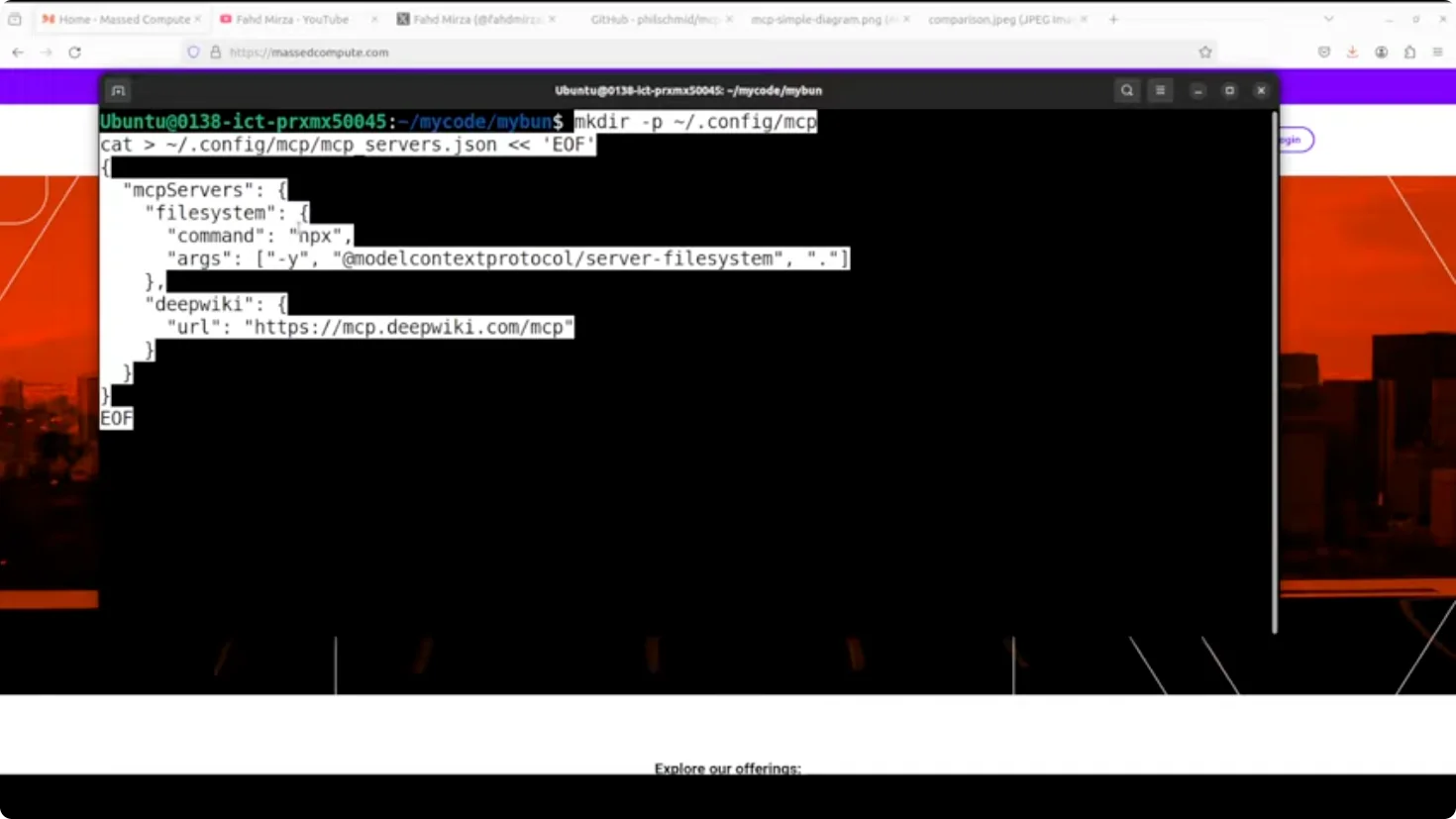
I am going to create a configuration file for MCP. Do not worry if you do not understand it immediately.
Step-by-step:
- Create a .config directory for MCP. That is a standard.
- Create a JSON file where you tell the MCP CLI which MCP servers to connect to.
- Define two servers:
- A file system server that runs via an npx command and lets us read files.
- A deep wiki remote server accessible over HTTP for searching documents.
Old vs new loading behavior
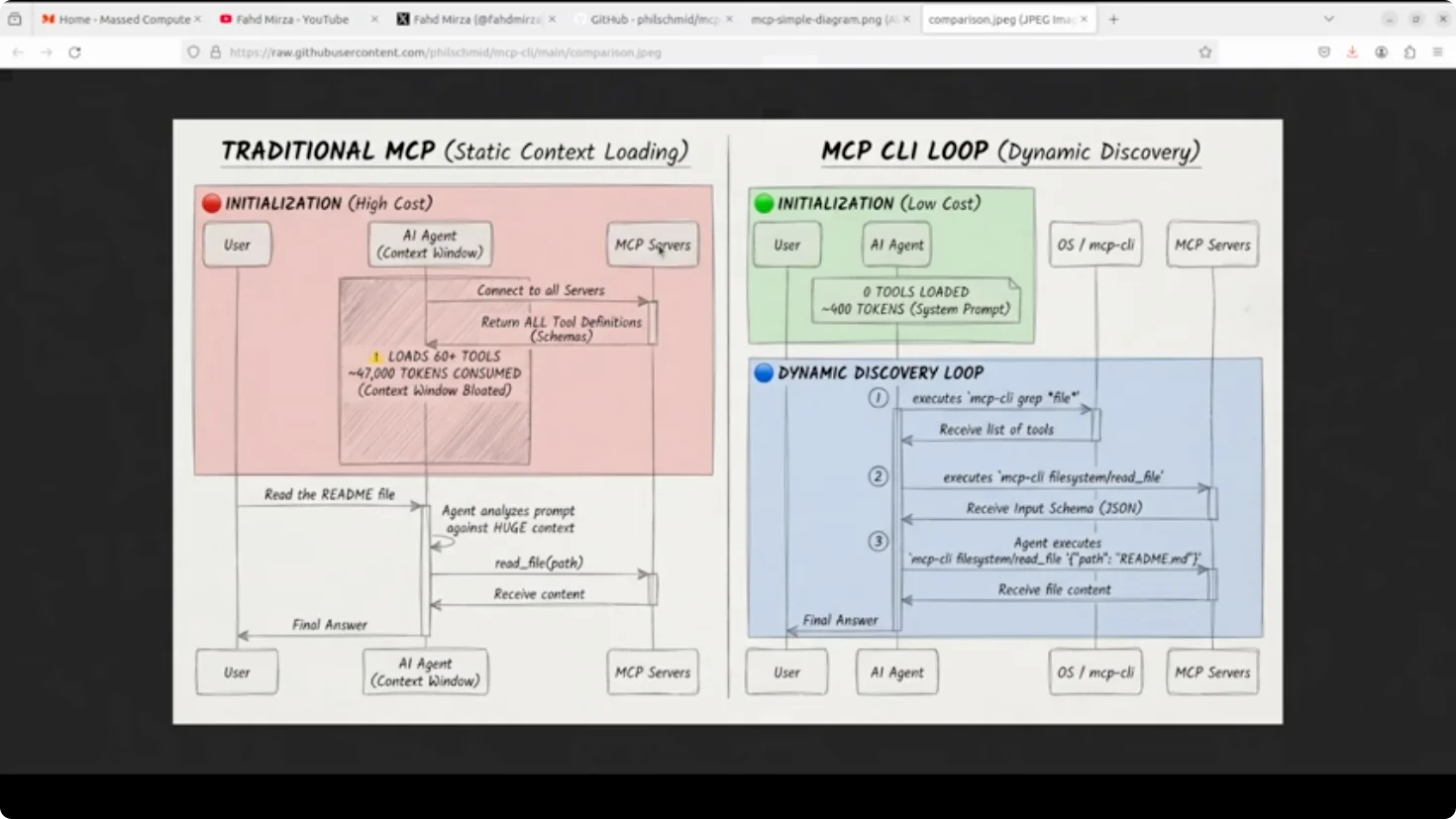
Here is a comparison of what used to happen and what you can do with MCP CLI.
- The agent starts with zero tools loaded, just a lightweight system prompt explaining CLI commands.
- When it needs to read a file, it first runs MCP CLI GP file to find the relevant tool.
- It then fetches the specific schema with MCP CLI file system read file.
- Finally, it executes a call with a JSON argument.
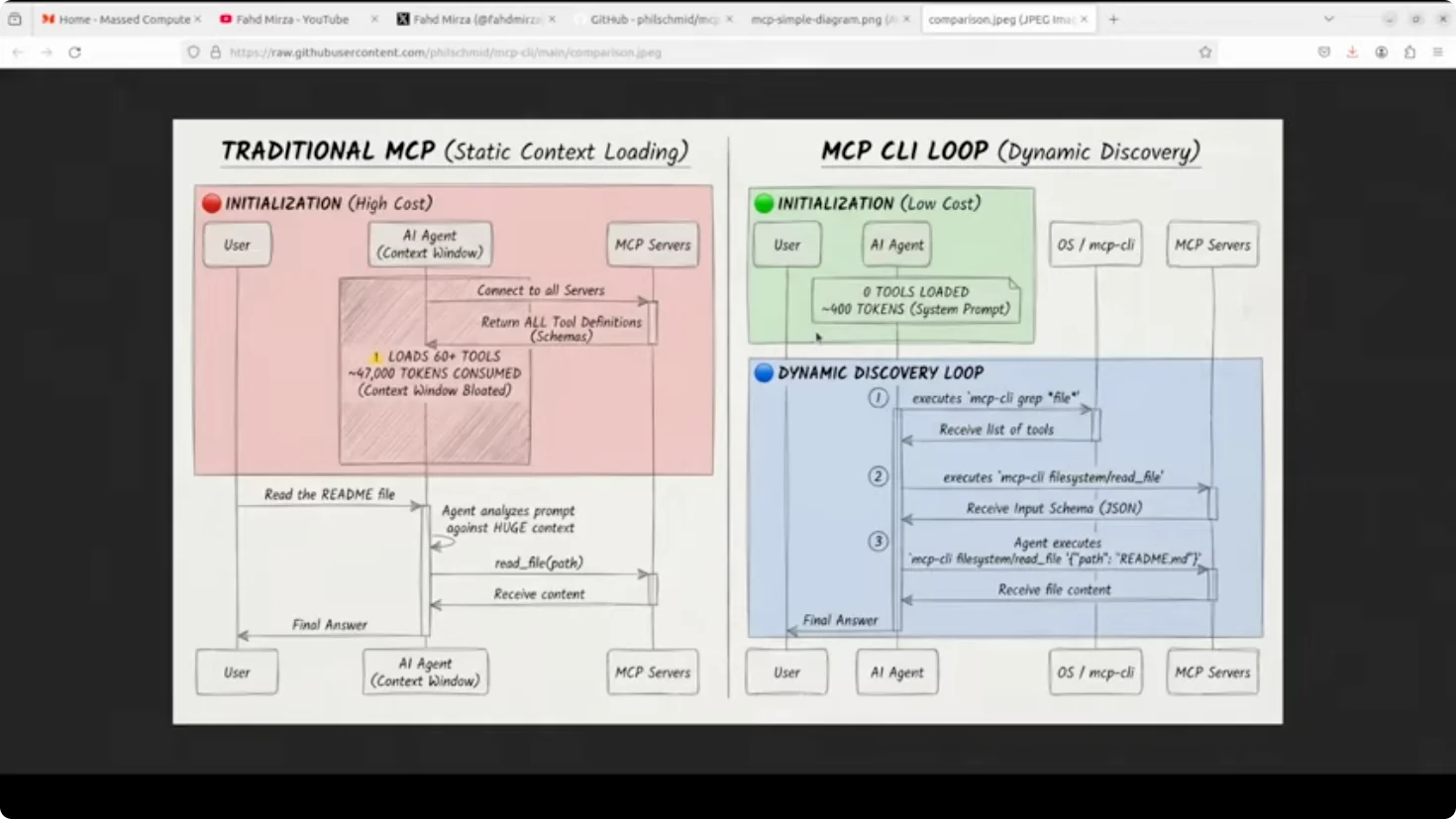
That is three shell commands instead of 47,000 tokens sitting in context. Huge difference.
Architecture and design
- The architecture is lazy by design. Connections to MCP servers are opened only when needed and closed immediately after.
- It handles both local stdio servers and remote HTTP endpoints.
- It uses a worker pool with concurrency limits to prevent resource exhaustion.
- It includes automatic retry with exponential backoff for flaky connections.
- The config format stays compatible with cloud desktop and VS Code, so you are not rewriting anything.
It is a simple trade. A few extra shell calls in exchange for a dramatically linear context window and lower API cost. Cost optimization should be first class citizen.
Working with MCP-CLI (Model Context protocol) ? Stop wasting tokens on MCP Loading
List servers and tools
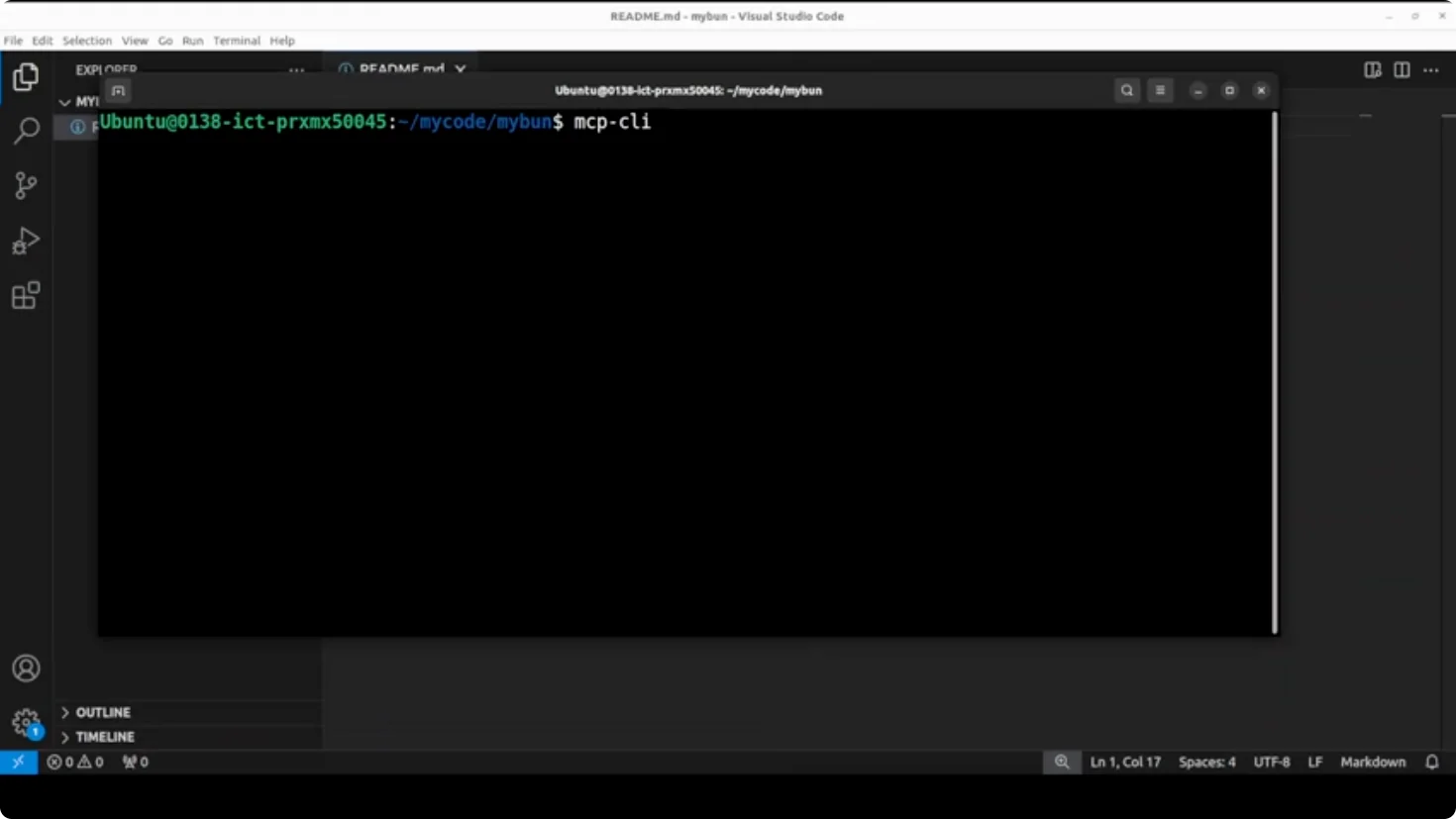
- Run mcpi to list all configured servers. You will see deep wiki and file system and their available tools.
- Include the -d flag to get the same list with full tool descriptions.
Search tools by pattern
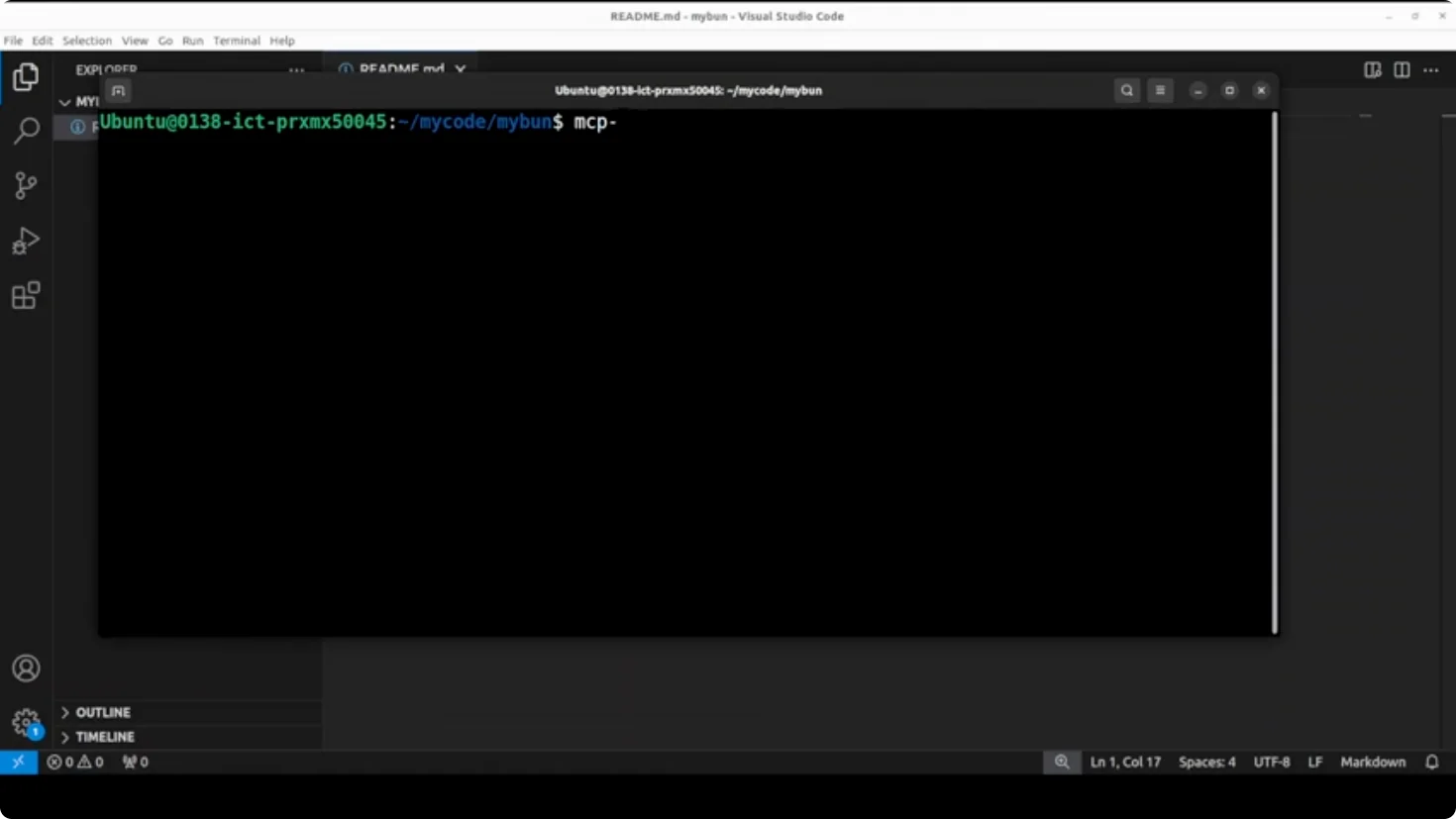
- Search and return all tools matching a file pattern across servers if you are only interested in the file tools. Use typical Linux pattern matching and grep to filter for file.
Inspect server details
- To see file system server details like transport type, command, and all tools with their parameters, query the file system server. You can easily get how you are going to access this, HTTP or anything else.
Inspect a single tool schema
- If you are just interested in one function or tool, check its parameters. For example, mcpi file system/read file shows the input schema, what is required and what is not, the data types, and all that. This is what models read to generate a function call.
Execute calls
- Read a file by calling the file system read function. For example, if the directory has a README file that says hello, read it through MCP CLI by calling that function.
- The file system server also allows you to list all the elements of the directory.
- For the deep wiki server, you can get the structure of the documentation of any repo. You can go with one repo and ask a question about that repo if it allows you to do so.
Final Thoughts
If you are tired of MCP eating your context window alive, give MCP CLI a shot. It flips static loading into on-demand discovery, keeps your prompts lean, and cuts cost without changing your MCP server configs or tool definitions.
Subscribe to our newsletter
Get the latest updates and articles directly in your inbox.

Related Posts

8 Best Claude Code Plugins in 2026 (You Need to Know)
8 Best Claude Code Plugins in 2026 (You Need to Know)

7 Best Claude Code Skills (You Need to Know)
7 Best Claude Code Skills (You Need to Know)

Claude Code Desktop IDE Features (You Need to Know)
Claude Code Desktop IDE Features (You Need to Know)