
Table Of Content
- Run GLM-TTS Locally - Voice Cloning and Streaming for Free
- My System Setup
- What I Will Cover
- GLM-TTS Overview
- How GLM-TTS Generates Speech
- Language Support and Pronunciation Control
- How It Tunes for Natural Sound
- Install GLM-TTS Locally
- Clone and Install
- Prepare for Inference
- What to Expect During Setup
- Run GLM-TTS Inference
- Chinese Text to Speech
- English Text to Speech
- Voice Cloning With a Short Prompt
- Performance Notes, Warnings, and Resource Use
- Step by Step - Run GLM-TTS Locally
- 1) Prepare the System
- 2) Get the Code and Dependencies
- 3) Create the Checkpoint Directory
- 4) Install Hugging Face Hub and Download the Model
- 5) Run the Provided Inference Script
- 6) Review Outputs
- 7) Try Voice Cloning
- GLM-TTS Architecture - A Closer Look
- Step 1 - LLM Plans and Writes Speech Tokens
- Step 2 - Flow Matching Produces the Features and Vocoder Outputs Audio
- Pronunciation Control and Language Coverage
- Multi-Reward Reinforcement Learning
- Outputs and Observations
- Chinese Output
- English Output
- Voice Cloning Output
- Practical Notes and Tips
- Feature Summary
- Quick Reference - Steps and Outcomes
- What Works Today and What Needs Improvement
- Conclusion
GLM-TTS on Your PC: Free Voice Cloning and Live Streaming
Table Of Content
- Run GLM-TTS Locally - Voice Cloning and Streaming for Free
- My System Setup
- What I Will Cover
- GLM-TTS Overview
- How GLM-TTS Generates Speech
- Language Support and Pronunciation Control
- How It Tunes for Natural Sound
- Install GLM-TTS Locally
- Clone and Install
- Prepare for Inference
- What to Expect During Setup
- Run GLM-TTS Inference
- Chinese Text to Speech
- English Text to Speech
- Voice Cloning With a Short Prompt
- Performance Notes, Warnings, and Resource Use
- Step by Step - Run GLM-TTS Locally
- 1) Prepare the System
- 2) Get the Code and Dependencies
- 3) Create the Checkpoint Directory
- 4) Install Hugging Face Hub and Download the Model
- 5) Run the Provided Inference Script
- 6) Review Outputs
- 7) Try Voice Cloning
- GLM-TTS Architecture - A Closer Look
- Step 1 - LLM Plans and Writes Speech Tokens
- Step 2 - Flow Matching Produces the Features and Vocoder Outputs Audio
- Pronunciation Control and Language Coverage
- Multi-Reward Reinforcement Learning
- Outputs and Observations
- Chinese Output
- English Output
- Voice Cloning Output
- Practical Notes and Tips
- Feature Summary
- Quick Reference - Steps and Outcomes
- What Works Today and What Needs Improvement
- Conclusion
Run GLM-TTS Locally - Voice Cloning and Streaming for Free
GLM team released a vision model yesterday and followed it today with a TTS model. This TTS model combines a large language model, flow matching, and multi-reward reinforcement learning to produce studio-quality, emotionally rich, instantly clonable, streaming-ready speech. It is fully open source and ready to run locally. In this guide, I install it on my machine and test it.
My System Setup
I am using an Ubuntu system with one NVIDIA RTX 6000 GPU and 48 GB of VRAM.
- OS: Ubuntu
- GPU: NVIDIA RTX 6000 - 48 GB VRAM
What I Will Cover
- Install GLM-TTS locally
- Explain the model at a high level while installation runs
- Run inference with the provided scripts
- Generate Chinese and English speech
- Try voice cloning with a short prompt
- Share observations on performance, warnings, and output quality
GLM-TTS Overview
GLM-TTS is a next generation text-to-speech system. As described, it aims to sound natural and expressive. It processes input text in two steps and supports real time token streaming, bilingual usage with Chinese and English, phoneme-level input, and short-prompt voice cloning.
How GLM-TTS Generates Speech
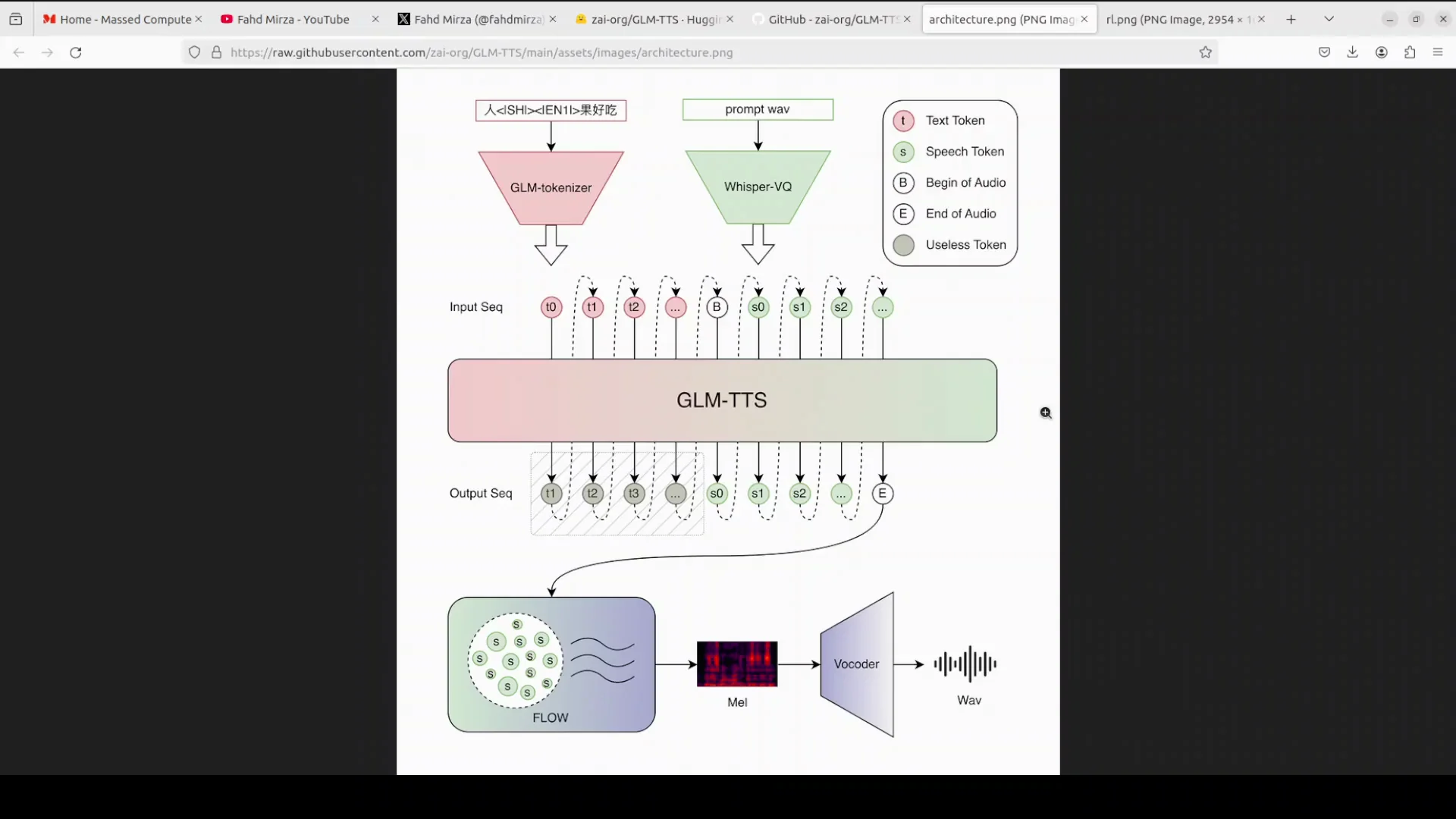
GLM-TTS operates in two clean steps.
- LLM-driven planning and token generation:
- A powerful LLM from the GLM family reads the text.
- It decides how the sentence should sound, including pauses, rhythm, and emotion.
- It converts that plan into a sequence of speech tokens.
- Tokens include normal sound tokens, a token that marks the start of audio, and a special token that marks the end.
- A short reference prompt, only 3 to 10 seconds of someone’s voice, lets the model instantly clone that speaker without retraining.
- Flow matching and vocoding:
- A flow matching model refines the tokens into a clean, high quality mel spectrogram.
- A vocoder converts the spectrogram into waveform audio.
Because the LLM can stream tokens one by one, the system supports real time streaming. Words can appear and the voice can speak almost at the same time.
Language Support and Pronunciation Control
- Works well in Chinese.
- Handles English mixed into Chinese sentences.
- Accepts raw phonemes when precise pronunciation is needed for tricky words or polyphones.
How It Tunes for Natural Sound
GLM-TTS uses reinforcement learning with multiple rewards.
- It introduces reward models that score each generated clip on similarity to the reference code and voice, character error rate, natural emotion, prosody, and whether laughter sounds real.
- These scores are combined and fed back to the LLM using a GRP algorithm, so the model learns to target higher scores across all criteria at once.
- The goal is a voice that does not just read but performs.
Install GLM-TTS Locally
I start the installation and let it run while I continue to discuss the model. Then I complete the download and run inference.
Clone and Install
- Clone the GLM-TTS repository.
- From the repository root, install requirements.
- Installation can take a few minutes.
While installation runs, I continue with the high-level walkthrough of the model above. After installation finishes, I move to inference.
Prepare for Inference
- Create a directory named ckpt.
- Install the Hugging Face Hub library.
- Download the GLM-TTS model locally.
Note on the Hugging Face CLI:
- A previous command was removed and replaced by hf download.
- Use hf download to fetch the model checkpoint.
What to Expect During Setup
- The provided repository includes Python and bash scripts for inference.
- Text inputs are read from files in the repo.
- There are example inputs for Chinese and English.
- Example prompts are available for voice cloning, or you can provide your own prompt audio.
Run GLM-TTS Inference
I use the provided inference scripts. The scripts load the models, process text files, and generate WAV outputs.
Chinese Text to Speech
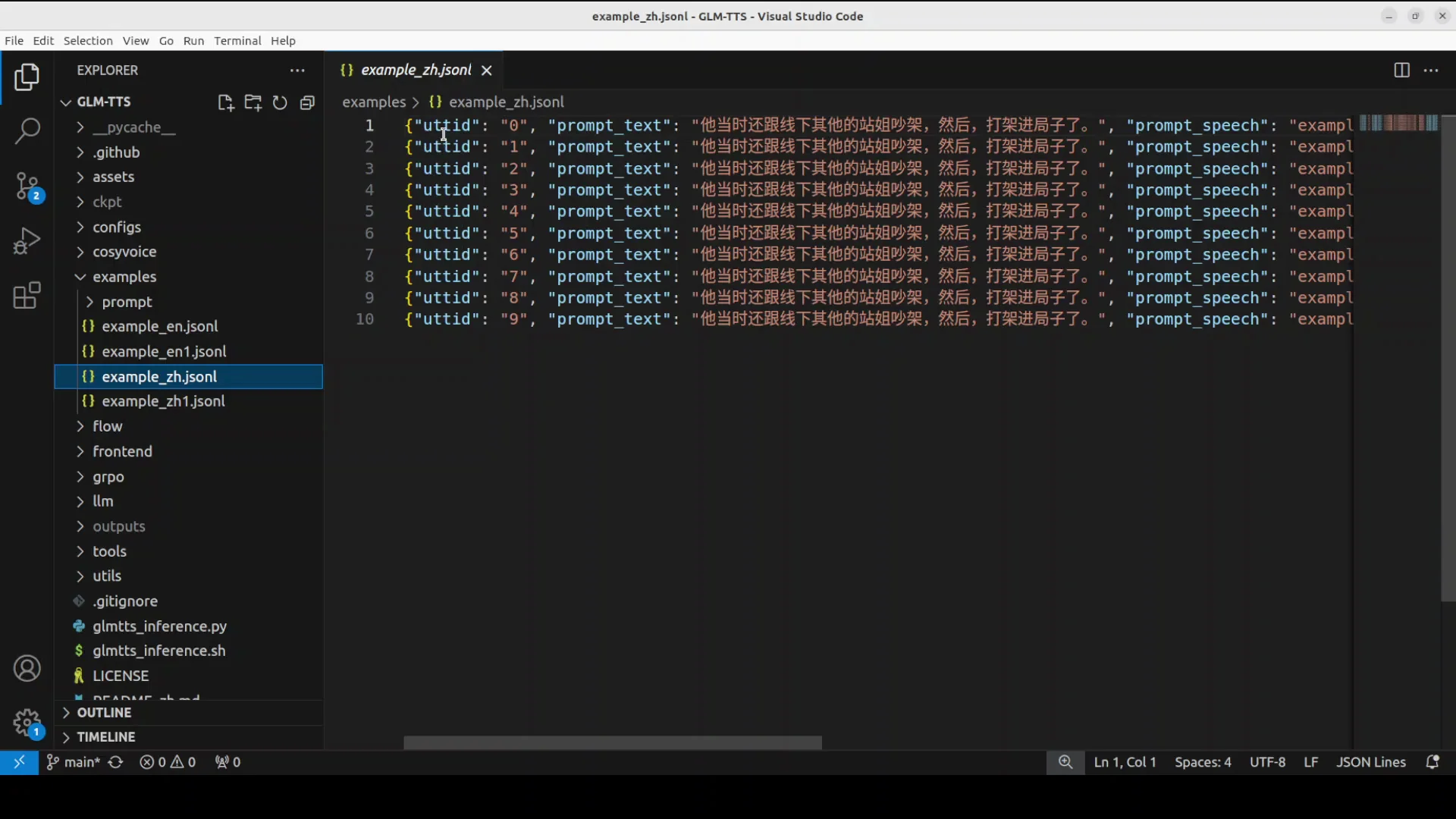
I start with Chinese. The example file contains 10 lines. When the script runs, it generates 10 WAV files locally, one per line of input.
What I observed during the run:
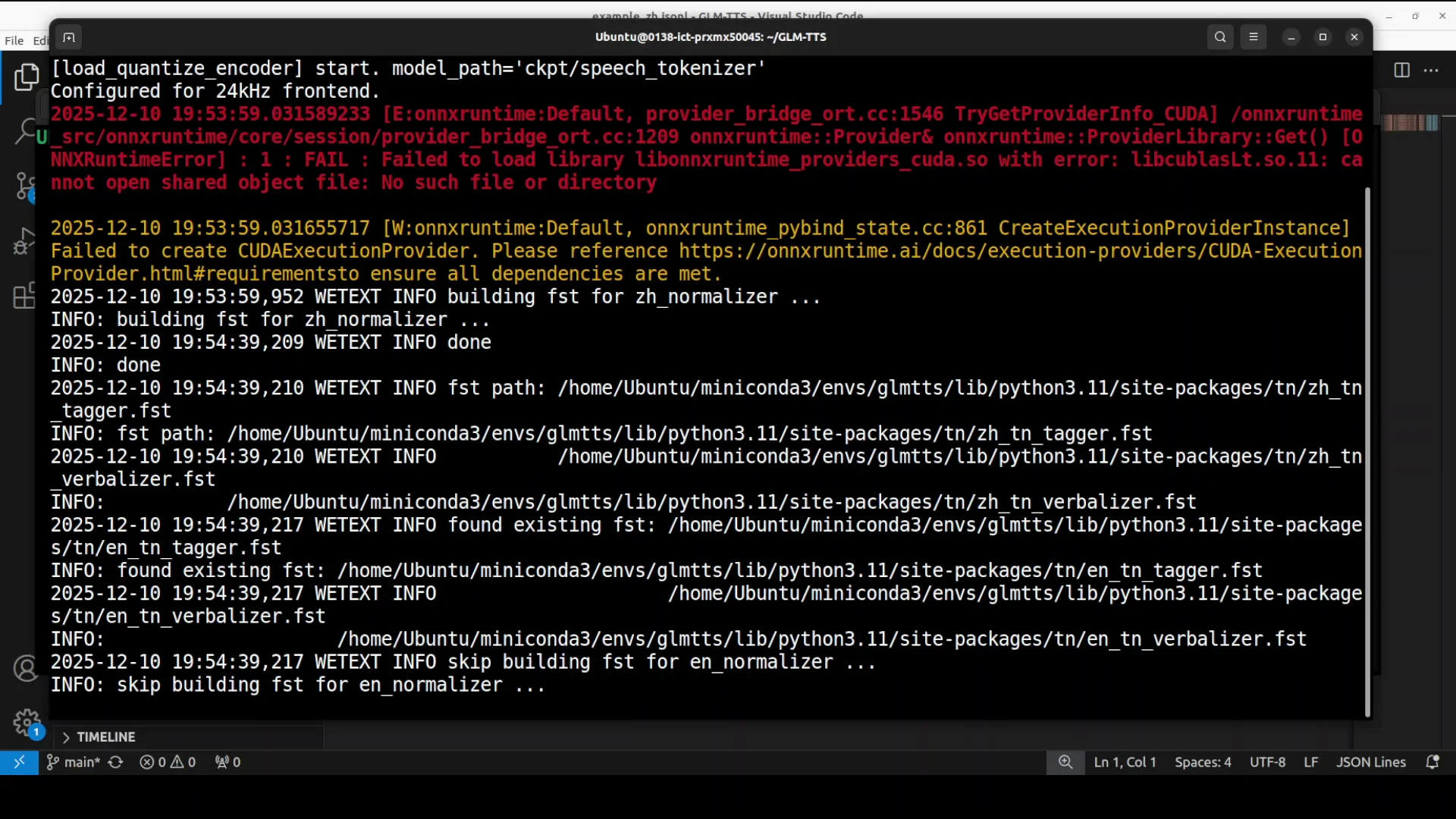
- The system tries to initialize parts of the pipeline on the GPU.
- It loads the models and attempts ONNX, then falls back to CPU when it encounters issues.
- There are many warnings. Even with warnings, the script continues and produces audio.
- It builds normalizers, loads the vocoder, and loads the speech tokenizer.
VRAM usage:
- Under 10 GB on my system for these runs.
Generation speed:
- Roughly under 10 seconds per speech clip in this test.
Outputs:
- 10 WAV files are created.
- A log text file records the input text, any normalization, and whether phonemes were used.
I transfer the outputs for playback. I can see that the files correspond to the 10 lines. I play them back to review how it handles the Chinese text. I cannot independently verify pronunciation quality for Chinese here.
English Text to Speech
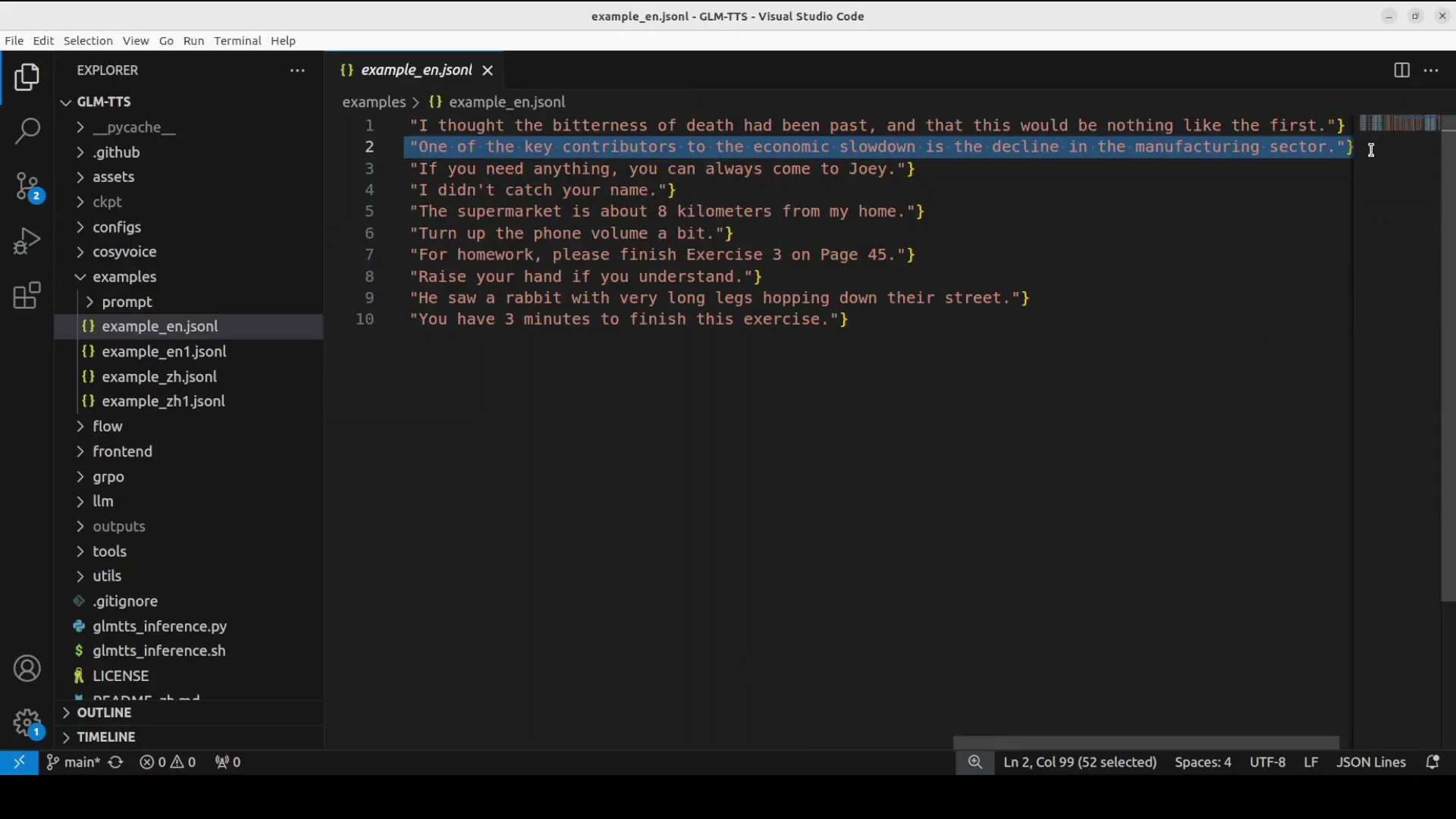
Next, I switch to English. The repo includes an English example with an accompanying prompt and several lines of text. The generation finishes and the files are created in the English example folder.
Playback observations:
- The accent is reasonable.
- Sentences like the following are produced clearly:
- One of the key contributors to the economic slowdown is the decline in the manufacturing sector.
- If you need anything, you can always come to Joey.
- I did not catch her name.
- The supermarket is about 8 km from my home.
- Turn up the phone volume a bit.
- For homework, please finish exercise 3 on page 45.
- Raise your hand if you understand.
- He saw a rabbit with very long legs hopping down their street.
- You have 3 minutes to finish this exercise.
- At times, it sounds a bit monotonous.
Voice Cloning With a Short Prompt
I then test voice cloning using my own short prompt:
- I provide a reference WAV file of my voice, about a single sentence in length.
- The prompt text and the path to the reference audio are specified in the script.
- The process is the same as standard inference.
Guidance on prompt length:
- Aim for a reference audio around 5 to 11 seconds.
Result:
- The generated audio truncates at about 2 seconds.
- I tried longer sentences multiple times and observed the same truncation.
- The cloning quality is close to the reference voice, but the length is too short.
This appears to be an issue in the current inference pipeline or code. It might require fixes in a later update.
Performance Notes, Warnings, and Resource Use
During the Chinese test run:
- The script prints many warnings.
- It attempts to use ONNX, fails at that stage, and falls back to CPU for parts of the pipeline.
- Even with warnings, it proceeds and generates audio.
VRAM use:
- Stays under 10 GB during my tests.
Speed:
- About under 10 seconds per clip for these example inputs.
Artifacts:
- Output directories include WAV files and a log text file.
- Logs note input text, any text normalization, and phoneme usage.
Step by Step - Run GLM-TTS Locally
Follow the steps below in order. This matches the flow I used in my tests.
1) Prepare the System
- Use a Linux machine with a recent NVIDIA GPU and drivers.
- Ensure Python environment tools are available.
- Confirm enough disk space for the model and outputs.
2) Get the Code and Dependencies
- Clone the GLM-TTS repository locally.
- From the repository root, install requirements as instructed by the repo.
3) Create the Checkpoint Directory
- Create a directory named ckpt in the repository root.
4) Install Hugging Face Hub and Download the Model
- Install the huggingface-hub library.
- Use hf download to fetch the GLM-TTS model checkpoint to the ckpt directory.
Notes:
- The old CLI command has been deprecated in favor of hf download.
- The download can take time based on connection speed.
5) Run the Provided Inference Script
- Use the Python or bash script included in the repo for inference.
- Start with the Chinese example. It reads input from the example text file and generates one WAV per line.
- Then switch to the English example. The outputs go to the English example folder.
During generation:
- Expect warnings and ONNX fallbacks to CPU.
- VRAM use might stay under 10 GB on a capable GPU.
- Audio generation speed can be under 10 seconds per file for the provided examples.
6) Review Outputs
- Check the output directory for WAV files.
- Inspect the log file. It shows:
- Input text
- Text normalization activity
- Phoneme usage
7) Try Voice Cloning
- Prepare a clean reference WAV of your voice between 5 and 11 seconds.
- Point the script to your prompt text and your reference WAV.
- Run inference as before.
Current behavior observed:
- The voice clone sounds close to the reference voice.
- Output length truncates to about 2 seconds.
- Longer prompt text did not change the truncation behavior in my tests.
GLM-TTS Architecture - A Closer Look
This overview follows the exact path described earlier and reflects how the repository is structured for inference.
Step 1 - LLM Plans and Writes Speech Tokens
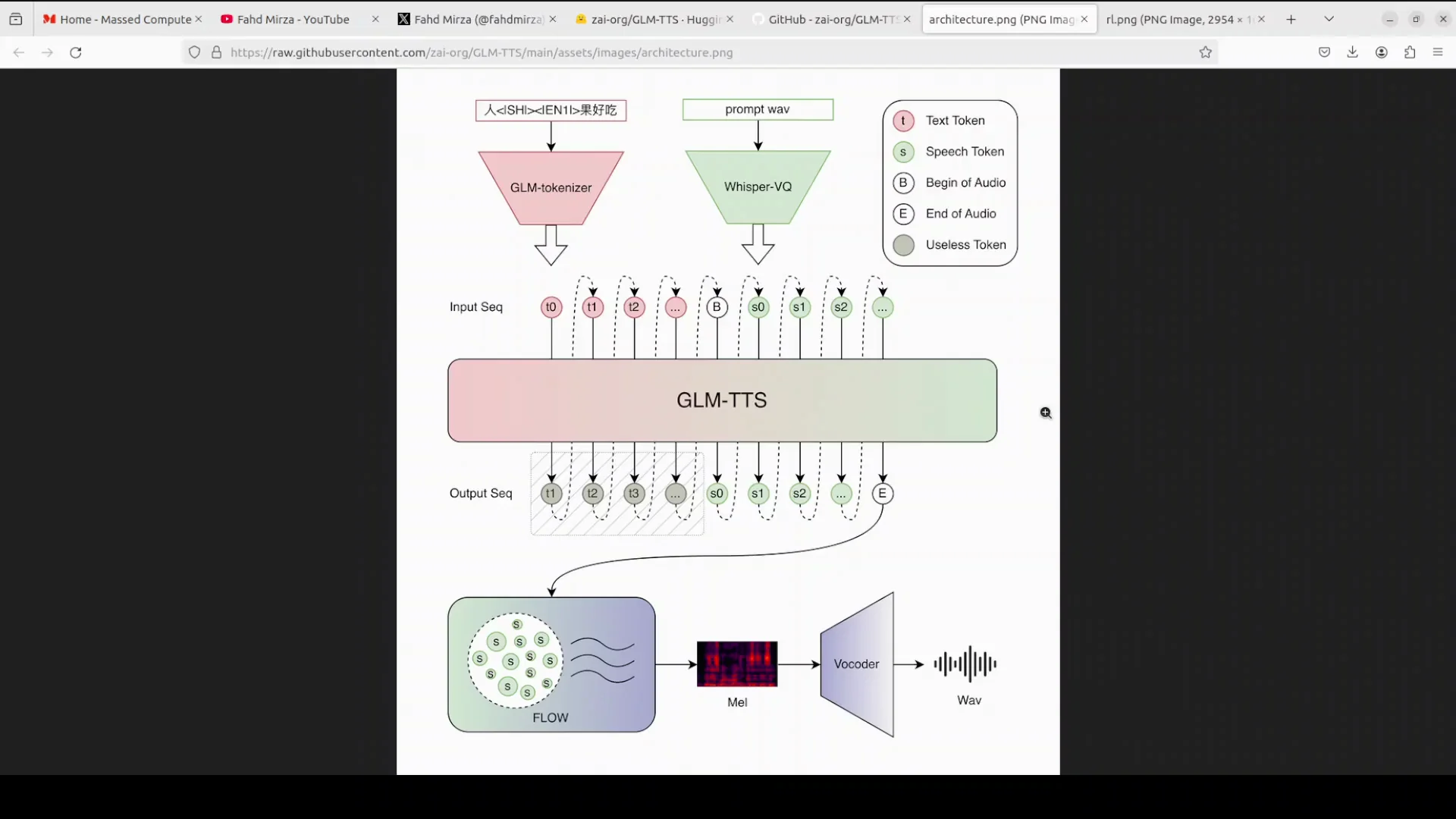
- The GLM family LLM reads the input text.
- It decides on pacing, pauses, rhythm, and emotion.
- It writes a sequence of speech tokens according to that plan.
- Token types include normal sounds, a start-of-audio token, and a special end token.
- A short reference prompt of 3 to 10 seconds allows instant voice cloning without retraining.
In effect, these tokens act like musical notes for speech, encoding how the utterance should be delivered.
Step 2 - Flow Matching Produces the Features and Vocoder Outputs Audio
- The flow matching model turns tokens into a smooth mel spectrogram.
- A vocoder then converts the spectrogram into waveform audio.
- Because token emission can be streamed, streaming voice output is supported, letting you hear speech almost as soon as tokens arrive.
Pronunciation Control and Language Coverage
- Works strongly in Chinese.
- Handles English mixed with Chinese.
- Supports raw phoneme input for precise pronunciation control, helpful for polyphones and tricky words.
Multi-Reward Reinforcement Learning
To improve quality beyond correctness:
- Clips are scored by reward models for multiple criteria: similarity to reference code and voice, character error rate, emotion naturalness, prosody, and realistic laughter.
- Scores are combined and fed back using a GRP algorithm so the LLM learns to improve on all criteria together.
- The goal is expressive speech that reads and also performs.
Outputs and Observations
I followed the repository’s example structure and observed the following across languages and cloning.
Chinese Output
- Generated 10 WAV files from the provided 10 input lines.
- VRAM use stayed under 10 GB.
- Processing included normalizer setup, vocoder loading, and speech tokenizer initialization.
- The script produced many warnings and fell back to CPU for ONNX-related steps.
- Output files were created successfully along with a log text file.
- I could not evaluate correctness of Chinese pronunciation independently.
English Output
- The English example produced multiple files in the English example folder.
- Sentences were clear, with a reasonable accent.
- At times, the delivery sounded a bit monotonous.
Voice Cloning Output
- I provided a short reference WAV of my own voice.
- The cloned output matched the voice signature fairly closely.
- The output length consistently truncated to around 2 seconds, even with longer prompts and multiple attempts.
- Reference audio length guidance: aim for 5 to 11 seconds.
- This truncation looks like a current limitation or issue in the provided inference path.
Practical Notes and Tips
The following points reflect exactly what I encountered while following the repository’s instructions and running the provided scripts.
- Expect warnings and fallbacks:
- The script made an ONNX attempt, failed, and continued on CPU.
- Despite warnings, audio generation completed.
- Manage expectations on resource use:
- VRAM use stayed under 10 GB in my case.
- Plan for speed:
- Generation for these examples was under 10 seconds per clip.
- Check logs:
- The log file records helpful details about normalization and phoneme usage.
Feature Summary
Below is a concise view of what GLM-TTS offers based on the current release and the behavior observed.
- LLM-based planning:
- Prosody, pauses, rhythm, and emotion are planned by an LLM.
- Outputs speech tokens including start and end indicators.
- Flow matching and vocoder:
- Tokens are refined into a mel spectrogram.
- A vocoder produces waveform audio.
- Streaming:
- Tokens can stream for near real time playback.
- Language and control:
- Strong in Chinese.
- Handles mixed Chinese-English input.
- Accepts raw phonemes for precise pronunciation.
- Voice cloning:
- Zero-shot cloning with a 3 to 10 second prompt.
- In current tests, cloned outputs truncated to about 2 seconds.
- Reinforcement learning:
- Multi-reward training targeting similarity, low character error rate, emotion, prosody, and realistic laughter.
- Combined feedback through a GRP algorithm.
Quick Reference - Steps and Outcomes
| Step | Action | Outcome |
|---|---|---|
| Setup | Ubuntu, NVIDIA GPU | Environment ready for local runs |
| Clone and install | Clone repo and install requirements | Dependencies installed |
| Checkpoint prep | Create ckpt directory | Storage location for model |
| Model download | Use hf download | Model files available locally |
| Chinese inference | Run script on Chinese examples | 10 WAV files generated, logs created |
| English inference | Run script on English examples | Multiple WAV files generated |
| Voice cloning | Provide 5-11 second reference WAV | Cloned voice produced, but truncated around 2 seconds |
| Resource check | Monitor VRAM | Under 10 GB during runs |
| Logs | Review text file logs | See normalization and phoneme usage |
What Works Today and What Needs Improvement
From these tests:
-
Strengths:
- TTS quality is solid for both Chinese and English examples.
- The LLM-driven prosody planning is effective.
- Streaming support aligns with token-by-token generation.
- VRAM usage is reasonable for a model of this size.
-
Needs improvement:
- Voice cloning output length is truncated to about 2 seconds in current tests.
- The code and scripts surface many warnings and ONNX fallbacks.
- Increasing cloned audio length would make cloning more practical.
- Expanding from bilingual to multilingual would broaden real world utility.
Conclusion
GLM-TTS brings together an LLM for prosody planning, a flow matching model for smooth features, and a vocoder for waveform synthesis, with multi-reward reinforcement learning to encourage expression and clarity. The repository makes it straightforward to run locally. I installed it, ran the Chinese and English examples, and tested voice cloning. The TTS output is good, streaming capability is supported, and VRAM use is under 10 GB in my tests. The main issue I encountered is truncated output during voice cloning. Extending cloned audio length and reducing warnings and fallbacks would be valuable next steps. The release shows strong potential, and improvements on cloning length and multilingual coverage would make it more versatile.
Subscribe to our newsletter
Get the latest updates and articles directly in your inbox.

Related Posts

8 Best Claude Code Plugins in 2026 (You Need to Know)
8 Best Claude Code Plugins in 2026 (You Need to Know)

7 Best Claude Code Skills (You Need to Know)
7 Best Claude Code Skills (You Need to Know)

Claude Code Desktop IDE Features (You Need to Know)
Claude Code Desktop IDE Features (You Need to Know)