
Table Of Content
- ByteDance Improves Dolphinv2: Universal Document Parsing - Local Hands-on Demo
- What stands out in Dolphinv2
- Test Setup
- Getting the Code and Installing Requirements
- Dolphinv2 Two-Stage Process
- Stage 1 - Joint classification and layout analysis
- Stage 2 - Type-specific content parsing
- Reported Improvements and Openness
- Downloading the Model
- First Run: Supplied Page With Formulas and Indentation
- JSON Output and Page Content
- Markdown Output
- Layout Visualization
- Element Extraction: Table Parsing
- Note on Supporting Libraries
- PDF With Embedded Image: AI-Generated Driving License
- Invoice Parsing
- Assessment of ByteDance Improves Dolphinv2
- Step-by-Step: Reproducing the Local Demo
- 1. Prepare the environment
- 2. Get the repository
- 3. Install dependencies
- 4. Download the model
- 5. Run a page with formulas
- 6. Test table extraction
- 7. Test a PDF with embedded image
- 8. Test an invoice
- Outputs and Observations Summary
- Output formats
- Accuracy highlights
- Known limitations from tests
- Quick Reference Table
- Why the Two-Stage Design Matters
- Final Thoughts
ByteDance Dolphin v2 Review: Universal Document Parser, Local Demo
Table Of Content
- ByteDance Improves Dolphinv2: Universal Document Parsing - Local Hands-on Demo
- What stands out in Dolphinv2
- Test Setup
- Getting the Code and Installing Requirements
- Dolphinv2 Two-Stage Process
- Stage 1 - Joint classification and layout analysis
- Stage 2 - Type-specific content parsing
- Reported Improvements and Openness
- Downloading the Model
- First Run: Supplied Page With Formulas and Indentation
- JSON Output and Page Content
- Markdown Output
- Layout Visualization
- Element Extraction: Table Parsing
- Note on Supporting Libraries
- PDF With Embedded Image: AI-Generated Driving License
- Invoice Parsing
- Assessment of ByteDance Improves Dolphinv2
- Step-by-Step: Reproducing the Local Demo
- 1. Prepare the environment
- 2. Get the repository
- 3. Install dependencies
- 4. Download the model
- 5. Run a page with formulas
- 6. Test table extraction
- 7. Test a PDF with embedded image
- 8. Test an invoice
- Outputs and Observations Summary
- Output formats
- Accuracy highlights
- Known limitations from tests
- Quick Reference Table
- Why the Two-Stage Design Matters
- Final Thoughts
ByteDance Improves Dolphinv2: Universal Document Parsing - Local Hands-on Demo
ByteDance has quietly released another version of their Dolphin model. I covered this model a few months back when it was not there yet, and the Dolphin name has been used by many other providers too. I wanted to see what ByteDance has done with this new version and how it behaves in practice.
Dolphin is a universal document parsing model and this update represents a clear upgrade over the original release. It processes a wide range of document types, from clean digital PDFs to distorted photographed images, through a document type aware two-stage architecture. I cover that process below and then walk through a local hands-on demo.
What stands out in Dolphinv2
- Expanded support for 21 element categories, up from 14.
- Dedicated handling for code blocks with preserved indentation.
- Dedicated handling for mathematical formulas in LaTeX.
- Promised improved precision via absolute pixel coordinates.
I tested these claims locally to see how they hold up.
Test Setup
I used an Ubuntu system with an Nvidia RTX 6000 GPU with 48 GB of VRAM. The goal was to run the model locally, examine its output formats, check memory consumption, and validate the parsing results across different document types and structures.
Getting the Code and Installing Requirements
I cloned the repository and installed the requirements from the root of the repo. The repository size is slightly large. Installation took a few minutes.
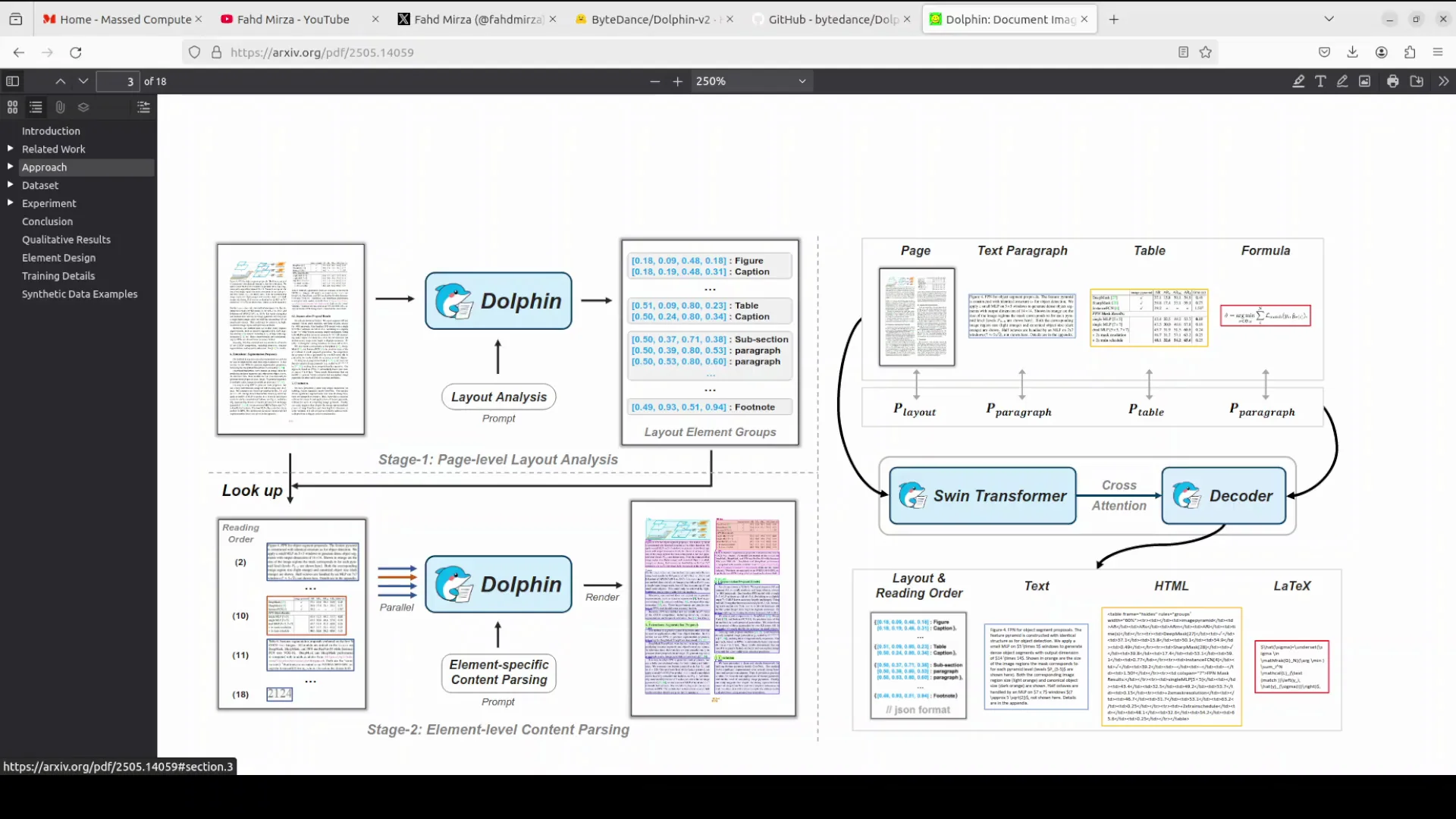
While the installation ran, I reviewed the two-stage training and inference process that underpins Dolphinv2. This mechanism explains many of the observed behaviors and outputs in the tests that follow.
Dolphinv2 Two-Stage Process
Stage 1 - Joint classification and layout analysis
- Given an input, the model first identifies the document type: digital or photographed.
- It then generates a reading order sequence of elements across the expanded categories.
- Supported categories include hierarchical headings, paragraphs, lists, figures, captions, footnotes, and more.
Stage 2 - Type-specific content parsing
- Type-specific prompts drive content parsing.
- For digital documents, parsing is parallel and efficient.
- For photographed documents, parsing is holistic.
- Dedicated modules exist for formulas, code, tables, and paragraphs.
I tested formulas, code structure, tables, and general paragraphs to check both correctness and formatting fidelity.
Reported Improvements and Openness
ByteDance shared information on their GitHub repository and model card with benchmark results that indicate around a 14 percent improvement over the original model. It is an evolution, not a claim of perfection. They also invite users to report issues on GitHub, which I appreciate.
Downloading the Model
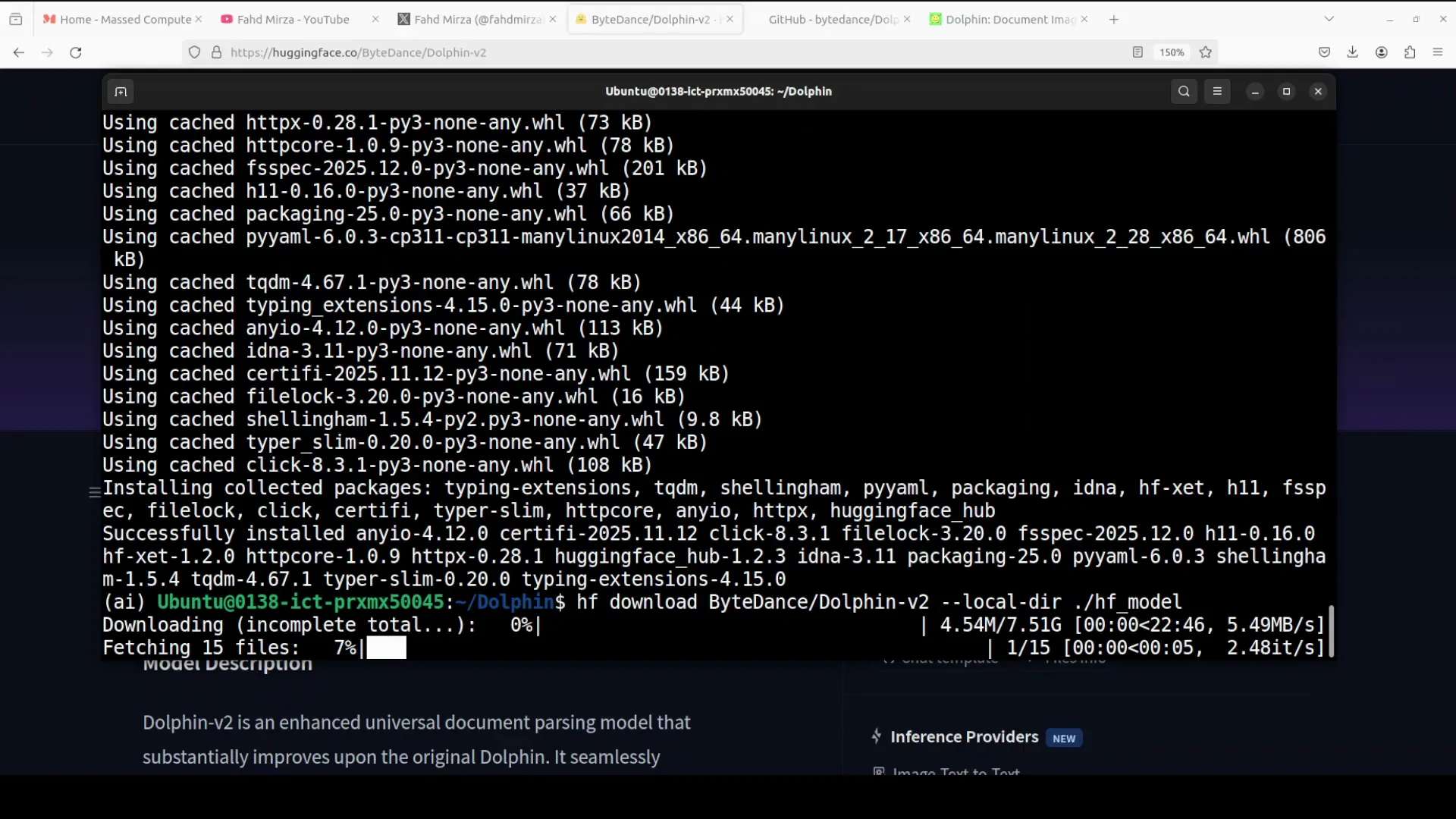
I downloaded the model locally after installation. The size is reasonable. The parameter count has increased to around 3 billion. The model loaded without issues.
First Run: Supplied Page With Formulas and Indentation
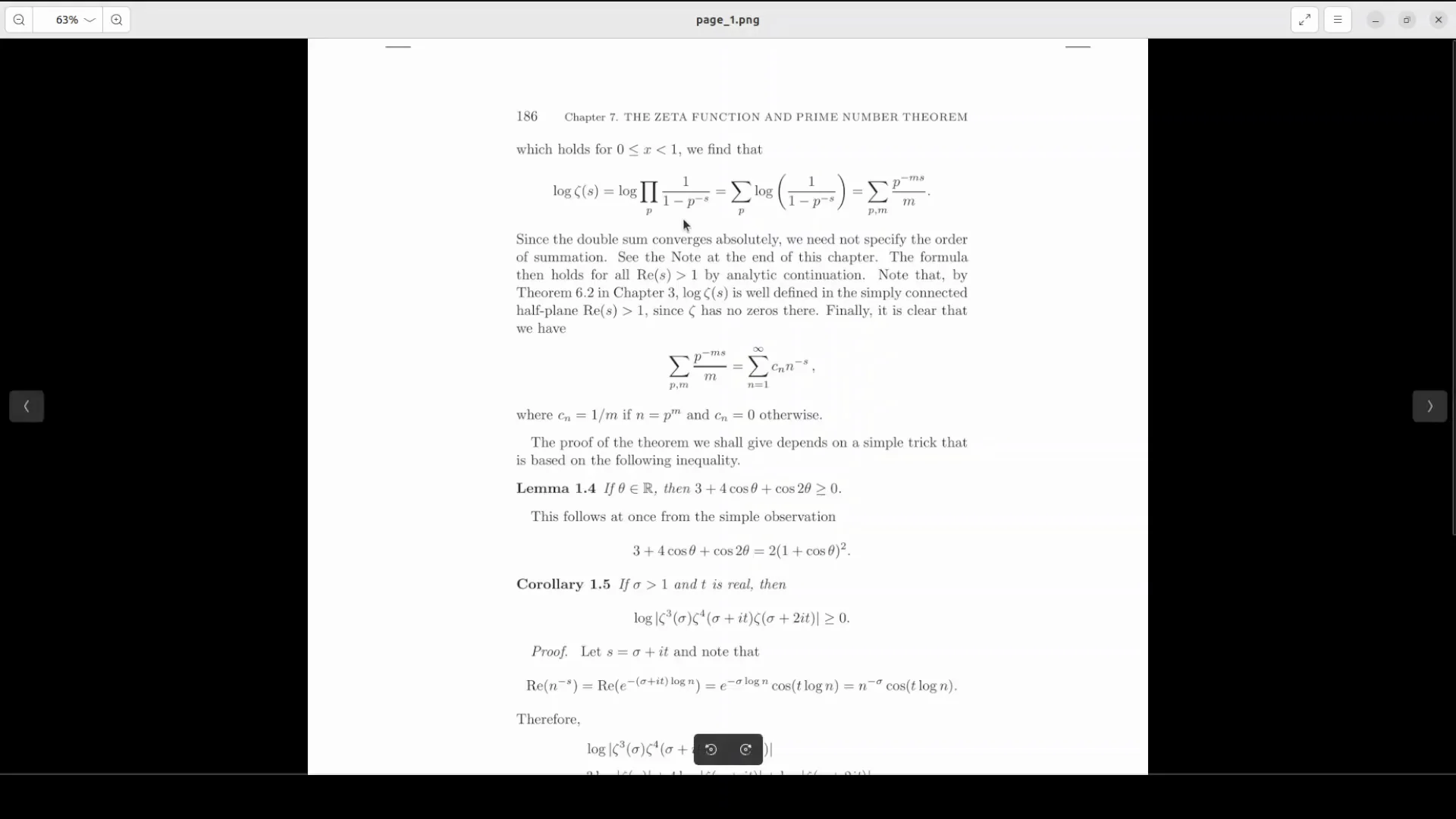
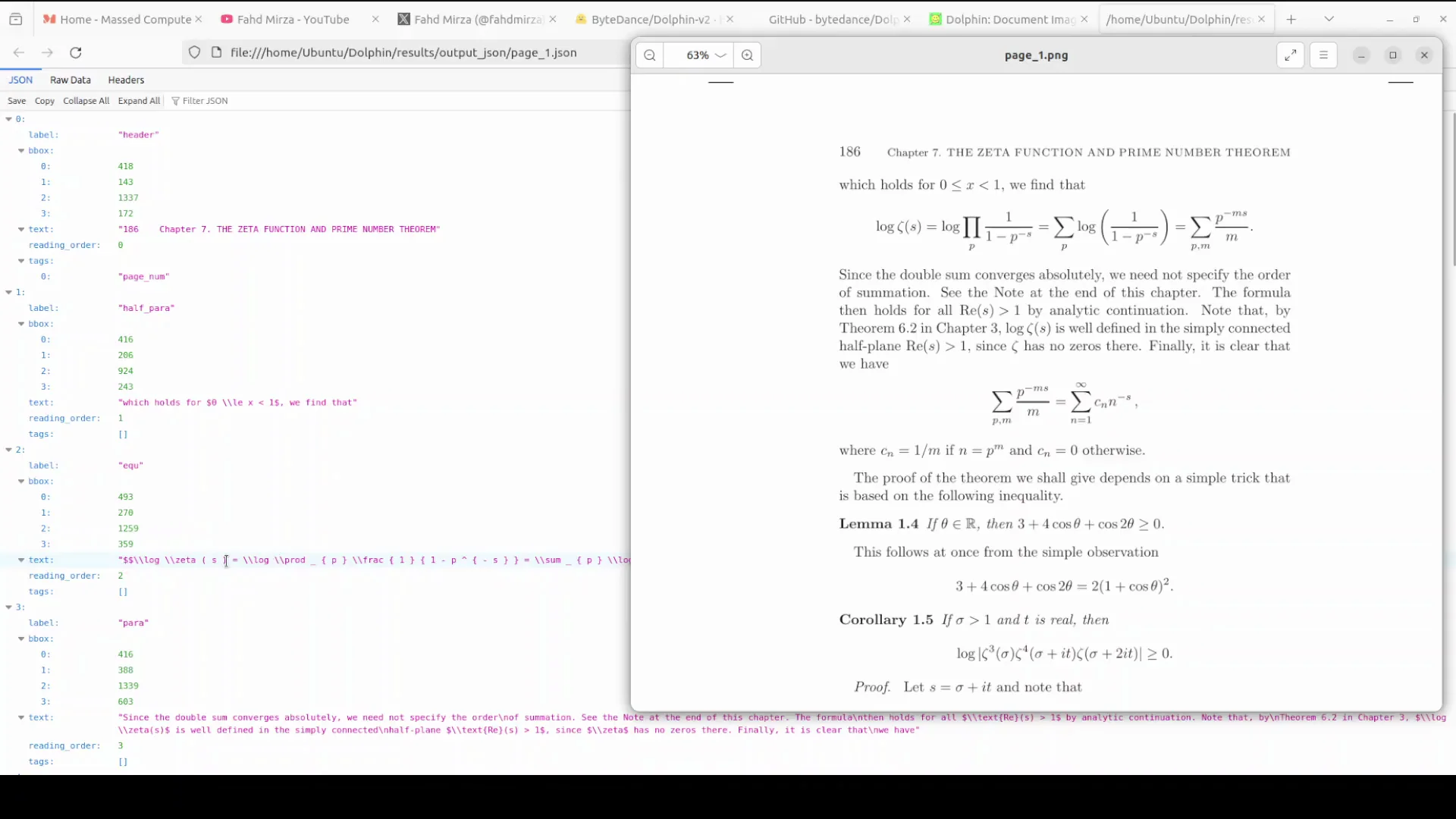
I started with a page from the repository that includes formulas and indentation to test parsing quality across text, headings, and LaTeX.
- The provided script loaded the weights and processed the image.
- GPU VRAM consumption was approximately 8.65 GB during inference.
- The system saved outputs to a results directory with multiple formats:
- JSON
- Markdown
- Layout visualization
- Figures, when present
JSON Output and Page Content
The JSON captured the document structure well. For example, it recognized the chapter heading "Chapter 7 The zeta function and prime number theorem." It enumerated lines and identified elements according to the reading order, reflecting the Stage 1 design.
I was particularly interested in the LaTeX equations. The markdown equation output looked correct, and formulas rendered cleanly. It also identified "LLaMA 1.4" correctly in the text. There were a few minor errors, such as occasional repeated characters, but overall the improvement over the previous version was clear.
Markdown Output
The model produced Markdown that mirrored the structured content and included formulas. The formatting fidelity for equations and indentation was strong for this page. The improvements here are tangible.
Layout Visualization
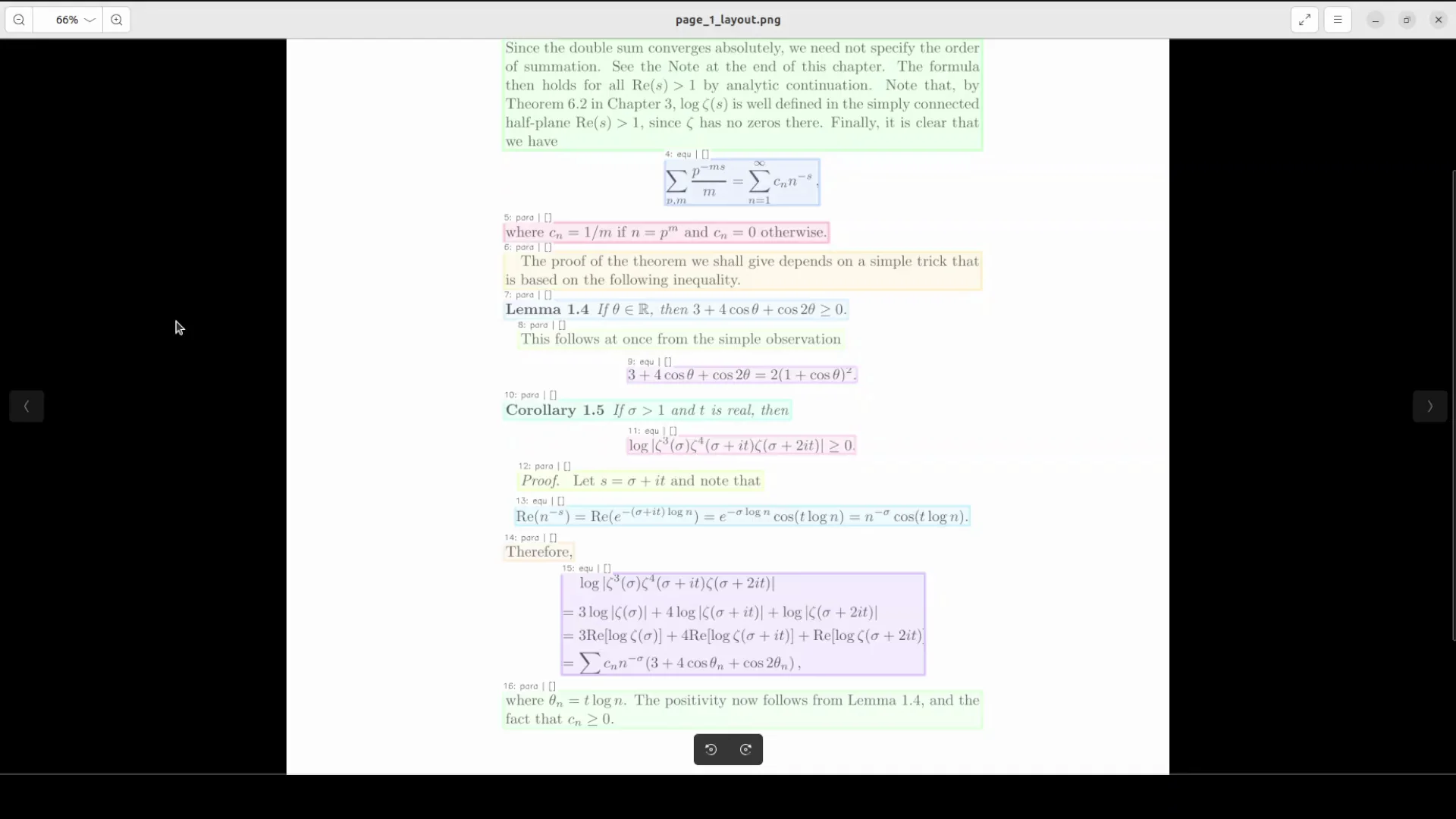
The layout visualization labeled elements such as paragraphs with numerical order (for example, 7th para, 10th para, 12th para). This aligns with the architecture mentioned earlier and offers a good window into how the model sees the page. Understanding this internal structure helps explain the outputs produced in the subsequent content parsing.
Element Extraction: Table Parsing
Next, I tested element extraction with an image containing a table. The goal was to see if the model could extract structured tables into Markdown and JSON formats accurately.
- The process completed and produced results in the output directory.
- The Markdown table preserved headers and values such as "Method" and "Error percent."
- A JSON representation of the table was also generated with all values present and correctly placed.
This result was solid and shows practical utility for structured data extraction.
Note on Supporting Libraries
Interestingly, a Chinese company is using a library called quentov and a pipeline from Alibaba within this context.
PDF With Embedded Image: AI-Generated Driving License
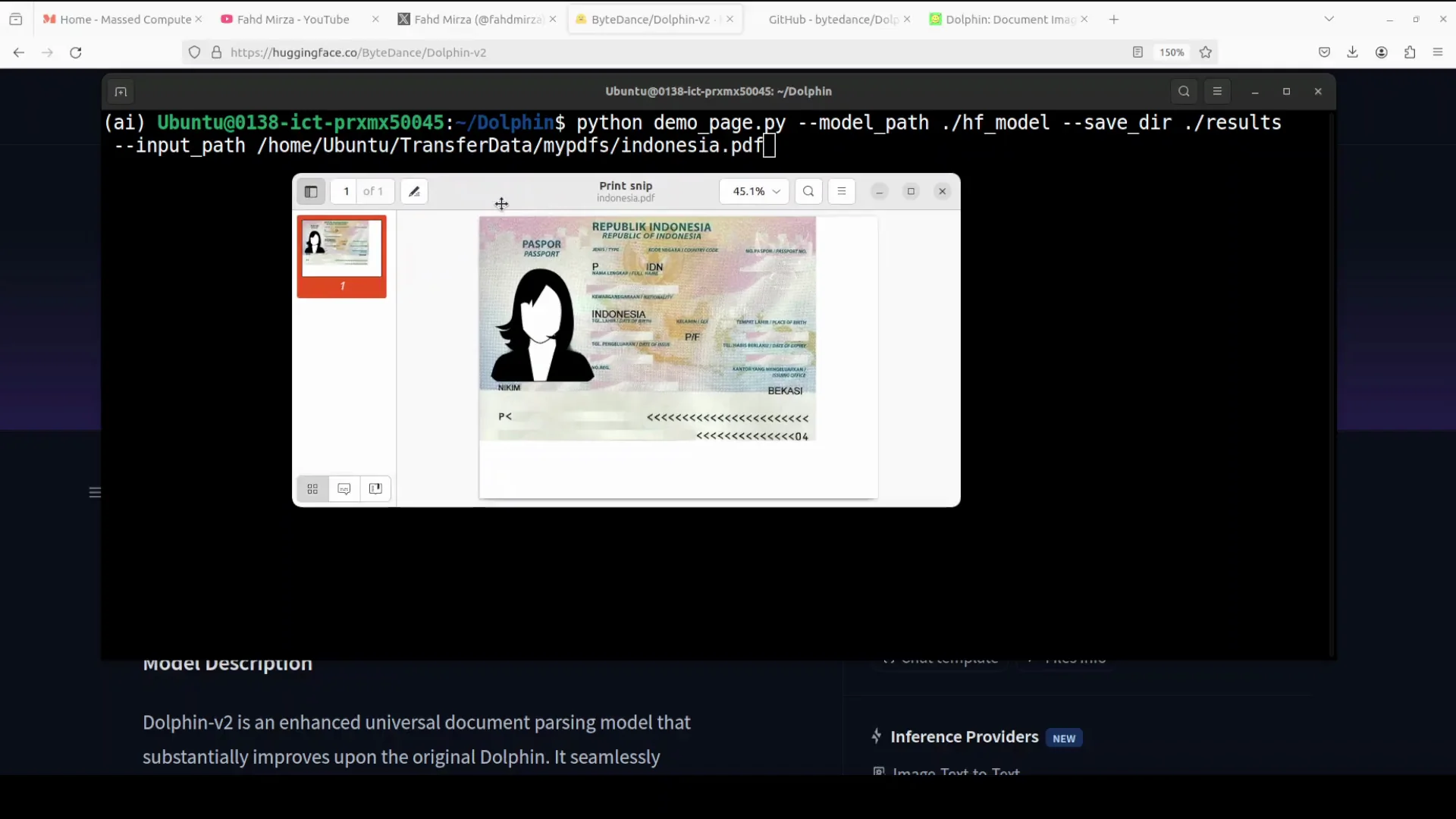
I then used a PDF file containing an AI-generated Indonesian driving license. The focus here was to test behavior on PDFs with embedded images.
- The model loaded and ran quickly on the PDF.
- It generated a recognition JSON that included elements and figure paths with bounding boxes.
- The Markdown output treated the content as a figure because the PDF effectively contained one embedded image.
- There was no additional layout visualization generated for this case.
This confirms that Dolphinv2 is not an OCR model for images embedded inside PDFs. For OCR on images within PDFs, another variation or model would be needed. In this case, it extracted the image rather than performing OCR on the image content.
Invoice Parsing
I moved on to an invoice to test document extraction in a common business scenario. If you only want layout parsing, there is a dedicated layout script available as shown earlier, but I proceeded with document extraction.
- The results printed successfully.
- The Markdown output extracted figures and text cleanly.
- Based on repeated testing of this invoice, the output was consistent and accurate.
This aligns with the model’s goal of universal document parsing and shows that the improvements carry over into practical formats.
Assessment of ByteDance Improves Dolphinv2
Dolphinv2 is noticeably better than the previous version. The parsing of complex structures such as LaTeX formulas, code blocks with indentation, and tables is improved. The addition of absolute pixel coordinates and the 21 element categories expands the range of content the model can handle.
There are still occasional errors, like repeated characters in the output. The model’s handling of PDFs is already good, but there is room for further improvement. A capability to extract data from images inside PDFs would significantly improve the utility for real-world workflows.
Step-by-Step: Reproducing the Local Demo
Below is a concise sequence that mirrors the order I followed.
1. Prepare the environment
- Use a Linux machine with a recent Nvidia GPU.
- Ensure CUDA and the required drivers are installed.
- Have Python and package tools ready.
2. Get the repository
- Clone the repository.
- Note that the repo is slightly large.
3. Install dependencies
- From the repository root, install the requirements.
- Installation may take several minutes.
4. Download the model
- Trigger the model download script or step provided in the repo.
- The model size is reasonable and the parameter count is around 3 billion.
5. Run a page with formulas
- Use the supplied page that contains formulas and indentation.
- Observe GPU VRAM consumption, which in my run was about 8.65 GB.
- Review outputs in the results directory:
- JSON structure and element ordering
- Markdown content with LaTeX formulas
- Layout visualization with labeled paragraphs and reading order
6. Test table extraction
- Use an image that contains a structured table.
- Check Markdown output for headers and columns such as Method and Error percent.
- Verify that JSON output reflects the table structure accurately.
7. Test a PDF with embedded image
- Use a PDF that is essentially a single image.
- Note that the output will include a recognition JSON with bounding boxes and a Markdown figure.
- Understand that OCR on embedded images is not performed by this model in this setup.
8. Test an invoice
- Run the invoice through the document extraction script.
- Inspect the Markdown for extracted figures and text.
- Optionally, try the layout only script if you need only structural information.
Outputs and Observations Summary
Output formats
- JSON for structural and element level detail.
- Markdown for readable reconstruction, including formulas and tables.
- Layout visualization to understand parsing and reading order.
- Figures extracted separately when present.
Accuracy highlights
- LaTeX formulas: strong fidelity in Markdown output.
- Code blocks: preserved indentation.
- Tables: accurate extraction into Markdown and JSON.
- Layout: consistent labeling and ordering reflecting the architecture.
Known limitations from tests
- Occasional repeated characters in text.
- Embedded images in PDFs are extracted as figures without OCR.
- Some outputs may lack layout visualization, depending on the input.
Quick Reference Table
| Test | Input type | Output formats | Key observations |
|---|---|---|---|
| Supplied page with formulas | Image page | JSON, Markdown, layout visualization, figures | VRAM about 8.65 GB during inference. Chapter heading detected. Formulas correct in LaTeX. Minor repeated character. LLaMA 1.4 identified. |
| Table image | Image | Markdown, JSON | Headers and values preserved. JSON table structure correct. |
| Driving license PDF | PDF with embedded image | Recognition JSON, Markdown figure | Bounding boxes recorded. Single figure extracted. No OCR on embedded image. No layout visualization for this case. |
| Invoice | Markdown | Figures and text extracted well. Output consistent with prior runs. |
Why the Two-Stage Design Matters
The results align closely with the two-stage approach.
- Stage 1 identifies the document type and constructs a reliable reading order across 21 categories. This improves how headings, paragraphs, lists, and figures are sequenced.
- Stage 2 applies type specific prompts. Digital documents benefit from parallel parsing, which keeps processing quick. Photographed documents use a holistic approach that handles irregularities better. Dedicated modules for formulas, code, tables, and paragraphs explain the improved handling of LaTeX and indentation as well as table structure.
This architectural clarity helps explain both the strengths and the remaining gaps observed in the tests.
Final Thoughts
ByteDance has improved Dolphinv2 meaningfully over the original release. The model handles complex elements like formulas and code blocks with better fidelity and expands to 21 element categories. The use of absolute pixel coordinates appears to improve precision in layout tasks. The outputs across JSON, Markdown, and layout visualization are useful for real document processing tasks.
It is still not perfect. A few minor mistakes appear in text reproduction, and embedded image OCR in PDFs is not part of this workflow. Further enhancements to PDF handling and image text extraction would make the model more capable in broader scenarios.
Overall, this version shows clear progress. Continued iteration and user feedback will likely push it further.
Subscribe to our newsletter
Get the latest updates and articles directly in your inbox.

Related Posts

8 Best Claude Code Plugins in 2026 (You Need to Know)
8 Best Claude Code Plugins in 2026 (You Need to Know)

7 Best Claude Code Skills (You Need to Know)
7 Best Claude Code Skills (You Need to Know)

Claude Code Desktop IDE Features (You Need to Know)
Claude Code Desktop IDE Features (You Need to Know)