
Table Of Content
- What is How Prompt Relay Enhances Temporal Control in Video Generation
- How Prompt Relay Enhances Temporal Control in Video Generation Overview
- How Prompt Relay Enhances Temporal Control in Video Generation Key Features
- How Prompt Relay Enhances Temporal Control in Video Generation Use Cases
- Performance & Showcases
- How it Works
- The Technology Behind It
- Step by Step: Write Multi Event Prompts That Work
- Getting Started
- FAQ
- What problem does Prompt Relay solve
- Does this require training a new model
- What models does it work with
- Can it improve quality beyond timing
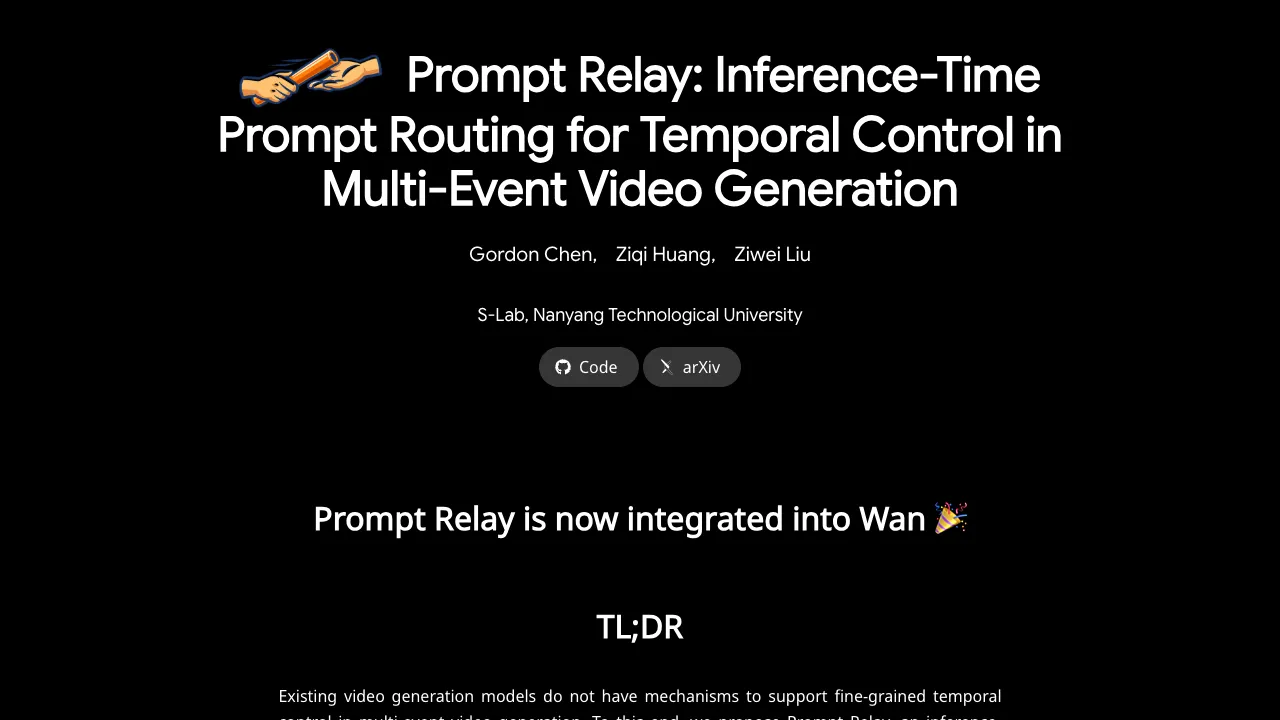
How Prompt Relay Enhances Temporal Control in Video Generation
Table Of Content
- What is How Prompt Relay Enhances Temporal Control in Video Generation
- How Prompt Relay Enhances Temporal Control in Video Generation Overview
- How Prompt Relay Enhances Temporal Control in Video Generation Key Features
- How Prompt Relay Enhances Temporal Control in Video Generation Use Cases
- Performance & Showcases
- How it Works
- The Technology Behind It
- Step by Step: Write Multi Event Prompts That Work
- Getting Started
- FAQ
- What problem does Prompt Relay solve
- Does this require training a new model
- What models does it work with
- Can it improve quality beyond timing
What is How Prompt Relay Enhances Temporal Control in Video Generation
How Prompt Relay Enhances Temporal Control in Video Generation is a research method that helps text to video models follow long, multi part prompts over time. It guides which words should matter at each moment, so scenes change when you want them to.

This idea is called Prompt Relay. It is like passing a baton in a race, where each part of your prompt takes its turn at the right time. This makes complex videos with clear scene changes much easier to create.
How Prompt Relay Enhances Temporal Control in Video Generation Overview
Prompt Relay focuses on time control in multi event video prompts. The team shows it working with Wan 2.2 and compares it with well known closed models. Results show stronger control and better quality when the prompt is long and includes many events.
Prompt Relay overview:
| Item | Detail |
|---|---|
| Type | Research method for text to video generation |
| Purpose | Give clear time control for prompts with many events |
| Main features | Inference time prompt routing, segment based control, better focus with less prompt interference |
| Works with | Shown with Wan 2.2, concept applies to other text to video systems |
| Input | A long prompt with multiple scenes or actions in order |
| Output | A video where events appear at the planned times |
| Best for | Story like shots, strong camera moves, subject or scene switches |
| Access | Live demos and write up on the project page at https://gordonchen19.github.io/Prompt-Relay/ |
If you want a wider view of the space, see our short roundups in video generation.
How Prompt Relay Enhances Temporal Control in Video Generation Key Features
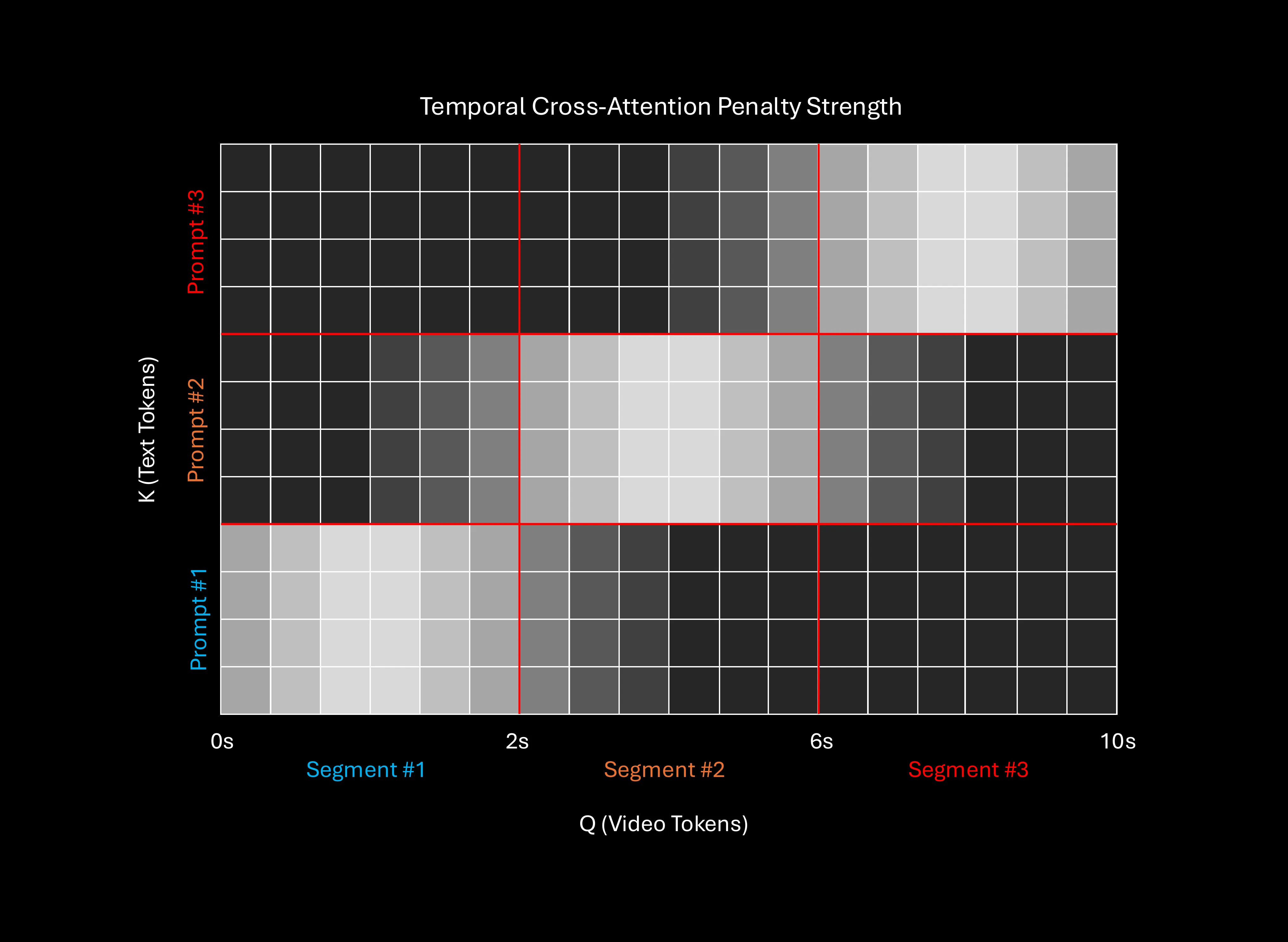
- Time aware prompt routing: The method turns parts of your prompt on and off as time passes. Each segment gets full attention when it is active.
- Multi event control: You can describe several actions or scenes. The system keeps them in order without mixing them up.
- Better quality with fewer conflicts: By lowering prompt competition, the model can focus on what matters right now. This often gives cleaner shots and fewer odd frames.
- Model friendly: It works at inference time, so it can be added on top of existing text to video models.
- Works for long shots and transitions: The method is strong for long prompts with changes in subject, place, or camera.
For more context on where the field is heading, check our quick guide on AI video generation.
How Prompt Relay Enhances Temporal Control in Video Generation Use Cases
- Short films and ads with scene changes: Plan a full story in one prompt with set moments for each beat.
- Educational clips: Move from one topic or place to the next at clear times without prompt drift.
- Product and brand videos: Switch focus across features or settings with planned timing.
- Creative camera moves: Pull in effects like zoom in, reveal, whip pan, or cut away at exact moments.
Performance & Showcases
The team presents side by side results with Wan 2.2 alone and Wan 2.2 plus Prompt Relay. In many hard multi event prompts, Prompt Relay shows stronger timing and clearer scenes.
Showcase 1 — A single continuous cinematic shot inside a cozy child's bedroom during the daytime. A young boy is lying flat on his bed in the middle of his room, staring up at the ceiling. After a brief moment, he rolls over, stands, jumps on the bed, then runs to grab a toy airplane and races in a circle.
Showcase 2 — An eagle flies high through the sky as the camera zooms toward the eye, revealing a cyberpunk city inside the pupil. The view enters the city with cars, neon lights, and a man in a car, then zooms out to show the scene playing on a television. The camera keeps pulling back to an old living room with warm lamplight and people near the TV.
Showcase 3 — A low angle handheld shot tracks a caveman in tall grass, then whips down to the grass and up to reveal a Spartan soldier. The camera repeats the move and comes up to show a horse and a knight riding through the grass. Each whip marks a clear change in the subject on screen.
For a deeper look at model progress, you may also like our quick take on recent long video work from Nvidia.
How it Works
- Split your prompt by events: Think of your script as sections in time. Each section owns a window in the video.
- Route prompts by time: As the video is generated, the system passes control from one prompt section to the next. The active section gets the most attention.
- Reduce cross talk: Since only the current section guides the model, words from other sections do not fight for space.
In simple words, the method helps the model listen to the right part of your script at the right time. This is why changes feel cleaner and better aligned with your plan.
The Technology Behind It
Prompt Relay is an inference time method. That means it changes how the model reads your prompt during video creation, not how the model is trained.
When you assign a time span to each part of your prompt, the system routes attention to that part. This lowers confusion between old and new scene words and helps the current moment come through.
The team shows that this also improves overall look in many cases. When the model is less confused, it draws a cleaner frame.
Step by Step: Write Multi Event Prompts That Work
- Start with a clear outline: Break your story into steps with rough times, like start, middle, and end.
- Add action and camera notes: For each step, write the main subject, what it does, and any camera move.
- Keep each section focused: Do not load one section with many unrelated thoughts. Short and clear wins.
- Mark transitions: Add cues like zoom in, reveal, cut to, or move to a new place, with the timing you want.
- Review and adjust: After a first render, tweak the times or wording for cleaner handoffs between sections.
Getting Started
You can explore demos and read more details on the project page at https://gordonchen19.github.io/Prompt-Relay/. The page shows many side by side runs to compare timing and quality. Use these samples to learn how to structure your own long prompts.
FAQ
What problem does Prompt Relay solve
It helps text to video models follow long prompts with many events in the right order. This reduces confusion when scenes or subjects change.
Does this require training a new model
No. It is an inference time method, so it guides the model during video creation. You can apply it on top of a compatible text to video system.
What models does it work with
The page shows strong results with Wan 2.2. The idea can be applied to other systems that accept rich prompts and can follow time based guidance.
Can it improve quality beyond timing
Yes. By reducing prompt interference, the method often gives cleaner frames and steadier scenes. This is most clear when the prompt is long and complex.
Image source: How Prompt Relay Enhances Temporal Control in Video Generation
Subscribe to our newsletter
Get the latest updates and articles directly in your inbox.

Related Posts
Relit-LiVE: Enhancing Videos by Learning Environment Together
Relit-LiVE: Enhancing Videos by Learning Environment Together
CausalCine: Real-Time Video Narratives with Autoregression
CausalCine: Real-Time Video Narratives with Autoregression
DreamX-World: The Future of Interactive World Models
DreamX-World: The Future of Interactive World Models