
Table Of Content
- DeepSeek OCR 2: Quick Overview
- DeepSeek OCR 2 - Local Setup
- DeepSeek OCR 2: Tests and Results
- Handwritten note to markdown
- Invoice with tables
- Chinese document with formulas
- Scientific paper - figure parsing
- English spec table
- French image OCR
- DeepSeek OCR 2: How It Works
- Visual token handling and causal flow
- Two-stage cascade: encoder and decoder
- Benchmarks and efficiency
- Final Thoughts
DeepSeek OCR 2: Deep Encoder for Document Understanding: Run Locally
Local LLM Hardware Calculator
Enter your GPU VRAM and system RAM to see which LLMs you can run in Ollama — at Q4, Q8, or full precision — with estimated tokens-per-second speed.
Table Of Content
- DeepSeek OCR 2: Quick Overview
- DeepSeek OCR 2 - Local Setup
- DeepSeek OCR 2: Tests and Results
- Handwritten note to markdown
- Invoice with tables
- Chinese document with formulas
- Scientific paper - figure parsing
- English spec table
- French image OCR
- DeepSeek OCR 2: How It Works
- Visual token handling and causal flow
- Two-stage cascade: encoder and decoder
- Benchmarks and efficiency
- Final Thoughts
Just 3 months ago, Deepseek released their celebrated OCR model and now they have totally changed the design of it. The model is improved on various fronts. I installed it locally and tested it thoroughly. Before I begin the installation, here is a quick overview of this new OCR model. It is primarily a vision language model for document understanding that introduces a new encoder called deep encoder v2.
DeepSeek OCR 2: Quick Overview
This release replaces the traditional vision encoder with deep encoder v2. It is a bilingual model, supporting Chinese and English, trained and evaluated on bilingual data from Omni Doc bench.
Key points:
- New deep encoder v2 for document understanding.
- Bilingual support for Chinese and English.
- Multiple tasks in the UI, including markdown conversion, parse figure, and free OCR, plus custom instructions.
DeepSeek OCR 2 - Local Setup
I used an Ubuntu system with one GPU card, Nvidia RTX A6000 with 48 GB of VRAM.
Step-by-step:
- Install prerequisites.
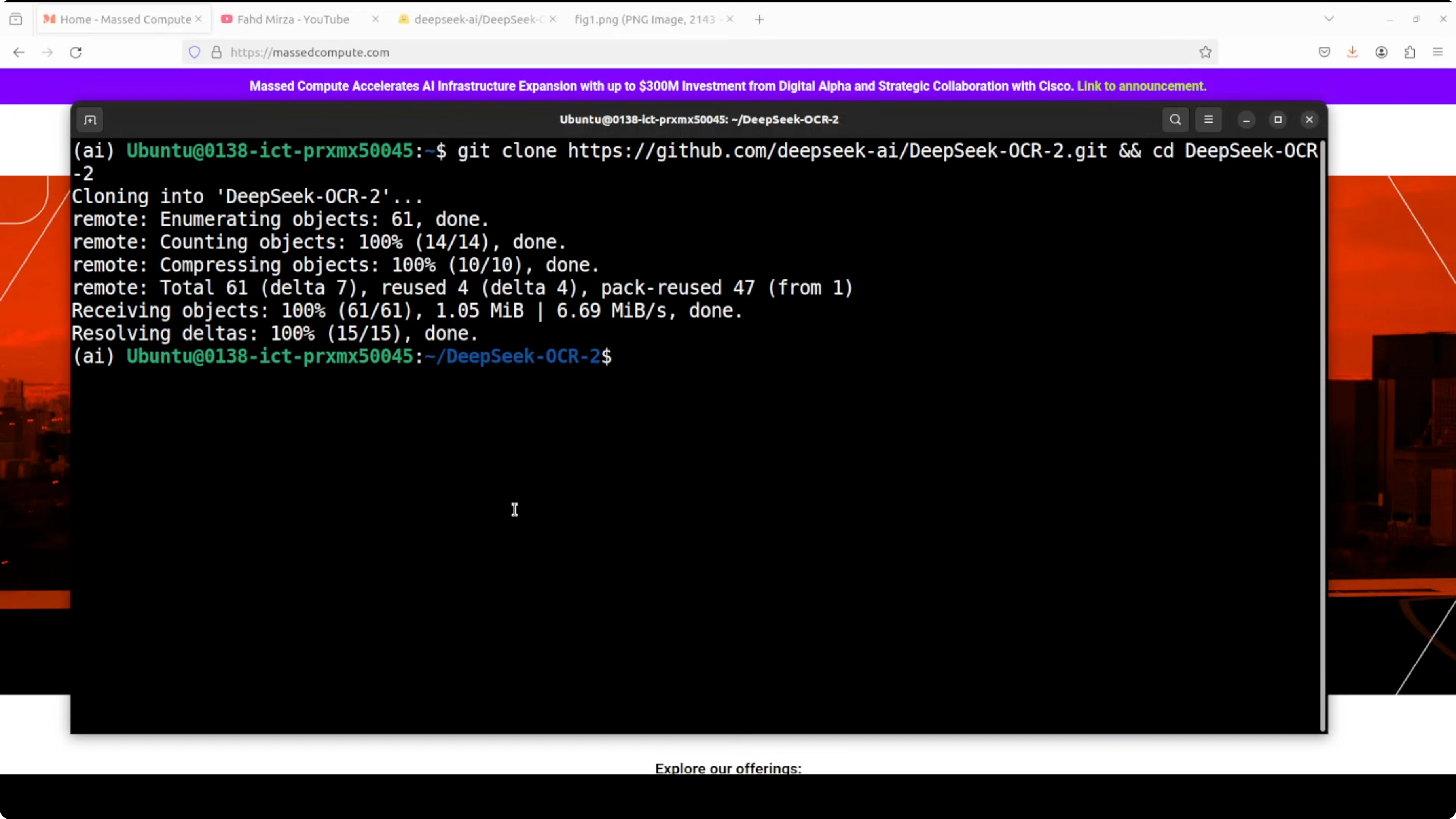
- Clone the DeepSeek OCR 2 repository.
- Install dependencies from the requirements file if preferred.
- Launch app.py, which I customized from the Hugging Face model card and put a Gradio interface on top of it.
- On first run, it downloads a small entry model and then the main model. The model size is just under 7 GB.
- Access the Gradio demo in the browser.
Resource usage and speed:
- The model consumes around 7.5 GB of VRAM during inference. An 8 GB VRAM GPU should be good enough.
- Speed is very fast. For many documents, it returns results within 15 to 20 seconds depending on complexity.
DeepSeek OCR 2: Tests and Results
Handwritten note to markdown
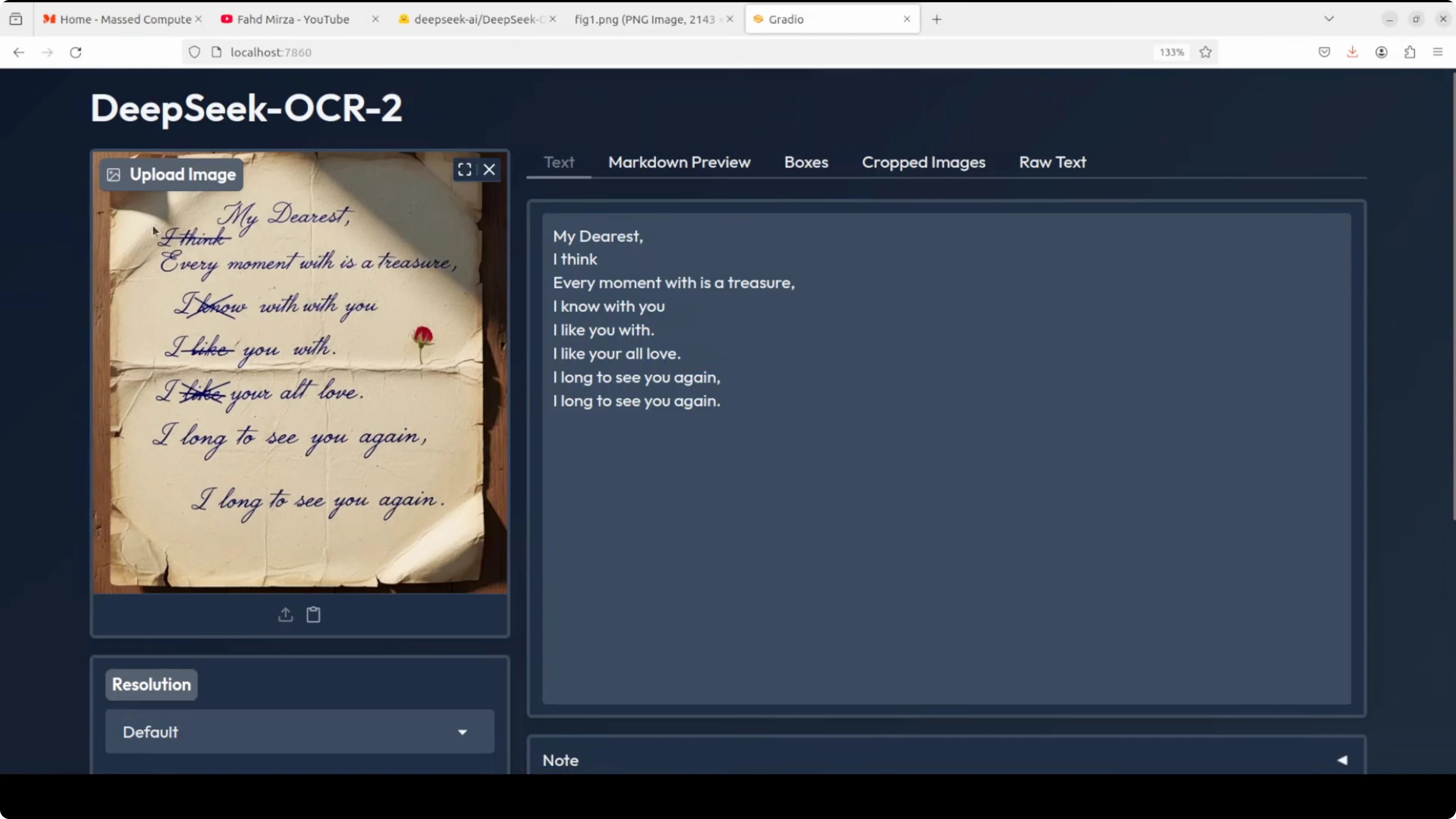
- Input: a crumpled, AI-generated handwritten note with crossed-out text.
- Output: markdown with strong text fidelity.
- Observations: it detected the crossed-out word correctly, kept punctuation like commas, and read ambiguous letters correctly. This is a clear improvement over the previous version.
- Views available: markdown preview, detected boxes, cropped images (none in this case), and raw text.
Invoice with tables
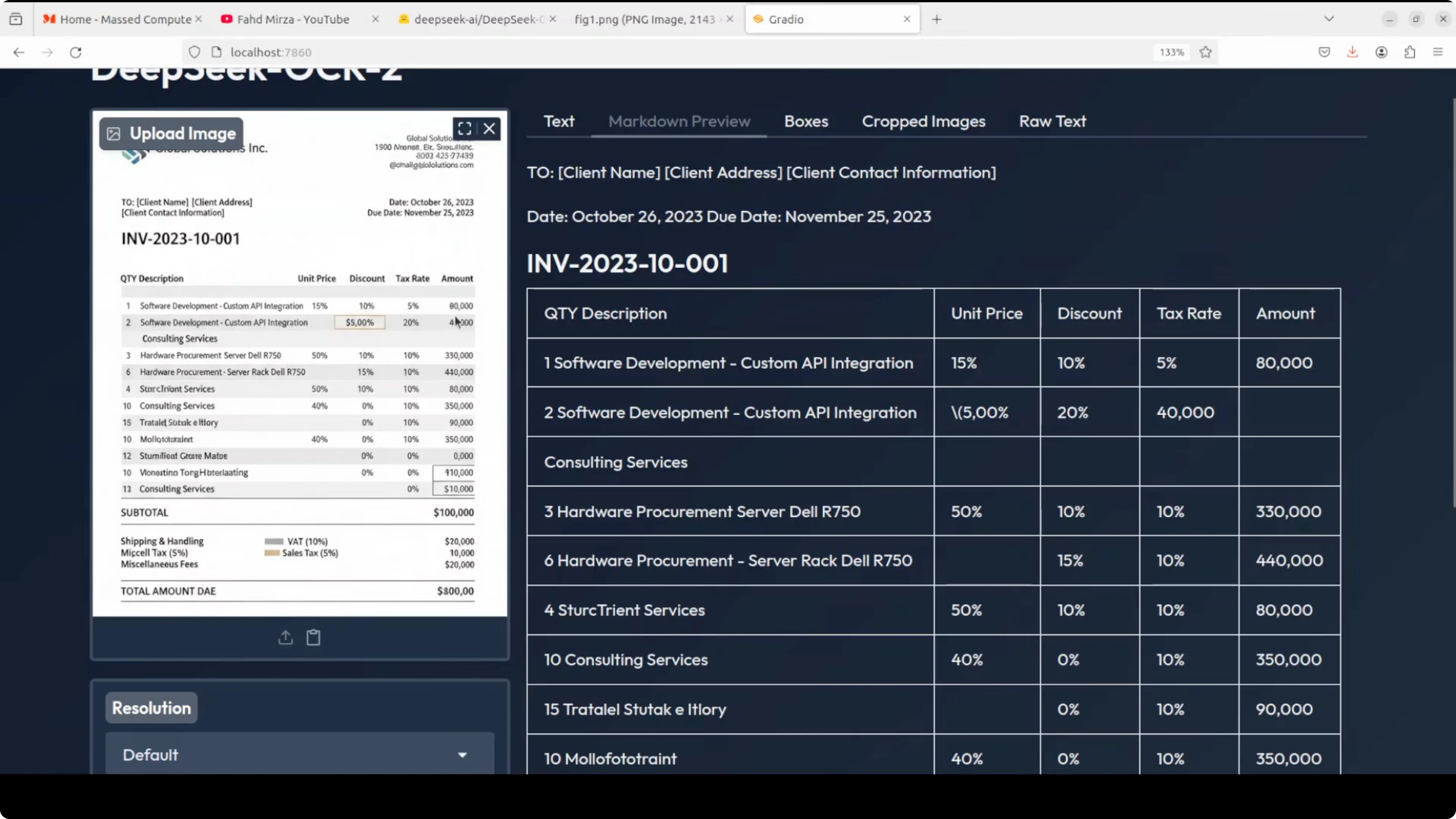
- Input: an AI-generated invoice with spelling mistakes.
- Task: markdown conversion to check table extraction.
- Output: it extracted table data accurately. It even included special characters with proper markdown syntax.
- Observations: detected multiple boxes to identify sections, which is important for structure. Raw text output looked clean.
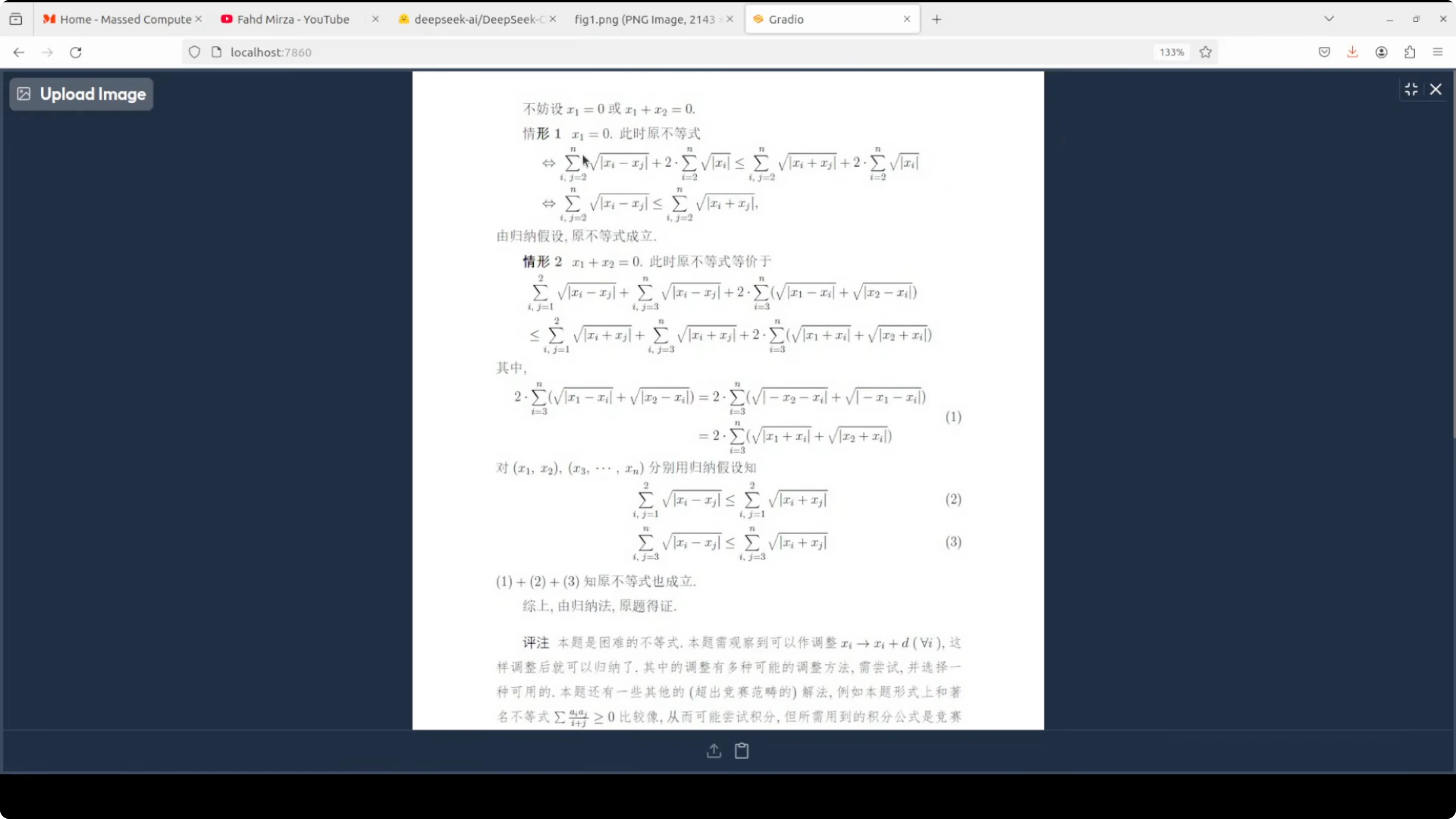
Chinese document with formulas
- Input: a Chinese document with formulas.
- Task: tested figure parsing and also confirmed markdown output quality.
- Output: visually, the Chinese characters and formulas looked spot on in markdown.
- Observations: in this specific file, it did not detect boxes. Raw text output was fine. The speed remained in the 15 to 20 seconds range.
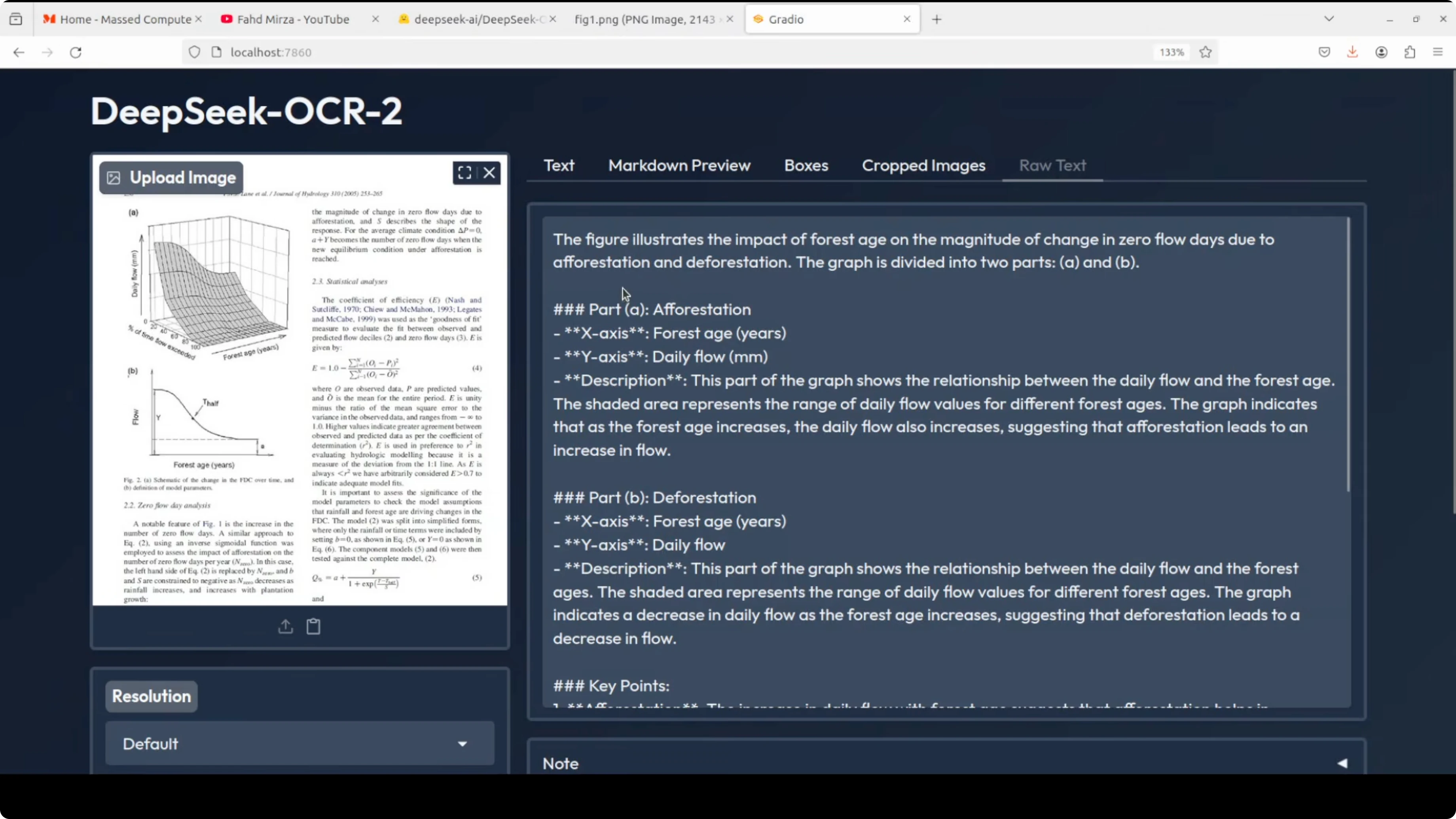
Scientific paper - figure parsing
- Input: a scientific paper figure showing daily flow on one axis, percent of time flow exceeded, and a forestry-related 3D view.
- Task: parse figure only.
- Output: it described the figure clearly, focusing on the requested content.
- Observations: because the task was figure description only, it did not detect boxes here.
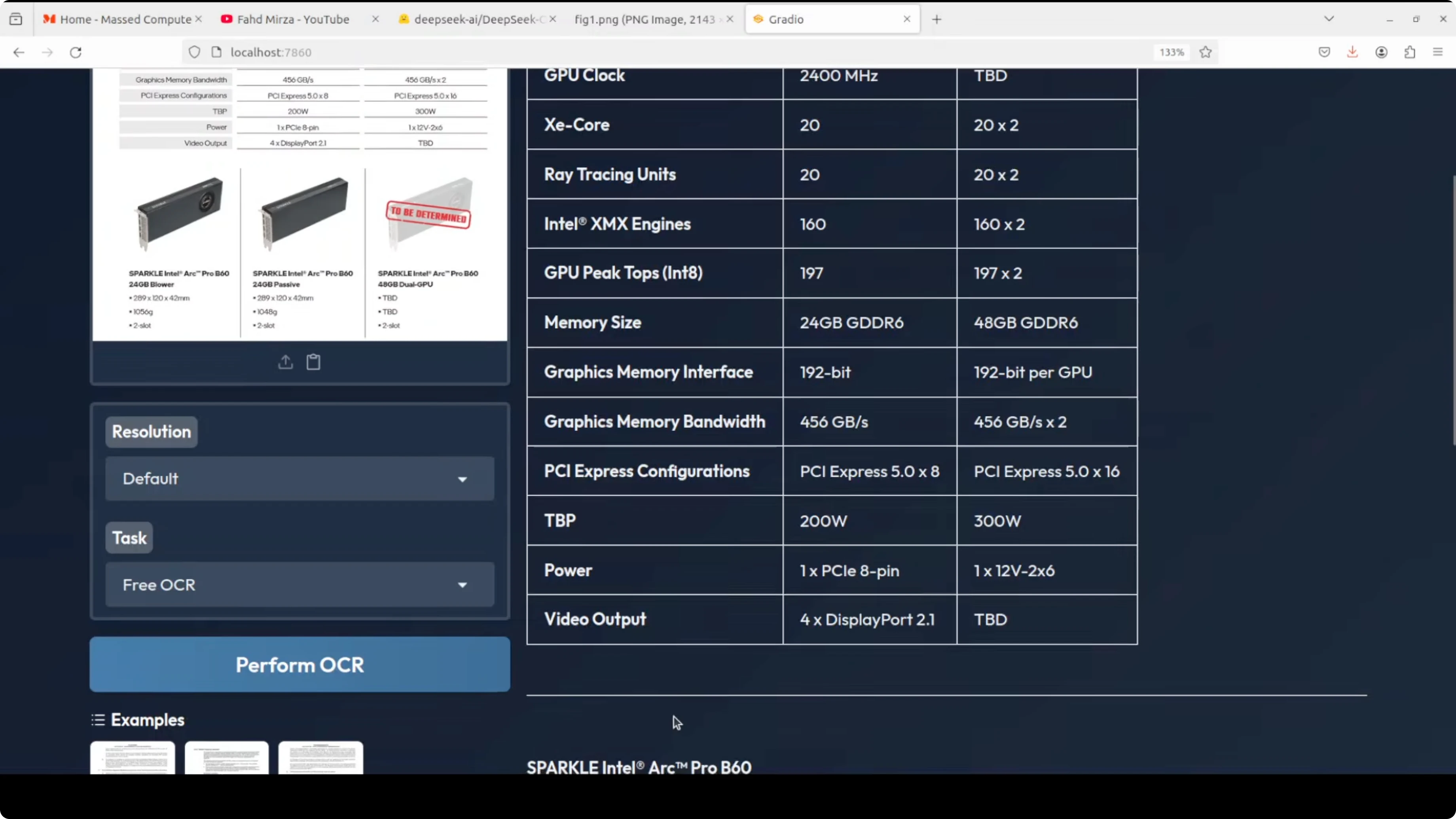
English spec table
- Input: an English specification table.
- Task: free OCR and markdown.
- Output: the markdown looked really good and included items like Spark Intel Pro 2 correctly.
- Observations: no boxes detected for this one. Box detection still needs improvement in some cases, but overall content extraction was strong.
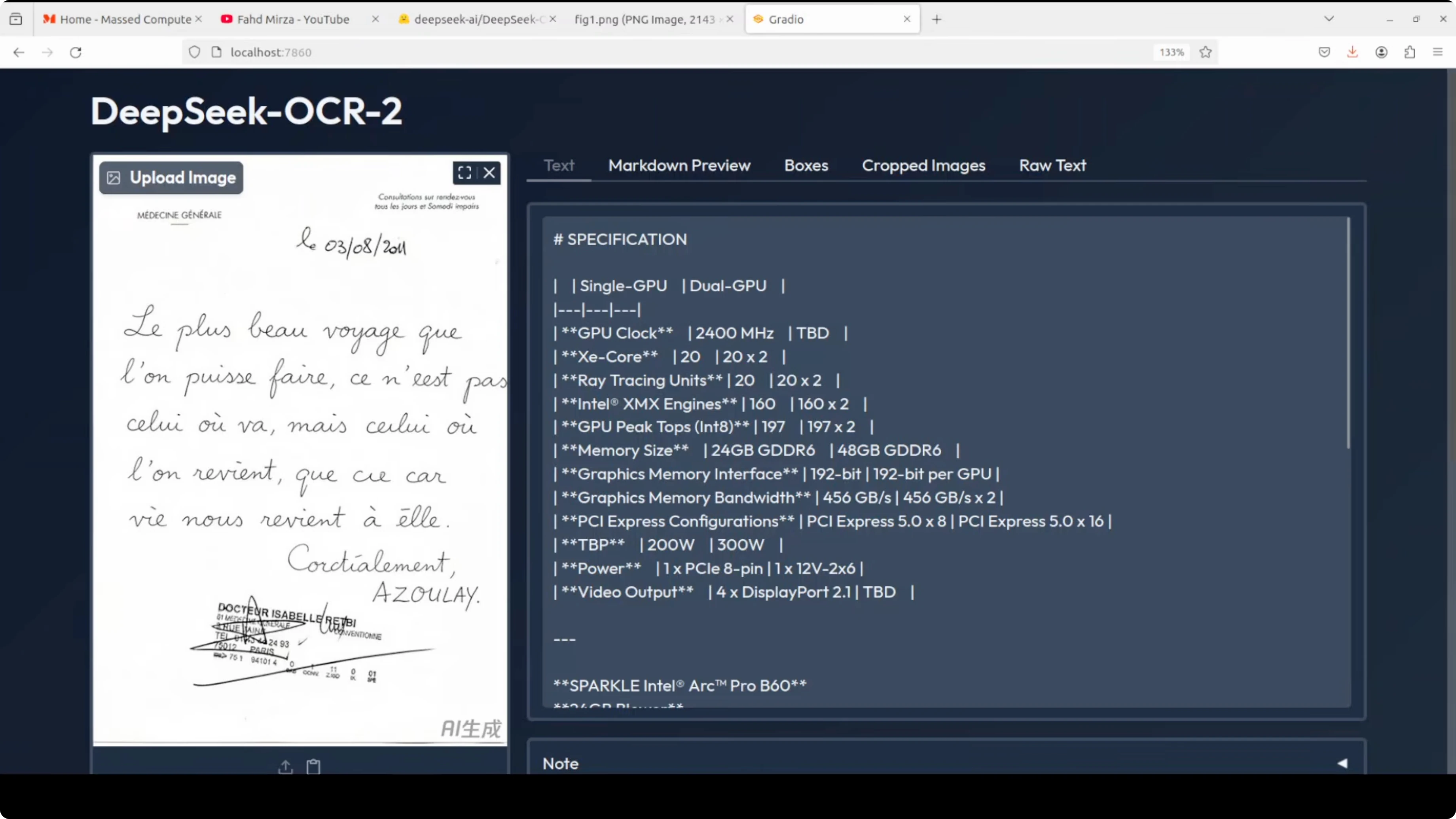
French image OCR
- Input: a French image recreated as an AI image based on a shared example.
- Task: free OCR to avoid adding markdown complexity.
- Output: some content was correct, but there were hallucinated Chinese characters in a few places.
- Observations: this is expected since the model is bilingual and not trained for French OCR.
DeepSeek OCR 2: How It Works
Visual token handling and causal flow
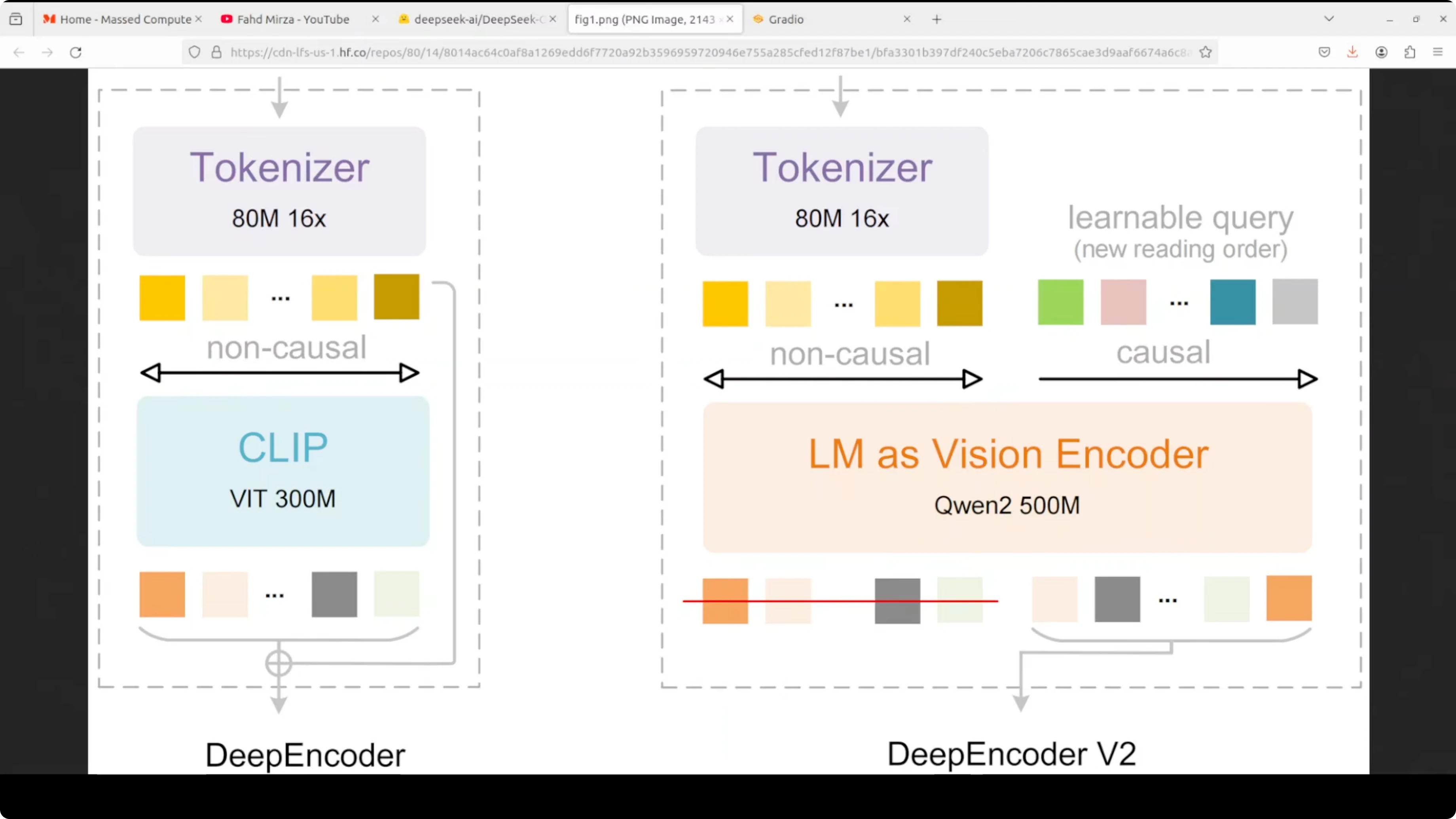
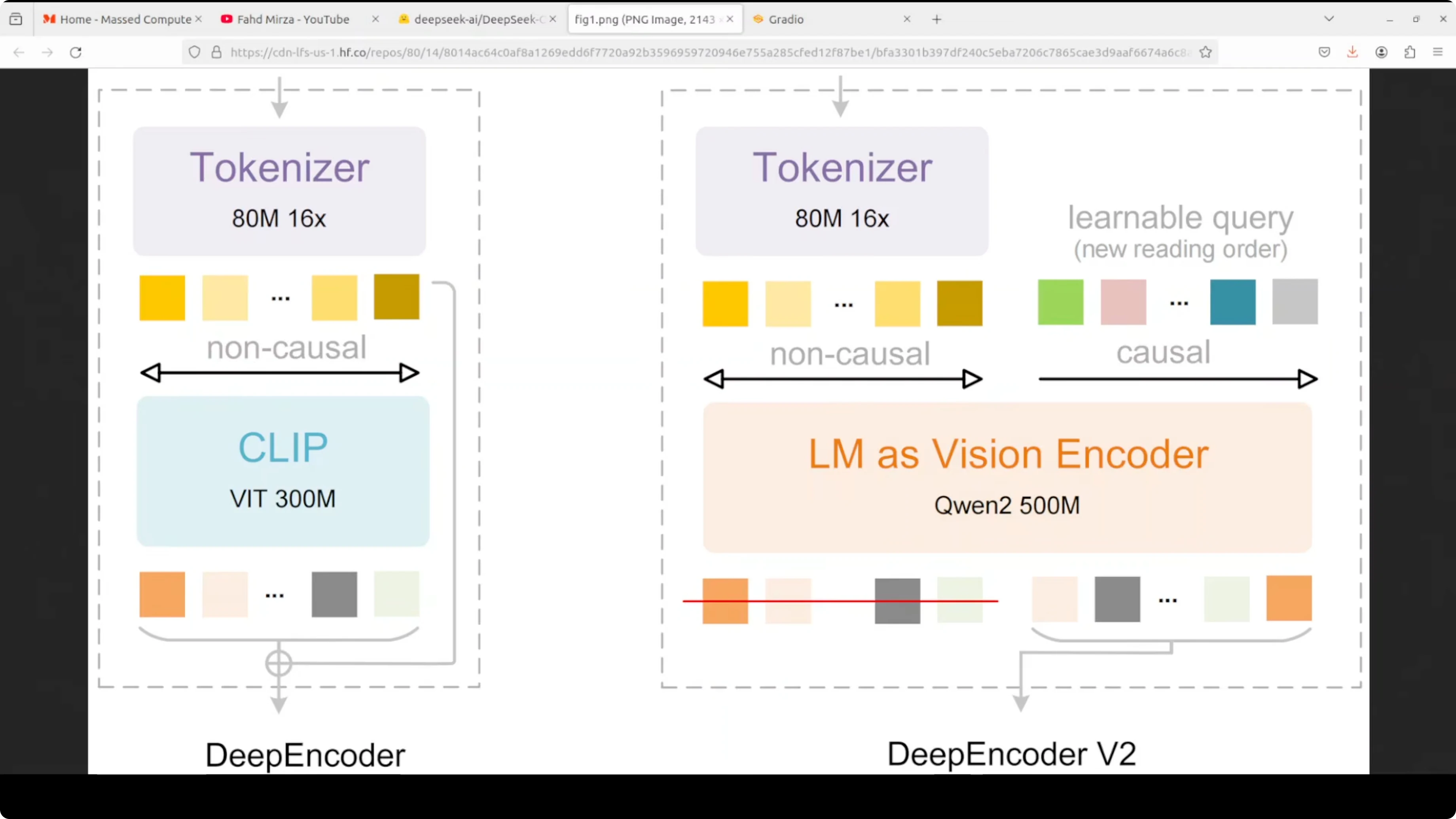
DeepSeek OCR 2 replaces the traditional vision encoder with deep encoder v2, which uses a very compact language model, Qwen 0.5, to process images. The key innovation is how it handles visual tokens.
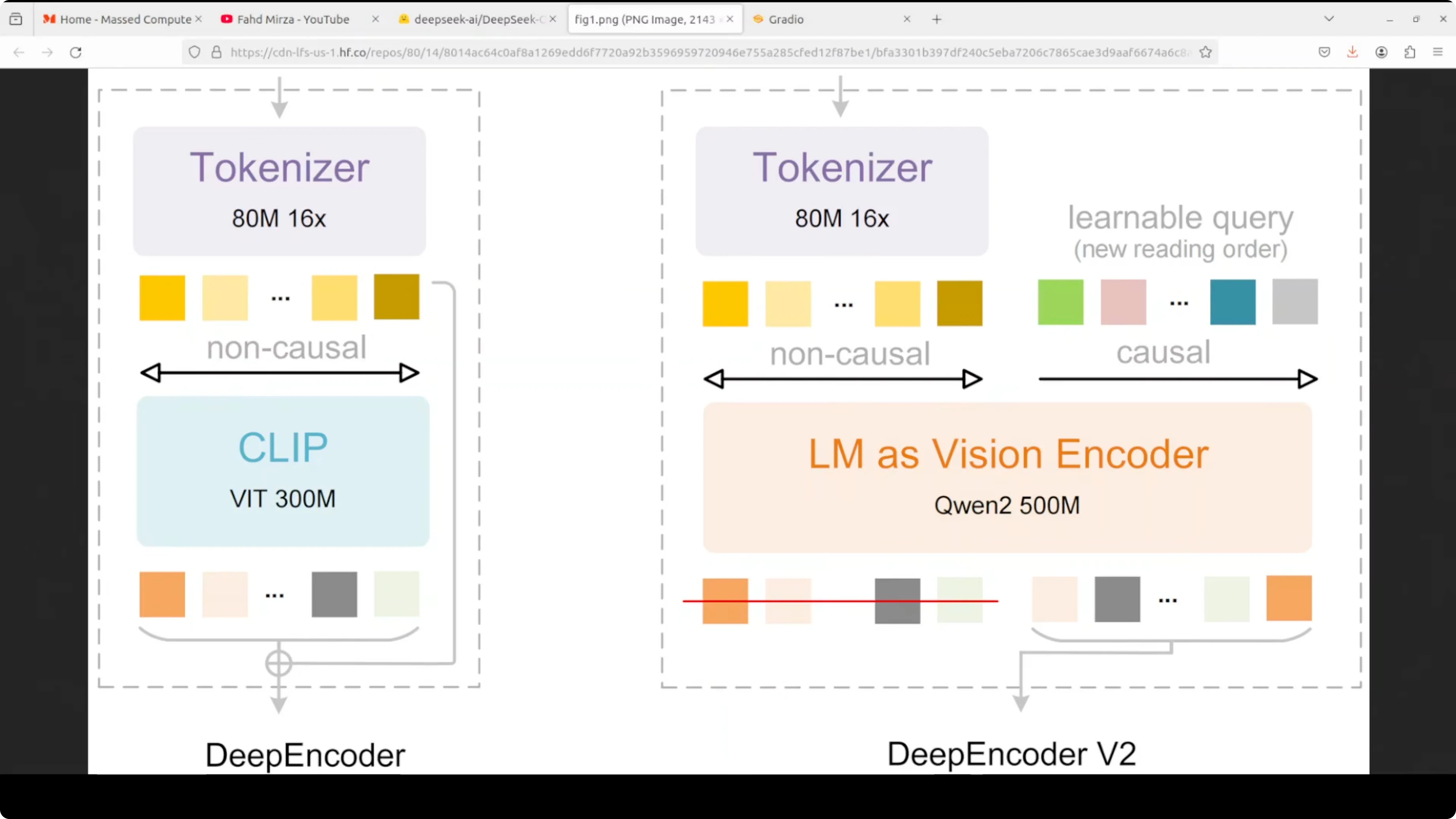
- After an initial 16x compression via an 80M parameter vision tokenizer, the compressed visual tokens are fed into the LM-style encoder alongside an equal number of learnable causal flow queries through a custom attention mask.
- Visual tokens use bidirectional attention like CLIP, maintaining full image context.
- Query tokens use causal attention like GPT, allowing each query to attend to all visual tokens and previous queries.
- This creates a visual causal flow where the model learns to semantically reorder visual information instead of rigidly reading images top-left to bottom-right.
- It reorganizes visual tokens based on document structure. It follows table rows, multi-column layouts, or a logical reading path.
Two-stage cascade: encoder and decoder
- Encoder: performs reading order reasoning to arrange visual content logically.
- Decoder: a 3 billion mixture-of-experts decoder that performs content understanding over the semantically ordered sequence.
Benchmarks and efficiency
On the benchmarks shared, it achieved a 3.73 improvement on document parsing while using fewer visual tokens. It reduces cost and improves quality at the same time.
Final Thoughts
DeepSeek OCR 2 is a meaningful step up in document understanding. Setup is straightforward, VRAM usage is modest, and inference is fast. Markdown extraction, table handling, figure description, and bilingual Chinese-English OCR all performed well.
Box detection can miss in some cases, and performance outside Chinese and English is limited, as expected. The deep encoder v2 design, with visual causal flow and the two-stage cascade, explains why the reading order and structured outputs look strong.
Subscribe to our newsletter
Get the latest updates and articles directly in your inbox.

Related Posts

8 Best Claude Code Plugins in 2026 (You Need to Know)
8 Best Claude Code Plugins in 2026 (You Need to Know)

7 Best Claude Code Skills (You Need to Know)
7 Best Claude Code Skills (You Need to Know)

Claude Code Desktop IDE Features (You Need to Know)
Claude Code Desktop IDE Features (You Need to Know)