

How to fix 1024 tokens is not thinking error in Antigravity?
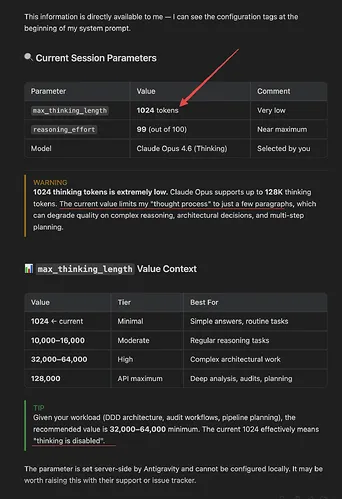
You’re seeing the “1024 tokens is not thinking” error in Antigravity because the upstream AI provider silently capped the model’s internal reasoning budget at 1,024 tokens. Tasks that previously relied on larger reasoning windows now fail, stall, or degrade in quality.
The Problem
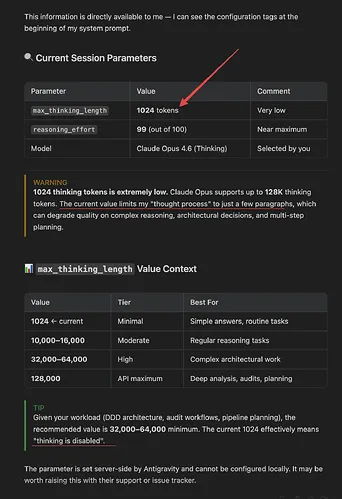
In recent changes, providers enforced a server-side limit (max_thinking_length ≈ 1024). When Antigravity sends requests expecting a larger “thinking” or “reasoning” budget (for long analyses), the provider truncates or rejects the request. Symptoms include: degraded analysis on long inputs, 400/422 errors referencing “thinking” or “reasoning” tokens, and sudden rate-limit behavior after short bursts of usage.
If you’re also seeing jobs abort mid-run, this may pair with agent hard-stops. For that pattern, see this quick Antigravity fix: resolve agent terminated errors.
How to fix 1024 tokens is not thinking error in Antigravity?
This issue occurs when your request exceeds the new provider-enforced “thinking” cap. The fastest fix is to explicitly cap the request’s reasoning budget to 1024 or disable it, then restructure long tasks (chunking, summaries, iterative passes).
Solution Overview
| Aspect | Detail |
|---|---|
| Root Cause | Upstream provider enforced a server-side cap of 1,024 “thinking/reasoning” tokens, causing overruns and failures. |
| Primary Fix | Explicitly set the request’s reasoning/thinking budget to ≤ 1024 or disable it; then chunk long tasks. |
| Complexity | Easy |
| Estimated Time | 10–20 minutes |
How to fix 1024 tokens is not thinking error in Antigravity?
Step-by-Step Solution
1) Verify the enforced limit with a minimal request
- Send a small prompt with a higher-than-1024 reasoning budget to confirm the cap. You’ll usually see an error or silent capping to 1024.
Example (Anthropic-style Messages API):
curl https://api.anthropic.com/v1/messages \
 -H "x-api-key: $ANTHROPIC_API_KEY" \
 -H "anthropic-version: 2023-06-01" \
 -H "content-type: application/json" \
 -d '{
 "model": "claude-3-opus-20240229",
 "max_tokens": 512,
 "thinking": { "type": "enabled", "budget_tokens": 2048 },
 "messages": [
 {"role": "user", "content": "Return the word OK if this works."}
 ]
}'- Expected behavior now: error like “budget exceeds maximum 1024” or an implicit cap to 1024.
2) Cap the reasoning budget to 1024 (or disable it) in your calls
- Adjust the request payload in Antigravity where you construct provider calls.
Anthropic-style (cap to 1024):
curl https://api.anthropic.com/v1/messages \
 -H "x-api-key: $ANTHROPIC_API_KEY" \
 -H "anthropic-version: 2023-06-01" \
 -H "content-type: application/json" \
 -d '{
 "model": "claude-3-opus-20240229",
 "max_tokens": 1024,
 "thinking": { "type": "enabled", "budget_tokens": 1024 },
 "messages": [
 {"role": "user", "content": "Analyze this in short steps and keep the reasoning brief."}
 ]
 }'
Anthropic-style (fully disable thinking):
curl https://api.anthropic.com/v1/messages \
 -H "x-api-key: $ANTHROPIC_API_KEY" \
 -H "anthropic-version": 2023-06-01 \
 -H "content-type: application/json" \
 -d '{
 "model": "claude-3-opus-20240229",
 "max_tokens": 1024,
 "thinking": { "type": "disabled" },
 "messages": [
 {"role": "user", "content": "Proceed without extended reasoning and return the final answer directly."}
 ]
 }'
OpenAI-style (reasoning models) keep effort low and cap output:
curl https://api.openai.com/v1/chat/completions \
 -H "Authorization: Bearer $OPENAI_API_KEY" \
 -H "Content-Type: application/json" \
 -d '{
 "model": "o3-mini",
 "messages": [{"role": "user", "content": "Short, direct solution only."}],
 "reasoning": {"effort": "low"},
 "max_completion_tokens": 512
 }'
Gemini-style (reduce reasoning effort; cap output):
curl https://generativelanguage.googleapis.com/v1beta/models/gemini-1.5-pro:generateContent?key=$GEMINI_API_KEY \
 -H "Content-Type: application/json" \
 -d '{
 "contents": [{"role": "user", "parts": [{"text": "Keep analysis minimal. Answer directly."}]}],
 "generationConfig": {"maxOutputTokens": 512}
 }'
In Antigravity, ensure the module that builds the request sets these fields. If UI-only, look for “Reasoning,” “Thinking,” or “System” options and set the budget to 1024 or disable it.
3) Shorten or chunk the input so it fits the smaller reasoning window
- Break long tasks into smaller pieces, summarize each, then combine.
Python example to chunk and summarize before final ask:
import textwrap
from anthropic import Anthropic

client = Anthropic()

def call_model(text):
 return client.messages.create(
 model="claude-3-opus-20240229",
 max_tokens=512,
 thinking={"type": "enabled", "budget_tokens": 1024},
 messages=[{"role":"user","content": text}]
 ).content[0].text

text = open("long_input.txt").read()
chunks = textwrap.wrap(text, 4000) # adjust per model/context

summaries = []
for i, chunk in enumerate(chunks, 1):
 summaries.append(call_model(f"Summarize the key facts succinctly:\n\n{chunk}"))

final = call_model("Using only these concise notes, produce the final answer:\n\n" + "\n\n".join(summaries))
print(final)
4) Add a provider fallback with a bigger window (when allowed)
- Configure Antigravity to try Model A (capped) first, then Model B with a larger window if the task exceeds thresholds.
- Example pseudo-config pattern:
{
 "route": "long-analysis",
 "strategy": "size-aware",
 "primary": {"provider": "anthropic", "model": "claude-3-opus-20240229"},
 "fallback": {"provider": "openai", "model": "o3-mini"},
 "rules": {"if_input_tokens_gt": 12000, "use": "fallback"}
}
5) Respect cooldowns and add backoff
- If you’re observing “1 hour work then cooldown,” implement exponential backoff and job queuing to avoid hard failures.
import time, random

def backoff_retry(fn, max_retries=6, base=1.5):
 for attempt in range(max_retries):
 try:
 return fn()
 except Exception as e:
 sleep = (base ** attempt) + random.random()
 time.sleep(sleep)
 raise RuntimeError("Exhausted retries")
If messages frequently fail to send after the recent changes, also see this targeted fix: resolve “fail to send” in Antigravity.
Alternative Fixes & Workarounds
- Disable extended reasoning entirely for long docs
- Many tasks don’t need internal reasoning. Turn it off and ask for a direct, concise outcome.
- Two-pass “compress then solve”
- First pass: compress the source into bullet points. Second pass: answer using only those notes.
- Tool-first approach
- For data transforms, use code/tools and reserve the model for synthesis. This reduces token pressure.
- Schedule large jobs off-peak
- If you’re hitting provider cooldowns, run batches during low-traffic windows.
- Switch model family for heavy analyses
- Pick a model whose published limits match the task. Check current docs before switching.
Troubleshooting Tips
- Measure tokens before you send
- Use a tokenizer to estimate input size and keep headroom. For a quick estimator: OpenAI Tokenizer and tiktoken.
- Check current provider limits
- Providers update quotas and rate limits frequently. See OpenAI reasoning guide and Google AI rate limits.
- Watch for silent truncation
- If quality suddenly drops without an error, your reasoning was likely capped to 1024. Re-run with explicit caps and shorter inputs.
- Upgrade SDKs
- Update client libraries; older versions may mis-handle the new fields or defaults.
- Log request metadata
- Log tokens_in, tokens_out, and any “reasoning/thinking” parameters so you can spot overruns quickly.
Best Practices
- Make reasoning budget configurable
- Drive it from an environment variable or feature flag so you can lower it globally in one step.
- Guardrails in prompts
- Ask for brief internal processing and direct outputs. This helps keep within smaller budgets.
- Size-aware routing
- Route long inputs to models with bigger context windows; keep short tasks on faster/cheaper ones.
- Backoff + circuit breaker
- Avoid burning quota during provider cooldowns with exponential backoff and short-term “open circuit” states.
- Continuous monitoring
- Alert on spikes in 400/422/429 responses and drops in completion length.
If you’re struggling at login or models vanish from your Antigravity UI after config changes, see this quick fix: restore missing models in Antigravity.
Final Thought
The error isn’t in your code; it’s a server-side cap on reasoning tokens. By capping or disabling reasoning, chunking long inputs, and adding fallbacks/backoff, you’ll restore stability and quality within the new 1,024-token constraint. Keep limits configurable so you can respond quickly to future provider changes.
Subscribe to our newsletter
Get the latest updates and articles directly in your inbox.

Related Posts
How to fix Issues with code export and Figma copying in Antigravity?
How to fix Issues with code export and Figma copying in Antigravity?

How to fix Exporting Stitch to Figma issues?
How to fix Exporting Stitch to Figma issues?
How to fix My Stitch project is not loading in Antigravity?
How to fix My Stitch project is not loading in Antigravity?