Table Of Content
- What is Lance AI by ByteDance: Modern Open Source Unified Multimodal
- Overview
- Key Features
- Use Cases
- Performance & Showcases
- Benchmarks at a glance
- How Lance AI by ByteDance Works
- The Technology Behind It
- Examples of What It Can Do
- Getting Started
- Quick install and first run (hands-on summary)
- Who Is Lance AI For
- FAQ
- Is Lance AI open source
- Can I run Lance AI on my own machine
- What kind of edits can it do on video
- How strong is it on image generation
- Does it handle charts and text inside images
Lance AI By bytedance: Modern Open Source Unified Multimodal
Table Of Content
- What is Lance AI by ByteDance: Modern Open Source Unified Multimodal
- Overview
- Key Features
- Use Cases
- Performance & Showcases
- Benchmarks at a glance
- How Lance AI by ByteDance Works
- The Technology Behind It
- Examples of What It Can Do
- Getting Started
- Quick install and first run (hands-on summary)
- Who Is Lance AI For
- FAQ
- Is Lance AI open source
- Can I run Lance AI on my own machine
- What kind of edits can it do on video
- How strong is it on image generation
- Does it handle charts and text inside images
What is Lance AI by ByteDance: Modern Open Source Unified Multimodal
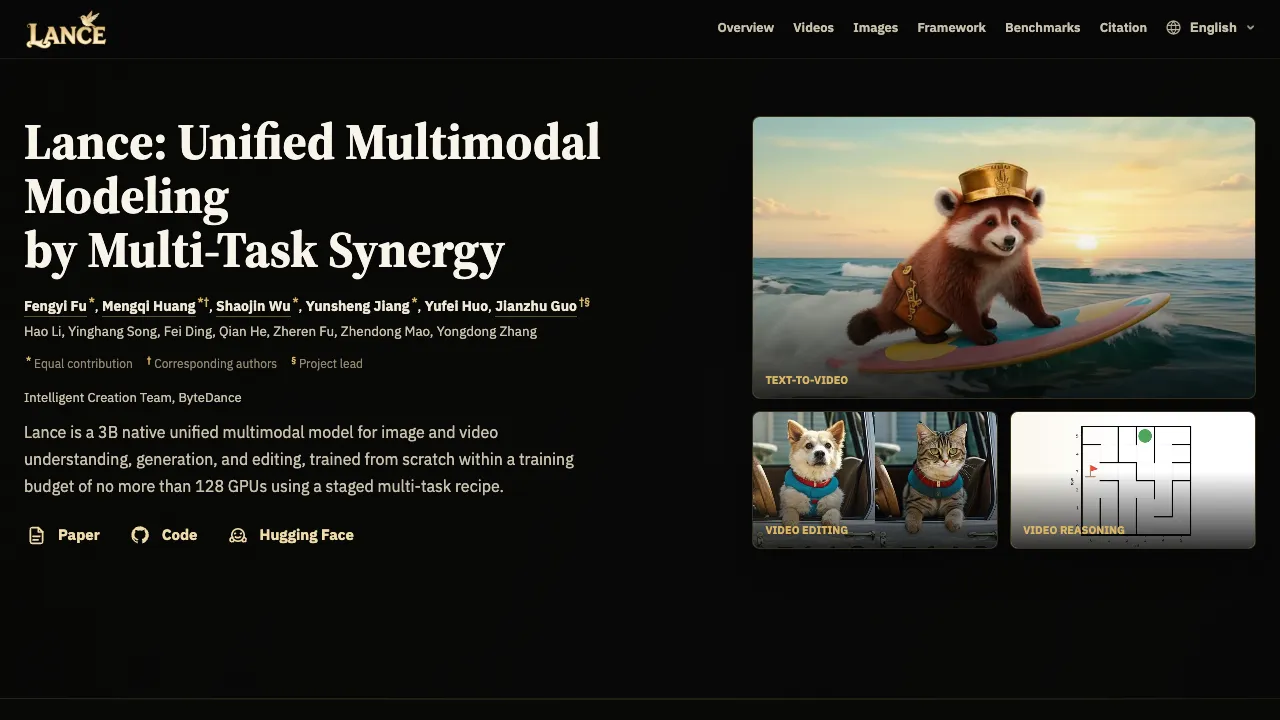
Lance AI is a small but strong 3B model from ByteDance that works with both images and videos. It can understand, create, and edit content with text prompts and examples. It was trained entirely from scratch with a careful multi task plan using no more than 128 GPUs.

Lance brings many skills into one place. You can ask it to write a caption, answer questions about a chart, make a new image from text, edit a picture, turn text into video, and even make smart plans in video scenes.
Overview
Here is a quick look at the project in one place.
| Type | Open source unified multimodal model |
| Main purpose | Image and video understanding, generation, and editing |
| Creator | Intelligent Creation Team, ByteDance |
| Model size | 3B parameters |
| Training budget | No more than 128 GPUs with a staged multi task recipe |
| Inputs | Text, images, video |
| Outputs | Images, videos, captions, answers, edits |
| Core ideas | Shared sequence for text and pixels, separate experts for understanding and generation |
| Key methods | ViT tokens, VAE latents, generalized 3D causal attention, MaPE |
| Demos | Text to video, video editing, video reasoning, text to image, image editing, image understanding |
| Availability | Paper, code, and models listed on the project site |

If you want to compare with a strong text to image system, check our short guide on Hunyuanimage 3.
Key Features
- One model for many jobs. It does image and video tasks in one place.
- Rich generation. Text to video, text to image, and creative edits for pictures and clips.
- Smart understanding. It answers questions, reads charts and text in images, and writes short or long captions.
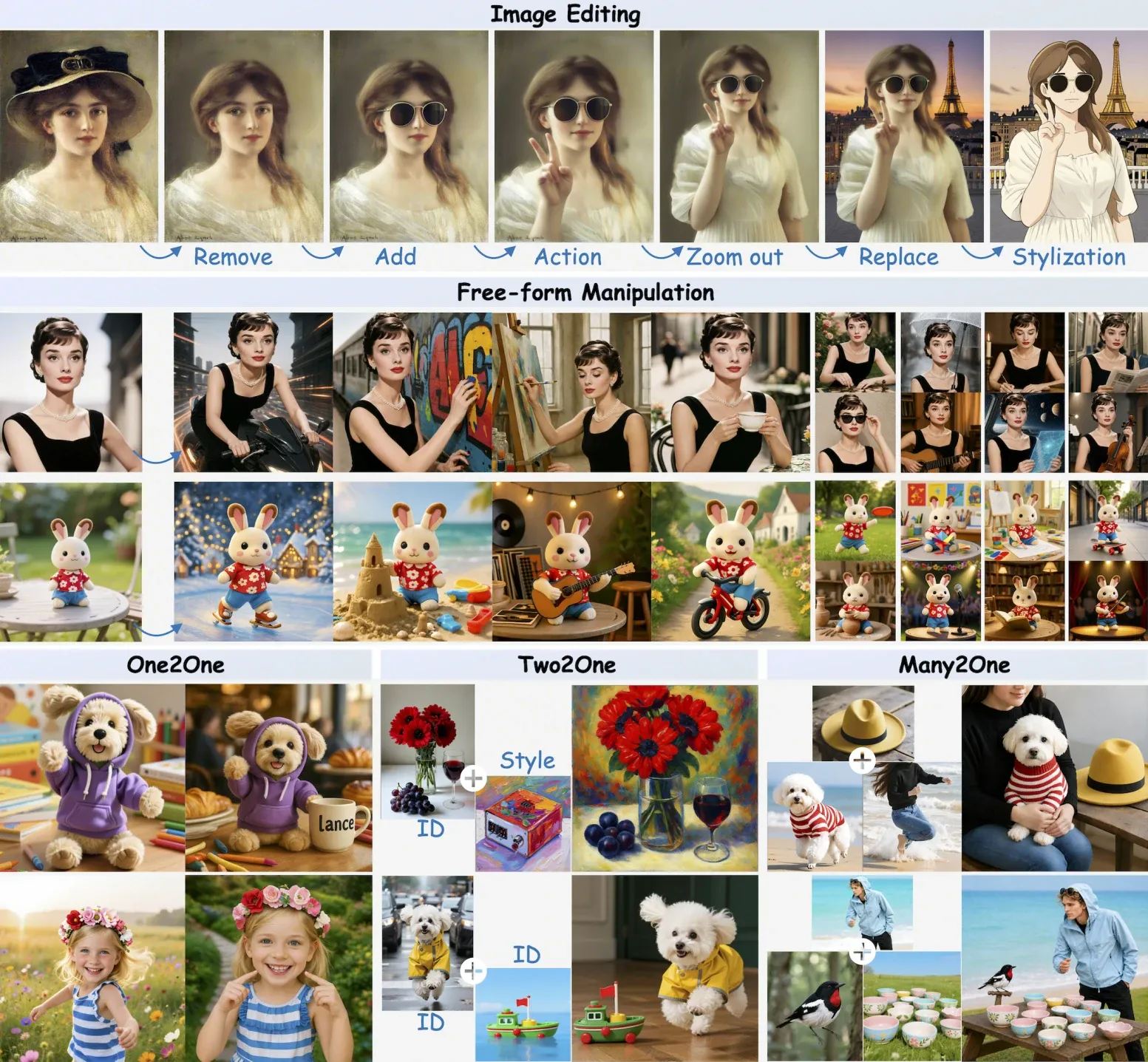
- Edit with care. It can replace subjects, change styles, add or remove objects, and keep the layout stable.
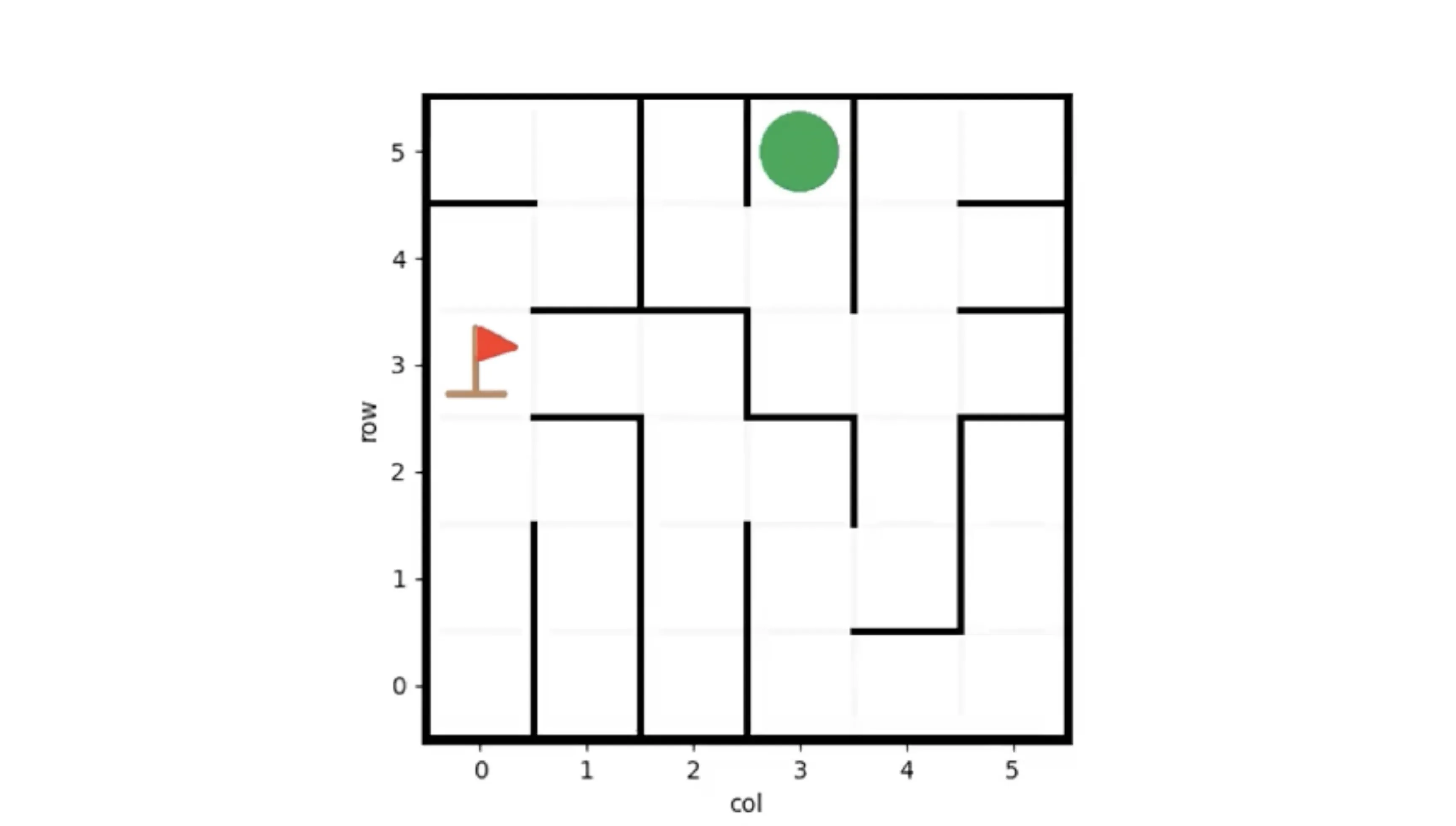
- Planning in motion. It shows grid navigation and physics aware moves over time.
- Video quality boost. Demos are shown with 2x super resolution and 2x frame interpolation.
Use Cases
- Creative work. Make concept images, mood clips, storyboards, and quick drafts for ads or films.
- Marketing and media. Swap backgrounds, change styles, recolor items, and add or remove objects for fast content refresh.
- Education and reports. Ask questions about charts, read numbers from tables, and turn complex scenes into clear text.
- Product and UX teams. Try edits and motion ideas before full shoots to save time and cost.
Performance & Showcases
Below are short showcases that match the labels from the project page.
Showcase 1 — TEXT-TO-VIDEO This demo shows TEXT-TO-VIDEO results from simple text prompts. It focuses on character motion, two person scenes, and dreamy looks. Quality is displayed with 2x super resolution and 2x frame interpolation.
Showcase 2 — VIDEO EDITING This demo highlights VIDEO EDITING guided by prompts. It covers background change, subject swap, object edits, style transfer, and simple action edits. Results keep the scene layout and apply clean changes.
Showcase 3 — VIDEO REASONING This demo presents VIDEO REASONING with question answering and captioning. It tracks motion and time to form correct answers. It can also write short or longer captions for the same clip.
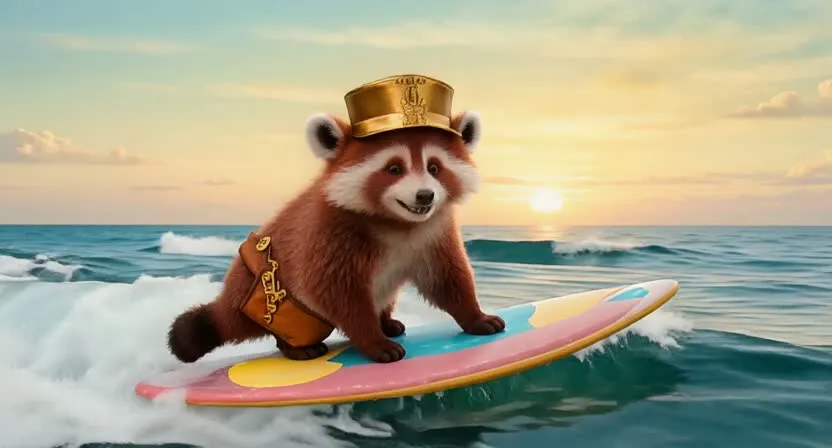
Showcase 4 — Surfing animal character This clip shows Surfing animal character created from text. It keeps the subject on theme and adds natural water motion. The result is smooth and fun to watch.
Showcase 5 — Robot and dog duet This clip shows Robot and dog duet generated from a prompt. The scene focuses on two subjects and their joint action. Timing across both characters stays in sync.
Showcase 6 — Wizard cat with magic This clip shows Wizard cat with magic based on a text idea. Sparks and motion effects support the theme. The character remains clear and steady across frames.
Benchmarks at a glance
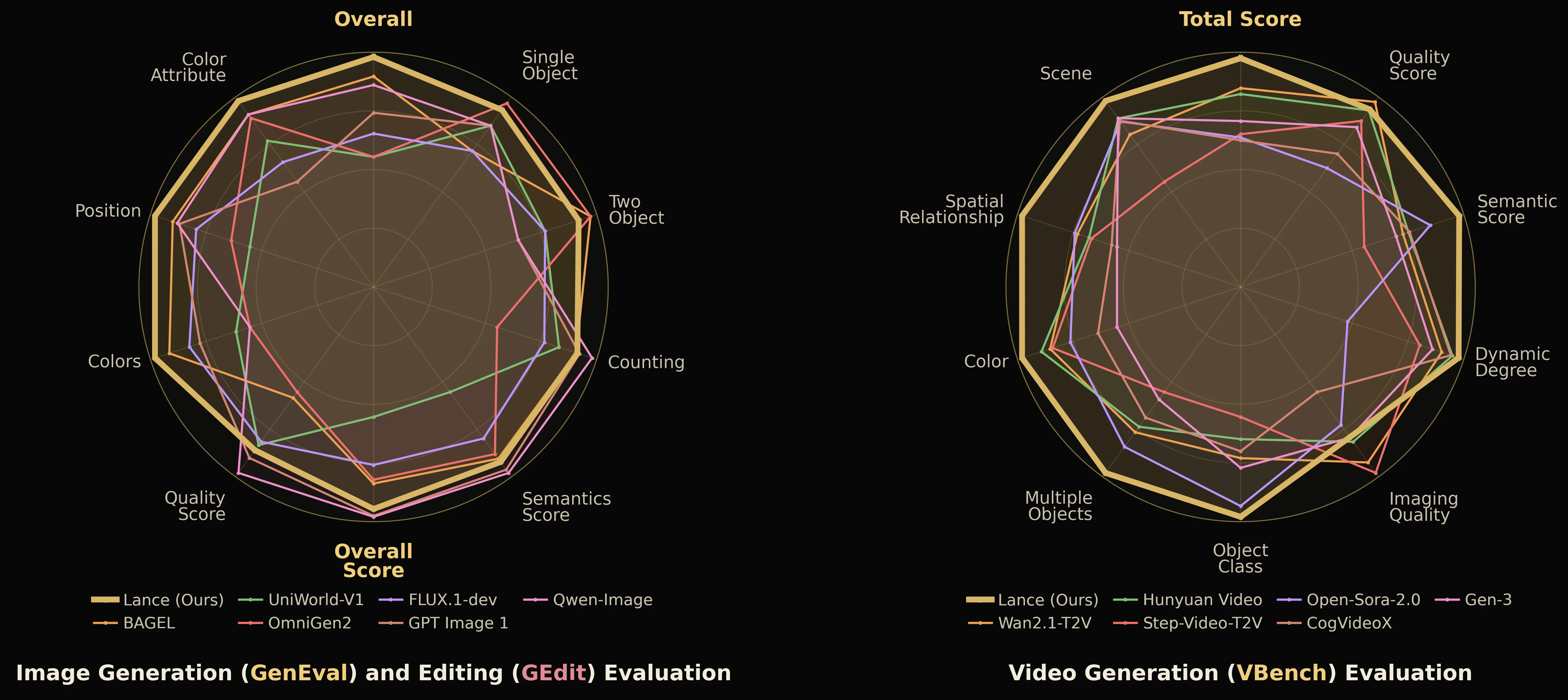
Lance compares well with both unified and task focused models across public tests. It scores an overall 0.90 on GenEVAL for image generation, which tracks object count, color, position, and attributes. On DPG Bench it shows strong relation grounding and solid results across global and entity checks.
Early hands-on notes from a community walkthrough suggest that:
- Image generation is broadly solid for composition and style variety, with some samples leaning plasticky versus top-tier photoreal models; watercolor/stylized prompts look especially good.
- Text-to-video is promising for a 3B model, with occasional artifacts (for example, minor eye misalignment) and longer runtimes.
- Image/video editing quality looks competitive on paper, with more testing pending in popular UIs.
How Lance AI by ByteDance Works
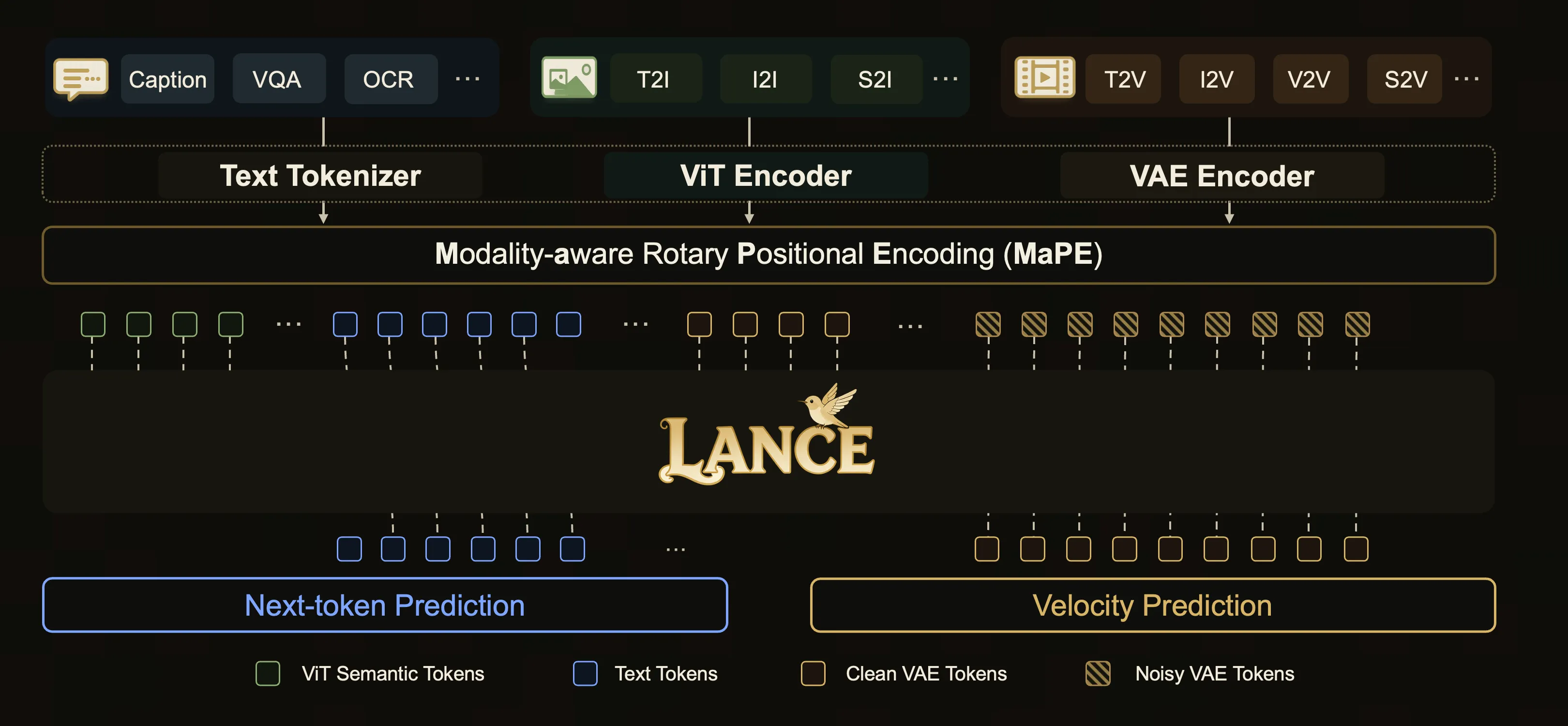
Lance keeps one shared sequence for text, images, and video. This lets it learn links between words and pixels in a simple way. After that, it uses different expert parts to do understanding and to do generation.
For understanding, it works on semantic tokens that capture what is in the scene. For generation, it uses clean and noisy latent codes to build and refine images and video. Generalized 3D causal attention helps it handle space and time together.
The Technology Behind It
- Shared interleaved sequence. Text and pixel tokens live together so the model can align them better.
- Separate experts. One expert focuses on meaning and reasoning. The other expert focuses on making pictures and clips.
- Token choices. It uses ViT tokens for meaning and VAE latents for making content.
- Attention for time. Generalized 3D causal attention handles both spatial and temporal context.
- MaPE. This helps reduce interference among different token types and positions.
For a look at tools that mix many skills across inputs, see our note on open multimodal agents.
Examples of What It Can Do
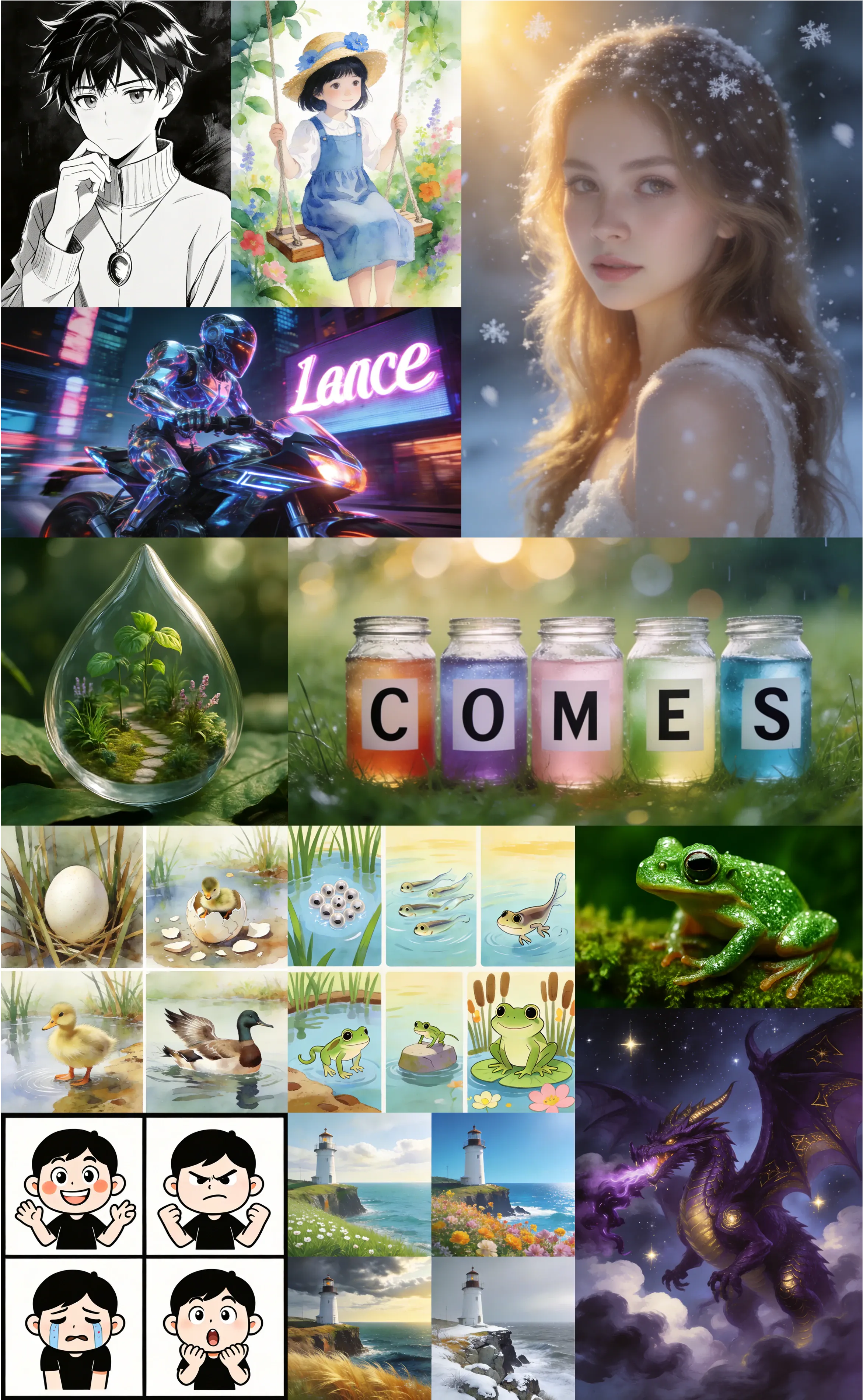
- Text to image: From photoreal to stylized, with solid control over count, color, and layout.
- Image editing: Replace subjects, transfer styles, add or remove items, and keep structure.
- Image understanding: Read charts and documents, answer questions, recognize landmarks and objects.
Getting Started
The project page lists the paper, code, and models. You can explore demos, then visit the code link and the model hub to try it in your own setup. If you plan local tests, check GPU memory and storage first, then follow the official instructions from their repo.
If you are new to running large local models, our quick guide on running Qwen 35B locally can help you plan resources and steps.
Quick install and first run (hands-on summary)
A community walkthrough (Ubuntu + NVIDIA H100) showed the following simple path to install and run Lance locally:
-
Prerequisites
- Recent Python and pip (upgrade pip if installs fail).
- A CUDA-capable GPU. For smooth generation, 24–48 GB VRAM is recommended; more helps for video.
- Git, PyTorch (per repo instructions), and access to Hugging Face to download weights.
-
Install
- Clone the official Lance repository from the project site.
- Install dependencies (PyTorch first as directed, then the repo’s setup script).
- If you hit install errors, upgrade pip and retry.
-
Download models
- Log in with your free Hugging Face read token using the CLI.
- Use the provided download script in the repo to fetch checkpoints.
-
Run inference
- The repo includes example scripts for text-to-image (T2I), text-to-video (T2V), image editing, and video editing.
- Prompts/configs are typically stored under a config/examples directory.
- In the hands-on test, loading the model stack for T2I peaked around ~29–30 GB of VRAM at default settings; video generation used more memory and took longer.
-
Early quality impressions
- T2I: Mixed but promising out of the box; several strong stylized results, with some samples less photoreal than larger image models.
- T2V: Two quick samples looked coherent and on-prompt for a compact 3B model, with minor artifacts.
- Editing: Usable via scripts today; popular node-based UIs (e.g., ComfyUI) will make this easier as community nodes mature.
Who Is Lance AI For
- Creators who need fast mockups for images and clips.
- Editors who want prompt based edits with source layout kept.
- Researchers and students who study image and video tasks in one model.
FAQ
Is Lance AI open source
Yes. The team lists the paper, code, and model links on the project page. You can review them and test in your own setup.
Can I run Lance AI on my own machine
It is a 3B model, so a modern GPU helps a lot for speed. Community tests saw roughly ~29–30 GB VRAM during a default text-to-image run, with higher usage and longer runtimes for video. Start with the official repo notes to see memory needs and supported tools, and use lower resolutions/batch sizes if you’re tight on VRAM.
What kind of edits can it do on video
It can rewrite backgrounds, add or remove objects, change the subject, restyle looks, and adjust simple actions. Multi turn edits can keep the same subject across steps.
How strong is it on image generation
On GenEVAL, Lance scores 0.90 overall while staying compact at 3B. It tracks color, count, and position well for many prompts. Early hands-on tests echo solid control and composition, with photorealism varying by prompt compared to larger, image-specialized models.
Does it handle charts and text inside images
Yes. It answers chart questions, reads numbers, and can output captions. The site shows clear examples of this skill.
Image source: Lance AI By bytedance: Modern Open Source Unified Multimodal
Subscribe to our newsletter
Get the latest updates and articles directly in your inbox.