
Table Of Content
- Run Qwen3 Coder Next Locally for Maximum Efficiency - System and Files
- Run Qwen3 Coder Next Locally for Maximum Efficiency - Step-by-Step
- Run Qwen3 Coder Next Locally for Maximum Efficiency - Test 1: C++ DP Problem
- Run Qwen3 Coder Next Locally for Maximum Efficiency - Test 2: Full HTML Landing Page
- Run Qwen3 Coder Next Locally for Maximum Efficiency - Test 3: SQL Optimization
- Final Thoughts on Run Qwen3 Coder Next Locally for Maximum Efficiency
How to Run Qwen3 Coder Next Locally for Maximum Efficiency
Qwen Model Recommender
Not sure which Qwen model fits your GPU? Pick your VRAM, use case, and task type — get matched to the right model instantly. Covers Qwen3, QwQ, QVQ, Qwen2.5-VL, Qwen3-Coder, Qwen3-TTS, and 80+ models.
Table Of Content
- Run Qwen3 Coder Next Locally for Maximum Efficiency - System and Files
- Run Qwen3 Coder Next Locally for Maximum Efficiency - Step-by-Step
- Run Qwen3 Coder Next Locally for Maximum Efficiency - Test 1: C++ DP Problem
- Run Qwen3 Coder Next Locally for Maximum Efficiency - Test 2: Full HTML Landing Page
- Run Qwen3 Coder Next Locally for Maximum Efficiency - Test 3: SQL Optimization
- Final Thoughts on Run Qwen3 Coder Next Locally for Maximum Efficiency
Qwen team has released a highly efficient coding model - a mixture-of-experts architecture with 80 billion total parameters that activates only 3 billion at inference time. I installed it locally with llama.cpp and tested it on various coding prompts.
Before the installation, a quick overview of the model. The architecture combines traditional attention with gated delta, which is a linear attention variant, and the layout is hybrid. There are five 12 experts, only 10 are active, and one is shared. It is designed specifically for agentic coding tasks - tool use, long-horizon reasoning, and error discovery.
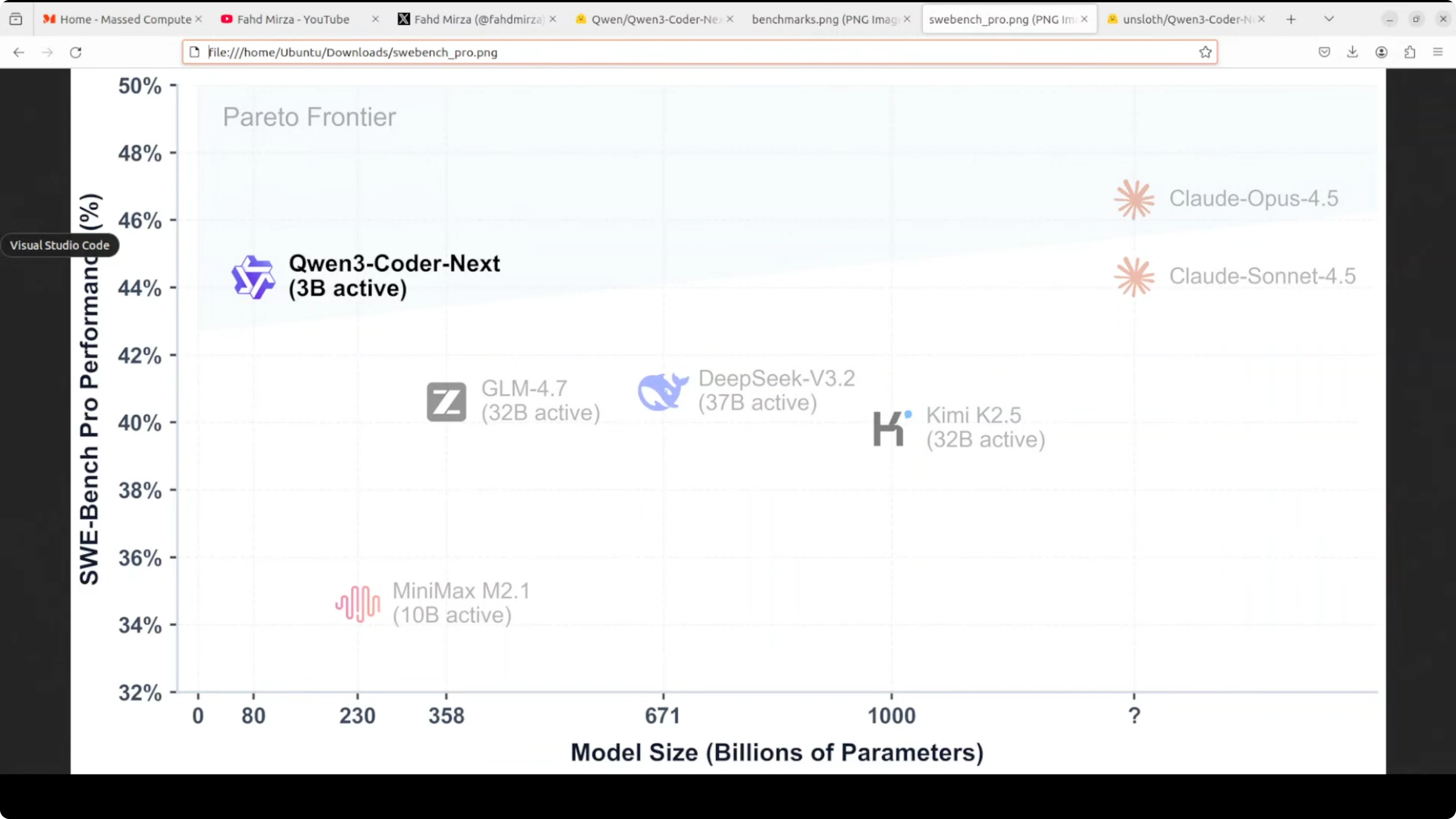
On benchmarks, it has beaten big names like GLM 4.7, DeepSeek 3.2, and even Miniax M2.1 on all five benchmarks. The efficiency story is clear from a scatter plot - Qwen3 Coder Next sits on the Pareto frontier, the optimal efficiency line, with only 3 billion active parameters and has achieved 44% on SWE-bench Pro. Compared to DeepSeek V3.2 or even Claude Opus 4.5, it is very good in terms of efficiency because the model delivers near-frontier performance at a fraction of compute cost. The Qwen team is projecting these models so that even if they are slightly less performant than big labs, the cost is very low and you can strike a very cost-to-efficiency balance when running them.
Run Qwen3 Coder Next Locally for Maximum Efficiency - System and Files
I used an Ubuntu system with one Nvidia H100 80 GB VRAM. I rent it - no need to buy these GPU cards.
The model is quite large, so I used the Unsloth GGUF file. Qwen also provides a GGUF, but that is slightly larger than I like.
I already had llama.cpp installed. If you need it, install llama.cpp on Linux, Windows, or Mac first and you will be set.
Run Qwen3 Coder Next Locally for Maximum Efficiency - Step-by-Step
- Download the Qwen3 Coder Next model from Hugging Face.
- Note the disk footprint - the quant I used took around 49 GB on disk.
- If you do not have enough VRAM, pick a lower quant.
- Use the llama.cpp CLI with your preferred hyperparameters to load the model onto the GPU.
- Talk to the model in the terminal once it loads.
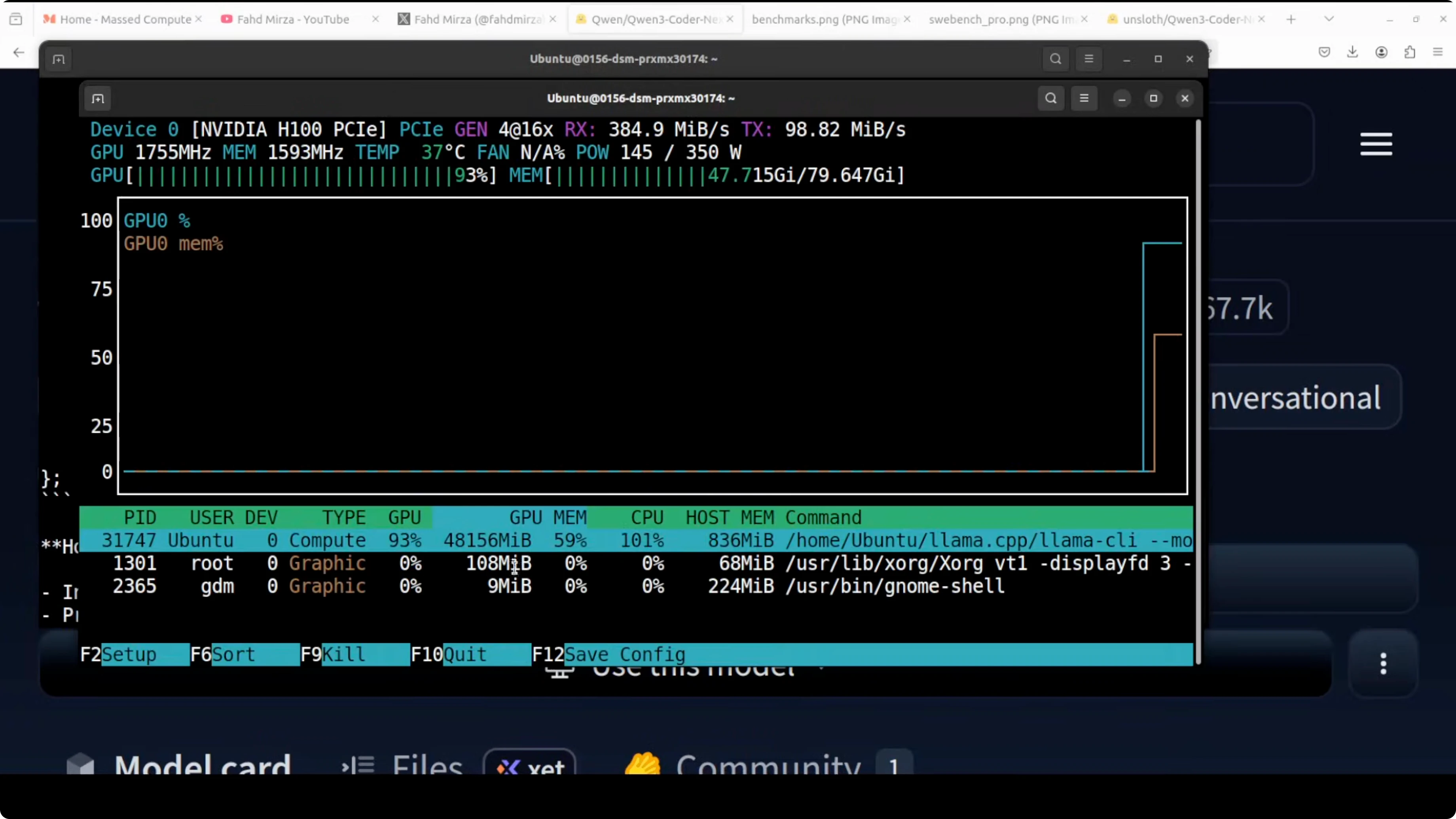
The model loaded successfully. On my setup, fully loaded onto the GPU, it consumed over 48 GB of VRAM.
Run Qwen3 Coder Next Locally for Maximum Efficiency - Test 1: C++ DP Problem
I asked it to write a C++ solution - given two strings, return the count of distinct subsequences. The response was excellent even in this quantized format. It used the correct DP approach with proper space optimization via reverse iteration, and the code was very clean. It also performed some self-correction during the trace, which shows good reasoning. Token generation speed was very quick.
Run Qwen3 Coder Next Locally for Maximum Efficiency - Test 2: Full HTML Landing Page
Next, I asked for a single HTML file - a sleek, modern, responsive landing page for an EV startup called Vault Drive. I asked for interactivity, some charts, illustrations, glassmorphism cards, and smooth animations.
It jumped straight into the code and finished quickly. I copied the code into an HTML file and opened it in the browser. The result was simply amazing for a single static HTML file:
- Modern, responsive layout with smooth animations running in the background.
- A counter section that animates values correctly on reload.
- Charts rendered cleanly - no malformation or irregularities.
- Tabs and interface elements wired as requested.
- Creative copy like “Power up faster than your coffee break.”

This is a direct match for Anthropic in my view because the coding output is sublime. Software engineering as we knew it is no longer there.
Run Qwen3 Coder Next Locally for Maximum Efficiency - Test 3: SQL Optimization
Finally, I tested SQL optimization. I asked it to explain the performance issues, what was wrong, and provide an optimized version.
It identified the major issues correctly:
- Non-sargable filter
- Correlated subqueries
- Inefficient subquery patterns
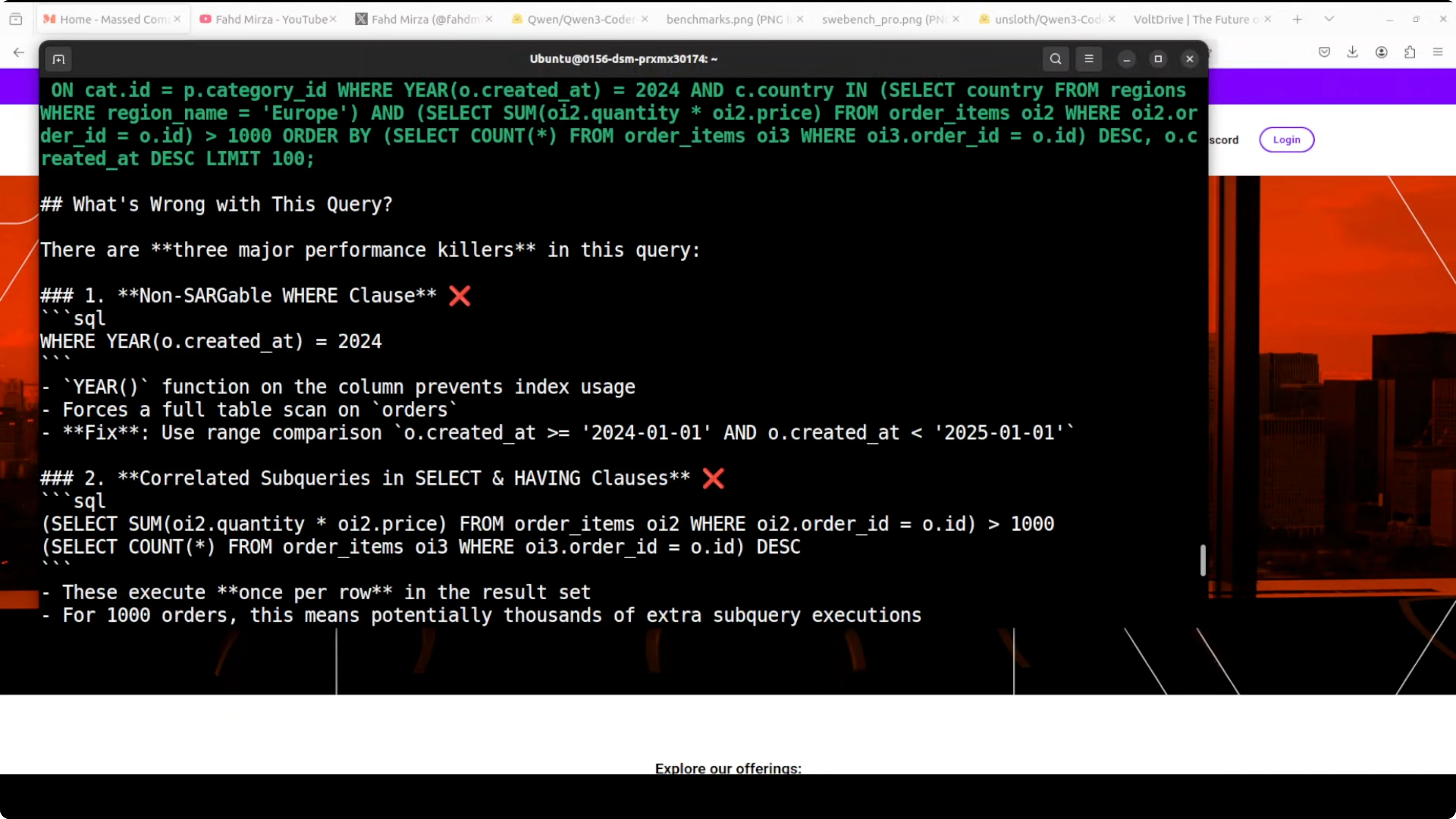
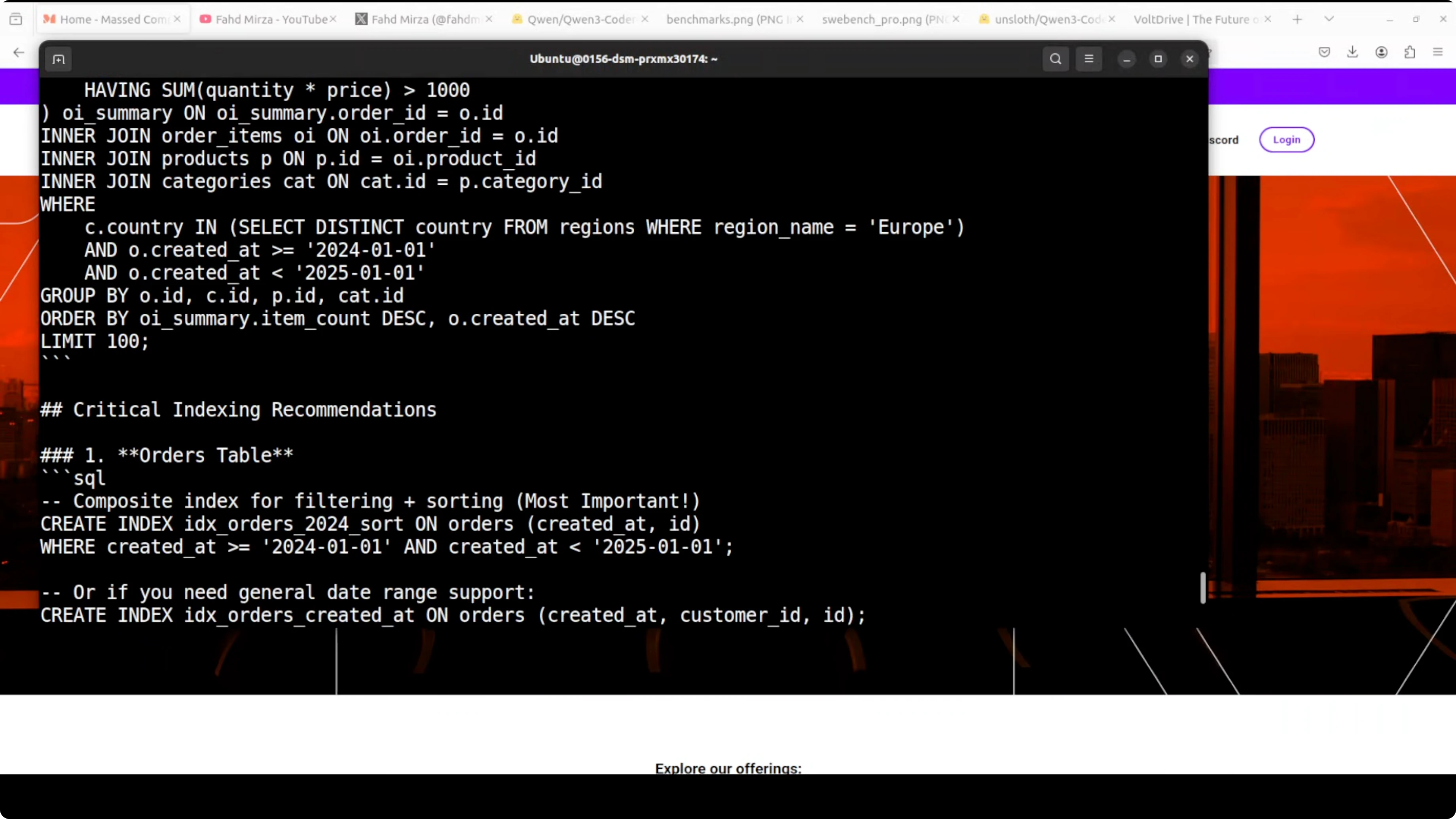
It then proposed two solid optimization approaches with rewritten queries. Even better, it provided comprehensive indexing recommendations with clear performance impact estimates. This is production-quality SQL optimization advice. I have spent years on SQL optimization, and this covered both query rewriting and indexing strategy based on the given schema context.
Final Thoughts on Run Qwen3 Coder Next Locally for Maximum Efficiency
Qwen3 Coder Next delivers strong coding performance with only 3 billion active parameters and an excellent efficiency profile. Local setup with llama.cpp was straightforward, the model ran fast, and it produced high-quality outputs across algorithmic coding, front-end generation, and SQL optimization. If you have the VRAM, the higher quant delivers great results, and you can always opt for lower quants if needed.
Subscribe to our newsletter
Get the latest updates and articles directly in your inbox.

Related Posts

8 Best Claude Code Plugins in 2026 (You Need to Know)
8 Best Claude Code Plugins in 2026 (You Need to Know)

7 Best Claude Code Skills (You Need to Know)
7 Best Claude Code Skills (You Need to Know)

Claude Code Desktop IDE Features (You Need to Know)
Claude Code Desktop IDE Features (You Need to Know)